
TikTok Shop turns your TikTok content directly into a sales channel. Instead of sending viewers elsewhere to buy, you sell inside the app through videos, live sessions, and a product catalog that links directly to checkout.
This guide walks you through every step: eligibility, registration, shop setup, the three ways to sell, and how to use TikTok’s affiliate program to expand reach beyond your own account.
In this guide, you will learn:
- Who can sell on TikTok Shop, and what documents do you need
- How to register and complete the verification process
- The three sales channels available on TikTok Shop
- How the affiliate program works and how to collaborate with creators
- How the new seller probation system limits orders and products
- What TikTok Shop fees look like and how to calculate profit
Get Free TikTok Ad Credit Up to $6000 [Limited Time Offer]

Key Takeaways
- TikTok Shop is available to individuals and businesses in the US, EU, and several other markets, and you do not need an existing TikTok following to open a shop
- New US sellers must be 18+, a US resident, and provide a government-issued ID, proof of address, and a W-9 form
- There are three core selling channels: shoppable videos, LIVE shopping, and the product showcase tab
- The affiliate program lets sellers recruit creators to promote products on commission, extending reach without upfront ad spend
- New shops start in a probation tier with daily order and product limits that unlock as your account builds a track record
How Do You Sell on TikTok Shop?
To sell on TikTok Shop in the US, create an account at seller-us.tiktok.com, complete identity and address verification, add your products, and choose your sales channels (shoppable videos, LIVE, or product showcase).
According to TikTok Shop Academy, individual sellers in the US need a valid ID, proof of address, and a W-9 form.
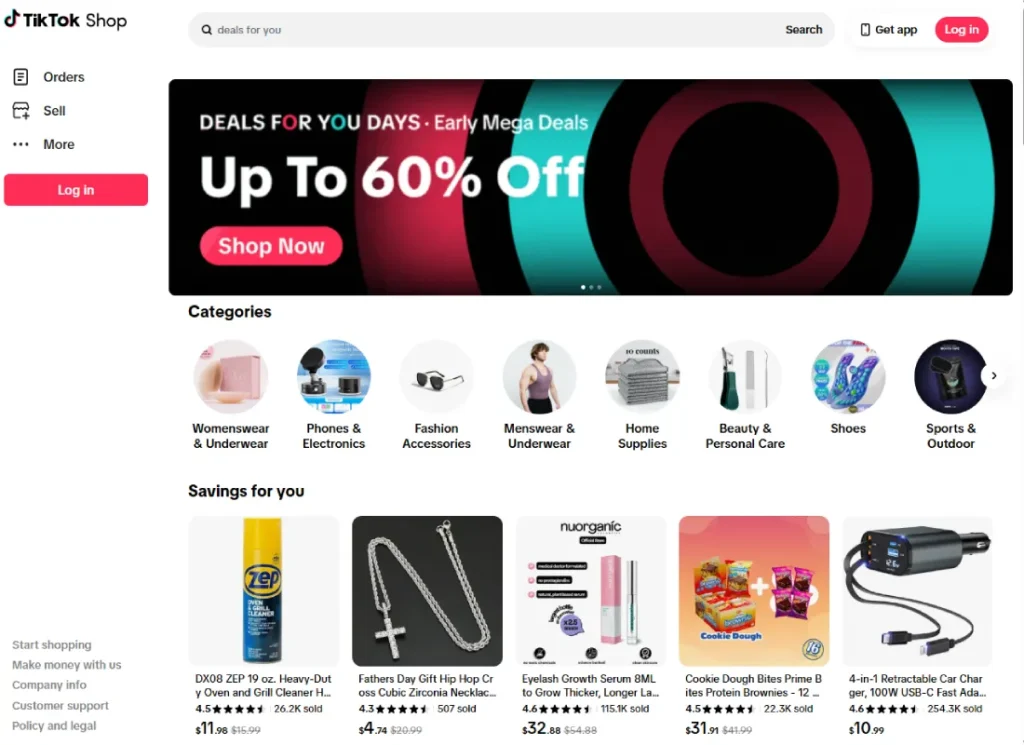
Once your shop is approved, you can start listing products and linking them directly to your TikTok content.
Who Can Sell on TikTok Shop?
TikTok Shop is currently available in the US, UK, select EU countries, Southeast Asia, and a few additional markets. Eligibility requirements depend on whether you are registering as an individual, sole proprietorship, or registered business. The requirements below apply to US sellers.
Eligibility Requirements for US Sellers
TikTok Shop is available to three types of sellers in the United States: individuals (selling under their own name), sole proprietorships, and corporations or partnerships.
According to TikTok Shop Academy’s official documentation, all US individual sellers must meet these requirements:
- Be at least 18 years old
- Be a US resident
- Have a unique email address or phone number not already registered for another TikTok Shop
- Not to be a politician (per TikTok’s government accounts policy)
Accepted forms of ID for verification include a US Passport or Passport Card (front and back of Passport Card), a US Driver’s License, a State ID, or a Permanent Resident Card.
Politicians are explicitly prohibited from becoming TikTok Shop sellers by TikTok’s platform policies.
What Documents Do You Need to Open a TikTok Shop?
For individual sellers, TikTok Shop requires three categories of documentation:
Identity verification: Government-issued ID (passport, driver’s license, state ID, or permanent resident card) showing your legal name, date of birth, and expiration date. Both front and back must be uploaded. Documents must be valid, unexpired, and under 10 MB in PDF, JPG, or PNG format.
Proof of address: A utility bill (gas, water, electricity, or phone), insurance policy, bank statement, or credit card bill showing your residential address.
Tax documentation: A W-9 form. This is required for tax purposes and is triggered when your cumulative sales exceed $2,000.
You will also need the last four digits of your Social Security Number (SSN) or, if you do not have an SSN, an Individual Taxpayer Identification Number (ITIN).
How to Register as a TikTok Shop Seller
The registration process happens entirely through the TikTok Shop Seller Center at seller-us.tiktok.com.

Before you start, have your government-issued ID, proof of address, and bank account details ready. The full process typically takes 15 to 30 minutes to complete.
Step 1: Sign Up at the TikTok Shop Seller Center
Go to seller-us.tiktok.com to start registration. You have two options:

Option A: Sign up with your TikTok account. Use the QR code or log in with your existing TikTok phone number, email, or username. After logging in, you will authorize the connection between your TikTok account and your seller account.
Option B: Sign up with a new email or phone number. Enter your email address or phone number, receive a verification code, and set a password.
If you see “Account already exists,” the email or phone number is already tied to a TikTok Shop or TikTok for Business account. Either use a different contact method or log in to the existing account.
Step 2: Choose Your Business Type
Once registered, select your business type:
- Individual: Selling under your own name, not as a registered business
- Sole Proprietorship: Independently owned business with one owner
- Corporation or Partnership: Registered business entities
The verification requirements differ slightly by type. This guide focuses on individual registration, which is the most common starting point for new sellers.
Step 3: Enter Your Account Owner Information
Provide your legal name, date of birth, physical residential address, ID expiration date, last 4 digits of your SSN (or ITIN), and bank account information for payouts.
Everything you enter must match exactly what is on your ID documents. Mismatches between the information you entered and the uploaded documents are the most common cause of registration delays.
Step 4: Set Up Your Shop Preferences
Create a shop name that will be visible to buyers. TikTok Shop Academy offers these guidelines:
- Use letters, numbers, and special characters, but do not use only numbers or special characters
- Do not include “flagship” or “official” in the name
- Choose a name that reflects your products or brand clearly
- You can change the name later if needed
Select your primary product category. This does not limit what you can sell; it is used for the registration process only.
Add contact information for verification purposes.
Step 5: Upload Documents and Submit
On the Review Application page, green checkmarks indicate verified information. Yellow caution symbols indicate issues that must be resolved before submission.
To pass verification, all four fields (legal name, date of birth, residential address, and SSN) must be verified. If a field cannot be auto-verified, you will need to upload supporting documents manually.
After all fields show green checkmarks or verified documentation, click Submit. Your application has entered review. If it is rejected, you will receive an email explaining what to resubmit.
What Is the New Seller Probation System?
All new TikTok Shop accounts in the US start in a probation tier. According to TikTok Shop Academy’s official documentation, this system is designed to protect buyer trust while new sellers build a track record.
Order and product limits by tier:
| Tier | Daily Order Limit | Product Listing Limit |
|---|---|---|
| Beginner | 50 orders/day | 100 products |
| Standard | 100 orders/day | 200 products |
| Premium | 200 orders/day | 1,000 products |
New shops start at the Beginner tier. Advancement to higher tiers is based on your account’s performance and compliance record in Seller Center.
The specific criteria for tier advancement are outlined in TikTok Shop Academy’s Account Health resources.
These limits do not prevent you from selling; they are a ramp-up structure that expands as your shop demonstrates reliable fulfillment and customer service.
The Three Ways to Sell on TikTok Shop
TikTok Shop gives sellers three distinct channels to reach buyers: shoppable videos, LIVE shopping, and the product showcase tab. Each one works differently and suits a different type of buyer intent.
Most successful sellers use all three simultaneously to maximize visibility and conversions.
Shoppable Videos
Shoppable videos are pre-recorded TikTok videos with product links added directly in the content. When a viewer taps the product link while watching, they can purchase without leaving the TikTok app.
According to TikTok Shop Academy, the Shoppable Video Hub within Seller Center gives sellers access to templates, AI-assisted video creation tools, and performance data all in one place. Sellers can access it through the LIVE & Video tab in Seller Center.
Effective May 11, 2026, TikTok Shop introduced daily posting limits for shoppable content for all US merchants and creators, with the stated goal of promoting content quality and improving the overall user experience.
The TikTok Engagement Predictor can help estimate how a piece of shoppable content is likely to perform before you post it.
LIVE Shopping
LIVE shopping is a real-time video session where you demonstrate and sell products while viewers watch. During a LIVE, you pin products to the screen so viewers can tap, view details, and check out without leaving the session.
To access LIVE selling, go to the LIVE & Video tab in Seller Center on desktop, or the LIVE tab in the Seller Center app. Your TikTok account must be linked (bound) to your shop before you can go live.
LIVE shopping works because it creates urgency and social proof simultaneously: viewers see other people asking questions and purchasing in real time, which accelerates buying decisions. It also enables real-time product demonstrations that shoppable videos cannot replicate.
Product Showcase Tab
Every TikTok Shop has a product showcase tab on the seller’s TikTok profile. This is a permanent storefront where visitors can browse your full product catalog, similar to an eCommerce listing page inside TikTok.
Products listed here are accessible even to users who find you through search or profile visits rather than a specific video.
The product showcase requires no ongoing content creation; it exists as long as your shop is active and products are listed.
How the TikTok Shop Affiliate Program Works
The affiliate program connects sellers with creators who promote products in exchange for a commission on sales they generate.
For sellers: You set a commission rate for each product. Creators apply to promote your products through the Product Marketplace or through direct invitations you send from Seller Center. When a creator’s video or LIVE generates a sale, the commission is deducted from the product revenue automatically.
For creators: Creators who meet TikTok’s eligibility requirements can join the Affiliate program through their TikTok account settings. They browse available products from the Product Marketplace, choose what to promote, and earn commission for each sale traced to their content.
According to TikTok Shop Academy, there are three creator types within the broader ecosystem: Official Shop Creators (bound to a single seller’s shop), Marketing Creators (tied to a brand but able to promote multiple brands), and Affiliate Creators (independent creators promoting any available products on commission).
The affiliate model is particularly valuable for new sellers who do not yet have a large TikTok following of their own.
A seller with 500 followers can reach millions of viewers if the right affiliate creators promote their products.
The TikTok Influencer Finder helps identify creators whose audience matches your product category.
Setting Up Your Product Listings
Strong product listings are the foundation of your TikTok Shop. Clear titles, quality images, and accurate descriptions improve both search performance within TikTok and your conversion rate once shoppers land on your product page.
What Information Does Each Listing Need?
To list a product on TikTok Shop, you need:
- Product title and description
- Product images (high-quality, plain background images perform best for browsing)
- Price and inventory count
- Product category
- Variants (if applicable: size, color, etc.)
- Shipping settings
If you want to sell custom-designed products without holding traditional inventory, Print-on-Demand for TikTok Shop is another option worth exploring. It lets you connect your TikTok Shop strategy with print-on-demand fulfillment, so products can be produced and shipped after a customer places an order.
TikTok Shop’s Restricted Products Policy establishes categories that require additional qualification before you can sell them.
Restricted product categories include Beauty, Electronics, and Medical Devices at the category level. Some individual products require separate qualification. Invite-only categories exist for certain higher-risk product types.
Check the current Restricted Products Policy in TikTok Shop Academy before listing products in any potentially sensitive category.
How to Add Products to Your TikTok Shop
Products are added through Seller Center at seller-us.tiktok.com. Go to Products, then Add Product, and fill in all required fields. Once submitted, products go through a brief review before they appear in your shop.
You can also import products in bulk using TikTok Shop’s import template, which reduces setup time if you are moving inventory from an existing catalog. If you run a Shopify store, TikTok’s official Shopify integration syncs your product catalog and inventory automatically.
The TikTok Shopify Dropshipping guide covers that integration in detail.
TikTok Shop Fees and Profit Calculation
Understanding your costs before your first sale is essential for setting prices that leave room for profit.
TikTok Shop charges a commission on each completed sale, and the rate depends on your product category and seller tier.
What Fees Does TikTok Shop Charge?
TikTok Shop charges sellers a commission fee on each completed sale. Fee rates vary by product category and seller tier, and are updated periodically on TikTok Shop Academy. The standard commission fee applies after your shop exits any introductory fee period.
In addition to commission fees, sellers are responsible for any shipping costs not covered by the buyer, and payment processing is handled by TikTok Shop.
For a full breakdown of what you keep after fees, the TikTok Shop Profit Calculator helps you model profit margins by entering your product cost, sale price, and estimated fee rates.
What Costs Should New Sellers Plan For?
Before your first sale, plan for:
- Product cost or manufacturing cost
- Any packaging or fulfillment materials
- Shipping costs to your customers
- TikTok Shop commission fees
- Any creator commission you set for affiliate promotions
For sellers running paid advertising alongside organic content, the TikTok Ads Budget Planner helps estimate how much to allocate for paid promotion versus organic content.
How to Drive Sales on TikTok Shop
Opening a shop is the easy part. Generating consistent sales requires a content strategy that pulls viewers into the purchase funnel.
TikTok’s algorithm favors content that holds attention, and products discovered through engaging videos convert at significantly higher rates than those found through passive browsing.
Content Is the Primary Traffic Channel
On TikTok Shop, the content you post drives traffic to your products. Unlike a standalone e-commerce site where you pay for traffic via SEO or ads, TikTok Shop integrates directly with your content feed. Every shoppable video is both content and a product page.
The most effective TikTok Shop content formats are:
Product demonstrations that show the item in real use, not just static display. Viewers want to see the product actually working, being worn, being opened, or being used in a realistic context.
Problem-solution framing that positions the product as the answer to a specific frustration. This format works especially well for utility products and personal care items.
Social proof moments, such as reactions, unboxings, and before-and-after formats that create vicarious purchase experiences.
For TikTok content strategy, the organic TikTok strategy guide covers the full content planning framework that applies to both brand and product content.
How to Optimize for TikTok Search
A significant portion of product discovery on TikTok now happens through TikTok search rather than the For You Page. According to Adobe Express research, 62% of adult TikTok users use the platform to look at product reviews and recommendations. Appearing in those search results requires keyword optimization.
Place your product name and key descriptive terms in the first 50 characters of your caption. State the product name out loud in the first 15 seconds of your video, since TikTok indexes audio transcriptions for search. Add relevant hashtags to your product category in the caption.
The TikTok search guide covers all ten TikTok search ranking signals in detail.
Using Paid Ads to Amplify Shop Content
TikTok’s Sales campaign objective in Ads Manager is designed specifically for TikTok Shop sellers. It can target users who have visited your product pages, added items to cart, or match the behavioral profile of your previous buyers.
Running Spark Ads on your best-performing organic product videos combines existing social proof with paid distribution, an efficient way to amplify content that has already demonstrated organic engagement.
FAQ
Here are the most common questions sellers ask before and after setting up a TikTok Shop.
Do you need a TikTok account to open a TikTok Shop?
You do not need an existing TikTok account with followers to open a TikTok Shop. You can register with just an email address or phone number.
However, if you want to post shoppable videos and run LIVE sessions from your own account, you will need to bind a TikTok creator or business account to your shop.
Having followers accelerates organic reach, but it is not a prerequisite for registration or selling.
How long does TikTok Shop approval take?
According to TikTok Shop Academy, your application enters review after submission. Approval time is not published as a fixed period.
Document issues such as mismatched information, expired IDs, and unclear photos are the most common cause of delays.
Ensuring all uploaded documents are clear, unexpired, and match your submitted information speeds up the process.
Can you sell on TikTok Shop without going live?
Yes. Shoppable videos and the product showcase tab are both active sales channels that do not require LIVE sessions. LIVE shopping is optional.
Many TikTok Shop sellers generate consistent revenue through shoppable video content alone without ever going live.
What products can you not sell on TikTok Shop?
TikTok Shop’s Restricted Products Policy defines categories and individual products that require additional qualification or are prohibited entirely.
Certain product types, including regulated health items, weapons, and age-restricted goods, cannot be listed without qualification. The full list is available in TikTok Shop Academy.
Before adding any product in a potentially regulated category, check the current Restricted Products Policy.
How do you get paid from TikTok Shop?
Payouts go to the bank account you provided during registration. TikTok Shop pays out on a regular schedule after orders are completed and any applicable return windows have closed.
The payout schedule and settlement timing are outlined in the Finances section of TikTok Shop Academy and may vary by seller tier.
Wrapping Up
TikTok Shop gives sellers three integrated sales channels: shoppable videos, LIVE shopping, and the product showcase tab, all tied to TikTok’s content feed.
The setup process is straightforward: verify your identity, add your products, and start creating content that links directly to checkout.
The strategic advantage of TikTok Shop compared to a standalone store is the content-to-purchase pipeline. When a product video earns strong organic reach, every viewer is already in a context where they can buy without switching apps.
That removes the drop-off that happens when you direct someone from social media to an external website.
For the full picture on TikTok marketing beyond the shop, the TikTok marketing guide covers brand building, audience growth, and content strategy that feeds into your shop’s conversion funnel.
The TikTok Shop overview page covers TikTok Shop’s features and platform context.
Sources
- How to Register as an Individual, TikTok Shop Academy (US)
- Requirements to Register as a Seller on TikTok Shop, TikTok Business Help Center
- Shop Probation Program Requirements, TikTok Shop Academy (US)
- Setting Up Affiliate Collaborations, TikTok Shop Academy (US)
- LIVE Selling on TikTok Shop, TikTok Shop Academy (US)
- Restricted Products Policy, TikTok Shop Academy (US)
- Introducing TikTok Shop, TikTok Newsroom