
TikTok Engagement Predictor
Enter your followers, niche, a self-rated video quality, content type and posting frequency to get AI-estimated ranges for likes, views, comments and engagement rate, plus five tips.
Grow your Business & Social Media Marketing
- Branded Link Shortener
- QR Code Generator
- Bio Page Builder
- Tracking & Analytics
- 16+ Integrations
More TikTok Tools for Creators
A guess before you post, not a measurement
The TikTok Engagement Predictor gives you an AI-made estimate of how a video might do before you post it. You enter your follower count, niche, a quality rating you choose yourself, the content type and how often you post. It returns ranges for likes, views and comments, an engagement rate range, a short explanation and five tips.
Nothing in that result comes from TikTok. The tool doesn’t connect to your account or look at a video, so the numbers are the AI’s own estimate from five answers. Use them as a rough sanity check, then compare with your real results after posting.
Fill in five details about your account and video
Every field is required, and each one is a dropdown except the first:
- Current Follower Count. Type your followers as a number. The form doesn’t take less than 100.
- Account Niche. Comedy/Skits, Education/Tutorials, E-commerce/Product Reviews, Fitness/Health, Gaming/Esports, Finance/Business or Lifestyle/Vlog.
- Video Quality Rating (1-5). Rate your own video, from 1 (poor: low light, bad audio) to 5 (excellent). Be honest here, because it’s your opinion and the AI takes it at face value.
- Content Type. Trend Participation, Original Skit/Storytelling, Tutorial/How-To, Product Showcase/Review or Q&A/Direct-to-Camera.
- Posting Frequency. Daily, Multiple Times A Week, Weekly, or Bi-Weekly/Monthly.
Click Predict Engagement. Clear empties the form so you can try a different video idea.
Our test: a 4,800-follower tutorial account
In our test on November 3, 2026, the predictor answered in 5.1 seconds. We described a made-up Colorado outdoor gear brand: 4,800 followers, Education/Tutorials, a quality rating of 4, Tutorial/How-To and Multiple Times A Week.
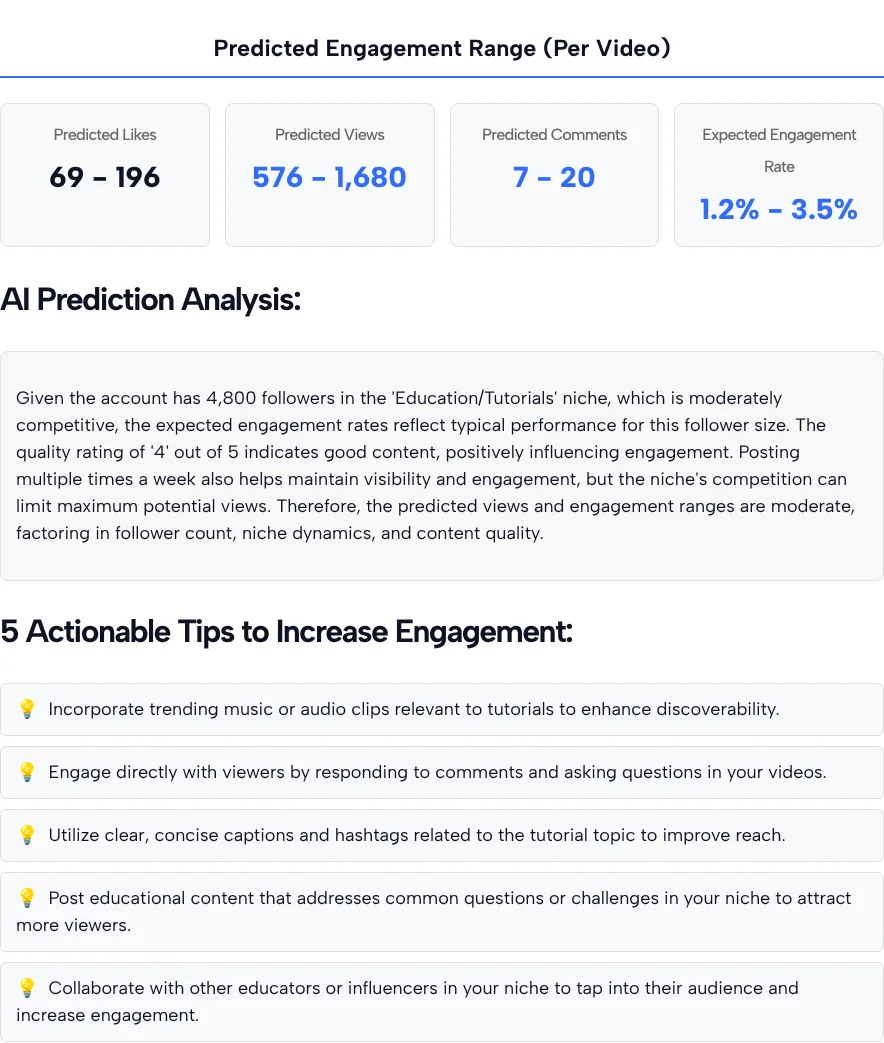
In our test, the four result tiles showed these ranges:
- Predicted Likes: 69 to 196
- Predicted Views: 576 to 1,680
- Predicted Comments: 7 to 20
- Expected Engagement Rate: 1.2% to 3.5% in our test
Under the tiles, the AI explained its reasoning in one paragraph: the niche is “moderately competitive,” the quality rating of 4 helps, and posting several times a week keeps the account visible. The five tips covered trending audio, replying to comments, captions and hashtags, answering common questions in the niche, and collaborating with other creators. They’re sound, but they’d fit almost any tutorial account.
One line in the tips list isn’t a tip: it’s TLinky’s TikTok ad credit promo, placed between the second and third tip.
Why the ranges don’t add up
Read the four tiles together and they disagree with each other. Divide the predicted likes by the predicted views from our test and you get about 12% at both ends of the range (69 of 576, and 196 of 1,680). In our test, the engagement rate tile showed 1.2% to 3.5%, which is far lower.
The likely reason is that each number is an estimate on its own, not the output of one formula. That’s fine for a quick gut check. It’s not fine for a client report, a sponsor pitch or a goal you’ll judge yourself against.
What TikTok says about followers and reach
Your follower count drives this tool’s answer, but TikTok says followers aren’t what decides who sees a video. In TikTok’s newsroom post on how For You recommendations work, the company explains that an account with more followers is likely to get more views, yet neither follower count nor past high-performing videos are direct factors in the recommendation system.
So two accounts with the same followers, niche and rating can see very different results. The predictor can’t see how viewers actually respond to the video itself.
Check the guess against your real numbers
After you post, check the guess against your real numbers, because your own data replaces the estimate. TikTok Support’s guide to TikTok Analytics describes it as a free tool for content performance, audience demographics and engagement trends, opened from Profile, then the Menu button, then TikTok Studio, then Analytics in the Posts tab, and it warns that Analytics isn’t available to everyone and that data can be delayed.
Once you have a video’s views, likes, comments, shares and saves, TLinky’s TikTok Engagement Rate Calculator works out its actual engagement rate. The two tools do different jobs: the predictor guesses before you post, and the calculator measures a video that’s already live.
A simple way to use both:
- Run the predictor for a video idea and note the ranges.
- Post the video and wait a few days for Analytics to settle.
- Put the real numbers into the engagement rate calculator.
- If you keep landing well outside the predicted ranges, trust your history over the tool.
Good and bad uses for the predictor
The predictor is most useful when you treat it as a conversation starter:
- Good: comparing two ideas. Change only the content type or the quality rating and see how the ranges move. That hints at what the AI weighs, even if the numbers aren’t precise.
- Good: a reality check for new accounts. If you expect thousands of views from a few hundred followers, the ranges may give a more modest picture to plan around.
- Good: a list of basics. The tips remind you of things like replying to comments. The TikTok comment generator can draft those replies.
- Bad: promising numbers to a brand. Use your Analytics, not an AI estimate.
- Bad: judging one video. A single post can land far above or below any range.
If a weak hook is the problem, the TikTok video title generator suggests on-screen title lines to test. More free creator and ads tools are on the TikTok tools page.
TikTok engagement predictor: your questions
Is the TikTok engagement predictor accurate?
Treat it as a rough estimate. The ranges are written by an AI from five answers you give, not pulled from TikTok or your account. In our test the likes and views ranges implied a much higher rate than the engagement rate tile showed, so check every guess against your real results.
Where do the predicted numbers come from?
From an AI model that reads your follower count, niche, quality rating, content type and posting frequency. It doesn’t see your video, your past posts or any TikTok data, so two very different videos with the same answers can get similar ranges.
How is this different from the engagement rate calculator?
The predictor guesses before you post. The engagement rate calculator measures a video that’s already live, using its real views, likes, comments, shares and saves. Use the predictor to plan and the calculator to check.
Is the engagement predictor free?
Yes, and you don’t need an account. Fill in the five details and click Predict Engagement as often as you like.
What quality rating should I give my video?
Pick the description that fits without flattering yourself: 3 is a clear video that follows basic trends, 4 is a strong production with a good hook, 5 is something unique. Since the AI trusts your rating, a generous score only makes the estimate rosier.
Can I show these numbers to a brand or sponsor?
We wouldn’t. They’re AI estimates, not results. For a pitch, use the numbers from TikTok Analytics on videos you’ve already posted.