
TikTok is no longer just a video feed. According to Adobe Express’s 2026 U.S. consumer survey, 49% of respondents said they had used TikTok as a search engine, including 65% of Gen Z respondents. That shift changes how content needs to be built.
Most creators optimize for the For You Page and assume those same tactics transfer to TikTok search. They do not.
TikTok search and the FYP behave like two different systems with different signal weights. Content that performs well on the FYP can rank poorly in search if captions and audio are not built for it.
In this guide, you will learn:
- How TikTok search works and how it differs from the FYP algorithm
- The signals most consistently linked to TikTok search visibility
- How to do keyword research on TikTok
- How to optimize your video content for TikTok search
- What TikTok SEO looks like versus Google SEO

Key Takeaways
- TikTok search and the FYP behave like separate systems. The same video can rank well in one and poorly in the other.
- Third-party testing consistently points to the first 40 to 50 characters of a caption as the highest-weighted text for search relevance, though TikTok has not confirmed an exact character threshold.
- Audio transcription is a documented TikTok Search feature. Stating your keyword clearly early in the video gives TikTok’s transcript a stronger match to that keyword.
- 49% of Americans and 65% of Gen Z say they have used TikTok as a search engine, according to Adobe Express’s 2026 consumer survey.
- TikTok keyword research relies on in-app search behavior, not Google Trends. Query formats on TikTok are shorter and more conversational.
How Does TikTok Search Work?
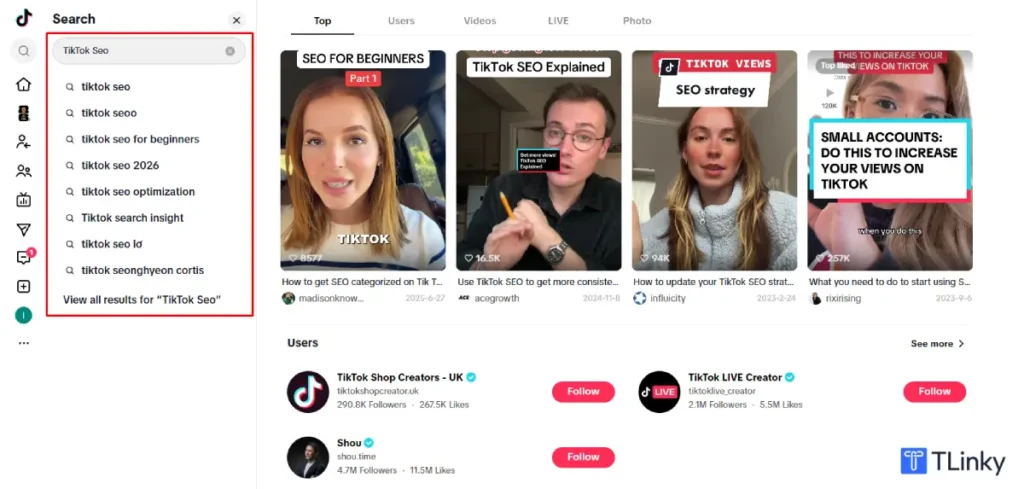
TikTok search ranks existing videos for a typed query using metadata signals (caption keywords, on-screen text, audio transcription) combined with engagement signals (completion rate, watch time, relevance-based interaction). TikTok has not published the exact weighting of each signal, but third-party testing and TikTok’s own creator guidance consistently point to caption keyword placement and audio transcription as the two strongest levers, with high completion rate reinforcing both.
How Is TikTok Search Different from the FYP Algorithm?
TikTok’s FYP surfaces new content based on real-time engagement velocity: re-watch rate, completion rate, and sharing behavior. It is built to show people content they did not know they wanted. A full breakdown of that system lives in the TikTok algorithm guide.
TikTok search instead ranks existing content against a specific typed query. It weighs metadata, caption keywords, audio transcripts, on-screen text, and comment relevance, alongside many of the same engagement signals that matter on the FYP.
The practical difference is proportion, not two entirely separate rulebooks. On the FYP, engagement signals do most of the work. In search, keyword relevance carries comparable or greater weight.
A video with a strong hook and a high completion rate but no keywords in its caption can do well on the FYP and rank for nothing in search. The same video with a keyword-first caption, a stated keyword early in the audio, and reinforcing on-screen text can rank in both places.
What Signals Affect TikTok Search Ranking?
TikTok does not publish a complete ranking formula or confirm exact weighting for individual signals. The list below reflects patterns from third-party testing, including research from iMarkInfotech and posteverywhere.ai, and should be treated as observed correlation, not confirmed TikTok mechanics.
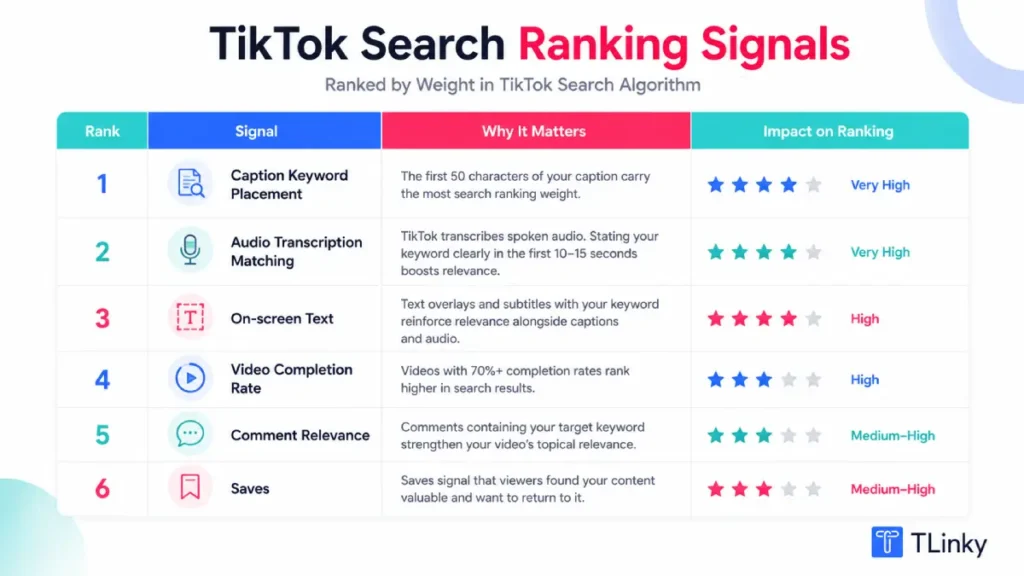
Caption keyword placement: Keywords placed in the first 40 to 50 characters of a caption consistently outperform keywords buried after line breaks or stacked in a hashtag block in third-party testing. Put your primary keyword first, written naturally.
Audio transcription matching: TikTok automatically transcribes spoken audio and uses it as a search input. Saying your target keyword clearly early in the video gives that transcript a cleaner match to the keyword. Unclear speech produces inaccurate transcripts and weakens the match.
On-screen text: Text overlays, subtitles, and on-screen graphics containing your keyword are indexed alongside captions and audio. Testing suggests that stating a keyword out loud, writing it in the caption, and showing it on screen together produces a stronger relevance signal than any one alone.
Hashtag relevance: Topically specific hashtags help TikTok categorize content within a search vertical. In third-party tests, three to five specific hashtags outperformed large generic hashtag blocks. Oversaturated tags like #viral or #fyp add little to search relevance.
Video completion rate: Videos with consistently high completion rates tend to rank higher in both search and the FYP. This is the one signal that clearly benefits both systems at once.
Watch time depth: Total watch time per view is a secondary signal of genuine interest, factored in alongside completion rate.
Comment relevance: When viewers comment using the keyword you are targeting, it reinforces the video’s association with that query.
Saves: A save signals that a viewer found the content useful enough to return to, which testing links to stronger search performance.
Shares: Direct message shares and public shares contribute to a video’s broader authority signals.
Publishing consistently within one topic area also appears to build search presence over time, likely because it gives TikTok more signal about what a channel is reliably about. Treat this as a directional pattern rather than a confirmed ranking rule.
How to Do Keyword Research for TikTok
TikTok keyword research is not the same as Google keyword research. TikTok users phrase queries in conversational, experiential language, often shorter and more casual, and frequently framed around personal experience (“how I…” or “why I stopped…”) rather than informational intent (“best way to…”).
Use TikTok’s search suggestions directly: Type your topic into TikTok’s search bar and note the autocomplete suggestions. These reflect real searches other users are making.
Check “Others searched for” in results: After viewing search results for a term, TikTok surfaces related queries. These reveal adjacent questions your audience is actively asking.
Use the TikTok Keyword Suggestion tool: The TikTok Keyword Suggestion tool surfaces keywords with active TikTok search volume, sorted by relevance to your topic, which is faster than manual searching alone.
Look at top-ranking videos for your topic: Search your target keyword and study the captions and audio of the top 5 to 10 results. Note where keywords appear in the caption, what on-screen text they use, and how the keyword is stated in audio.
Analyze TikTok trends alongside search: Search volume tells you what people are looking for right now. The TikTok Trend Tracker shows which topics are gaining momentum before they peak, so you can pair a stable search term with a rising trend.
How to Optimize a Video for TikTok Search
Optimizing for TikTok search means layering the same keyword across caption, audio, and on-screen text in a way that still feels natural to watch.
Write a keyword-first caption: Put your primary keyword in the first 40 to 50 characters. If your keyword is “TikTok shop fee calculator,” open with something like “TikTok Shop fee calculator: here’s what actually gets deducted from your payout” rather than saving the keyword for the end or the hashtag block.
State your keyword early in the video: Say it clearly within the opening seconds so TikTok’s audio transcript reinforces your caption. Clear enunciation produces a more accurate transcript match than rushed or mumbled speech.
Use on-screen text reinforcement: Add a text overlay early in the video that restates your keyword. Caption, audio, and on-screen text working together produce the strongest combined relevance signal.
Build a tight hashtag cluster: Use three to five hashtags that accurately describe your topic: a mix of your primary keyword hashtag and closely related niche tags. The TikTok Hashtag Generator surfaces niche hashtag options with active search audiences.
Answer the query directly and early: TikTok search users have a specific question. Videos that answer it clearly within the first 30 seconds tend to earn stronger completion rates and saves than videos that build context before getting to the point.
Check your caption before posting: The TikTok Caption Analyzer checks keyword placement, caption length, and metadata signal strength before you publish.
How to Structure Content for Both FYP and Search
Most creators treat FYP and search as separate content tracks. With the right structure, one video can perform in both.
The overlap point is completion rate. Both systems reward videos that hold attention, so build the hook first, then layer in search optimization.
A video built this way opens with a specific tension or question that states the keyword out loud early on. It carries the keyword in the first 40 to 50 characters of the caption.
It uses on-screen text to reinforce the topic in the opening shot, delivers a direct answer before the 30-second mark, and ends in a way that earns saves, a checklist, a specific result, or a reference-worthy detail.
This works because it serves the viewer’s actual intent first, which is what produces the engagement signals both systems reward, while still including the metadata signals search relies on.
How TikTok SEO Differs from Google SEO
Applying Google SEO logic to TikTok is one of the most common mistakes brands make. The platforms share some principles but differ in important ways.
On Google, page authority and backlinks carry real ranking weight. TikTok has no direct equivalent to backlinks; authority is built through per-video engagement and topical consistency, not domain-level reputation.
Google users tend to type longer, more structured queries. TikTok users search conversationally, in short phrases or partial sentences, which changes how keyword research needs to be done.
On Google, older, well-linked content often keeps outranking newer pages. On TikTok, search ranking is more dynamic and leans on recent engagement, so a video posted this week can outrank one from two years ago if it earns better engagement now.
Google ranks web pages. TikTok ranks videos. A text-heavy explanation that works as a blog post has to be rebuilt as something visual and auditory to work on TikTok. The social media SEO best practices guide covers these overlaps and differences across platforms in more depth.
FAQ
Can short videos rank in TikTok search?
Yes, and they often rank better. Shorter videos tend to have higher completion rates by default, since there are fewer moments for a viewer to drop off.
A 30-second video that answers a query clearly and holds attention will often outrank a 3-minute video on the same topic with weaker completion. The format should still match the query. Some topics genuinely need more explanation.
Do I need a certain number of followers to rank in TikTok search?
No. Follower count affects FYP distribution speed but is not a documented factor in search ranking.
A new account with a well-optimized video on a specific keyword can rank for that query. Per-video engagement and keyword relevance are what matter, not account size.
How long does it take for a video to rank on TikTok search?
TikTok search results update frequently, and a video can appear within hours of posting if it earns early engagement.
Stable ranking, where a video holds a consistent position for a given keyword, typically takes 48 to 72 hours as TikTok gathers enough engagement data to rank it confidently.
Should I optimize for TikTok search or focus on the FYP?
You do not have to choose one. A strong hook drives FYP completion, and keyword-optimized captions and audio drive search, and the same video can carry both.
Start with content quality and hook strength first, then layer in the keyword work. Never trade completion rate for keyword density.
Can I use TikTok search to find content ideas?
Yes, and it is one of the most practical uses of TikTok search. Searching your topic area and reading the autocomplete suggestions and related searches shows you exactly what your audience is asking.
These are ready-made video topics with confirmed search demand behind them, rather than a guess at what might resonate.
Wrapping Up
TikTok search is no longer a minor discovery channel. With roughly half of American consumers saying they have used TikTok as a search engine, search-optimized content reaches an audience that FYP-only optimization misses.
Ranking well means treating captions, audio, and on-screen text as connected search signals rather than afterthoughts, while staying aware that TikTok has not confirmed the exact weighting behind any of these signals.
Caption keyword placement early in the text, a clearly stated keyword early in the audio, and consistently strong completion rate are the three levers with the most third-party evidence behind them.
The TikTok analytics guide shows how to track whether your views are coming from search, the FYP, or your profile, so you can measure whether your optimization is actually working.
The organic TikTok strategy guide connects search optimization to a broader growth system, and the TikTok for You Page guide covers the discovery side this article does not.
Sources
- Adobe Express 2026 U.S. Consumer Survey on TikTok Search Behavior
- How TikTok Search Algorithm Actually Works in 2026, iMarkInfotech
- TikTok SEO 2026: How to Rank on TikTok Search, posteverywhere.ai