
A TikTok Shop business needs the same books as any small store: income, costs, and reports your accountant can file from.
FreshBooks covers all three for a solo or small seller, as long as you set it up around how TikTok Shop pays you.
The setup choice that matters most is how you record payouts, because TikTok Shop deposits arrive after its fees are taken out.
Book each TikTok Shop payout at its gross sales figure, with fees as separate expenses, and your profit figures will match what actually happened.
Below you will find the FreshBooks plan that suits each stage of a shop, a one-time account setup, and a weekly payout routine.
How Do TikTok Shop Sellers Use FreshBooks?
Connect your business bank account so each TikTok Shop payout imports automatically. Record the gross sales behind each payout as income, then add TikTok’s fees, product costs, and ad spend as expenses. Run FreshBooks’ tax-time reports at year end. Lite at $23 a month covers most solo sellers; Plus at $43 adds bank reconciliation and accountant access. For how those fees are set, see what TikTok Shop is and what it charges.
What Your TikTok Shop Books Need to Show
Before choosing plans or settings, it helps to know what the books are for. A TikTok Shop seller needs four numbers at any point in the year.
- Gross sales: What buyers paid for your products before TikTok took its fees. This is your real revenue figure.
- Platform costs: TikTok Shop fees, affiliate creator commissions, and refunds. These sit between gross sales and the money you actually receive.
- Product and shipping costs: Inventory, packaging, shipping labels, and samples. These decide whether each sale makes money.
- Marketing costs: Ad spend and paid creator deals, kept in their own category so you can compare them against sales.
Accurate records also matter at tax time, when your accountant needs gross sales and costs that match any tax forms you receive.
The IRS says online marketplaces must send a Form 1099-K once a seller’s payments exceed $20,000 across more than 200 transactions, according to the IRS guide to understanding Form 1099-K.
The IRS also says you must report all income from selling goods, whether or not a 1099-K arrives.
Your FreshBooks records are what prove the income and costs behind that figure.
Which FreshBooks Plan Fits Your Shop
FreshBooks sells four plans. Prices below are the standard monthly rates and the promotional rates shown on the FreshBooks pricing page on October 14, 2026.
New to TikTok Ads? Get Up to $6,000 in Matching Ad Credit
| Plan | Standard price | Promotional price shown | Best shop stage |
| Lite | $23 a month | $1 a month for the first year | Solo seller, TikTok Shop only |
| Plus | $43 a month | $8.60 a month for 3 months (80% off) | Growing shop with an accountant or wholesale buyers |
| Premium | $70 a month | $14 a month for 3 months (80% off) | Shop paying suppliers on terms |
| Select | Custom, quoted by sales | Not listed | Larger team needing lower card fees |
Promotional prices are time-limited, so check the live offer before you buy. Budget against the standard price, since that is what you pay once the discount ends.
Every plan starts with a 30-day free trial, and the pricing FAQ confirms no credit card is needed. Paid plans also carry a 30-day money-back guarantee.
Lite: Enough for a Solo Seller
Lite includes Automated Bank Import, unlimited expense tracking, mobile mileage tracking, and tax-time reports. That covers the full payout routine in this guide.
Lite limits you to 5 billable clients, but TikTok Shop buyers never become FreshBooks clients unless you invoice them yourself. A marketplace-only seller is unlikely to hit that cap.
Plus: When an Accountant Joins
Plus adds double-entry accounting reports, bank reconciliation, accountant access, and automatic expense receipt data capture. It also raises the client limit to 50.
Accountant access is the main reason to upgrade. Your bookkeeper logs into the same account instead of waiting for exported spreadsheets.
Premium: When You Pay Suppliers on Terms
Premium adds accounts payable, automatic bill receipt data capture, and project profitability. You can track what you owe a manufacturer and when each bill is due.
That becomes useful once you order inventory on 30-day terms or pay contractors for packing and content.
Add-Ons and Payment Fees
Three add-ons sit outside the plan price. A solo seller with no staff may need none of them.
- Team Members: $11 a month per person on every plan. Select includes 2 team member accounts.
- Advanced Payments: $20 a month on Lite, Plus, and Premium, and included on Select.
- FreshBooks Payroll: $40 a month plus $6 a month per person paid.
FreshBooks Payments charges 2.9% plus $0.30 per card payment and 1% for ACH bank transfers. Those fees apply only to invoices you collect through FreshBooks, never to TikTok Shop orders.
How to Set Up FreshBooks for a TikTok Shop Business
A short one-time setup saves you from re-sorting transactions later, so do it before your first payout lands in the account.
Step 1: Start the 30-day trial and enter your business name and details.

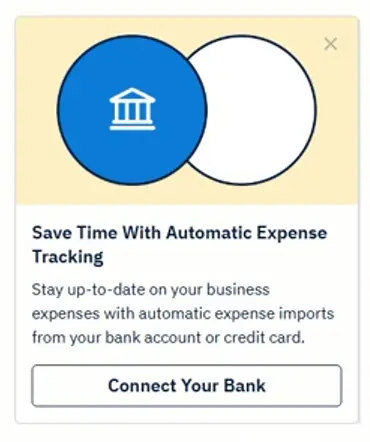
Step 2: Connect the bank account that receives TikTok Shop payouts, so Automated Bank Import pulls each deposit in.
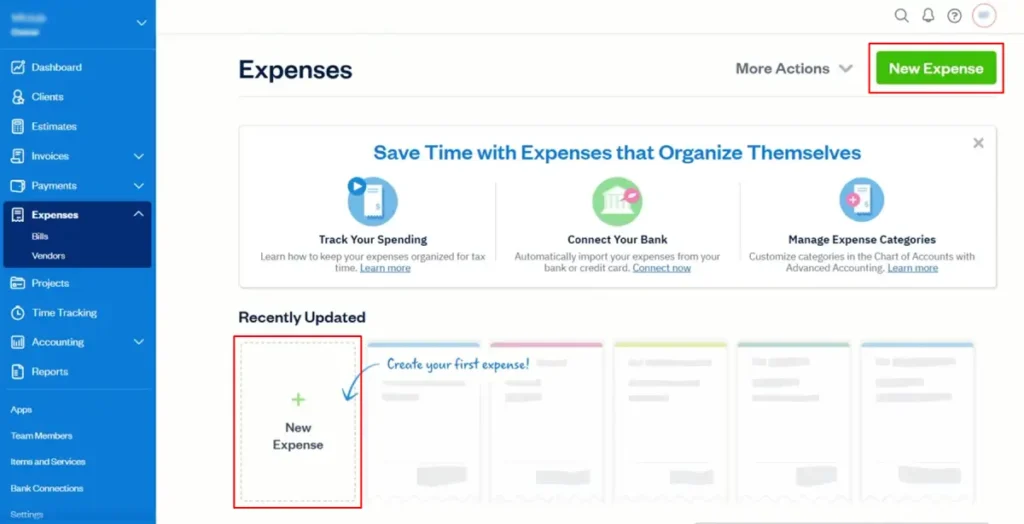
Step 3: Create expense categories for TikTok Shop fees, affiliate commissions, refunds, inventory, packaging, shipping, samples, and ad spend.
Step 4: Install the FreshBooks mobile app so you can photograph supplier and packaging receipts as you buy.
Step 5: Turn on mileage tracking if you drive to suppliers, the post office, or a storage unit.
Step 1: On Plus or higher, invite your accountant so they can review the books directly.
How to Record TikTok Shop Payouts Each Week
FreshBooks does not import TikTok Shop orders directly, so your sales data has to come from TikTok Shop’s own payout records.
A search for TikTok in the FreshBooks App Store returned no apps on October 14, 2026, so the routine below works from payouts instead.
Working from payouts keeps the manual work small. You record a few lines per payout rather than one line per order.
- When a payout appears through Automated Bank Import, open the matching payout record in TikTok Shop’s Seller Center.
- Record the gross sales for that payout period as income, not the smaller deposit amount.
- Record TikTok Shop fees and affiliate commissions as expenses in their own categories.
- Record refunds in the period they happened, not the period of the original sale.
- Check that gross sales minus those expenses equals the bank deposit. If it does not, find the missing line before moving on.
Booking only the net deposit is an easy mistake to make. It understates both sales and fees, and you need both figures to price products with a margin.
If you also sell through Shopify, the split looks different, because that channel can feed orders into FreshBooks on its own.
The FreshBooks App Store lists a Shopify app from developer Carry The One that imports orders as invoices, so only the TikTok Shop side needs this weekly routine.
Sellers who push one catalog to both channels can follow the steps for adding Shopify products to TikTok Shop, then keep each channel’s sales in separate income categories.
Tracking the Costs That Decide Your Profit
Sales figures alone will not show whether the shop makes money. These cost lines are easy to leave out of TikTok Shop books.
- Samples sent to creators: Product you ship to affiliates for free is a real cost. Log it as samples, not as a sale.
- Ad spend: Give paid campaigns their own category, so TikTok ads for small business budgets can be compared against the payouts they drive.
- Packaging and shipping supplies: Mailers, tape, and labels add up quickly. Receipt capture on Plus and higher turns a photo into an expense line.
- Print or supplier charges: Print-on-demand sellers pay a supplier for each order, so a print-on-demand setup for TikTok Shop needs those charges booked per payout period.
- Software and tools: Subscriptions for design apps, scheduling, and FreshBooks itself are business expenses too.
Selling Beyond TikTok Shop: Invoices and Wholesale
Sooner or later, a shop can outgrow one channel. A boutique asks for a bulk order, or a returning customer wants a custom piece.
FreshBooks handles those sales on every plan with unlimited customized invoices, automated recurring invoices, and scheduled late fees. Checkout links let a buyer pay without a formal invoice.
Plus adds estimates with e-signatures, proposals, and client retainers. Those suit wholesale buyers who order on a regular schedule.
Tax Time: Reports Your Accountant Needs
Every FreshBooks plan includes tax-time reports and business health reports. The pricing FAQ points to the Profit and Loss report and the Sales Tax Summary report.
Your Profit and Loss report shows gross sales, then every cost category beneath it.
If you followed the payout routine, it lines up with the gross figure on any 1099-K you receive.
Sales tax deserves its own line. If your payout records show sales tax collected on orders, keep it out of income and confirm with your accountant how it was handled.
When FreshBooks Stops Being Enough
FreshBooks fits a shop that books a modest number of payouts each month. A few signs tell you it is time to add more.
- You need item-level profit: The payout routine shows totals by period, not profit per product. That needs order-level data from a marketplace accounting connector.
- You sell on several marketplaces: Each extra channel adds another set of payouts to match by hand.
- The weekly routine takes hours: At that point a connector that feeds orders into your books saves more time than it costs.
Choosing your main sales channel shapes how much of this manual work you face. Comparing Shopify and TikTok Shop as sales channels helps you decide where most orders should flow.
Which Setup Fits Your Shop?
| Your shop | Best setup |
| Solo seller, TikTok Shop only | FreshBooks Lite with the weekly payout routine |
| Seller working with an accountant | FreshBooks Plus for reconciliation and accountant access |
| Shopify plus TikTok Shop | FreshBooks with the Shopify app, plus manual TikTok Shop payouts |
| Seller with wholesale or custom orders | FreshBooks Plus for estimates, e-signatures, and retainers |
| Seller paying suppliers on terms | FreshBooks Premium for accounts payable |
| Several marketplaces or high daily order volume | A marketplace accounting connector, with FreshBooks optional on top |
FAQs
These are the questions TikTok Shop owners ask most when setting up their books in FreshBooks.
Can FreshBooks import TikTok Shop orders automatically?
No. A search for TikTok in the FreshBooks App Store returned no apps on October 14, 2026.
Automated Bank Import still brings in each payout deposit. You then record the gross sales and fees behind it from your TikTok Shop payout records.
Should I record TikTok Shop payouts as gross or net?
Record gross sales as income and TikTok Shop’s fees as separate expenses. The bank deposit is the net figure after those fees.
Booking only the deposit understates both revenue and costs. It also leaves your books out of line with the gross amount reported on a Form 1099-K.
Which FreshBooks plan is best for a small TikTok Shop seller?
Lite at $23 a month is enough for most solo sellers. It includes bank import, unlimited expenses, and tax-time reports.
Move to Plus at $43 a month once you work with an accountant or invoice wholesale buyers. Plus adds bank reconciliation and accountant access.
Do TikTok Shop sellers get a Form 1099-K?
Online marketplaces must send one when your payments exceed $20,000 across more than 200 transactions, according to the IRS. They may also send one below that level.
Either way, the IRS says you must report all income from selling goods. Your FreshBooks Profit and Loss report gives you the gross sales and costs behind that figure.
Next Step
Start the free trial a few days before your next payout, so the bank connection and expense categories are ready when it lands.
Record that first payout with the weekly routine above. If it takes only a few minutes, FreshBooks Lite is likely all your shop needs for now.
For the rest of your seller stack, the best dropshipping tools for TikTok Shop sellers cover sourcing and fulfillment.
If your shop is not open yet, setting up your TikTok Shop storefront comes before any bookkeeping starts.