
If you searched for TikTok LIVE Shopping Ads to promote a TikTok Shop stream, the format you remember is gone. Since July 2025, Shop sellers can no longer create, edit or duplicate LIVE Shopping Ads, and LIVE GMV Max took their place. LIVE Shopping Ads still exist in Ads Manager, but only with a TikTok identity and no Shop attached.
New to TikTok Ads? Get Up to $6,000 in Matching Ad Credit

Key Takeaways
- TikTok Shop sellers now promote a LIVE with LIVE GMV Max. Since July 2025, LIVE Shopping Ads can’t be created for a Shop, though campaigns that already existed keep running, and new ones are possible only in Ads Manager with a TikTok identity and no Shop.
- LIVE GMV Max is set up in Seller Center under Shop Ads, where you click Promote LIVE, pick the TikTok account, choose Gross revenue as the goal, then set a LIVE ROI target, a daily budget and a schedule.
- Both campaign types are scheduled ahead of the stream, and identity-based LIVE Shopping Ads need the stream to go live no more than 48 hours after the start time you planned.
- LIVE GMV Max allows one campaign per TikTok identity and counts ROI as total LIVE room gross revenue divided by ad cost, so organic sales during the campaign count too.
What Are TikTok LIVE Shopping Ads?
TikTok LIVE Shopping Ads are paid ads that send people from the feed straight into a live stream where they can buy. During the live stream, pinned product cards appear on screen and viewers can add to cart and check out without leaving TikTok. These ads show in the TikTok feed, the Shopping Center and search, and a tap takes the viewer to the video or LIVE you picked.
For TikTok Shop sellers, that job now belongs to LIVE GMV Max. The idea is the same, but the controls and the reporting are different.
What Changed in July 2025
Beginning July 2025, TikTok made GMV Max the default and only supported campaign type for TikTok Shop Ads. For a Shop, you can’t make new LIVE, Product or Video Shopping Ads anymore, and you can’t edit or copy the old ones either. Campaigns that were already running stayed active.
Two GMV Max types took over: Product GMV Max for product sales, covered in TikTok Shopping Ads, and LIVE GMV Max for streams. TikTok describes LIVE GMV Max as an automated Shop Ads campaign that steers traffic to your LIVE room for the highest gross revenue. It uses two kinds of creative: Video-to-LIVE, where your videos invite people into the stream, and LIVE-to-LIVE, where the stream itself is the ad.
Who Can Still Create LIVE Shopping Ads
LIVE Shopping Ads didn’t disappear completely. You can still make them if you choose a TikTok identity, but you can no longer attach a TikTok Shop, and official and marketing accounts can no longer be picked as the identity.
That route suits accounts that go live without a Shop tied to the campaign. If you sell through TikTok Shop, use LIVE GMV Max.
Which LIVE Ad Option Fits You
The right LIVE ad option depends on two things: whether you sell through TikTok Shop, and who manages the ads.
| Your situation | Use this | Where you set it up |
|---|---|---|
| You sell through TikTok Shop and go live from your shop’s account | LIVE GMV Max | Seller Center, Shop Ads |
| An agency or teammate runs ads for the shop | LIVE GMV Max with GMV Max authorization | Business Center, then Ads Manager or Seller Center |
| You go live without a Shop linked to the campaign | LIVE Shopping Ads with a TikTok identity | TikTok Ads Manager |
| You want to promote a stream from your phone | Promote with the Boost LIVE goal | TikTok app |
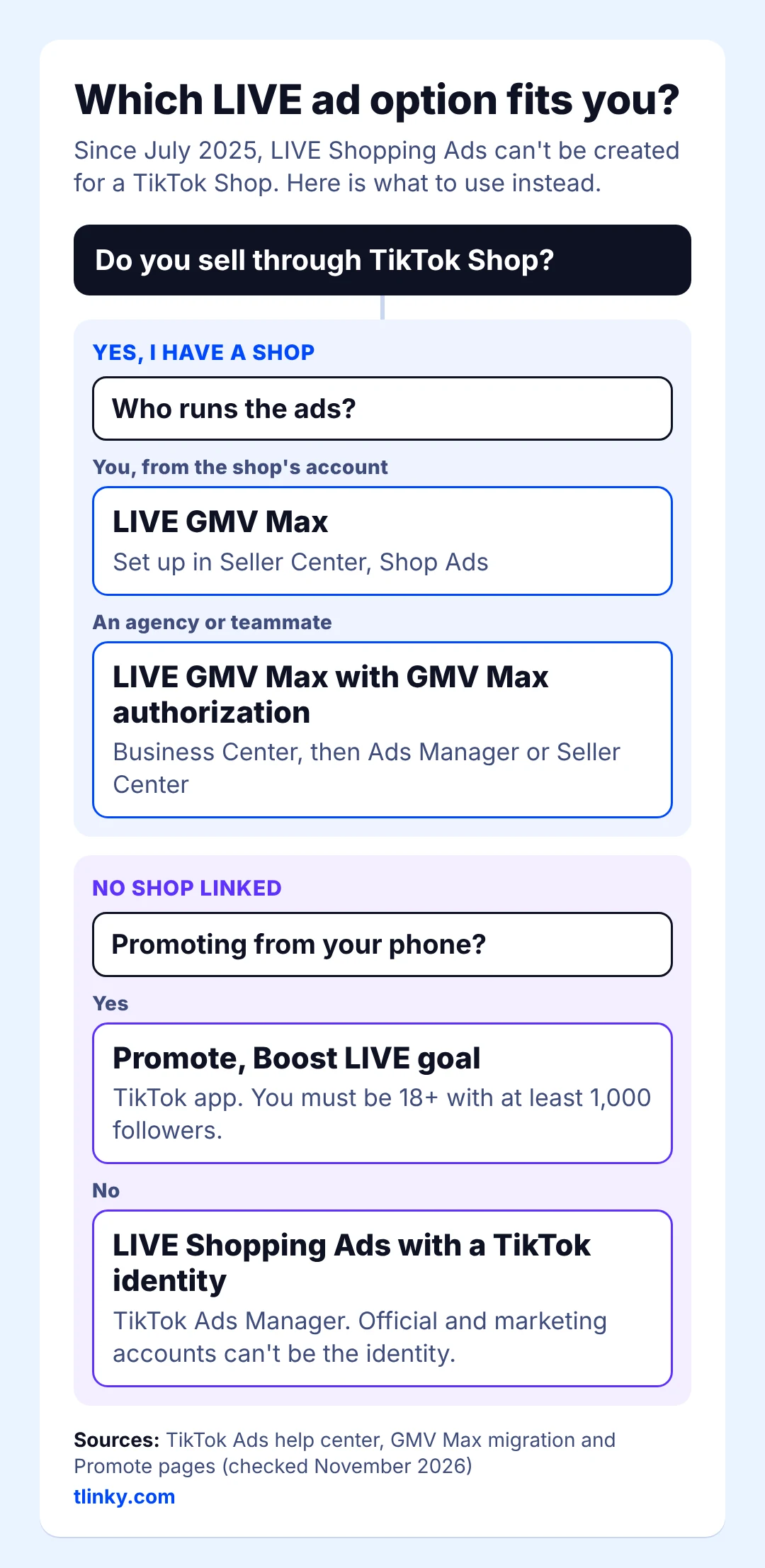
Promote has its own entry rules: you must be at least 18, and your account needs at least 1,000 followers to promote a LIVE. If your account can’t stream yet, start with how to go live on TikTok. If you don’t have a Shop yet, how to sell on TikTok Shop walks through seller setup.
LIVE Shopping Ads vs LIVE GMV Max
The biggest change is control. LIVE Shopping Ads let you choose targeting, bidding and creative, while LIVE GMV Max needs a profile, a budget and a start time, plus the ROI target you set during setup, and handles the rest. The rows below come from TikTok’s comparison of the two campaign types, last updated in September 2026.
| LIVE Shopping Ads | LIVE GMV Max | |
|---|---|---|
| Set up and reported in | TikTok Ads Manager | Seller Center Ads tab |
| Works at | Ad account level | Shop level |
| What you enter | Profile, budget, schedule, optimization goal, bidding strategy, targeting, creative | Profile, budget, start time |
| Optimizes for | LIVE ad placements | LIVE ad and organic placements |
| ROI means | Ad gross revenue / ad cost | Total LIVE room gross revenue / ad cost |
| Attribution | 7-day click, 1-day view | All LIVE room conversions while the campaign is active |
| Delivery | Prioritizes delivery and spending the budget | Prioritizes the ROI target and won’t scale spend unless it can reach an ROI near it |
| Budget pacing | Maximum delivery bidding paces the budget evenly across the schedule | Delivers as fast as possible as long as it can meet the ROI goal |
| Campaigns per TikTok account | Several | One per TikTok identity |
In practice, LIVE GMV Max leaves you two numbers to manage: the ROI target and the budget. Watch for one side effect: while a shop’s primary ad account runs LIVE GMV Max, any LIVE Shopping Ads for the shop’s official TikTok account pause automatically, and they don’t restart when the campaign ends.
How to Set Up a LIVE GMV Max Campaign
You create LIVE GMV Max in Seller Center under Shop Ads: click Promote LIVE, pick the TikTok account that will go live, set a LIVE ROI target, a daily budget and a schedule, then publish. The steps below follow TikTok’s Seller Center setup page.
U.S. shops can use LIVE GMV Max. TikTok’s U.S. Academy guide on how to get started with advertising on TikTok Shop, dated February 9, 2026 and marked “Applies to: United States,” covers both Product GMV Max and LIVE GMV Max, and it recommends the LIVE version for sellers who stream regularly with more than $1,000 in LIVE GMV a week. Product GMV Max names the U.S. outright on TikTok’s Product GMV Max setup page, updated June 2026. TikTok hasn’t published a separate U.S. start date for the LIVE version. Its January 23, 2025 post on the UK launch says only that GMV Max rolled out in the U.S. the year before, without saying whether that rollout included LIVE.
Before You Start
- You need Admin or Ads Tab permission in Seller Center.
- If a LIVE Shopping Ads or GMV Max campaign is already running for that LIVE, turn it off first; TikTok won’t let you create a new LIVE GMV Max campaign until you do.
- Don’t read the short market list as a U.S. block. The ads.tiktok.com Seller Center setup page, updated September 2026, still names only Indonesia, Vietnam, Thailand, the Philippines, Malaysia and Singapore, while TikTok’s U.S. Academy teaches LIVE GMV Max to U.S. sellers. UK sellers are covered too: in the UK, GMV Max is available for products and LIVE shopping sessions. If Shop Ads doesn’t offer a LIVE option for your shop, ask TikTok Shop seller support before you plan ad spend around it.
Steps in Seller Center
- In Seller Center, click Shop Ads in the left menu.
- Click Create GMV Max ads. The campaign goes into your primary ad account; the gear icon next to the account name switches to another one.
- Click Promote LIVE.
- Pick the TikTok account with the LIVE you want to promote.
- In the Optimization goal section, pick Gross revenue.
- Under Bid Strategy, enter your LIVE ROI target or accept the recommended one.
- Under Budget, enter a daily budget or follow the recommendation based on your past LIVE results. You can change it after launch.
- Set the Schedule, then click Publish.
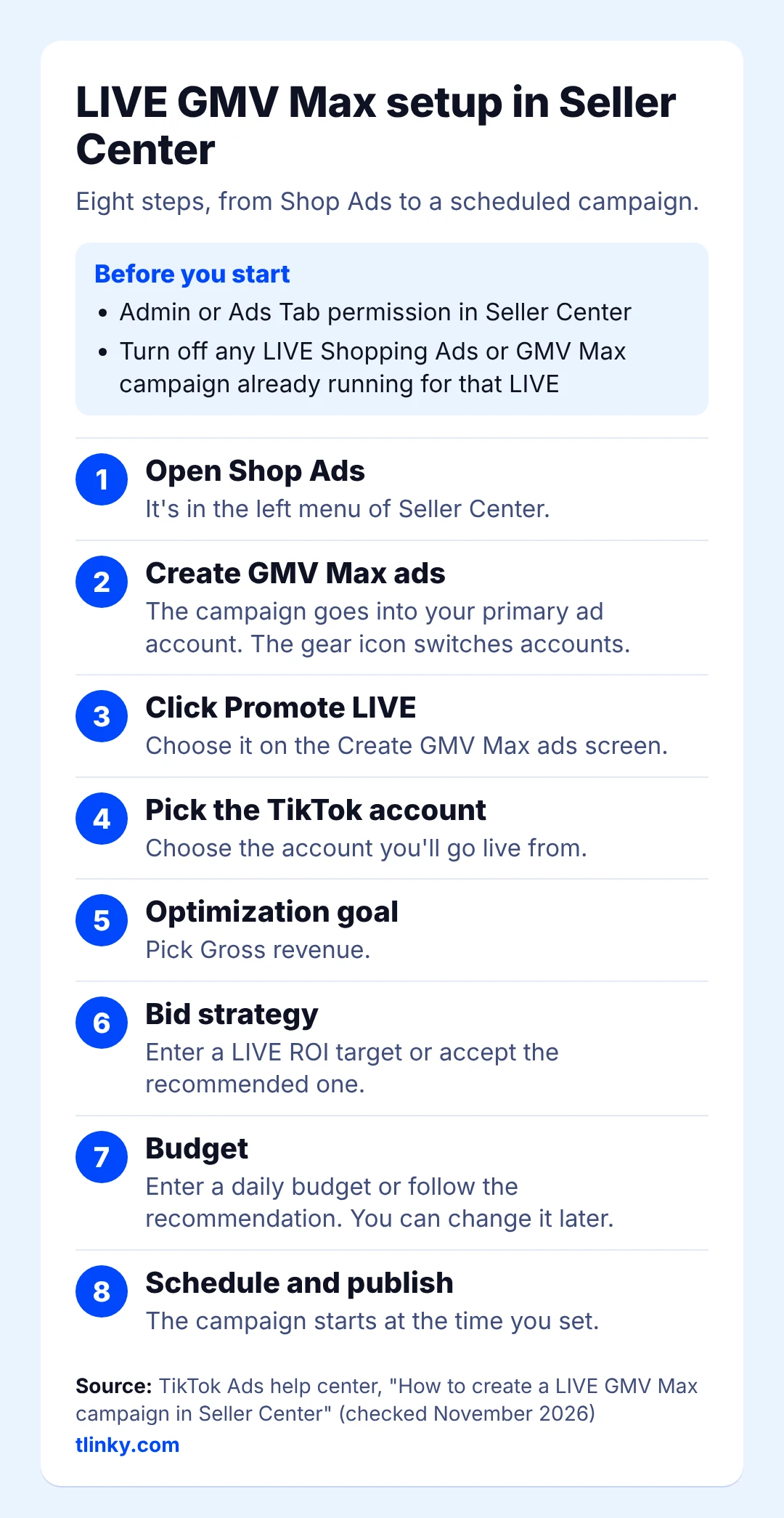
The campaign starts at the time you scheduled, and you can check results or turn it off at any time in Seller Center.
Setting It Up in TikTok Ads Manager
TikTok’s Ads Manager setup page describes a second route: click GMV Max at the top of the dashboard, choose the Shop, click Create GMV Max ads, pick the TikTok account, then set a LIVE ROI target, a daily budget and a schedule. It needs the Shop connected to your Business Center, Admin or Advertising Manager permission for the Shop, and GMV Max authorization for the ad account, which is how an agency runs LIVE GMV Max for a client. That page lists the same six Southeast Asian markets, and so does the copy in TikTok’s U.S. Academy, so TikTok’s own pages disagree on this route. In the U.S., plan on Seller Center, and check whether GMV Max shows at the top of your Ads Manager dashboard before an agency counts on it.
Scheduling and the 48-Hour Start Rule
You schedule both campaign types ahead of the stream; you don’t have to wait until you’re live to switch them on. LIVE GMV Max starts at the time you scheduled. For identity-based LIVE Shopping Ads, set start and end times that match your LIVE schedule, and make sure the stream goes live no more than 48 hours after the start time you planned.
Identity-based LIVE Shopping Ads have three scheduling options: run the ad group continuously from a start time, set a fixed start and end time, or set a delivery duration that begins once the LIVE starts. The first fits regular daily streams with dayparting, and the last gives you room if a single stream starts late. Older guides say LIVE ads can’t be scheduled before the stream begins; TikTok’s own help pages show they can.
What LIVE GMV Max Costs
You pay what the campaign spends against the daily budget you set, and TikTok’s LIVE GMV Max help pages don’t list a minimum budget. When you create the campaign, TikTok recommends a daily budget based on your past LIVE results, and TikTok’s LIVE GMV Max best practices suggest following that recommendation or setting a budget two to three times higher than your past LIVE ads.
A bigger budget doesn’t mean a bigger bill by default. The budget won’t be fully used unless the campaign can roughly meet your target ROI, and a campaign may qualify for reimbursement under TikTok’s ROI protection if its ROI falls below a set threshold while you follow the GMV Max guidelines.
So the real cost lever is the ROI target. A high target keeps spend low and can leave the stream short of new viewers; a lower target lets TikTok buy more traffic at a lower return. For CPM and CPC ranges across other TikTok campaign types, see TikTok advertising cost.
How to Read Your LIVE Ad Results
LIVE GMV Max results sit in the Seller Center Ads tab, as the comparison table above shows, while LIVE Shopping Ads results show in the Campaigns tab of Ads Manager or the ads dashboard in Seller Center.
The number that trips people up is ROI, because TikTok defines it differently for each campaign type:
- LIVE Shopping Ads: ad gross revenue divided by ad cost, with a 7-day click and 1-day view attribution window.
- LIVE GMV Max: total LIVE room gross revenue divided by ad cost, counting every sale in the LIVE room while the campaign is active.
Here is a simple example with made-up numbers. Say you spend $500 on ads for one session. If the orders TikTok ties to ad clicks and views add up to $1,500, the LIVE Shopping Ads definition gives an ROI of 3.0. If the LIVE room’s total sales during the campaign, including viewers who came from your followers and the For You feed, reach $2,400, LIVE GMV Max reports an ROI of 4.8. Same stream, two honest numbers.
That’s why you shouldn’t compare a LIVE GMV Max ROI with an old LIVE Shopping Ads ROAS line by line. Compare LIVE GMV Max sessions with each other, and judge profit with your margin in mind. The TikTok Ads ROI Calculator takes your ad spend, revenue and product costs and shows net profit, ROI and ROAS, so you can see whether a session paid off after product costs, and ROI of TikTok ad campaigns explains breakeven ROAS.
Common Setup Mistakes
- Keeping LIVE Shopping Ads on your official account next to LIVE GMV Max. While LIVE GMV Max is active on the shop’s primary ad account, those ads pause and stay paused afterward. Restart them by hand in Ads Manager if you still need them.
- Trying to add a second campaign for the same account. TikTok allows one LIVE GMV Max campaign per TikTok identity, because one campaign covers the whole LIVE room.
- Judging the campaign after one stream or changing the ROI target in the first hours. TikTok recommends a campaign that spans at least three days and waiting one day before you adjust: lower the target if spend is slow, and raise the budget or the target if it spends fast.
- Following old setup steps. Guides that tell you to pick TikTok Shop as the product source inside a LIVE Shopping Ads campaign describe a setup TikTok removed in July 2025.
Once the setup is right, the stream decides the result: the host, the offer and how often you pin and call out products. That side is covered in TikTok LIVE Shopping Ads best practices.
FAQ
Are TikTok LIVE Shopping Ads discontinued?
Not completely. Since July 2025, TikTok’s GMV Max migration page says you can’t create, edit or duplicate LIVE Shopping Ads for a TikTok Shop, while existing ones keep running. You can still create them with a TikTok identity and no Shop. Shop sellers use LIVE GMV Max instead.
Can I run LIVE Shopping Ads without a TikTok Shop?
Yes. TikTok’s migration page says you can create LIVE Shopping Ads in Ads Manager by selecting a TikTok identity; the Shop option was removed, and official and marketing accounts can’t be the identity. To promote a LIVE straight from the app, TikTok’s Promote page says you must be at least 18 and have at least 1,000 followers to promote a LIVE.
How much does LIVE GMV Max cost?
You set a daily budget, and TikTok’s help pages don’t list a minimum. TikTok’s LIVE GMV Max best practices suggest the recommended budget or two to three times what your past LIVE ads spent, and the budget isn’t fully used unless the campaign can roughly meet your ROI target.
Do I have to go live at the exact scheduled time?
For LIVE GMV Max, the campaign starts at the time you schedule, per TikTok’s Seller Center setup page, so plan to be live then. For LIVE Shopping Ads, TikTok’s LIVE Shopping Ads page says the stream has to go live no more than 48 hours after the planned start, and one scheduling option starts delivery only after the LIVE begins.
Can I set up LIVE GMV Max in TikTok Ads Manager?
In some markets. TikTok’s Ads Manager setup page lists Indonesia, Malaysia, the Philippines, Thailand, Vietnam and Singapore, and it needs your Shop connected to Business Center plus GMV Max authorization for the ad account. If the option doesn’t show in Ads Manager, use Shop Ads in Seller Center.
Is LIVE GMV Max available in the U.S.?
Yes. TikTok’s U.S. Academy guide on getting started with advertising on TikTok Shop, dated February 9, 2026 and marked for the United States, covers LIVE GMV Max for U.S. sellers. Some ads.tiktok.com setup pages still list only six Southeast Asian markets, so if the LIVE option doesn’t show in Shop Ads, ask TikTok Shop seller support.