Best Free Wedding Hashtag Generator [AI Powered]
The Wedding Hashtag Generator turns your names and wedding details into three sets of hashtag ideas, 3, 5 or 10 in each set, so you can pick one tag for guests to use on their photos.

Grow your Business & Social Media Marketing
- URL Shortener
- Branded Links
- 14+ QR Code Type
- Dynamic QR
- Bio Page Builder
- Tracking & Analytics
- Retargeting
- 16+ Integrations
Free wedding hashtag generator for couples
The free wedding hashtag generator, also known as a wedding hashtag maker or creator, writes custom hashtag ideas from your names, your wedding details and the tone you want. It returns three themed sets of ideas, so you can compare a romantic option with a punny one before you print anything.
It’s for couples, wedding planners and the friend who got put in charge of the details. There’s no sign-up and no cost. Type your names, describe the day, and copy the ideas you like.
One limit matters more than any other: the generator does not check whether a hashtag is already in use. It can’t see Instagram, TikTok or any other app. Before you put a tag on signs or invitations, search it yourself, as explained below.
How to create a wedding hashtag with the generator
You fill in four fields and click Generate Wedding Hashtags:
- Couple’s Names. First names, maiden names and the shared last name if one of you is changing it. “Emily Carter and James Walker. Emily is changing her last name to Walker” gives the AI both surnames to play with.
- Wedding Details & Vibe. The month and year, the place and the theme. Details like “barn,” “sunflowers” or “beach in Maui” are what turn into puns.
- Desired Tone. Romantic & Classic, Funny, Clever & Punny, Pop Culture & Movie References, or Short & Simple (Easy to type).
- Number of Hashtags. 3, 5 or 10 per set. There are always three sets, so you’ll get 9, 15 or 30 ideas.
Both text boxes are required, and Clear resets the form. Each run gives a fresh batch, so if nothing clicks, change the tone or add a detail and try again.
Wedding hashtag ideas from our test
The generator came up with a few genuinely good puns, plus some ideas we’d never put on a sign. On November 2, 2026, we entered Emily Carter and James Walker (Emily taking the Walker name), an October 2027 fall barn wedding near Asheville, North Carolina, with sunflowers and string lights. We picked Funny, Clever & Punny and 10 hashtags, and got 30 ideas in about 5.9 seconds.
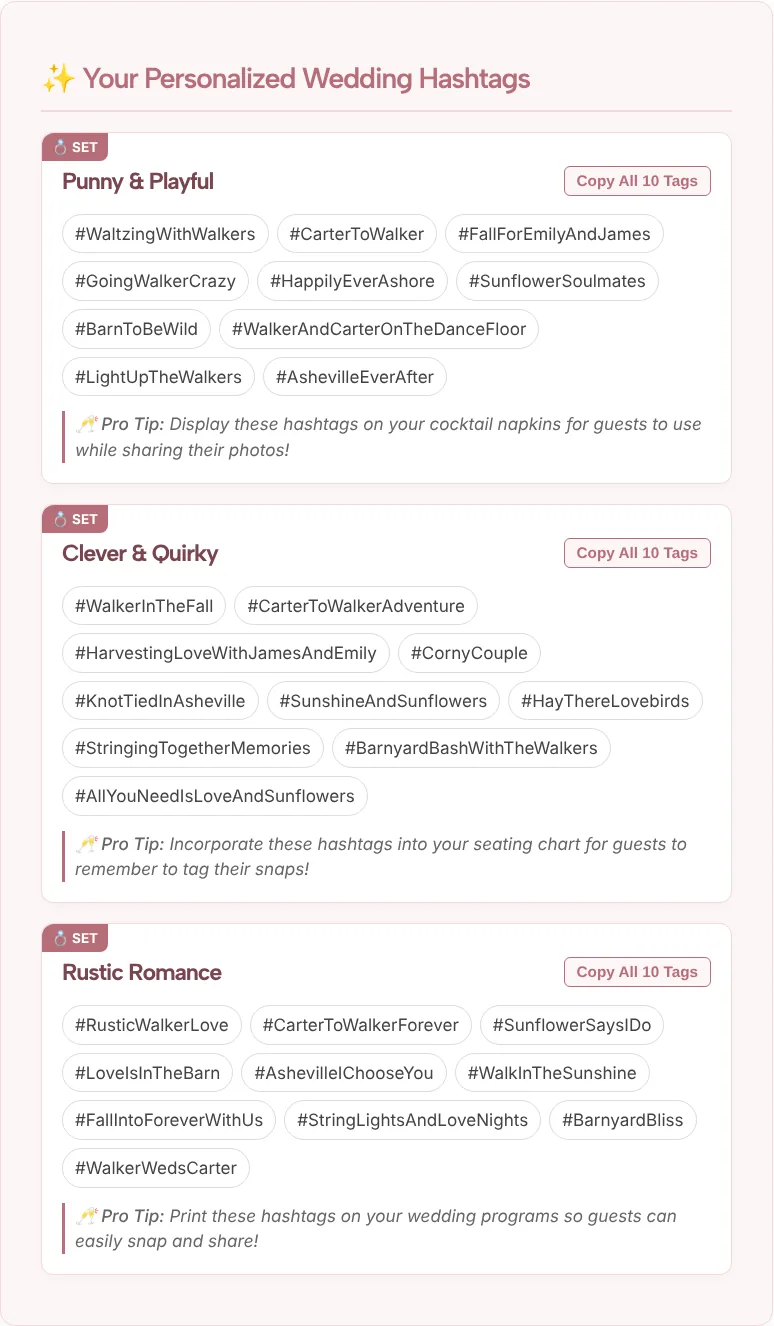
The three sets were Punny & Playful, Clever & Quirky and Rustic Romance. Each came with a Copy All 10 Tags button and a short tip on where to display the tags at the wedding.
Worth shortlisting:
- #BarnToBeWild, a pun on the venue that guests will remember
- #HayThereLovebirds, playful and still easy to type
- #WalkerWedsCarter and #CarterToWalker, which use both last names
- #AshevilleEverAfter, a place name that works for any tone
Better left out:
- #HarvestingLoveWithJamesAndEmily is 32 characters including the #. Guests typing that on a phone at the reception will get it wrong.
- #WalkerAndCarterOnTheDanceFloor and #AllYouNeedIsLoveAndSunflowers have the same problem.
- #HappilyEverAshore is a beach pun. It makes no sense for a barn wedding in the mountains.
Expect a similar mix from your own run: a handful of keepers, some long tags, and the odd idea that misses your theme.
Check that your wedding hashtag isn’t already taken
Search every finalist on Instagram and TikTok before you choose, because the generator never checks this. If other couples already posted under a tag, your guests’ photos will be mixed in with strangers’ weddings.
How to check:
- Open the search in Instagram and in TikTok and type the full hashtag.
- Look at the posts. If you see other weddings, or a lot of posts about anything else, skip that tag.
- To make a used tag yours, add a detail only you have: a last name, the year or the place. #WalkerWedsCarter is less likely to be taken than #LoveIsInTheBarn.
Also tell guests about privacy. Instagram’s Help Center says that when an account is private, a post with a hashtag won’t appear on that hashtag’s page. Some guest photos will be missing from your hashtag no matter how good it is, so pair it with a shared album or a QR code for wedding pictures that sends guests straight to an upload folder.
What makes a good wedding hashtag
A good wedding hashtag is short, easy to spell and clearly yours. Run each finalist through these checks:
- Type it on your phone. If you slow down or make a typo, your guests will too. That’s usually the long ones, like the 32-character tag from our test.
- Say it out loud. If you have to spell it for someone, it’s too complicated. Watch for double letters where two words meet.
- Capitalize each word on signs. #WalkerWedsCarter is easier to read than #walkerwedscarter, and it helps avoid odd readings of words that run together.
- Pick one main tag. The tool gives you up to 30 ideas, but guests can only remember one. A second tag for the rehearsal dinner or the weekend events is fine.
- Match the tone to the day. A punny tag suits a relaxed barn party. A formal evening wedding may call for Romantic & Classic or Short & Simple.
Where to share your wedding hashtag
Put the hashtag everywhere guests look before and during the day. Good places include the save-the-dates, your wedding website, a sign at the welcome table, the table cards and the program. The tips in our test also suggested cocktail napkins and the seating chart.
After the wedding, you’ll probably post your own photos too. The Instagram hashtag generator can suggest broader tags for those posts, and the TikTok hashtag generator does the same for your first-dance video. Both sit alongside the other platform tools in TLinky’s hashtag generator collection.
Wedding Hashtag Generator FAQ
Is the wedding hashtag generator free?
Yes. The wedding hashtag generator is free and you don’t need an account. Enter your names and wedding details, choose a tone and how many ideas you want, and the hashtags appear on the page with a button to copy each set.
Does the generator check if a wedding hashtag is already used?
No. The tool can’t see Instagram, TikTok or any other app, so it can’t tell whether a tag is taken. Search each finalist on Instagram and TikTok yourself. If other couples have used it, add your last name, the year or your venue’s town.
How do you make a catchy wedding hashtag?
Start with what’s unique to you: both last names, the place, or a theme you can pun on, like a barn or sunflowers. Keep it short enough to type on a phone, and say it out loud to make sure guests can spell it from hearing it once.
Is there an AI tool that can create wedding hashtags?
Yes, this one uses an AI model to write ideas from your names, details and chosen tone. Treat the results as a brainstorm. In our test, a few ideas were long or off-theme, so pick your favorite and check that it’s not already in use.
How many wedding hashtags should we use?
One main hashtag works best, since guests will only remember one. You can add a second for related events like the rehearsal dinner. The generator gives you 9, 15 or 30 ideas so you have plenty to choose from.
Will every guest photo show up under our hashtag?
Not always. Instagram’s Help Center says posts from private accounts don’t appear on the hashtag’s page. Ask close friends to share photos another way, such as a shared album, so the private-account photos aren’t lost.
Free Hashtag Generator Tools
Boost your social media reach with our free Hashtag Generator Tool, tailored just for you! Whether you’re on Facebook, LinkedIn, Instagram, TikTok, Twitter, or YouTube, Pinterest and others social media. Generate relevant, trending hashtags to amplify your content, increase engagement, and connect with your perfect audience.