
Best Free Facebook Hashtag Generator [AI Powered]
Describe your Facebook post and your niche, pick a strategy, and the generator returns three clusters of hashtags you can copy in one click.
Grow your Business & Social Media Marketing
- Branded Link Shortener
- QR Code Generator
- Bio Page Builder
- Tracking & Analytics
- 16+ Integrations
Free Hashtag Generator for Facebook
This hashtag generator for Facebook reads a sentence or two about your post and suggests three groups of hashtags you can copy in one click. It’s for business owners, community managers and creators who want tags that match a specific Facebook post instead of the same generic list every time.
Use this FB hashtag generator like a brainstorming partner. An AI model writes the tags from your topic, niche and chosen strategy. There’s no live trend feed or reach data behind them, so you decide which ones belong in the post.
How to Use the Facebook Hashtag Generator
The Facebook hashtag generator needs four inputs and one click:
- Describe the post in the Post Topic / Brief Description box, for example “weekend pop-up at our East Austin roastery with free tastings.”
- Enter your niche or industry, such as Local Coffee Roaster, Fitness or B2B SaaS. Both text fields are required.
- Pick a Hashtag Strategy: Balanced (Mix of Broad & Niche), Hyper Local (City/Area Focused), Trending / High Volume Focus, or Community Building (Niche Focus). Trending / High Volume Focus changes the style of the tags; it doesn’t add volume numbers.
- Set the Number of Hashtags per Cluster: 5, 10, 15, 20 or 30. The form starts on 10.
- Click Generate Hashtags. Clear empties the form so you can start a new post.
What You Get: Three Facebook Hashtag Clusters
Each run returns three clusters, each with a title, a Copy All button, clickable hashtag pills and a short tip on when to use it. Copy All grabs the whole cluster; click a single pill to copy one tag.
In our test on November 2, 2026, we described a weekend pop-up at an East Austin roastery with free tastings of a new Ethiopian single-origin pour-over. We set the niche to Local Coffee Roaster, chose Hyper Local and asked for 10 tags per cluster, which gave us 30 hashtags. Here are five from each cluster:
- Local Flavor Spotlight: #EastAustin, #AustinCoffee, #EthiopianCoffee, #PourOver, #WeekendVibes
- Community Connection: #AustinEats, #ShopLocal, #EastAustinEats, #EthiopianPourOver, #WeekendEvents
- Taste Exploration: #EthiopianBeans, #FlavorJourney, #ArtisanCoffee, #CoffeeAddict, #WeekendPopUp
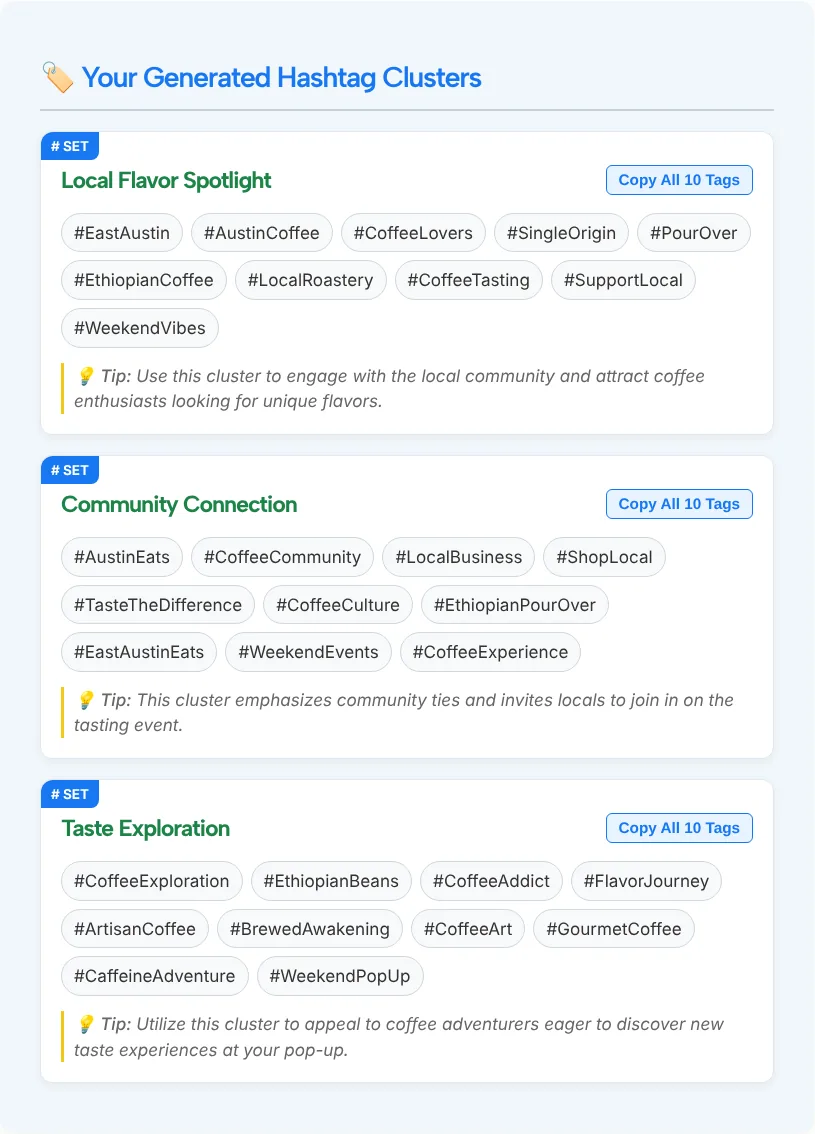
The local tags were the strongest part: #EastAustin and #EthiopianPourOver describe this exact event. Some were filler. #WeekendVibes and #CoffeeAddict could sit under any coffee post, and #BrewedAwakening is a pun more than a topic. We ran the same input twice and got a different set the second time, so generate again if the first set misses.
How Many Hashtags Should You Use on Facebook?
Use a few specific hashtags, not a block of them. On Facebook a hashtag becomes a clickable link that opens a feed of posts using the same tag, as Meta explained when it introduced clickable hashtags in 2013. Each tag you add should name something a reader might click to see more of: your city, your product or your community.
The form’s “30 Hashtags (Maximum Allowed)” option is the tool’s largest setting, not a Facebook limit. Thirty tags under a short post bury the message. Generate 5 or 10 per cluster to compare ideas, then keep the handful that fit.
Hashtags don’t change who sees your post. Meta notes that you control the audience for your posts, including those with hashtags, so a Friends-only post stays Friends-only.
Tips for Picking Facebook Hashtags From the Clusters
Build your final set from more than one cluster, then check it:
- Lead with place and specifics. For a local business, a neighborhood tag like #EastAustin plus one product tag says more than three general ones.
- Delete filler. Cut tags that would fit any post in your niche, such as #WeekendVibes or #CoffeeAddict.
- Search the tag on Facebook first. Type it into the search bar and look at the posts that come up. If they’re unrelated or spammy, skip it.
- Give recurring events one tag. Use the same event or brand tag every time, so people who click it find all your posts about it.
- Update seasonal and event tags. Run the generator again when the season, offer or event changes.
Posting the same update on Threads? It takes one topic tag per post, so use the Threads hashtag generator to choose it.
Who Uses a Facebook Hashtag Generator
Anyone who posts on Facebook regularly and wants tags that fit each post can use it:
- Local businesses: pick Hyper Local for city, neighborhood and event tags.
- Group admins and community pages: Community Building (Niche Focus) suggests tags around shared interests.
- Marketers managing several Pages: get three angles for each post in seconds, then trim to the tags that fit each brand.
- Event organizers: describe the event, the place and the date to get tags people can click for the event itself and the area around it.
Need the post text as well? TLinky’s Facebook caption generator covers the words around your hashtags.
Tools You May Need for Social Media Hashtags
Put All Your Links on One Bio Page
Build a free Link in Bio page with TLinky. Add your links, products and social profiles, pick a theme, and see how many people visit.
Facebook Hashtag Generator FAQ
What is a Facebook hashtag generator?
A Facebook hashtag generator suggests hashtags for a post. TLinky’s version reads your post description, niche and chosen strategy, then returns three clusters of tags with a tip for each, so you can compare angles and copy the ones that fit.
How do I find the right hashtag for Facebook?
Start with what the post is about and where you are. Generate a set here, keep the tags that name your topic, place or community, then type each one into Facebook search to see the posts already using it. Drop anything unrelated.
How many hashtags should I use on Facebook?
A few specific ones. Long blocks of tags make a post harder to read, and the form’s 30 option isn’t a Facebook limit. Keep the tags a reader might click to find similar posts, such as a city tag and a product tag.
How many hashtags can I generate?
Up to 90 per run. The number you pick (5, 10, 15, 20 or 30) applies to each of the three clusters, so the default of 10 gives you 30 tags. Copy All copies one cluster at a time, and each tag can be copied on its own.
How do I search Facebook hashtags?
Type the hashtag, including the # sign, into the Facebook search bar, or click a hashtag in any post. Both show posts that use the tag. Do this before you post to make sure the tag is used for the same kind of content as yours.
Is the Facebook Hashtag Generator accurate?
Read the results before you use them. In our test, most tags matched a local coffee pop-up, while #WeekendVibes and #CoffeeAddict were filler. The tool has no trend or volume data, so check each cluster and keep only the tags that describe your post.
Is the hashtag generator for Facebook free to use?
Yes. The TLinky Facebook Hashtag Generator is free on this page, and the form doesn’t ask you to log in. Enter your post details, generate, and copy the tags you want.