
Best Free YouTube Hashtag Generator [AI Powered]
Enter your video title and channel niche, and this free YouTube hashtag generator gives you three groups of hashtags to copy into your description or title.
Grow your Business & Social Media Marketing
- Branded Link Shortener
- QR Code Generator
- Bio Page Builder
- Tracking & Analytics
- 16+ Integrations
Free Hashtag Generator for YouTube Videos and Shorts
Our free YouTube hashtag generator suggests hashtags for a video or Short from its title and your channel niche. You get three groups of tags, each with a short tip, and you can copy a whole group or single tags into your description or title.
It’s made for YouTubers who upload often, from tutorial and review channels to Shorts creators, and for anyone who writes descriptions for a client’s channel. You don’t sign in, and the tool can’t see or change your YouTube account.
The suggestions are written by AI. The tool doesn’t read YouTube search data, so there are no view counts, search volumes or scores next to the tags. You still choose what goes into the video.
How to Use the YouTube Hashtag Generator
To use the YouTube hashtags generator, fill in four required fields and click Generate Hashtags.
- Video Title / Main Topic: paste your working title or a one-line summary, such as “How to Make Perfect Homemade Pizza Dough (Beginner Friendly, Step by Step)”.
- Channel Niche: name what your channel covers, like Tech Reviews, Gaming, Finance or Cooking Tutorials.
- YouTube Strategy: choose YouTube Search SEO (Evergreen), YouTube Shorts (Viral Reach), Suggested Video Ranking or Broad Channel Discovery. The choice changes the angle of the tags the AI writes.
- Number of Hashtags: choose 3, 5, 10 or 15. The number is per group, and you get three groups, so 10 gives you 30 hashtags and 15 gives you 45.
The Clear button empties the form. For a new set, change a field or submit again.
The form’s helper text warns that YouTube ignores all hashtags if you use more than 15. That warning is wrong. YouTube’s limit is 60, as the next section shows, so you can ignore that note on the form.
What the YouTube Hashtag Generator Returns
Each result shows three cards. Every card has a title for its angle, a “Copy All” button, the hashtags as clickable pills (click one to copy just that tag) and a one-line tip.
We ran a test on November 2, 2026. The topic was “How to Make Perfect Homemade Pizza Dough (Beginner Friendly, Step by Step)”, the niche was Cooking Tutorials, the strategy was YouTube Search SEO (Evergreen), and we asked for 10 hashtags. The three groups came back in 4.4 seconds with 30 tags in total.
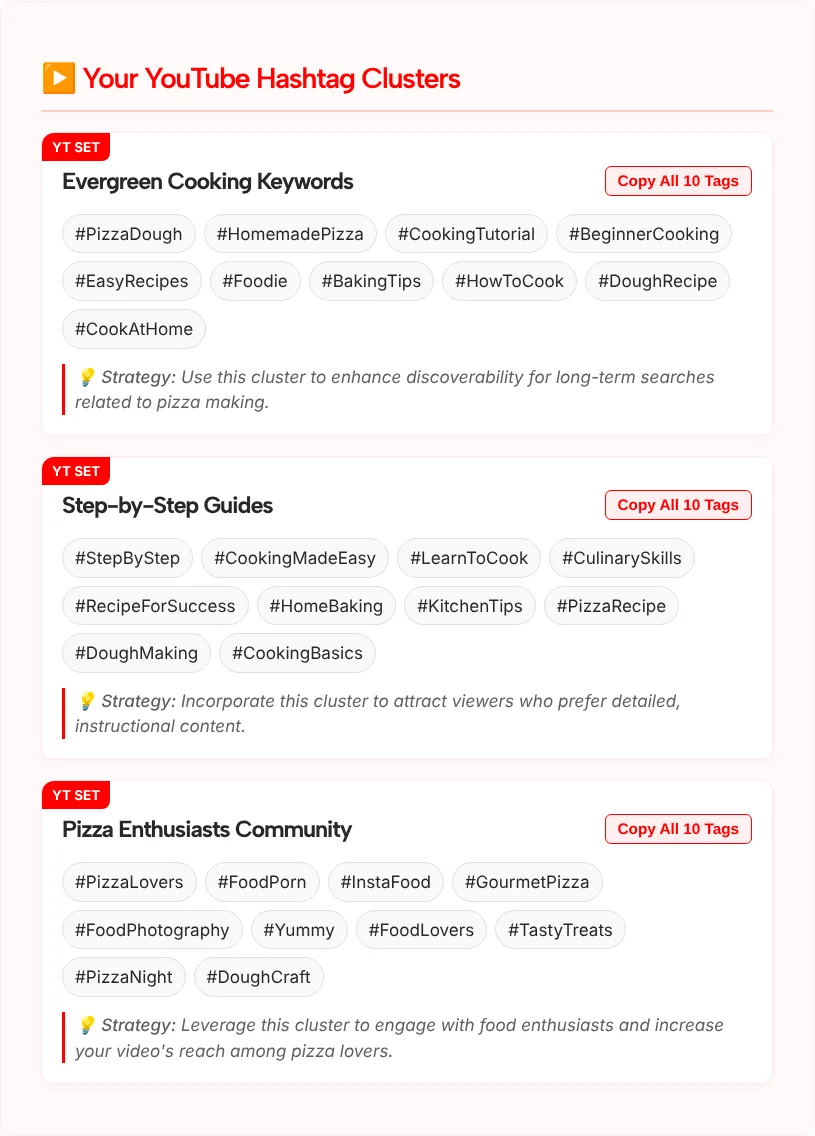
- Evergreen Cooking Keywords: #PizzaDough, #HomemadePizza, #CookingTutorial, #BeginnerCooking, #EasyRecipes and five more
- Step-by-Step Guides: #StepByStep, #LearnToCook, #PizzaRecipe, #DoughMaking, #CookingBasics and five more
- Pizza Enthusiasts Community: #PizzaLovers, #GourmetPizza, #PizzaNight, #FoodPorn, #InstaFood and five more
The first two groups matched the video well. The third shows why you should read every tag before you paste it. #InstaFood is an Instagram-style tag that adds little to a YouTube tutorial, and #FoodPorn has a word in it that can read as explicit, which YouTube’s hashtag rules warn about. We’d delete both and keep the pizza tags.
YouTube Hashtag Rules: How Many and Where They Show
YouTube lets you add hashtags to a video’s title and description, and the limit is 60. According to YouTube Help, if a video has more than 60 hashtags, YouTube ignores every hashtag on it, not just the extra ones.
Other points from the same help page:
- Up to three hashtags from your description that YouTube considers most engaging can appear by your video title.
- Hashtags in the title and description link to a results page with other videos that use the same hashtag.
- Don’t add hashtags that aren’t directly related to the video. Over-tagging may get a video removed from your uploads or from search.
- Sexual or explicit hashtags may get a video removed.
- A hashtag can’t contain spaces.
In practice you won’t come close to 60. For most videos we suggest three to five hashtags that describe the video, with your strongest ones first in the description. The form’s 3-hashtag option is labeled “Focus for Above Title”, which matches that limit of three.
Hashtags are not the same as video tags. Tags go into a separate field in YouTube Studio. For those, use our YouTube tags generator.
How to Choose the Best Hashtags for YouTube
Choose the best hashtags for YouTube by picking from the groups instead of pasting all of them. These checks keep a set short and clean:
- Lead with the topic tag. For our test video, #PizzaDough and #HomemadePizza say more than #Foodie or #Yummy.
- Remove off-platform tags. Tags like #InstaFood or #TikTokMadeMeBuyIt belong to other apps.
- Remove anything a brand would not show a viewer. That includes explicit or crude tags, even if they’re popular elsewhere.
- Click the hashtag on YouTube. The results page shows what’s posted under it. If it’s unrelated or spammy, don’t use it.
- Keep the channel tag consistent. One tag for your series or channel name helps viewers find the rest of your videos.
- Keep Shorts sets short. Pick the YouTube Shorts strategy and choose the few tags that fit the clip best. Our list of the best hashtags for YouTube Shorts has examples by niche.
When a YouTube Hashtag Generator Helps
The generator is most useful when you upload on a schedule and the description is the last job before you publish.
- Tutorial and how-to channels can use the Search SEO strategy for videos that people find months later.
- Shorts creators can get a quick short set for each clip with the Shorts strategy.
- Review and tech channels can use Suggested Video Ranking for videos that sit next to similar ones.
- Agencies and editors can draft hashtags for several client channels in a few minutes, then edit them.
Put All Your Links on One Bio Page
Build a free Link in Bio page with TLinky. Add your links, products and social profiles, pick a theme, and see how many people visit.
YouTube Hashtag Generator FAQ
Is this YouTube hashtag generator free?
Yes. The YouTube hashtag generator is free and there’s no sign-up form. Enter a title or topic, a channel niche, a strategy and a number, then click Generate Hashtags. The tool doesn’t connect to your channel, so you paste the tags into YouTube Studio yourself.
How many hashtags can I add to a YouTube video?
YouTube Help says that if a video has more than 60 hashtags, YouTube ignores all of them. That’s the hard limit. For a normal video, three to five relevant hashtags are plenty, because up to three from the description can show by the title and extra tags add little.
Where should I put hashtags on YouTube?
Add them to the description, the title, or both. Hashtags in either place link to a results page for that tag. Up to three description hashtags that YouTube considers most engaging can also appear by the title, so put your strongest, most specific tags in the description.
Does the tool find trending YouTube hashtags?
No. An AI model writes the suggestions from your title, niche and strategy. The tool doesn’t pull YouTube search data, so it shows no volume, views or trend scores. Click a hashtag on YouTube to see what’s posted under it before you rely on it.
Are YouTube hashtags the same as tags?
No. Hashtags start with # and go in the title or description, where viewers can click them. Tags are keywords you enter in a separate field in YouTube Studio. This page covers hashtags; for the tags field, use the TLinky YouTube tags generator.