
Best Free Twitter Hashtag Generator [AI Powered]
The Twitter Hashtag Generator suggests hashtags for posts on X, the platform formerly called Twitter: describe your tweet or thread and your niche, and get three sets of 2, 3, 5 or 10 tags to copy.
Grow your Business & Social Media Marketing
- Branded Link Shortener
- QR Code Generator
- Bio Page Builder
- Tracking & Analytics
- 16+ Integrations
Twitter hashtag generator for posts on X
The Twitter hashtag generator gives you hashtag ideas for a single tweet or thread on X. Twitter was renamed X, but the tool and this page keep the Twitter name because many people still search for it that way. The tags work the same on X.
You describe the post and the community you’re writing for, and the tool returns three clusters of hashtags, each taking a different angle. It’s free, there’s no account to create, and it never connects to your X profile. You copy the tags you want and add them to your post yourself.
One thing to know up front: the tool has no live feed of X trends. The strategy called Trending Topics & Viral Reach only tells the AI what kind of tags to aim for. To see what’s trending right now, open the Explore tab on X.
How to generate hashtags for a tweet or thread
Fill in the four fields below, then click Generate Hashtags:
- Tweet Topic / Hook. Write what the post is about in plain words, such as “A thread on five product-led growth metrics for SaaS marketers.” Ignore the grayed-out example in the box and describe your own post.
- Your Niche / Community. The crowd you want to reach on X, for example Indie Hackers, Finance or Marketing Twitter.
- Twitter Strategy. Trending Topics & Viral Reach, Twitter Threads & Audience Growth, Industry Chats & Networking, or Live Events & Commentary.
- Number of Hashtags. 2, 3, 5 or 10. Each of the three clusters gets that many tags, so the totals are 6, 9, 15 or 30.
Both text boxes must be filled in before the tool runs. Clear resets everything. To get fresh ideas, edit the topic or switch the strategy and generate again, since there’s no separate regenerate button.
Example: hashtags for a SaaS marketing thread
Our test returned three short, clean clusters with no repeated tags. On November 2, 2026, we described a thread on five product-led growth metrics every B2B SaaS marketer should track, set the niche to B2B SaaS / Marketing Twitter, chose the threads strategy and 3 hashtags. The clusters appeared in about 3.9 seconds.
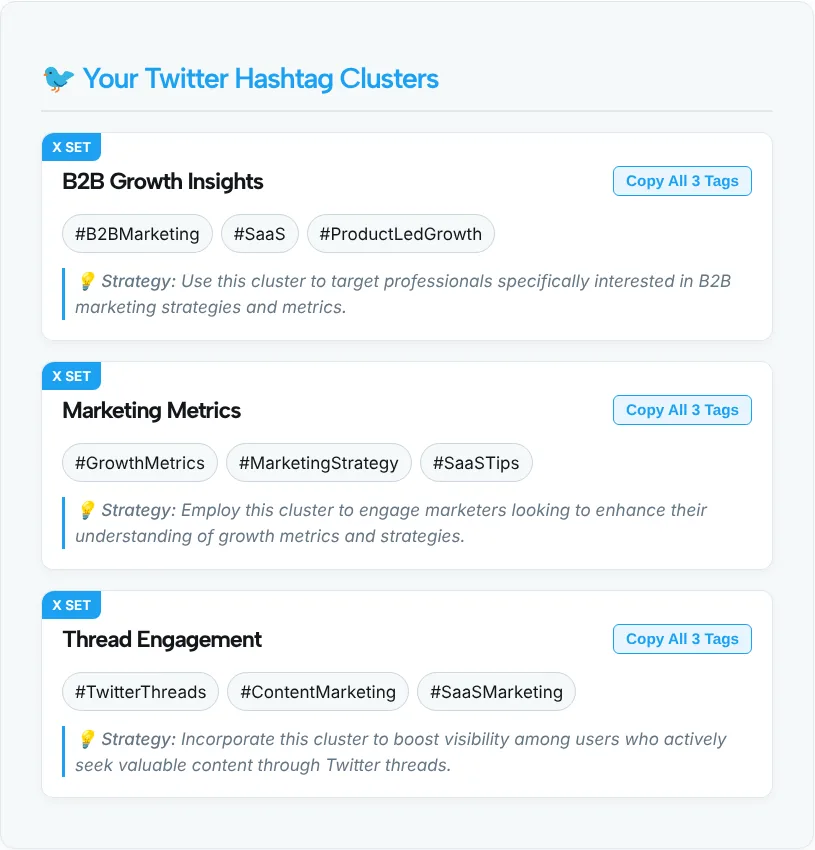
| Cluster | Tags |
|---|---|
| B2B Growth Insights | #B2BMarketing #SaaS #ProductLedGrowth |
| Marketing Metrics | #GrowthMetrics #MarketingStrategy #SaaSTips |
| Thread Engagement | #TwitterThreads #ContentMarketing #SaaSMarketing |
Each cluster came with a Copy All 3 Tags button and a one-line tip on who the set targets. For this thread we’d post #ProductLedGrowth with #SaaS. Those two name the subject and the community. #TwitterThreads only describes the format, so it says nothing about the metrics inside.
You’ll notice the result cards carry a small “X SET” label while the heading still says Twitter. Both refer to the same platform.
How many hashtags to use on X
X recommends no more than 2 hashtags per post. Its Help Center calls that a best practice and says you can still use as many as you like. That’s why the form’s smallest option, 2 hashtags, is the one that fits a single post.
A few other rules from the same X help page are worth knowing:
- Hashtags can go anywhere in a post, at the start, in the middle or at the end.
- A hashtag can’t contain spaces or punctuation, or it won’t work properly.
- Clicking a hashtag shows other posts that use it.
- On a public account, anyone who searches that hashtag may find your post.
So what are the 5 and 10 options for? Treat the bigger sets as a pool. In a thread, you might use one pair on the opening post and keep the rest for future posts on the same subject, rather than stacking them all on one.
Picking the right two tags
With only one or two slots, each tag has to earn its place. A few habits help:
- One topic tag, one community tag. In our test, #ProductLedGrowth named the topic and #SaaS named the crowd. That pairing covers both ways people look for posts.
- Write a tag into the sentence when you can. “Our #SaaS pricing test” reads more naturally than a tag tacked on at the end, and it saves characters.
- Search the tag on X before you post. Look at the latest posts under it. If they’re spam, off-topic or years old, pick another.
- Use the official tag for live events. The Live Events & Commentary strategy can suggest tags, but it can’t know which one the organizers announced. Check the event’s own account.
- Leave the replies alone. In a thread, put your tags on the first post, where people decide whether to read on, instead of repeating them on every reply.
Which Twitter strategy setting to pick
Choose the setting that matches the job of the post. It changes the angle of the suggestions, not the data behind them, because the tool has no trend data.
| Your post | Strategy | Count |
|---|---|---|
| A quick take on news in your field | Trending Topics & Viral Reach | 2 |
| A how-to or breakdown thread | Twitter Threads & Audience Growth | 2 or 3 |
| Joining a scheduled chat or community conversation | Industry Chats & Networking | 2, including the chat’s own tag |
| Live posts during a game, launch or conference | Live Events & Commentary | 2, with the official event tag |
Posting the same update on Threads as well? Generate a separate set with the Threads hashtag generator, since that app handles tags its own way. And if you want to check how often a tag is used before you commit to it, our roundup of hashtag research tools covers the options.
Put All Your Links on One Bio Page
Build a free Link in Bio page with TLinky. Add your links, products and social profiles, pick a theme, and see how many people visit.
Tools You May Need for Professional Social Media Hashtags
Twitter (X) Hashtag Generator FAQ
Does this Twitter hashtag generator work for X?
Yes. Twitter was renamed X, but hashtags work the same way on the platform, so the tags you get here are ready to use in X posts. The tool keeps the Twitter name because many people still search for it that way.
How many hashtags should a tweet have?
X’s Help Center recommends no more than 2 hashtags per post as a best practice, while noting you can use more. Pick the 2 Hashtags option in the form, or take the best two tags from a larger cluster.
Does the tool show trending hashtags on X?
No. The tool has no connection to X and no live trend data. The Trending Topics & Viral Reach setting only guides the AI’s suggestions. To see what’s trending today, check the Explore tab in the X app or on the website.
Where should I put hashtags in a tweet?
Anywhere works. X’s help page says hashtags can be included anywhere in a post. Placing one inside the sentence often reads better and saves characters, while a tag at the end keeps the message clean. Just never add spaces or punctuation inside a tag.
How many tags does the generator create?
You choose 2, 3, 5 or 10, and each of the three clusters gets that many tags. That means 6, 9, 15 or 30 tags in total. Use the larger sets as a pool to choose from rather than adding all of them to one post.
Is the Twitter hashtag generator free?
Yes. It’s free and there’s no sign-up or login. The tool never asks for your X account and never posts on your behalf. Copy the tags you like and paste them into your post.