Best Free TikTok Hashtag Generator [AI Powered]
Describe your video and pick a niche, and this free TikTok hashtag generator returns three ready-to-copy hashtag clusters of 3, 5, 10 or 15 tags each.

Grow your Business & Social Media Marketing
- URL Shortener
- Branded Links
- 14+ QR Code Type
- Dynamic QR
- Bio Page Builder
- Tracking & Analytics
- Retargeting
- 16+ Integrations
Free TikTok Hashtag Generator for Your Next Video
Our free TikTok hashtag generator turns a short description of your video into three sets of hashtags you can copy straight into your caption. You tell it what the video is about and which community you’re posting for, and the AI suggests tags grouped by angle.
It’s built for creators, small brands and social media managers who post often and don’t want to start every caption from a blank line. You don’t need an account, and nothing gets posted for you.
The tool writes suggestions. It doesn’t pull view counts, hashtag volume or live trend data from TikTok, so treat each set as a first draft and check it before you post. Hashtags are only one of the signals TikTok looks at; our TikTok algorithm explainer covers the rest.
How to Use the TikTok Hashtag Generator
To use the generator, fill in four fields. All of them are required.
- Video Topic / Hook: describe the video in a sentence, the way you’d pitch it to a friend. “POV: a day at our coffee roastery, from green beans to first crack” works better than “coffee”.
- Your Niche / Community: name the corner of TikTok you want to reach, such as CoffeeTok, BookTok or Streetwear. The AI may reuse it as a tag: in our test, CoffeeTok came back as #CoffeeTok.
- TikTok Strategy: pick one of four angles: For You Page (FYP) Viral, Niche Community Targeting, Trend Jacking & Viral Sounds, or Educational / How-To Focus.
- Number of Hashtags: choose 3, 5, 10 or 15. This number is per cluster, and you get three clusters, so 15 gives you 45 tags in total.
Click Generate Hashtags and the clusters appear under the form. The Clear button resets the fields. To get a different set, submit again.
One note on the Trend Jacking option: it changes the style of the suggestions, but the tags are still written by the AI. The tool has no feed of current TikTok trends or sounds, so look up a trend in the TikTok app before you build a video around it.
What You Get: Three Hashtag Clusters
Each result has three cards. A card has a short title that names its angle, a “Copy All” button, the tags as clickable pills, and a one-line tip on when to use that set. Clicking a single pill copies just that tag.
We tested the tool on November 2, 2026, with this topic: “POV: a day roasting small-batch coffee at our Austin micro-roastery, from green beans to first crack.” The niche was CoffeeTok, the strategy was Niche Community Targeting, and we asked for 5 hashtags. The result loaded in 3.8 seconds.
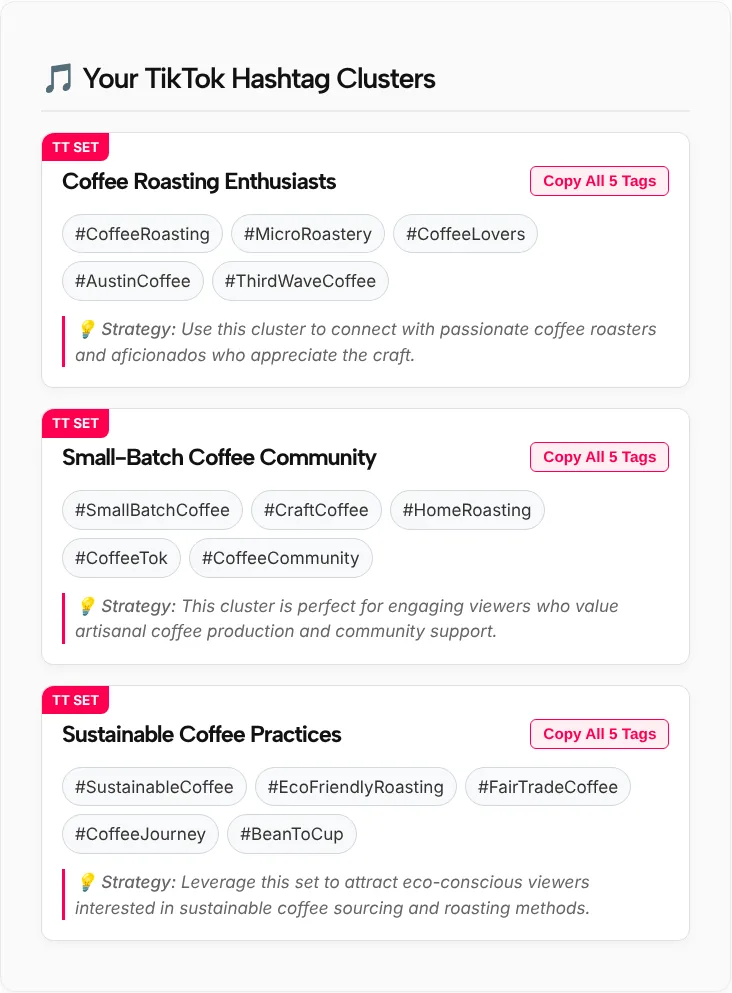
The three clusters were:
- Coffee Roasting Enthusiasts: #CoffeeRoasting, #MicroRoastery, #CoffeeLovers, #AustinCoffee, #ThirdWaveCoffee
- Small-Batch Coffee Community: #SmallBatchCoffee, #CraftCoffee, #HomeRoasting, #CoffeeTok, #CoffeeCommunity
- Sustainable Coffee Practices: #SustainableCoffee, #EcoFriendlyRoasting, #FairTradeCoffee, #CoffeeJourney, #BeanToCup
Most tags fit the video, and #AustinCoffee picked up the location from the topic. One didn’t: #HomeRoasting is for people roasting beans in their kitchen, and our test business is a commercial roaster. That’s the kind of tag you swap out before posting.
What TikTok Says About Hashtags
TikTok lists hashtags as one input for the For You feed, not the main one. Its 2020 newsroom post on how TikTok recommends videos names “video information, which might include details like captions, sounds, and hashtags” as one factor. How people interact with your video counts too. Our guide to the TikTok For You page explains how those signals fit together.
In its tips for creators, TikTok gives three pieces of advice on hashtags:
- More hashtags won’t guarantee a broader reach.
- Only add hashtags that best represent what your video is about.
- #FYP and #ForYou work like any other hashtag. Adding them won’t necessarily get you onto someone’s For You feed.
TikTok doesn’t publish an ideal number of hashtags. Our form starts at 3 and defaults to 5, and a short, accurate set is easier to check than a long one.
How to Pick and Edit Your TikTok Hashtags
Copy one cluster, then edit it. These checks take a minute.
- Read every tag against the video. If a viewer who searched that tag would feel misled, delete it. In our test that meant #HomeRoasting.
- Mix one broad tag with specific ones. #CoffeeLovers is broad and generic; #MicroRoastery and #AustinCoffee say exactly who the video is for.
- Search the tag in TikTok first. Look at the top videos under it. If they’re about something else, or the results look spammy, pick another tag.
- Skip #FYP filler. TikTok says these tags work like any other hashtag, and they take caption space from a tag that describes your video.
- Watch the dates. Holiday, event and challenge tags go stale fast. Drop them once the moment has passed.
- Combine clusters if it helps. You can take two tags from one card and three from another.
For a list of tags people actually use by niche, see our guide to the best hashtags for TikTok.
Who Uses a TikTok Hashtag Generator
People use this tool when they post often and want a fast first draft of tags.
- Small businesses that film product or behind-the-scenes clips and want local and niche tags, like the roastery in our test.
- Educators and how-to creators who pick the Educational / How-To Focus strategy for tutorials.
- Social media managers who write captions for several accounts and need a starting point for each video.
- New creators who are still learning which communities their videos belong to.
If you also need a profile link, caption ideas or other TikTok helpers, browse our free TikTok tools.
TikTok Hashtag Generator FAQ
Is the TikTok hashtag generator free?
Yes. The TikTok hashtag generator is free to use on this page and there’s no sign-up form. Fill in the four fields, click Generate Hashtags, and copy the tags you want. The tool never connects to your TikTok account and doesn’t post anything for you.
How many hashtags should I use on TikTok?
TikTok doesn’t set an ideal number. Its own creator tips say more hashtags won’t guarantee a broader reach and that you should only add tags that best represent the video. A short set of three to five accurate tags is easy to check, so start there and add more only when each one fits.
Does the tool show trending or popular TikTok hashtags?
No. The suggestions come from an AI model based on your topic, niche and strategy. The tool shows no view counts, volume or trend data, even with the Trend Jacking & Viral Sounds strategy. Search a tag in the TikTok app to see what’s posted under it before you use it.
Why did I get more hashtags than the number I picked?
The number you pick applies to each cluster, and every result has three clusters. Choosing 5 gives you 15 tags in total, and choosing 15 gives you 45. Use Copy All on the cluster that fits best, or click single tags to build your own short set.
Where do I put the hashtags on a TikTok video?
Paste them into the caption when you post the video. Put the most specific tags in first, keep the caption readable, and remove any tag that doesn’t match what viewers will see. You can edit the caption until you publish, so check the tags one last time before you tap Post.