
Best Free Threads Hashtag Generator [AI Powered]
Create a hashtag for your next thread: describe the post and your niche, and the generator returns three small sets of tag ideas to choose your one topic tag from.
Grow your Business & Social Media Marketing
- Branded Link Shortener
- QR Code Generator
- Bio Page Builder
- Tracking & Analytics
- 16+ Integrations
Free Hashtag Generator for Threads
TLinky’s free hashtag generator for Threads helps you create a hashtag that fits the post you’re about to publish. You describe the thread, add your niche and pick a strategy, and an AI model suggests tags in three small clusters. Threads lets each post carry one topic tag, so the goal is to choose the best one, not to stack a dozen.
It’s built for creators, founders, small businesses and social media managers who post on Meta’s Threads app and want a few good tag ideas before they hit Post.
Features of Our AI Threads Hashtag Generator
The generator takes four inputs and returns three tag clusters you can copy. Here’s what the form actually does:
- Topic or hook box: describe what you’re posting about, such as a hot take, a question or a launch story.
- Niche or community field: Tech, Writers, Marketing, Fitness or your own.
- Four strategies: Community & Conversation Starter, Trending Discussions, Authentic / Casual Storytelling, and Thought Leadership & Advice.
- Tag count: 1, 2, 3 or 5 tags in each cluster, so you see between 3 and 15 suggestions.
- Quick copy: Copy All copies a whole cluster, and clicking a single tag copies just that one.
- Free to use: the form doesn’t ask you to log in.
The Trending Discussions option doesn’t read live Threads data. It only changes how the AI writes the tags.
Free Hashtag Generator Tools
Boost your social media reach with our free Hashtag Generator Tool, tailored just for you! Whether you’re on Facebook, LinkedIn, Instagram, TikTok, Twitter, or YouTube, Pinterest and others social media. Generate relevant, trending hashtags to amplify your content, increase engagement, and connect with your perfect audience.
Purpose of using Hashtag on Threads
On Threads, a hashtag works as a topic tag: it files your post under one topic so people looking at that topic can find it. Meta’s Threads developer documentation says only one topic tag is allowed per post, and the first valid tag in a post becomes that post’s tag.
That changes how you use a generator. On Instagram you might choose five tags; on Threads you choose one. A tag that names your exact subject, like #IndieMakers, tells readers more than a broad one like #Business.
Why Choose Our Free Threads Hashtag Generator?
- Built around your post: the AI reads your topic and niche, so the tags come from what you wrote, not from a generic list.
- Several options for one slot: three clusters give you a handful of candidates to compare before you commit to one.
- Strategy control: switch from Community & Conversation Starter to Thought Leadership & Advice and the suggestions change with it.
- Fast: our test returned three clusters in about 4.9 seconds, and each tag copies with a click.
How It Works
The generator works in four steps, and you finish with one tag copied into your post.
- Describe your thread in the Thread Topic / Hook box. A full sentence beats a keyword: “Behind the scenes of launching our first productivity app for freelancers” gives the AI more to work with than “app launch.”
- Add your niche or community, such as Startups / Indie Makers.
- Choose a Threads Strategy and a Number of Tags. One or two tags per cluster is plenty, since you’ll post with one.
- Click Generate Hashtags and read the three clusters. Click the tag you want to copy it, then add it to your post. Clear resets the form.
In our test on November 2, 2026, we described that app launch, chose Community & Conversation Starter and asked for 3 tags. The tool returned three clusters:
- Startup Insights: #StartupJourney, #IndieMakers, #BetaTesting
- Freelancer Focus: #FreelancerLife, #ProductivityHacks, #WorkSmart
- Community Feedback: #UserExperience, #FeedbackLoop, #AppDev
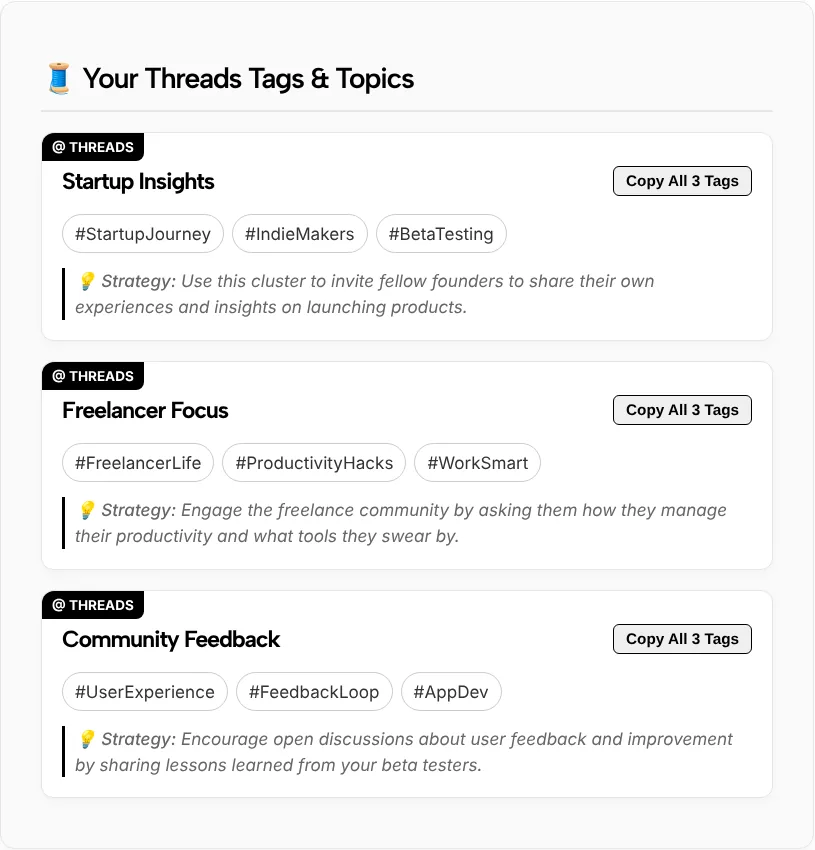
Every tag matched the topic. For this post we’d pick #IndieMakers, because it names the community the founder wants replies from. #WorkSmart is too vague to file the post anywhere useful.
Who Can Benefit from the Threads Hashtag Generator?
Anyone who posts on Threads and wants each post under the right topic can use the generator:
- Content creators: compare a few tag ideas for a post before choosing the one that matches your audience.
- Founders and small businesses: find a community tag such as #IndieMakers, or a local tag for the area you serve.
- Social media managers: get tag options for several client threads quickly, then choose one per post.
- Writers and experts: use Thought Leadership & Advice to find a topic tag for an opinion or how-to thread.
Posting on other networks too? TLinky’s free hashtag generators cover each platform’s own rules.
Tips for Using Hashtags on Threads:
- Use one tag per post. Threads takes a single topic tag, so pick the one that best names your subject.
- Pick specific over broad. #IndieMakers says more about a launch story than #Startup.
- Search the tag first. Type it into Threads search and look at the posts that come up. If they match your thread, use it; if the topic looks empty or spammy, choose another.
- Write it as one word. Meta’s documentation says a tag can be 1 to 50 characters and ends at the first space or punctuation mark, such as a period, comma or question mark. #FreelancerLife works; “#Freelancer Life” stops at #Freelancer.
- Change the tag when the topic changes. Reusing one tag on every thread files unrelated posts under the same topic.
- Ignore the 5 Tags label. The form’s “5 Tags (Maximum Allowed)” option isn’t a Threads rule. More suggestions help you compare, but only one becomes the topic tag.
How many hashtags are on Threads?
One per post. Meta’s Threads documentation says only one topic tag is allowed per post, and if a post contains several hashtags, the first valid one becomes the topic tag. Use the generator to compare options, then add the single tag that fits best.
Do hashtags work on Threads?
Yes, as topic tags. A tag files your post under one topic, which helps people browsing that topic find it. It doesn’t promise more views, since the post itself still has to earn replies. Choose one specific tag rather than a broad one.
Do hashtag generators work?
Hashtag generators work when you treat the output as ideas, not a final answer. This one writes tags from your description, and in our test every suggestion matched the topic. No generator can promise reach, so read the options, check them in Threads search and keep the one that fits.
Which hashtag generator is best for Threads?
Look for one that’s built for Threads, takes your post description rather than a single keyword, and lets you control how many tags you see. TLinky’s generator does all three and is free. Whichever tool you use, only one tag becomes the topic tag.
Is 7 hashtags too many on Threads?
Yes. Threads allows one topic tag per post, so six extra hashtags add no topics. Meta’s documentation says the first valid tag becomes the topic tag. A string of hashtags also makes a short post harder to read. Pick one.
Why does the form offer 5 tags?
The 5 Tags option sets how many suggestions appear in each of the three clusters, so you can see up to 15 ideas. It isn’t a Threads limit. Choose 1 or 2 for a short list, or 5 if you want more ideas to compare, then post with one.
Take Your Threads Strategy to the Next Level
Good Threads posts start conversations, and the right topic tag puts them where people browsing that subject can find them. Write the post first, generate tag ideas for it, then choose one specific tag and check it in search before you publish.