
Best Free Social Hashtag Generator [AI Powered]
Describe your post, pick your niche and target platforms, and this free hashtag generator returns three groups of hashtags you can copy for any social media network.
Grow your Business & Social Media Marketing
- Branded Link Shortener
- QR Code Generator
- Bio Page Builder
- Tracking & Analytics
- 16+ Integrations
Free Hashtag Generator for Any Social Media Platform
Our free hashtag generator writes hashtag sets for one post that you plan to share on several platforms. You describe the post, name your niche, and choose which kind of platforms it’s going to, and the tool gives you three groups of tags to copy.
Use it when one message goes out to Instagram, TikTok, LinkedIn, X, Facebook or Threads at the same time, or when you just want a quick list of tags to start from. It costs nothing, there’s no sign-up form, and it doesn’t post anything for you.
The tags come from an AI model. You won’t see search volume, follower counts or trend scores next to them, because the tool doesn’t pull that data from any network. If you post mostly on one platform, TLinky has a dedicated tool for each one in the hashtag generator collection.
How to Use the Social Media Hashtag Generator
The social media hashtag generator has five required fields, one more than the platform-specific tools.
- Post Topic / Message: write what the post says in a sentence or two. Details like the product, the place and the date help.
- Industry / Niche: for example Digital Marketing, Real Estate, Fitness or E-commerce.
- Target Platforms: Universal (All Platforms); Visual (Instagram, TikTok, Pinterest); Professional/Text (LinkedIn, X); or Community Focused (Facebook, Threads).
- Campaign Strategy: Maximum Brand Reach, Niche Audience Targeting, Trending & Viral Engagement, or Local / Location-Based.
- Number of Hashtags: 5, 10, 15, 20 or 30.
Click Generate Hashtags. The number you pick applies to each of the three groups, so 10 gives you 30 tags and 30 gives you 90. That’s far more than one post needs, which is the point: you choose from a pool.
Clear resets the form. Submit again with a changed field to get a fresh set.
What You Get from the Free Hashtag Generator
Every result has three cards. Each card shows a title, a “Copy All” button, the hashtags as pills you can click to copy one at a time, and a short tip on where that group fits.
In our test on November 2, 2026, we described a product launch: “Launching our new insulated stainless steel water bottle that keeps drinks cold for 24 hours, available online this Friday.” The niche was E-commerce / Outdoor Gear, with Universal (All Platforms), Maximum Brand Reach and 10 hashtags. The result took 4.9 seconds.
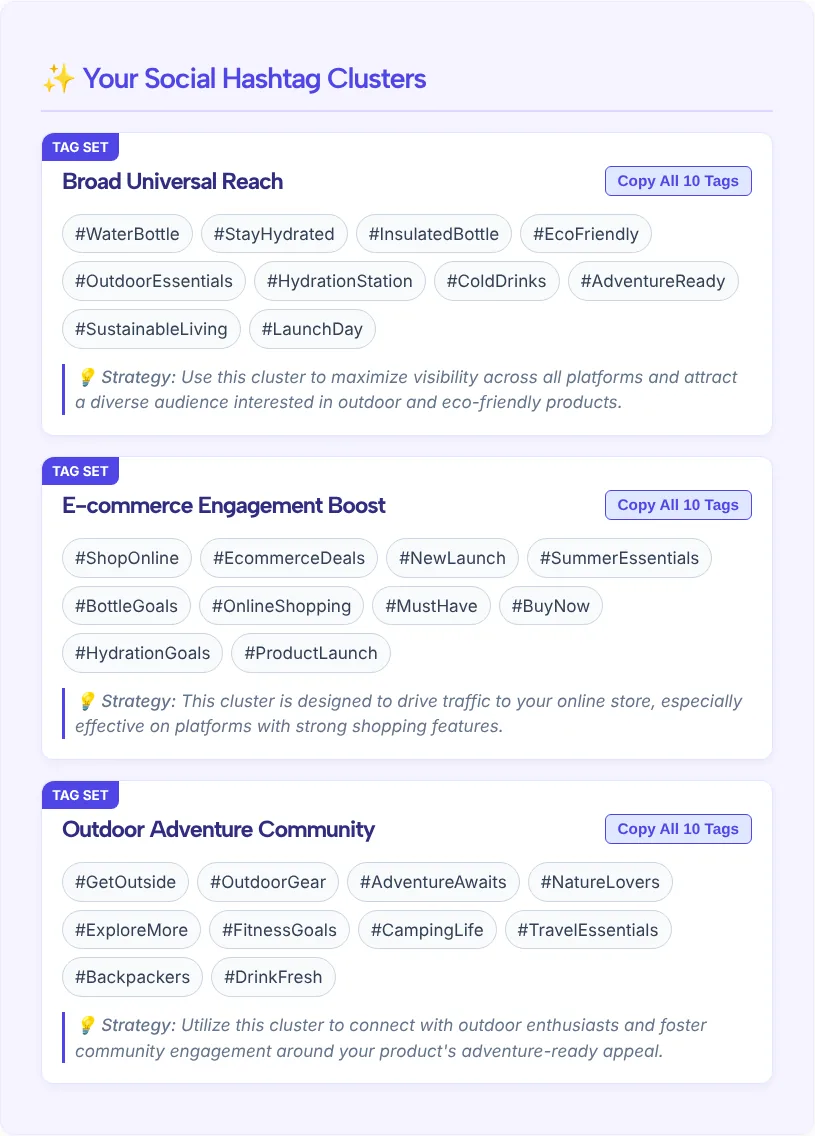
The three groups were Broad Universal Reach (#WaterBottle, #InsulatedBottle, #StayHydrated, #LaunchDay), E-commerce Engagement Boost (#NewLaunch, #ProductLaunch, #ShopOnline, #SummerEssentials, #BuyNow) and Outdoor Adventure Community (#OutdoorGear, #CampingLife, #GetOutside, #Backpackers).
Good tags were easy to spot. So were the ones to cut. #SummerEssentials made no sense for a launch in November. #BuyNow and #MustHave read like an ad, not a topic people follow. #FitnessGoals and #Backpackers were a stretch for a water bottle. Universal mode tends toward broad, general tags like these, so plan on editing.
Free Hashtag Generator Tools
Boost your social media reach with our free Hashtag Generator Tool, tailored just for you! Whether you’re on Facebook, LinkedIn, Instagram, TikTok, Twitter, or YouTube, Pinterest and others social media. Generate relevant, trending hashtags to amplify your content, increase engagement, and connect with your perfect audience.
Which Target Platform Setting to Choose
Choose the setting that matches where the post will get most of its views. Each option tells the AI which group of platforms to write for:
- Universal (All Platforms): for one set you can reuse anywhere. In our test it gave broad, general tags.
- Visual (Instagram, TikTok, Pinterest): for posts built around a photo, a pin or a short video.
- Professional/Text (LinkedIn, X): for text-led posts aimed at an industry or a work topic.
- Community Focused (Facebook, Threads): for posts meant to start a conversation in a group or a local community.
Platforms treat hashtags differently, and their rules change. Before a big campaign, read the platform’s own help page on hashtags. If one network matters most, the Instagram hashtag generator, Facebook hashtag generator and LinkedIn hashtag generator each ask questions specific to that platform.
How to Edit Hashtags Before You Post
Start from one group and cut it down to the tags that describe the post. Then run these checks:
- Match the season and date. Seasonal and event tags like #SummerEssentials, #BlackFriday or a conference tag go stale. Swap them for the current one or drop them.
- Cut sales words. #BuyNow, #MustHave and #ShopNow say nothing about the topic. Nobody follows them to find a water bottle.
- Keep one or two broad tags at most. #WaterBottle is fine. The rest should be specific, like #InsulatedBottle or a tag for your brand.
- Check each tag on the platform. Search it in the app. If the results are off-topic, spammy or empty, choose another.
- Trim per platform. The same pool can feed several posts. A LinkedIn post might take two industry tags, while an Instagram post can carry up to five.
If you want volume or competition numbers, which this tool doesn’t give, our roundup of hashtag research tools compares apps that track them.
Common Mistakes to Avoid When Using Hashtags
The easiest mistake to make is pasting a full generated list without reading it. With the count set to 30, one click gives you 90 tags, and many won’t fit your post.
- Using the same hashtag block on every post, even when the topic changes
- Leaving in tags from another platform or another season
- Choosing only huge, generic tags that bury the post under a flood of others
- Adding sales tags that tell viewers nothing about the content
- Using a tag without checking what else is posted under it
Who This Social Media Hashtag Generator Is For
Our social media hashtag generator fits people who publish the same message in several places, such as:
- Small business owners announcing a launch, a sale or an event across their accounts.
- Social media managers who need a starting list for many posts a week.
- Marketers testing which tags fit a new campaign before writing platform versions.
- Local businesses that choose the Local / Location-Based strategy to get city and neighborhood tags.
Free Hashtag Generator FAQ
Is this hashtag generator really free?
Yes. The social hashtag generator is free to use on this page, and there’s no sign-up form. Fill in the five fields, click Generate Hashtags, and copy what you need. The tool doesn’t connect to any of your social accounts.
Which social media platforms does it work for?
The Target Platforms field sorts networks into four groups: Universal, Visual (Instagram, TikTok, Pinterest), Professional/Text (LinkedIn, X) and Community Focused (Facebook, Threads). Pick the group where the post will get most of its views. For a single network, TLinky also has platform-specific generators.
Why does it give me so many hashtags?
The number you choose is per group, and every result has three groups. Picking 10 returns 30 hashtags, and picking 30 returns 90. Treat the result as a pool to choose from, not a list to paste. Most posts need only a handful of the best-fitting tags.
Does the generator show hashtag popularity or trends?
No. An AI model writes the tags from your topic, niche, platform group and strategy. There are no volume, reach or trend numbers, even with the Trending & Viral Engagement strategy. Search each tag on the platform, or use a hashtag research tool, if you need that data.
How is this different from the Facebook hashtag generator?
The social hashtag generator writes one set of tags for a post you’ll share across several platforms, and it adds a Target Platforms field. The Facebook hashtag generator focuses only on Facebook posts. Use this one for cross-posting and the Facebook tool when Facebook is the main channel.