
Getting TikTok advertising targeting right is what separates a profitable campaign from an expensive experiment. TikTok’s targeting system has matured significantly since the platform launched advertising, and in 2026, it offers a range of audience options that rival more established ad platforms, with some meaningful differences in how those audiences behave.
TikTok’s ad reach covers 1.59 billion users globally, according to DataReportal’s analysis of TikTok’s own ad planning data.
Within that reach, TikTok’s targeting tools let you narrow your audience to the specific segment most likely to take action on your offer.
This guide covers every targeting option available, how each one works, which strategies perform best for different campaign goals, and how to avoid common mistakes that inflate spend without improving results.
In this guide, you will learn:
- How TikTok’s targeting system is structured and what makes it different from Meta and Google
- Every available targeting option: demographic, interest, behavioral, custom audience, and lookalike
- When to use broad targeting versus narrow targeting
- How TikTok’s Smart Audience AI optimization works
- How to build and stack audiences for different campaign goals
- What targeting mistakes are costing advertisers the most
Get Free TikTok Ad Credit Up to $6000 [Limited Time Offer]

Table of Contents
Key Takeaways
- TikTok’s core targeting options are: demographic, interest, behavioral, custom audience (including retargeting), and lookalike audiences. Each serves a different stage of the funnel.
- TikTok’s “Smart Audience” feature uses its AI system to expand your targeting automatically beyond your defined parameters when it identifies high-probability converters. This is useful for scaling campaigns efficiently.
- Custom audiences built from customer lists, video viewers, and website visitors via TikTok Pixel typically outperform cold interest targeting for conversion objectives.
- TikTok’s user base skews toward 18 to 34-year-olds, representing about 66% of global users according to DataReportal. The 35-plus segment is growing fastest and is worth testing if your product targets older adults.
- eMarketer projects TikTok’s global ad revenue will reach $34.8 billion in 2026, reflecting the scale of business investment and the maturity of the platform’s advertising infrastructure.
How Does TikTok Ads Targeting Work?
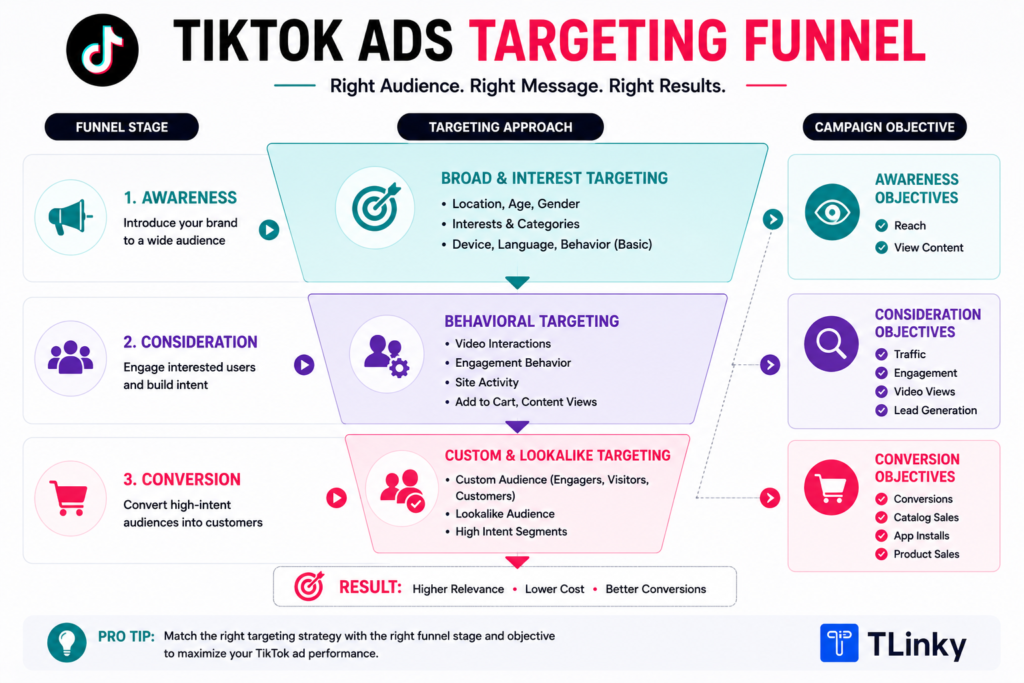
TikTok Ads Manager offers targeting across five dimensions: demographics (age, gender, location, language, device), interests (users who have engaged with related content categories), behaviors (users who have taken recent specific actions), custom audiences (your own data including customer lists, website visitors, app users, or TikTok engagement), and lookalike audiences (users who resemble your custom audience). These can be combined and stacked to define your target audience precisely.
How TikTok’s Targeting System Works
TikTok Targeting vs. Meta Targeting
TikTok and Meta (Facebook and Instagram) share a similar architecture. Both use interest categories, behavioral signals, custom audiences, and lookalikes.
However, two significant differences affect how you should approach TikTok targeting.
First, TikTok’s interest and behavior signals are based on in-platform activity only. They do not draw on external browsing data the way Meta historically did through its pixel-based cross-site tracking.
This means TikTok targeting requires more reliance on in-platform signals and custom audiences for precision.
Second, TikTok’s algorithm is more content-centric than Meta’s. Even with narrow targeting, the algorithm still evaluates your creative before deciding how to optimize delivery.
Strong creative performance can compensate for imprecise targeting on TikTok in ways that are less true on Meta.
This is why TikTok consistently advises advertisers to prioritize creative quality over targeting precision for new campaigns.
The Role of TikTok Pixel
TikTok Pixel is the tracking code you install on your website that sends event data back to TikTok Ads Manager. Events include page views, product views, add-to-cart actions, and purchases.
Pixel data does two things: it enables website visitor retargeting (custom audiences), and it gives TikTok’s optimization system data to improve conversion campaign delivery.
Setting up TikTok Pixel correctly is a prerequisite for any conversion objective campaign. Without pixel data, the algorithm cannot optimize for conversions. It can only optimize for clicks or impressions.
The TikTok Pixel Setup Helper guides you through installation to ensure your pixel is firing correctly before you spend budget.
Demographic Targeting
Age Targeting on TikTok
TikTok Ads Manager allows age targeting in the following groups: 13 to 17, 18 to 24, 25 to 34, 35 to 44, 45 to 54, and 55-plus. Advertisers can select multiple age groups or let the algorithm optimize across an age range.

TikTok’s global audience skews young. According to DataReportal’s analysis, users aged 18 to 34 represent approximately 66% of TikTok’s global ad audience. However, this varies significantly by country.
In the US, adults aged 30 to 49 represent a substantial and fast-growing segment, according to Pew Research Center data from March 2026, which found 44% of US adults in this age group use TikTok.
For advertisers targeting products relevant to adults 35-plus, age-targeted campaigns on TikTok are increasingly viable in Tier-1 markets.
Always test age segments separately rather than assuming the platform skews uniformly young.
Gender Targeting
TikTok’s global ad audience is 55.7% male and 44.3% female, as per DataReportal.
This global split varies by country and content category. Entertainment, beauty, and fashion content categories skew more female, while gaming, technology, and finance categories skew more male.
For gender-neutral products, starting with “All genders” and letting TikTok’s optimization find the best-performing segment is often more efficient than pre-selecting.
For products with a clear gender skew, apply gender targeting from the start to avoid wasting impressions on audiences unlikely to convert.
Location Targeting
TikTok supports location targeting at the country, state, or region, and in some markets, city or DMA level. For most advertisers, country-level targeting is sufficient.
For local businesses or regional campaigns, city-level targeting is available in major markets including the US, UK, and Australia.
Device and Connection Targeting
TikTok allows targeting by device type (iOS, Android), device model, carrier, and connection type (WiFi vs. cellular).
This is primarily useful for app install campaigns where you need to target a specific operating system, or for performance campaigns where data suggests conversion rates vary significantly by device.
Interest Targeting
Interest categories on TikTok represent users who have engaged with content in a specific topic area, such as viewed, liked, or interacted with videos in that category within TikTok’s own environment.
Interest targeting is broad by nature: it identifies users who have shown affinity for a topic, not necessarily users who are ready to buy.
TikTok’s interest categories include: Apparel and Accessories, Beauty and Personal Care, Education, Food and Beverage, Gaming, Health, Home Goods, Life Services, Maternal and Child, Music and Dance, News and Entertainment, Pets, Software and Apps, Sports and Outdoors, Technology, and Travel.
Each category has subcategories for more specific targeting. For example, “Health” includes subcategories like fitness, wellness, medical, and nutrition.
Interest targeting works best for awareness-stage campaigns where you are introducing your brand or product to a new audience that has demonstrated category-level interest. It is a broader signal than behavioral targeting and typically produces higher CPMs for conversion objectives, but is effective for reach and brand awareness.
For the most effective approach: combine two to four interest categories that describe your target customer’s lifestyle or content consumption habits, rather than stacking many categories, which can dilute the signal.
Behavioral Targeting
Behavioral targeting on TikTok targets users based on specific actions they have taken recently within the platform.
Unlike interest targeting, which measures category affinity, behavioral targeting identifies users who are actively doing something, such as watching certain types of videos, interacting with content in specific ways, or engaging with TikTok Shop.
Available behavioral signals include:
Video content interactions: Users who have watched videos in specific categories to completion, re-watched videos, liked, commented on, or shared videos in a category within the past 7 or 15 days.
Creator interactions: Users who have followed, visited the profile of, or engaged with creators in a specific content category.
TikTok Shop interactions: Users who have viewed, clicked, or purchased products in TikTok Shop within a specific timeframe.
Hashtag interactions: Users who have engaged with specific hashtags.
Behavioral targeting tends to produce stronger conversion signals than interest targeting because it identifies users currently in an active discovery or purchase mindset, not just users with historical interest in a category.
For direct response campaigns, behavioral targeting is worth testing as a primary targeting approach alongside or instead of interest targeting.
Custom Audiences
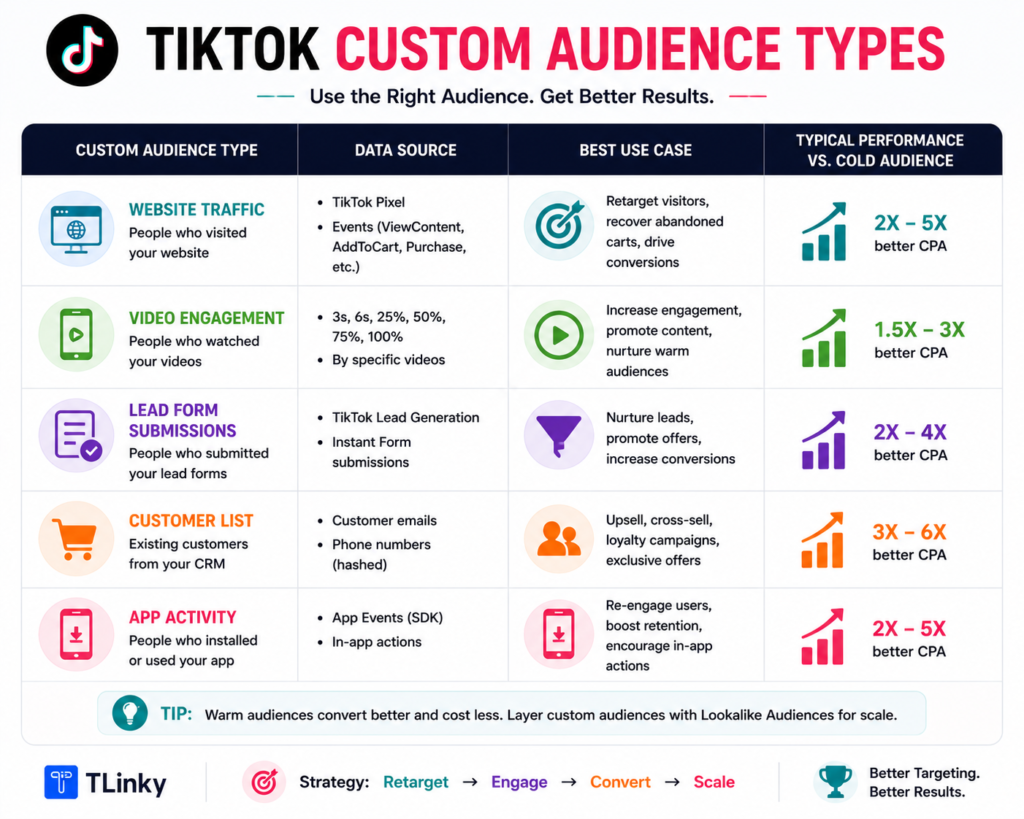
Custom audiences are your most powerful targeting tool. They are built from data you own or data generated by your audience’s engagement with your content on TikTok.
Customer List Audiences
Upload a list of customer email addresses, phone numbers, or TikTok user IDs to create a custom audience of your existing customers.
TikTok matches your list against its user database to identify which of your customers are on the platform.
Customer list audiences are useful for: excluding existing customers from acquisition campaigns, running win-back campaigns targeting lapsed customers, and creating lookalike audiences based on your highest-value customer segment.
For the best match rates, provide both email addresses and phone numbers together. Combined upload improves matching accuracy compared to single-identifier uploads.
Website Visitor Audiences (TikTok Pixel)
With TikTok Pixel installed, you can create audiences based on website activity:
- all website visitors
- visitors to specific pages (product pages, checkout)
- users who completed a specific event (added to cart, initiated checkout),
- and users who purchased (for exclusion from acquisition campaigns).
Website visitor retargeting audiences typically convert at significantly higher rates than cold interest audiences because they are targeting users who have already demonstrated intent by visiting your site.
This is one of the highest-ROI targeting strategies available to any TikTok advertiser.
App Activity Audiences
For businesses with mobile apps, TikTok’s SDK integration allows building audiences based on in-app actions such as app opens, in-app purchases, and specific feature usage.
Similar to pixel audiences, these are high-intent segments that outperform cold targeting for conversion objectives.
TikTok Engagement Audiences
Build custom audiences from users who have engaged with your TikTok content:
- Users who watched your videos (25%, 50%, 75%, or 100% watch completion)
- Users who liked, commented on, or shared your videos
- Users who followed your account
- Users who visited your profile
- Users who engaged with your TikTok Shop (if applicable)
Video view audiences, particularly users who watched 75% or more of your videos, are high-value retargeting segments because they represent users who found your content compelling enough to watch nearly all of it.
These are warm audiences worth targeting with a follow-up conversion campaign.
Lookalike Audiences
Lookalike audiences on TikTok are built by identifying the common characteristics of a source custom audience (typically your customer list or high-value video viewers) and finding TikTok users who share those characteristics.
TikTok offers three lookalike size options:
- Narrow: The closest match to your source audience, with a smaller size and higher similarity
- Balanced: A mid-range option that balances match quality with reach
- Broad: The largest audience size with the most relaxed similarity criteria
For conversion campaigns targeting high-intent customers, start with Narrow or Balanced lookalikes to maintain quality.
For awareness campaigns where reach is the priority, Broad lookalikes are appropriate.
The quality of a lookalike audience depends entirely on the quality of the source custom audience.
A customer list built from your highest-value customers (those with the most purchases or highest lifetime value) will produce better lookalikes than a general all-visitors list.
Segment your source audiences carefully before building lookalikes from them.
TikTok’s Smart Audience and AI Optimization
TikTok’s Smart Audience feature uses TikTok’s own AI system to automatically expand your audience beyond the parameters you defined when the algorithm identifies high-probability converters outside your original targeting. This is similar to Meta’s Advantage+ targeting expansion.
Smart Audience can significantly improve campaign efficiency for conversion objectives because it allows TikTok’s algorithm to find signals you may not have anticipated.
However, it reduces your control over who sees your ads, which matters for brand safety or in contexts where showing your ad to the wrong audience has a cost beyond just wasted spend.
For most direct response campaigns, enabling Smart Audience is recommended, particularly for campaigns with good pixel data or strong engagement history.
For brand safety-sensitive campaigns or tightly restricted targeting requirements, keep Smart Audience off and rely on manual targeting parameters.
Targeting Strategy by Campaign Objective
Awareness Campaigns
Goal: Reach new users who match your target audience profile. Best targeting approach: Demographic targeting combined with broad interest categories.
Keep audiences large (1 million-plus) to allow the algorithm to find optimal users at scale.
Metrics to optimize: CPM, reach, video completion rate, and view-through rate.
Consideration Campaigns
Goal: Drive profile visits, app installs, video views, or landing page traffic.
Best targeting approach: Interest targeting with 2 to 4 relevant categories, combined with behavioral targeting. Smart Audience can be enabled.
Metrics to optimize: CTR, cost per click, and profile visit rate.
Conversion Campaigns
Goal: Drive purchases, sign-ups, or other high-intent actions. Best targeting approach: Custom audiences (retargeting) for the highest conversion rate; lookalike audiences for scalable acquisition; behavioral targeting for mid-funnel.
Metrics to optimize: ROAS, cost per conversion, conversion rate.
For conversion campaigns, always exclude recent purchasers from your acquisition targeting to avoid wasting spend on users who have just bought.
Use the TikTok Ads ROI Calculator to model expected return on ad spend before committing budget to a targeting configuration.
How to Set Up Targeting in TikTok Ads Manager
Step 1: Define Your Campaign Objective
Log in to TikTok Ads Manager at ads.tiktok.com. Create a new campaign and select your objective: Awareness, Traffic, App Promotion, Lead Generation, Community Interaction, Website Conversions, or Catalog Sales.
Your objective determines which optimization goals are available at the ad group level, which in turn affects how TikTok’s algorithm optimizes delivery.
The TikTok Ads Manager guide covers the full campaign creation process and interface in detail.
Step 2: Configure Your Ad Group Targeting
At the ad group level, configure your targeting settings:
Audience: Select or create custom audiences if using retargeting or lookalike targeting. If starting fresh, skip this section.
Demographics: Set your target age ranges, genders, and locations.
Interests and Behaviors: Select your interest categories and behavioral signals. Keep the selection focused, typically two to four categories, rather than adding every potentially relevant category.
Devices: Set device-specific targeting only if it is relevant to your campaign objective.
Smart Audience: Toggle on or off depending on your campaign strategy.
After setting targeting, TikTok Ads Manager shows your estimated audience size.
For most conversion campaigns, an audience between 500,000 and 5 million is a reasonable range, large enough for the algorithm to optimize but focused enough to maintain relevance.
Step 3: Monitor and Optimize Targeting Performance
After your campaign has run for at least 3 to 7 days and collected meaningful data, review performance by audience segment.
Check your ad group’s delivery insights to see if the algorithm is concentrating delivery in specific age, gender, or interest segments. This often reveals better audience hypotheses for the next iteration.
For retargeting campaigns, check the custom audience size regularly. Audiences below 1,000 matched users have limited delivery. Rebuild or expand the source audience if the sizes are too small.
Common TikTok Targeting Mistakes
Targeting too narrowly on new campaigns. Overly narrow targeting on cold campaigns restricts the algorithm’s ability to find converters. Start with a broader audience and let TikTok’s optimization system identify the best-performing segments before narrowing in subsequent campaigns.
Not excluding existing customers from acquisition campaigns. Showing acquisition ads to users who recently purchased wastes budget. Always build a recent purchaser custom audience and exclude it from your acquisition campaigns.
Using the same audience for all campaign objectives. Awareness, consideration, and conversion campaigns serve different funnel stages and require different audience approaches. Using a broad interest audience for a conversion campaign produces high reach but poor conversion rates.
Not building custom audiences before starting ads. Custom audiences, especially website visitor audiences, require time and traffic to build. Install TikTok Pixel and start accumulating audience data before you plan to use retargeting, not on the day you launch.
Ignoring audience overlap between ad groups. Running multiple ad groups with overlapping audiences in the same campaign causes internal auction competition, meaning your ad groups bid against each other, inflating your CPM. Use TikTok’s audience overlap tool to check and minimize overlap between ad groups.
Frequently Asked Questions (FAQs)
What is the minimum audience size for TikTok targeting?
TikTok requires a minimum audience size to run ads effectively. For most campaign types, custom audiences need at least 1,000 matched users for delivery to work at scale.
Lookalike audiences are built from source audiences of at least 100 users, though larger source audiences produce better quality lookalikes.
If your audience size falls below these thresholds, TikTok Ads Manager will flag it and you may see limited or no delivery.
How is TikTok targeting different from Facebook ads targeting?
The most significant difference is data sourcing. Meta’s historical advantage came from cross-site tracking via the Meta Pixel, capturing behavioral signals from across the web.
TikTok’s behavioral signals are based on in-platform engagement only. This means TikTok interest and behavior targeting is built from what users do on TikTok, not what they do on the broader internet.
TikTok’s strength is in-platform content consumption signals. Both platforms use similar custom audience and lookalike tools, but TikTok’s in-platform behavioral signals tend to be especially strong for content-consumption-driven products.
Can you target by TikTok followers or following?
TikTok does not offer direct targeting by follower count or who a user follows. However, you can use Creator Interaction behavioral targeting to reach users who have engaged with creators in a specific category, which provides a proxy for reaching audiences that follow certain types of creators.
TikTok’s Creator Marketplace also allows brands to partner with specific creators, reaching their followers through sponsored content rather than targeted ads.
How long does it take for TikTok’s algorithm to optimize targeting?
TikTok’s algorithm typically needs 50 to 100 conversion events per ad group before entering a stable optimization phase. This learning period can take anywhere from 3 to 14 days, depending on your campaign budget and conversion rate.
During the learning phase, the cost per conversion is often higher and variable.
Avoid making significant targeting or budget changes during this period, as changes reset the learning process.
Use the TikTok Ads Budget Planner to estimate the budget required to exit the learning phase within a reasonable timeframe.
Should you use automatic or manual targeting on TikTok?
This depends on your experience level and campaign goals. Smart Audience (automatic) works well for conversion campaigns when you have good pixel data and want to scale reach efficiently.
Manual targeting gives more control and is preferred for brand safety-sensitive campaigns, highly niche audiences where the algorithm may not have sufficient signal, and when you have specific audience hypotheses you want to test.
Many advertisers use a hybrid approach: start with manual targeting to identify working audience segments, then test Smart Audience with those segments as the base.
Wrapping Up
TikTok ads targeting in 2026 offer a mature and flexible system for reaching specific audiences across all funnel stages.
The highest-performing strategies use custom audiences for conversion campaigns, behavioral targeting for mid-funnel consideration, and broad interest or demographic targeting for awareness, with lookalike audiences bridging the gap between your known customer base and scalable new acquisition.
Install TikTok Pixel before you start advertising. Build custom audiences from your first campaigns.
Use Smart Audience when scaling conversion campaigns with proven creative. And always separate your funnel stages across different campaigns rather than expecting one campaign to do everything.
For the full picture of running campaigns in TikTok Ads Manager, the TikTok Ads Manager guide covers campaign creation and interface navigation.
For understanding what your campaigns are costing and how to set realistic budget expectations, the TikTok advertising cost guide covers current pricing benchmarks in detail.
Sources
- TikTok Ads Manager, Official Campaign and Audience Tools
- TikTok Business Help Center, Ads Targeting Options
- DataReportal, TikTok Users Stats Data and Trends
- eMarketer, TikTok Advertising Revenue Forecast
- Pew Research Center, 8 Facts About Americans and TikTok