
Most beginners open TikTok Ads Manager for the first time, take one look at the dashboard, and close the tab. The interface is denser than Meta Ads, the terminology is different, and the campaign structure is not what you expect if you are coming from Google or Instagram.
But here is what those same beginners discover once they push through: TikTok’s advertising system is one of the most accessible paid platforms available right now. TikTok’s algorithm does more of the heavy lifting than any other major platform.
You do not need a massive budget. You do not need a background in media buying. You need to understand the structure, pick the right ad objective, and give the system creativity that earns attention in the first three seconds.
Get Free TikTok Ad Credit Up to $6000 [Limited Time Offer]
In this guide, you’ll learn what TikTok Ads Manager is, where to find it, how to set it up correctly, how to build your first campaign step by step, what Smart+ automation does for your workflow in 2026, and how to fix the five mistakes that stall most beginners before they see results.

Key Takeaways
- TikTok Ads Manager lives at ads.tiktok.com. Always use a desktop for building and managing campaigns
- The three-tier structure is Campaign (objective), Ad Group (audience and budget), and Ad (creative). Choosing the wrong objective is the single most expensive beginner mistake
- Install the TikTok Pixel and verify it with the Pixel Helper Chrome extension before spending a dollar on campaigns. Without it, conversion optimization and retargeting both fail
- According to TikTok’s official Smart+ announcement, Smart+ Web Campaigns delivered a 52% improvement in ROAS compared to standard campaigns. For beginners and lean teams, Smart+ is the recommended starting point in 2026
- TikTok’s average CPM was $7.03, lower than Meta’s $12.53 in the same period
Quick Answer: What Is TikTok Ads Manager?
TikTok Ads Manager is TikTok’s self-serve advertising platform where businesses create, manage, measure, and optimize paid ad campaigns. You access it at ads.tiktok.com. It uses a three-tier campaign structure: Campaign, Ad Group, and Ad. At the Campaign level, you set your objective. At the Ad Group level, you define your audience, budget, bidding, and placement. At the Ad level, you upload your creative and copy. Every ad running on TikTok, whether a basic In-Feed video or an AI-automated Smart+ campaign, flows through this platform.
What Is TikTok Ads Manager and How Does It Work?
TikTok Ads Manager is where paid advertising on TikTok begins and ends. You set objectives, define who sees your ads, control how much you spend, upload creative assets, and read performance data, all from one dashboard.
According to Exploding Topics data, TikTok has nearly 2 billion monthly active users worldwide. Those users are spread across every market you want to reach: the United States, the UAE, Canada, Vietnam, Morocco, Malaysia, and across North Africa. Ads Manager is the tool that connects your business to that audience.
The platform runs on an auction model. You tell TikTok your objective, your audience parameters, and your budget. TikTok’s algorithm then decides which users see your ad, when, and at what cost, based on your bid strategy and creative performance.
The better your creative performs, meaning higher completion rates, more clicks, more engagement, the cheaper your delivery becomes. Creative quality is your most powerful cost control on this platform.
TikTok Ads Manager vs TikTok Business Center: What Is the Difference?
This is one of the most common points of confusion for new advertisers.
TikTok Ads Manager is where you create and run campaigns. It is your day-to-day advertising interface.
TikTok Business Center is the account management layer above Ads Manager. It lets you manage multiple Ads Manager accounts, assign team roles and permissions, share pixels and audiences across accounts, and connect agency or freelancer partners using a Business Center ID, without sharing login credentials.

If you are a solo advertiser running one account, you can use Ads Manager without ever touching the Business Center. If you manage multiple clients, work with a team, or operate more than one brand, Business Center is where you centralize access and control.
You can find your Business Center ID by going to business.tiktok.com, then Settings, then Business Info. Your ID appears at the top of that page. Share this ID with agencies and partners. Never share your login credentials directly.
How to Set Up Your TikTok Ads Manager Account
Some settings cannot be changed after you create your account. Getting this right from the start matters.
Step 1: Create Your Account
1. Go to ads.tiktok.com

2. Click Get Started and sign up using your email or an existing TikTok account
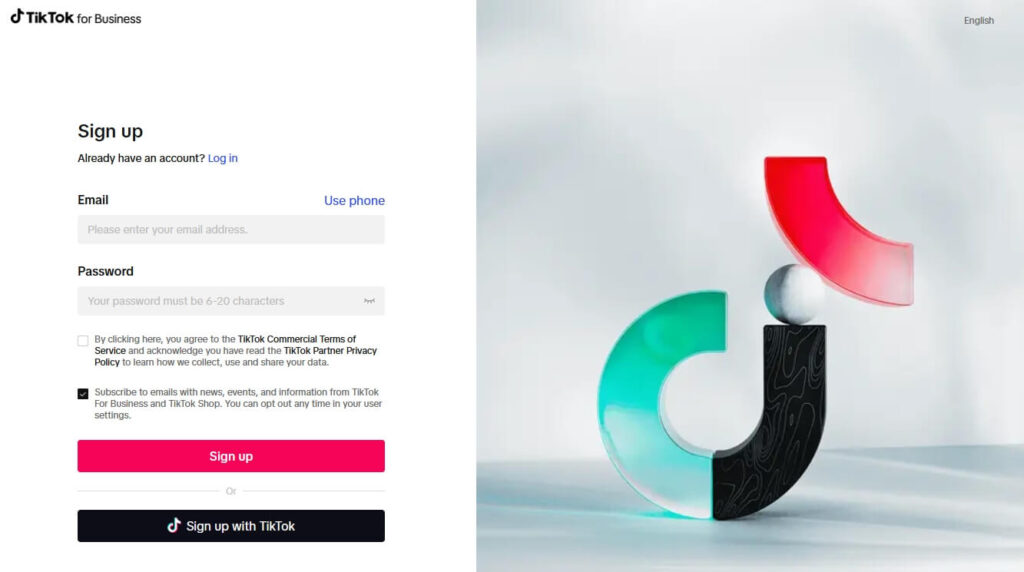
2. Confirm your email address by giving the 6-digit code from your given email address

3. Enter your country or region. This determines which currencies, payment methods, and ad formats are available to you. This cannot be changed later
4. Select your industry category
5. Enter your legal business name exactly as it appears on your registration documents
6. Set your time zone. Choose the zone your team reads reports in. This also cannot be changed later
7. Add your phone number and complete verification

8. Add billing information. Your ads will not run until payment is configured and approved
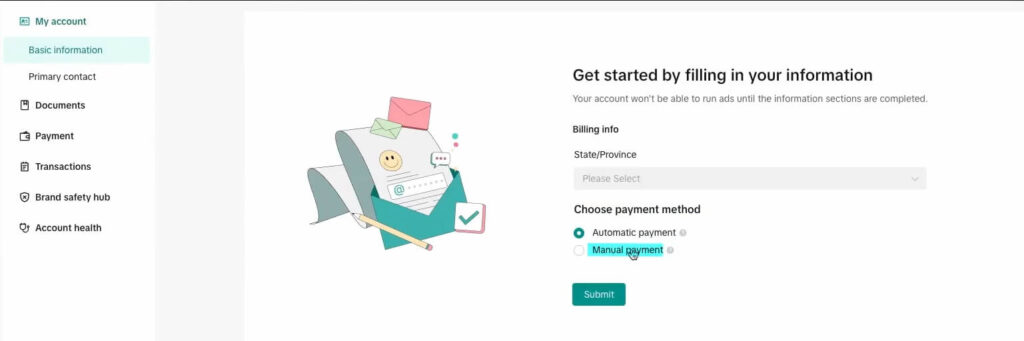
Check out this more detailed guide to make your perfect personalized TikTok Ads Manager Account.
Step 2: Enable Two-Step Verification
TikTok officially recommends enabling two-step verification right after account creation. Go to Account Settings, find Security, and turn on two-step verification. This protects your account and prevents unauthorized ad spend.

Step 3: Install the TikTok Pixel
The TikTok Pixel is a piece of code you place on your website that tracks visitor actions and sends that data back to Ads Manager. Without it, your conversion campaigns have no data to optimize on, and your retargeting audiences never build.
To create your TikTok pixel:
1. In Ads Manager, go to Tools, then Events

2. Click Connect Data Source: Select your target source and provide the source link.

3. Choose your installation method: manually adding code to your site, using a partner integration (Shopify, WooCommerce, Squarespace), or one-click setup if available

Note: You can use our free TikTok Pixel Setup Helper to quickly generate platform-specific installation code, including custom event tracking.
4. Create and copy your base code for your website

5. Verify the pixel is firing correctly using the TikTok Pixel Helper Chrome extension before you launch any paid campaigns
For a more detailed, step-by-step walkthrough, check out our complete TikTok Pixel installation guide.
Step 4: Connect Your TikTok Account (For Spark Ads Only)
If you plan to run Spark Ads, which amplify existing organic posts, you need to connect your TikTok profile to your Ads Manager account.
Go to Assets, then TikTok Accounts, and follow the authorization steps. This step is only required for Spark Ads. Standard In-Feed campaigns run without a connected organic profile.

How TikTok Ads Manager Is Structured: Campaigns, Ad Groups, and Ads
Every campaign you build follows the same three-tier hierarchy. Understanding this is the foundation of everything else.
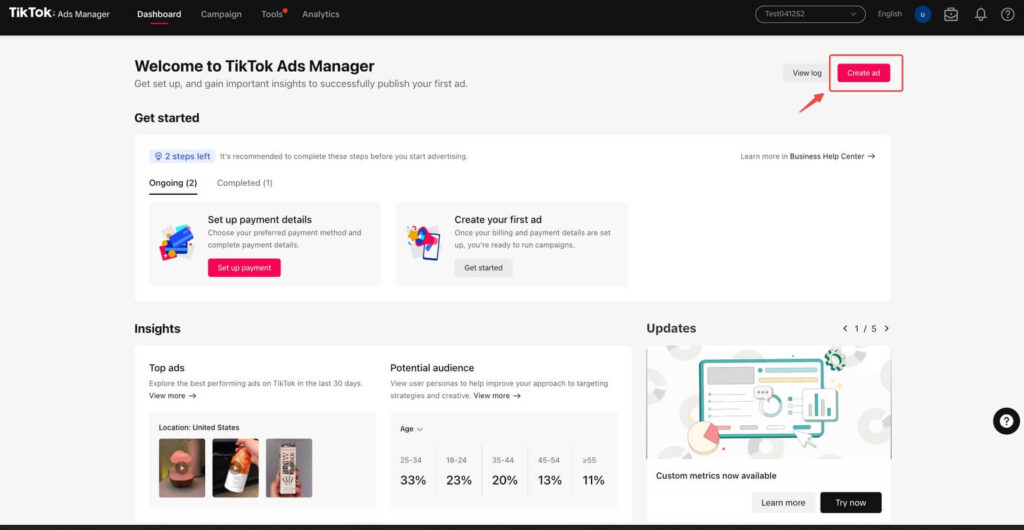
Campaign Level: Your Objective
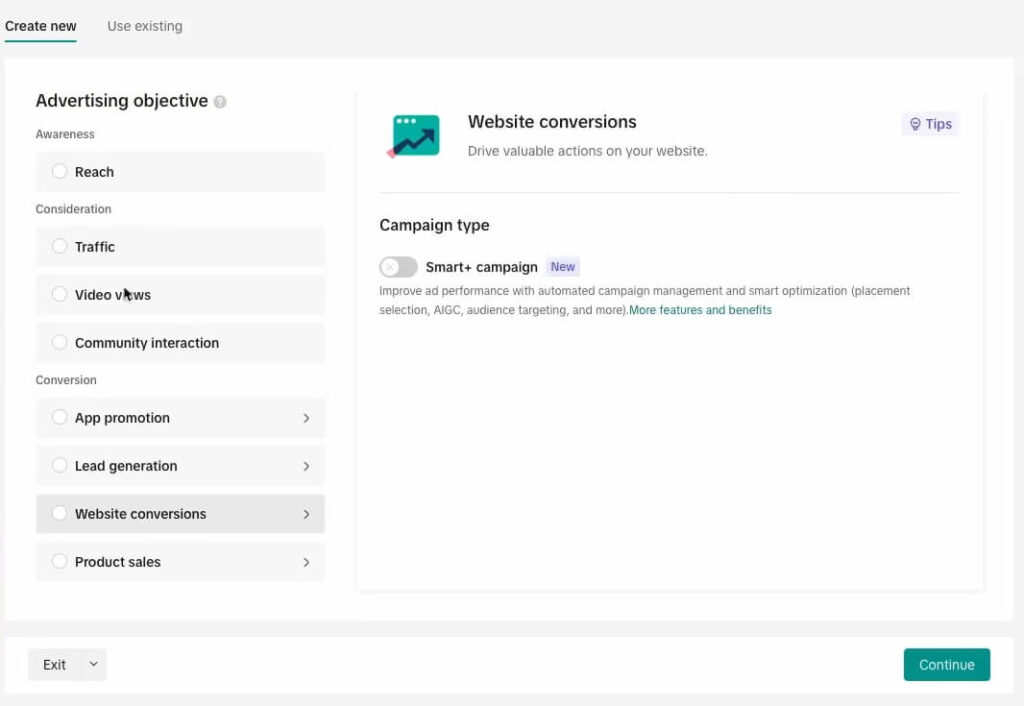
At the Campaign level, you choose what you want TikTok to optimize for. Your objective tells the algorithm what success looks like, which determines how it delivers your ads and who it targets.
TikTok group objectives into three categories:
Awareness:
- Reach: Show your ad to as many people as possible
Consideration:
- Traffic: Drive clicks to a website or landing page
- Video Views: Maximize video completion and engagement
- Community Interaction: Grow followers or profile visits
- App Promotion: Drive app installs or in-app actions
Conversion:
- Lead Generation: Capture leads via TikTok’s native Instant Form
- Website Conversions: Drive specific actions on your site, such as purchases and signups
- Product Sales: Promote products through TikTok Shop or a catalog
Choosing the wrong objective is one of the most costly beginner mistakes. If you want purchases and you choose Traffic, TikTok optimizes for clicks, not buyers. You will spend your budget on visitors who never convert. Match your objective to your actual business goal.
Campaign naming that works: BrandName | Objective | Audience Type | Date Example: TLinky | Conversions | Cold | March2026
This makes filtering and comparing campaigns easy as your account grows.
Ad Group Level: Your Audience, Budget, and Bidding
At the Ad Group level, you control who sees your ads, where they appear, how much you spend, and how you bid.
Audience targeting options:
- Demographics: Age, gender, location, language
- Interests and behaviors: Categories your target users engage with on TikTok
- Custom audiences: Upload your own customer list or retarget pixel website, visitors
- Lookalike audiences: Find users who share characteristics with your existing customers
Placement options:
- Automatic placement: TikTok places your ads across TikTok and its partner apps for maximum reach. Recommended for beginners
- Manual placement: You choose specific placements, including TikTok only, Pangle network, or Global App Bundle
Budget settings:
- Daily budget: Minimum $20 per day at the ad group level
- Lifetime budget: Minimum $500 at the campaign level
- Campaign Budget Optimization (CBO): Let TikTok distribute budget across ad groups automatically
Bid strategies:
- Lowest Cost: TikTok spends your budget to get the most results at the lowest possible cost. Best for beginners and during the learning phase
- Cost Cap: You set a maximum cost per result you are willing to pay. TikTok tries to stay at or below that threshold
- Bid Cap: You control the maximum bid per auction. More control, but requires more experience to use effectively
Start with the lowest cost for your first campaigns. Switch to Cost Cap once you have two to three weeks of data showing a clear average cost per result.
Ad Level: Your Creative and Copy
At the Ad level, you upload your video, write your copy, choose your CTA button, and set your display name and profile image.
TikTok supports several ad formats at the Ad level, each designed for different marketing goals:
- In-Feed Ads: Appear natively in the For You feed. 9:16 vertical format, 5 to 60 seconds long. 15 to 30 seconds is the recommended range
- Spark Ads: Boost an existing organic post from your own account or a creator’s account
- Video Shopping Ads: Shopping-focused ads that appear in the feed, search results, and TikTok Shop tab
- TopView Ads: Full-screen, sound-on format that appears when a user first opens TikTok. Premium placement with higher CPM
- Collection Ads: In-feed ads with an instant gallery that opens inside TikTok without the user leaving the app
How to Create Your First Campaign: Step by Step
1. Log in to ads.tiktok.com and click Campaign in the top navigation

2. Click Create

3. Choose between Simplified Mode (fewer options, faster setup) and Custom Mode (full control). Choose Custom Mode so you understand every setting you are building
4. Select your campaign objective
5. Name your campaign using the naming convention above

6. Turn on your Campaign Budget Optimization for your first test. Set the budget at $50.

7. Click Continue

8. Name your ad group to reflect your audience (e.g., “US | Women 25-34 | Interest: Skincare”)

9. Set placement to Automatic for your first campaign
10. Configure your audience: start broad. TikTok’s algorithm needs volume to optimize. Overly narrow targeting in week one limits what the algorithm can learn
11. Set your daily budget at a minimum of $50 per day. Higher daily budgets give the algorithm more data faster

12. Set a specific start date rather than “run continuously.” This creates clean data windows for comparison
13. Set bidding to Lowest Cost

14. Click Continue
15. Upload your video (9:16 format, under 500MB, under 60 seconds)

16. Write your ad copy: lead with your hook, keep it under 100 characters, use natural language your audience actually uses

17. Select your CTA button (Shop Now, Learn More, Sign Up, Download, etc.)

18. Add your destination URL with UTM parameters so all traffic is trackable in your analytics

19. Click Submit

Your ad enters a review process. TikTok’s standard review takes approximately 24 hours. If flagged, you will receive a notification in Ads Manager explaining the policy issue.
Smart+ Campaigns: TikTok’s AI Automation in 2026
Smart+ is TikTok’s most significant platform change in the past 12 months. According to TikTok’s official Smart+ announcement, Smart+ Web Campaigns delivered a 52% improvement in ROAS compared to standard campaigns. For beginners and lean teams, Smart+ is the recommended starting point in 2026.
What Smart+ Actually Does
Smart+ automates three things that manual campaigns require you to configure yourself: audience targeting, bid optimization, and placement. You provide your objective, creative assets, conversion event, and budget. TikTok’s AI system handles the rest.
The algorithm reads signals embedded in your creative content to identify the right audience, rather than relying only on the interest and demographic filters you set manually. This means your creative strategy matters more than your audience configuration when using Smart+.
What Changed in Smart+ in 2026
As of January 2026, the Smart+ upgrade includes:
- Creative for Smart+: Auto-select scans your existing ads and eligible creator content and recommends the best-performing creatives automatically
- Combination preview: You can preview every creative combination before it goes live, directly inside Ads Manager
- Updated efficiency tools: Duplication, draft mode, automated rules, and bulk editing are now all available inside Smart+ (previously only in manual campaigns)
- Unified flow: Manual and Smart+ experiences now share a single campaign creation flow. You can move between full automation, partial automation, and manual control without rebuilding your campaign
When to Use Smart+ vs Manual Campaigns
| Situation | Use Smart+ | Use Manual |
| Lean team, no dedicated media buyer | Yes | No |
| First 30 days on the platform | Yes | No |
| Testing creatives, not audiences | Yes | No |
| Specific audience control needed | No | Yes |
| Retargeting a known customer list | Partial | Yes |
| Agency managing multiple clients | Partial | Yes |
Underused Features Most Advertisers Never Find
These are legitimate, documented features inside Ads Manager that most beginners and intermediate advertisers never use.
1. TikTok Creative Center
Accessible at ads.tiktok.com/business/creativecenter, the Creative Center shows you top-performing ads in your industry ranked by engagement metrics, including CTR and completion rate. You can filter by country, industry, objective, and time period. Use this before creating any ad to see what formats and hooks are currently converting in your category.
2. Keyword Planner
Inside Ads Manager, go to Tools, then Keyword Planner. This shows you search volume data for keywords your target audience is typing into TikTok’s search bar. Use it to build Search Ad campaigns targeting users at the moment of intent.
3. TikTok Search Ads
Search Ads are fully available as of 2026 and let you run keyword-targeted ads that appear inside TikTok’s search results. You bid on specific keywords, and your ad appears when a user searches for that term. To access them, create a new campaign, select Website Conversions or Product Sales as your objective, and choose Search Placement at the Ad Group level.
4. Split Testing Tool
In Ads Manager, go to Campaign and look for the Split Test option when creating a new campaign. TikTok’s split testing runs two versions of your campaign with one variable different (audience, creative, or placement), splits your budget evenly, and gives you a statistically valid winner. Most advertisers manually compare campaigns instead of using this built-in tool, which means comparison data is never truly clean.
5. Automated Rules
Go to Tools, then Automated Rules. Here you set conditional triggers: if your CPA exceeds a threshold, pause the ad group automatically; if your ROAS drops below a target, reduce the budget by a percentage. This turns Ads Manager into a partially automated system that responds to performance without you checking it every hour.
6. Audience Insights
Under Tools, then Audience Insights, you can explore the characteristics of your custom audiences and how they overlap with TikTok’s broader user base. This tells you the age, gender, location, interests, and device profile of your existing customer list. Use this to inform both your creative direction and your lookalike audience strategy.
7. Pixel Events Debug View
Inside Tools, then Events, open your pixel and click Debug Events. This shows real-time pixel firing data: which events are triggering, from which pages, with which values. This is the fastest way to diagnose tracking problems without waiting for campaign data to surface discrepancies.
Top 7 TikTok Ads Manager Tips for Better Campaigns
If you already understand how TikTok Ads Manager is structured, the next step is improving performance. These seven tips focus on what actually moves results inside real campaigns.
1. Optimize for conversions, not clicks
Traffic campaigns look cheaper, but they rarely drive revenue. Always choose Website Conversions or Lead Generation if your goal is business outcomes.
2. Let the learning phase complete
TikTok needs around 50 conversion events to stabilize delivery. Avoid editing or pausing campaigns too early, or you reset optimization progress.
3. Start broad, then refine
In the first 5–7 days, keep targeting wide. TikTok’s algorithm performs better with more data. Narrow targeting too early limits performance.
4. Focus on the first 3 seconds
Your hook determines everything. If users scroll past instantly, no targeting or bidding strategy can fix that. Test multiple hooks for the same offer.
5. Use 2–3 creatives per ad group
Never rely on a single video. Multiple creatives give TikTok options to optimize delivery and reduce creative fatigue.
6. Monitor the right metrics
Ignore vanity metrics like impressions. Instead, focus on the right metrics, including CTR, conversion rate, cost per result, and ROAS. Understanding the right metrics helps you evaluate campaign performance, identify opportunities for improvement, and make data-driven optimization decisions.
7. Refresh creatives every 7–10 days
Even winning ads decline over time. Rotate new variations regularly to maintain performance and avoid ad fatigue.
These are not advanced tactics. They are fundamentals. But consistently applying them is what separates campaigns that burn budget from campaigns that scale profitably.
The 5 Mistakes Beginners Make in TikTok Ads Manager
Mistake 1: Pausing Campaigns During the Learning Phase
TikTok’s algorithm needs approximately 50 conversion events to exit the learning phase and optimize delivery reliably. If you pause a campaign after two days because you are not seeing results, you reset the learning phase every time you resume. This wastes your initial data investment entirely. Let campaigns run for at least five to seven days before making any decisions.
Mistake 2: Choosing the Wrong Objective
If you want purchases and you select Traffic, TikTok sends you clicks, not buyers. The objective determines what the algorithm optimizes for at a fundamental level. Match your objective to your actual goal: Website Conversions with Purchase event for ecommerce, Lead Generation for service businesses, App Promotion for apps, and Video Views only when you genuinely want views rather than actions.
Mistake 3: Over-Constraining Targeting in Week One
Narrow targeting limits the pool of users TikTok can learn from. In week one, use broad parameters and let the algorithm find your audience through creative performance signals. Tighten targeting based on what your audience insights show, not assumptions.
Mistake 4: Repurposing Non-TikTok Creative
Horizontal videos, polished corporate ads, and static images designed for Facebook or Google consistently underperform on TikTok. Users on this platform are conditioned to skip anything that does not feel native. Your creative must be vertical 9:16, feel like organic content, and earn attention in the first three seconds. Use your highest-performing organic video as your first test creative. It already has proof of engagement on the platform.
Mistake 5: Watching the Wrong Metrics
Beginners often focus on reach and impressions. The metrics that tell you whether your campaign is working are: video completion rate (above 25% is a strong signal), click-through rate (above 1.5% indicates creative relevance), cost per result compared to your target, and conversion rate on your landing page. A high completion rate with low CTR means your hook works, but your CTA does not. A low completion rate means you are losing people before they see your message.
TikTok Ads Manager Metrics and Reporting
The Ads Manager dashboard shows metrics at all three campaign levels.

| Metric | What It Measures | What to Do If It Is Low |
| Video Completion Rate | Percentage of viewers who watched to the end | Rewrite the hook, shorten the video |
| Click-Through Rate (CTR) | Percentage of viewers who clicked your CTA | Strengthen the CTA, check landing page alignment |
| Cost Per Click (CPC) | Average cost per click | Improve creative quality to lower CPM |
| Cost Per Mille (CPM) | Cost per 1,000 impressions | Broaden your audience, test new creative |
| Cost Per Result (CPR) | Average cost per conversion event | Check the landing page, improve audience match |
| ROAS | Revenue generated per dollar spent | Scale the creative that exceeds your target ROAS |
According to eMarketer’s TikTok CPM rates, TikTok’s average CPM was $7.03, compared to Meta’s $12.53 in the same period. Your actual CPM will vary based on your audience, industry, creative quality, and time of year.
More useful article for you:
👉 TikTok Ads Manager bonus credit: how it works in 2026
👉 How to Run TikTok Ads for Shopify to Boost Sales: A Step-by-Step Guide
👉 How to Optimize TikTok Shop Ads: 9 Proven Tips to Boost Sales
FAQs
How do I set up TikTok Ads Manager?
You set up TikTok Ads Manager by visiting ads.tiktok.com and clicking Get Started. Enter your country (which cannot be changed later), your industry, your legal business name, your time zone (also permanent), and your phone number. After verification, add billing information. Before launching any campaigns, install the TikTok Pixel through Tools, then Events, and enable two-step verification in your account settings. These two steps are the most commonly skipped and the most important for running effective campaigns long-term.
How does TikTok Ads Manager work?
TikTok Ads Manager works on a three-tier auction system. At the Campaign level, you set your objective, which tells TikTok what to optimize for. At the Ad Group level, you define your audience, budget, placement, and bid strategy. At the Ad level, you provide your video creative and copy. TikTok’s algorithm then enters your ads into real-time auctions for each available impression, delivering your ad to users most likely to take your desired action based on your objective, bid, and creative performance relative to other advertisers.
How do I link my TikTok account to Ads Manager?
You link your TikTok account to Ads Manager through the Assets section. Inside Ads Manager, go to Assets, then TikTok Accounts, and follow the authorization steps to connect your profile. This connection is required for Spark Ads, which allow you to boost existing organic TikTok posts as paid ads. For standard In-Feed campaigns, you do not need to connect an organic TikTok profile. Your campaigns will run with your business name and profile image as the display identity.
What are the main features of TikTok Ads Manager that most advertisers miss?
Several useful features go unused by most advertisers. The Keyword Planner under Tools shows TikTok search volume data for planning Search Ads. The Split Testing tool runs clean A/B tests on audiences, creatives, or placements. Automated Rules let you set performance-triggered actions like auto-pausing underperforming ad groups. The Audience Insights tool reveals the demographic and interest profile of your custom audiences. The Pixel Debug Events view shows real-time pixel-firing data for diagnosing tracking issues. The Creative Center at ads.tiktok.com/business/creativecenter shows top-performing ads in your industry by objective and country.
Is TikTok Ads Manager the same as TikTok Business Center?
No, they are different tools that work together. TikTok Ads Manager at ads.tiktok.com is where you create and run ad campaigns. TikTok Business Center at business.tiktok.com is the account management layer above it. Business Center lets you manage multiple Ads Manager accounts, assign team roles and permissions, share pixels and audiences across accounts, and grant agency or partner access using a Business Center ID without sharing login credentials. Solo advertisers running one account can use Ads Manager alone. Teams, agencies, and multi-brand advertisers need Business Center.
Conclusion
TikTok Ads Manager is not as complicated as it looks the first time you open it. Once you understand that every campaign follows the same three-tier structure, that your objective determines how the algorithm delivers your ads, and that your creative quality directly controls your delivery costs, the platform starts to make complete sense.
The beginners who struggle are almost always making one of five specific mistakes: wrong objective, premature pausing, over-constrained targeting, recycled non-TikTok creative, or watching metrics that do not connect to real business outcomes. Every one of those mistakes is fixable.
TikTok’s advertising infrastructure in 2026 has matured significantly. Smart+ automation, Search Ads now out of beta, split testing, automated rules, and real-time pixel debugging all make this a platform where you can run efficient campaigns without a large agency budget. The creative is still the work. The system, once you understand it, handles the rest.
Start with your account setup. Install your pixel. Build your first campaign in Custom Mode so you understand every setting. Let it run for five to seven days without pausing. Read the data. Then iterate. That is not a complicated process. It is a disciplined one.
Source:
eMarketer (CPM benchmarks and advertising data)
TikTok Smart+ announcement (official automation and campaign feature updates)