
TikTok Pixel Setup Helper
Pick your platform, a conversion event, a sample value and a currency to see where TikTok event code goes on your site. Copy your real base code from TikTok Events Manager, not from this tool.
Grow your Business & Social Media Marketing
- Branded Link Shortener
- QR Code Generator
- Bio Page Builder
- Tracking & Analytics
- 16+ Integrations
Tools You May Also Need for TikTok Ads
What this helper is for, and what to copy from TikTok instead
The TikTok Pixel Setup Helper shows where pixel code goes on Shopify, WooCommerce, a custom HTML page or another platform, and writes a sample event line with the value and currency you enter. The base code it displays is a shortened sample with a placeholder ID, TIK_MOCK_PIXEL. It isn’t TikTok’s official base code, so don’t paste it on your site.
Your real base code belongs to your own pixel in TikTok Events Manager. Use this tool to understand where each piece of code goes, then install what TikTok gives you.
Start in TikTok Events Manager
Create or open your pixel in Events Manager and copy the code TikTok generates for it. TikTok’s pixel help page describes the pixel as a piece of code you place on your website to share website events with TikTok.
TikTok’s get-started guide for the pixel walks through the manual route: in TikTok Ads Manager, go to Tools, then Events, then Connect Data Source, click Copy code and paste the pixel code at the top of the header section of your website. The same guide points to partner setups for Shopify, WooCommerce and Google Tag Manager.
If you’re new to the dashboard itself, our TikTok Ads Manager guide covers the layout first.
The four fields
Only the event is required:
- Website Platform / CMS: Shopify (the default), WordPress / WooCommerce, Custom HTML / Landing Page Builder, or Other / General.
- Conversion Event Type: Complete Payment (Purchase), Initiate Checkout, Add To Cart, View Content, Subscribe (Newsletter/Trial) or Contact.
- Mock Event Value: a sample amount, such as your average order value.
- Currency Code: USD, EUR, GBP or CAD.
Click Generate Pixel Code to get the result. Clear resets the form.
Our WooCommerce test, part by part
We tested the helper on November 4, 2026, with WooCommerce, Complete Payment, a value of 42 and USD. The result took 2.1 seconds and had three parts, but only two of them showed on screen.
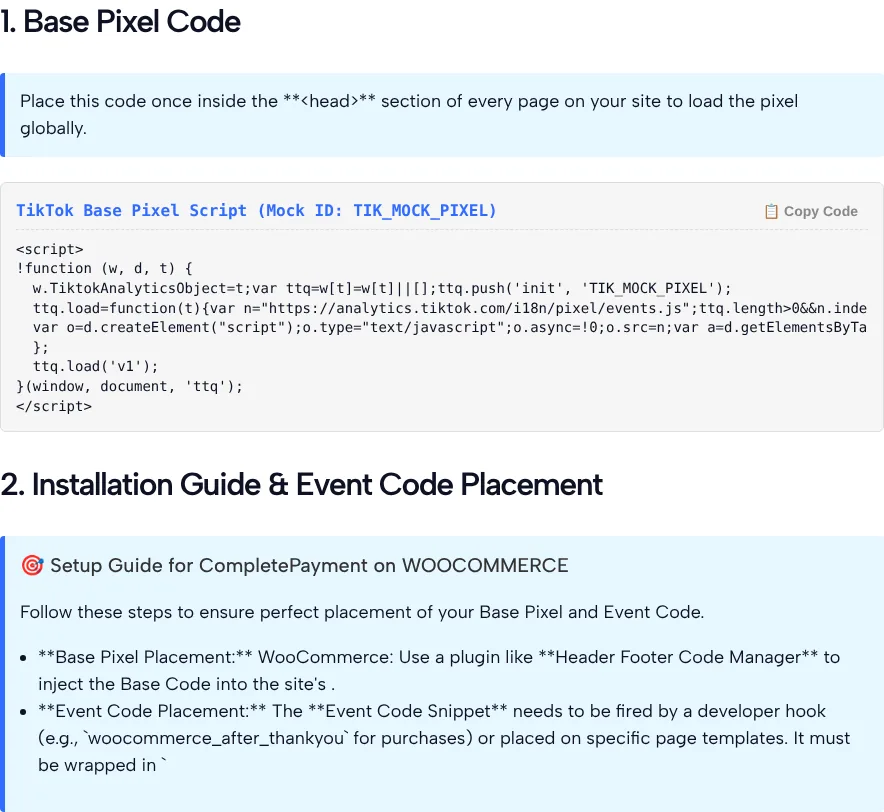
- Base Pixel Code. A short script labeled “Mock ID: TIK_MOCK_PIXEL” with a Copy Code button. The button worked and copied the mock script.
-
Installation Guide and Event Code Placement. It suggested a plugin like Header Footer Code Manager for the base code and a developer hook such as
woocommerce_after_thankyoufor the purchase event. Double asterisks showed where bold text should have been, and one sentence ended with “into the site’s .” because the word head was missing. -
Dynamic Event Code Snippet. The server sent
ttq.track('CompletePayment', { "value": 42, "currency": "USD" });, but it never appeared on the page. The instruction text above it contains a literal script tag, so the browser treated everything after it as code, and the visible text stopped at “It must be wrapped in”.
So in our test, the only code you could see and copy was the mock base code, the one part you shouldn’t use. We only tested WooCommerce, so other platforms may show the event snippet.
Where event code goes, and why it needs the base code
Event code fires on the page or action you want to count, after the base code has loaded. TikTok’s guide to adding events with custom code says to have the base code on all of your webpages and that event code won’t work by itself without it.
For a WooCommerce purchase, the helper’s own suggestion is the order thank-you step, the woocommerce_after_thankyou hook. Whoever adds it should also replace the sample value. Our test snippet carried 42 because that’s what we typed. On a live store, each order’s own total and currency have to be passed in, or every purchase reports the same amount.
CompletePayment is now called Purchase
For a new pixel, use Purchase where the helper writes CompletePayment. TikTok’s note on its updated standard events says CompletePayment was renamed to Purchase on May 1, 2025, that existing setups keep working without renaming any code, and that new pixels should use Purchase.
TikTok’s standard events page lists Purchase, InitiateCheckout, AddToCart, ViewContent, Subscribe and Contact among its events and recommends value and currency parameters for AddToCart, Purchase and ViewContent. Once you swap the purchase name, the helper’s six events all appear on that list.
After you install
Check in Events Manager that your events are coming through, then place a test order or send a test form so you see the event you care about. Once purchases are tracked, the TikTok Conversion Rate Calculator turns your clicks and sales into a rate you can compare across ads.
Limits
- Mock base code. Never paste it. Use the code from your own pixel.
- Hidden event snippet. In our WooCommerce test, the event line didn’t display.
- Formatting bugs. Literal asterisks and a cut sentence in the setup notes.
- Old event name. It writes CompletePayment, not Purchase.
- Fixed sample value. The value is whatever you type, not your real order total.
- No account connection. It can’t see your pixel or tell you whether events fire.
Pixel Setup Helper FAQ
Can I paste the base code from this tool on my site?
No. In our test it showed a placeholder ID, TIK_MOCK_PIXEL, inside a shortened loader, so it can’t send events to your pixel. Copy the base code TikTok generates for your own pixel in Events Manager, and use this tool only to see where event code goes.
Is this the same as TikTok Pixel Helper?
No. TikTok’s Pixel Helper is a Chrome extension from TikTok that helps you verify and troubleshoot a pixel installation on your website. This page’s tool never looks at your site; it writes sample code and placement notes.
Why didn’t I see the event code snippet?
In our WooCommerce test, the server returned the snippet, but the instruction text above it held a literal script tag, so the browser hid everything after it. The line we got was a ttq.track call for CompletePayment with a value of 42 in USD.
Does the helper set up the TikTok Events API?
No. It only writes browser code. TikTok’s Events API page describes it as a secure server-to-server interface and recommends running it together with the pixel, using event deduplication so the same event isn’t counted twice.
What value should I enter in the Mock Event Value field?
Any sample amount works, such as your average order value. The tool prints it into the sample event line as a fixed number. On a live site, the purchase event needs each order’s real total and currency passed in by your platform or developer.
Does the tool connect to my TikTok account?
No. The form has no login and no pixel ID field, so it can’t see your pixel or tell whether events are firing. It returns sample code and notes based only on the platform, event, value and currency you pick.