
TikTok Ad Targeting Planner
Describe your product and your ideal customer, pick a daily budget band and a goal, and the AI drafts a targeting plan: suggested demographics plus three audiences, each with a placement, a bid strategy and keywords to look up.
Grow your Business & Social Media Marketing
- Branded Link Shortener
- QR Code Generator
- Bio Page Builder
- Tracking & Analytics
- 16+ Integrations
Tools You May Also Need for TikTok Ads
A first draft of your audience mix
The TikTok Ad Targeting Planner reads a product and a short customer description and drafts a targeting plan: a strategy summary, suggested demographics and three audiences, each with an audience type, a placement, a bid strategy and a few keywords. An AI model writes the whole plan.
Think of the result as a whiteboard sketch for a planning meeting. The keywords aren’t TikTok’s interest categories, and the plan doesn’t know who already follows or buys from you, so every line still has to be rebuilt inside TikTok Ads Manager.
Four inputs, one plan
Two fields are required and two dropdowns come preset:
- Product or Service Offered. Name the product and, if you like, the price, for example “Hand-poured soy candles, $28”.
- Ideal Customer Persona. Write who buys: country, age range, gender if it matters and what they’re into. In our test, the suggested demographics came almost straight from this box.
- Daily Ad Budget. If you leave it alone, the form uses Less than $50 (Low/Testing); the other bands are $50 to $200, $200+ and No Budget Cap.
- Campaign Goal. Conversions (Sales/Leads) is preset, with Traffic, Reach and App Installs as the other choices.
Click Generate Targeting Plan for the result, or Clear to start over.
Our candle test: three audiences in 5.4 seconds
We tested the planner on November 4, 2026, as a fictional small Ohio brand selling a $28 hand-poured soy candle. Our test persona read “US women 25-44 who buy home decor and gifts”, with the $50 to $200 budget band and Conversions. The plan came back in about 5.4 seconds.
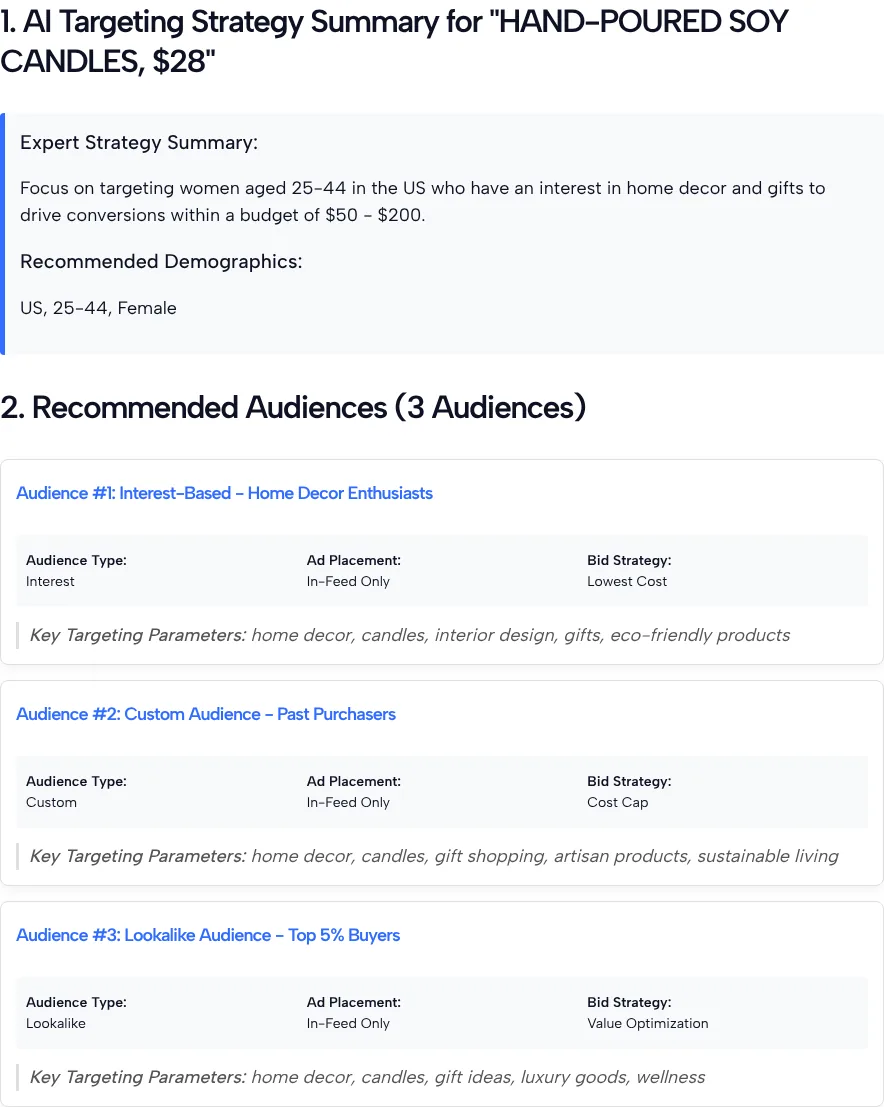
The suggested demographics were “US, 25-44, Female”, which is our persona read back to us. The three audiences:
| Audience | Type | Placement | Bid strategy | Key Targeting Parameters |
|---|---|---|---|---|
| Home Decor Enthusiasts | Interest | In-Feed Only | Lowest Cost | home decor, candles, interior design, gifts, eco-friendly products |
| Past Purchasers | Custom | In-Feed Only | Cost Cap | home decor, candles, gift shopping, artisan products, sustainable living |
| Buyer lookalike | Lookalike | In-Feed Only | Value Optimization | home decor, candles, gift ideas, luxury goods, wellness |
The mix itself is sensible: one cold audience, one built from people who already bought and one modeled on your buyers. The detail is where it slips. The custom and lookalike cards both list interest keywords, even though neither audience type is built from keywords. Only the first card’s parameters have a place in your setup.
Turning each card into a real TikTok audience
Each audience type gets built a different way in Ads Manager, so treat the three cards separately.
The interest card. Search each keyword in your ad group’s targeting settings and keep the closest matches TikTok offers. Some of the planner’s words may not exist as TikTok interests at all.
The custom card. TikTok’s Custom Audiences article describes them as audiences of known or engaged users, built from sources such as a customer file, website traffic, shop activity or engagement, and says a custom audience needs 1,000 matched users before you can use it in an ad group. For “past purchasers”, that points to a Customer File upload or a Website Traffic audience.
Short on buyers? Engaged viewers work too. TikTok’s engagement audiences guide lets you build an audience from people who watched 75% of your video ad, with lookback windows that run from 7 days up to 180 days. The TikTok Ad Retargeting Builder can help you sketch which warm groups to try first.
The lookalike card. The label the tool gave this audience in our test, “Top 5% Buyers”, isn’t a TikTok setting. TikTok’s lookalike audiences article offers three sizes, Narrow, Balanced and Broad, and needs a source audience of at least 1,000. If you read the label as “use your best 5% of buyers as the source”, you’d need 20,000 buyers to reach that minimum, which rules it out for most small shops. Use your whole buyer list as the source and pick a size instead.
Bid strategy names don’t match TikTok’s
The planner gave us Lowest Cost, Cost Cap and Value Optimization. TikTok’s bidding strategies page, updated in September 2026, lists two strategies: Target cost per result, where you set the cost per action you’re aiming for, and Maximum Results, which tries to get the most conversions your budget allows. It also says Target cost per result works for Conversions campaigns only when the optimization goal is Conversion.
Value-based bidding is a separate feature. TikTok’s Value-based Optimization article says it looks for people likely to bring a higher return on ad spend and uses Highest Value or Minimum ROAS as the bid strategy.
So map the planner’s labels to what your account shows rather than searching for them by name. For a new ad account, a cost target you can’t support yet with real results is a guess on top of a guess.
Before you build it in Ads Manager
Run through these checks first:
- Size. Run the demographics and interest keywords through our audience size estimator in the tools list above for a rough range, then check TikTok’s own estimate when you build the ad group.
- Placement. All three cards said In-Feed Only. That’s the AI’s default here, not a finding about your buyers.
- Budget band. Our test used only the $50 to $200 band, so we can’t say how much a different band changes the plan.
- Claims. If the AI suggests audiences around themes like “sustainable living” or “luxury goods”, make sure your product and your ad copy can back that angle up.
Audiences, placements and bidding all live in the ad group, and our TikTok Ads Manager guide shows where to find each one.
Targeting Planner Questions
Are the Key Targeting Parameters TikTok interest categories?
No. The planner’s AI writes them as plain keywords. Search each one in your ad group’s targeting settings and use the closest option TikTok actually offers.
Why does the custom audience card list keywords?
A flaw in the AI output, as far as we can tell. TikTok’s Custom Audiences article lists sources such as a customer file, website traffic and engagement, not keywords, so ignore the keywords on that card and build it from your own data.
What should I do with Top 5% Buyers?
Treat the label as an idea, not a setting. TikTok’s lookalike audiences article names three sizes, Narrow, Balanced and Broad, rather than percentages, so start from your full buyer list and choose a size in Ads Manager.
Will the plan pick my age and gender for me?
Only from what you type. In our test the demographics came back as the same country, age range and gender we wrote in the persona box, so put real customer data there.
Does the planner change the plan for a bigger budget?
We can’t say yet. We tested only the $50 to $200 band once. Run the same product and persona with two budget bands and compare the audiences and bid strategies it returns.
Can I plan targeting for a country outside the U.S.?
You can try. Name the country in the persona box, since the form has no separate country field. We only tested a U.S. persona, so check every suggested interest in Ads Manager for that market before you launch.