
Making a TikTok video does not require professional equipment or video editing experience. The platform’s built-in tools handle most of what you need, from recording and trimming to adding text, sound, and effects.
What matters most is not production quality but whether the content holds attention from the first second.
TikTok reached 1.99 billion global users as of late 2025, according to Statista.
The platform’s average engagement rate of 2.8% to 5% is significantly higher than competing short-form platforms, which means strong TikTok content finds an audience more efficiently than video content on most other channels.
In this guide, you will learn:
- How to set up and film a TikTok video on your phone
- How to use TikTok’s built-in editing tools
- How to choose sounds, add text, and apply effects
- How to write a hook and caption that increase watch time
- How to publish your video with the right settings
Get Free TikTok Ad Credit Up to $6000 [Limited Time Offer]

Key Takeaways
- TikTok’s built-in camera and editing tools are sufficient for creating high-performing content. A separate editing app is optional, not required.
- The first three seconds of your video determine whether most viewers continue watching or swipe away. Getting the hook right is the highest-impact part of making a TikTok video.
- Sound is central to TikTok’s culture. Using a trending audio increases your video’s discoverability through TikTok’s sound-based recommendation system.
- Good lighting matters more than camera quality. A modern smartphone in good light produces significantly better video than an expensive camera in bad light.
- Captions, on-screen text, and relevant hashtags help TikTok’s search algorithm categorize and surface your video to the right audience.
How Do You Make a TikTok Video?
To make a TikTok video, open the app and tap the plus button to access the camera. Record your video or upload existing footage, use the editing tools to trim clips and add text and sound, write your caption with relevant keywords and hashtags, and tap Post. The most important elements are a strong hook in the first three seconds and at least one audio track, either original or trending.
What You Need Before You Start
Equipment
You need a smartphone with a working camera. Modern iPhone and Android cameras produce video quality well above what TikTok requires. External equipment is optional.
The two accessories that make the biggest practical difference are a phone stand or tripod and a simple lighting source.
A tripod keeps the camera stable for talking-head videos and product demonstrations. Good lighting, natural light facing you or a ring light, prevents the flat, shadowy look that makes phone video appear low-effort.
An external microphone improves audio quality significantly, but it is not required for most content types. Many creators use the built-in phone microphone effectively by recording in a quiet environment.
TikTok App Setup
Download TikTok from the App Store or Google Play and create an account if you do not have one.
Switch to a Business Account through Settings if you are creating content for a brand, as this unlocks analytics, the commercial music library, and TikTok Shop integration.
How to Record a TikTok Video In-App
Opening the Camera
Tap the plus button at the bottom center of the TikTok home screen. This opens the in-app camera, which is where you record or upload your video content.
Choosing Your Video Length
At the bottom of the camera screen, you will see options for different video lengths: 15 seconds, 60 seconds, 3 minutes, and 10 minutes. Select the length that fits your content type before you start recording.
Short videos (under 30 seconds) tend to generate higher completion rates because the bar to watch completely is lower.
Longer videos (1 to 3 minutes) work well for tutorials, explanations, and storytelling content where depth adds value.
Recording Your Video
Press and hold the record button to capture video. You can release and press again to create multiple clips within a single video.
TikTok stitches the clips together automatically, and you can reorder, trim, or delete individual clips in the editing phase.
You can also upload existing video footage from your phone’s camera roll by tapping the gallery icon to the left of the record button.
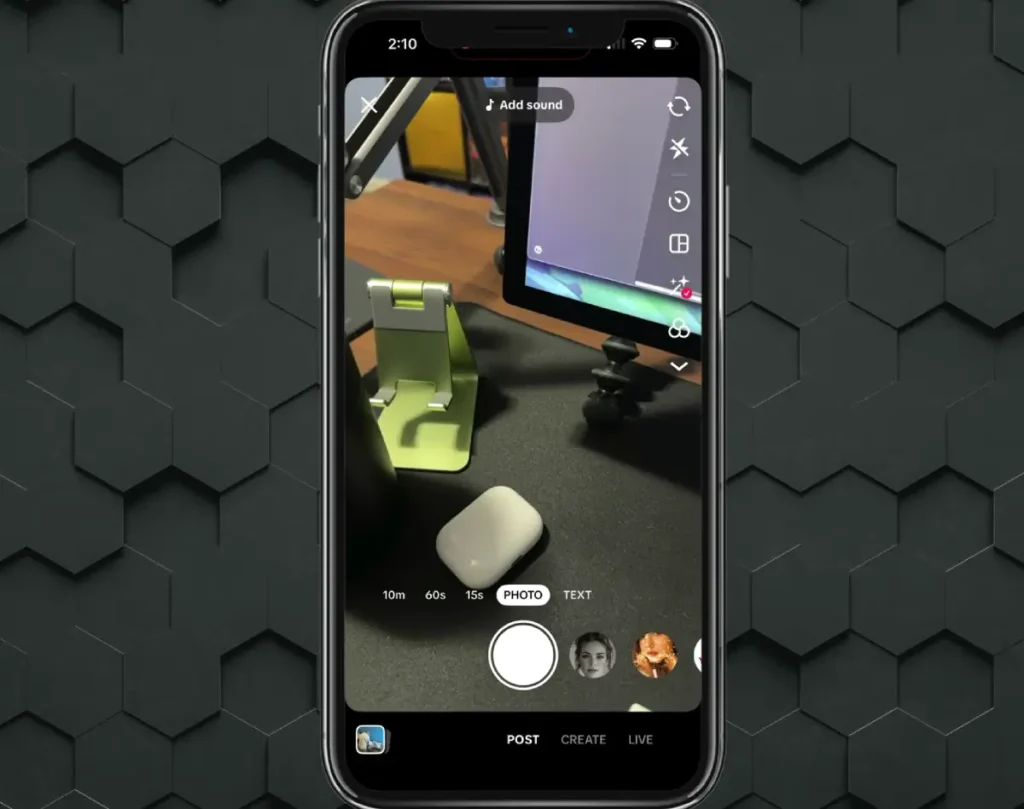
This is useful if you filmed your content in a separate camera app or want to edit together multiple pre-recorded clips.
Editing Your TikTok Video
Trimming and Adjusting Clips
After recording, TikTok opens the editing screen automatically. The timeline at the bottom shows all your clips laid out sequentially. Tap any clip to trim its start or end point, remove it from the sequence, or adjust its volume.
Remove any dead space at the beginning or end of clips. TikTok’s algorithm measures watch time from the first frame, so cutting the first two seconds where nothing happens yet is worth doing.
Adding Text and Captions
Tap the Text button to add on-screen text. You can choose font, color, and background style, then drag the text to position it anywhere on the frame.
Text on screen serves two purposes. It makes your content accessible to viewers watching on mute, which is a significant portion of TikTok’s audience in public spaces.
It also gives TikTok’s algorithm additional keyword signals to use when categorizing your video for search and discovery.
TikTok’s auto-caption feature (accessible through the Captions button) transcribes your spoken words automatically and adds styled captions to your video. Review the auto-captions and correct any errors before publishing.
Adding Sound
Tap the Sounds button to open TikTok’s audio library. You can browse trending sounds, search for a specific track by name, or choose audio from your favorites. Trending sounds are displayed at the top of the library and updated frequently.
Using a trending sound gives your video access to TikTok’s sound-based recommendation system.
Viewers who engaged with other videos using the same sound are more likely to see your video. The TikTok Sound Finder helps identify trending sounds relevant to your content type.
If you recorded with your own voice or original audio, keep it or layer a trending track underneath at reduced volume. Many creators combine their original voice with a trending instrumental in the background.
Applying Effects and Filters
TikTok offers a wide range of visual effects accessible through the Effects button in the editing screen. Filters adjust the overall color grade of your video. Effects add animated overlays, transitions, and visual treatments.
Use effects selectively. A single well-chosen effect adds visual interest without overwhelming the content itself. Videos with too many competing effects are harder to focus on, which reduces watch time.
Using Stickers and Polls
The Stickers button adds static or animated graphics to your video. Options include countdown timers, polls, question boxes, and location tags. Polls and question boxes increase comment and interaction volume, which are engagement signals the algorithm weighs positively.
Writing a Hook That Keeps Viewers Watching
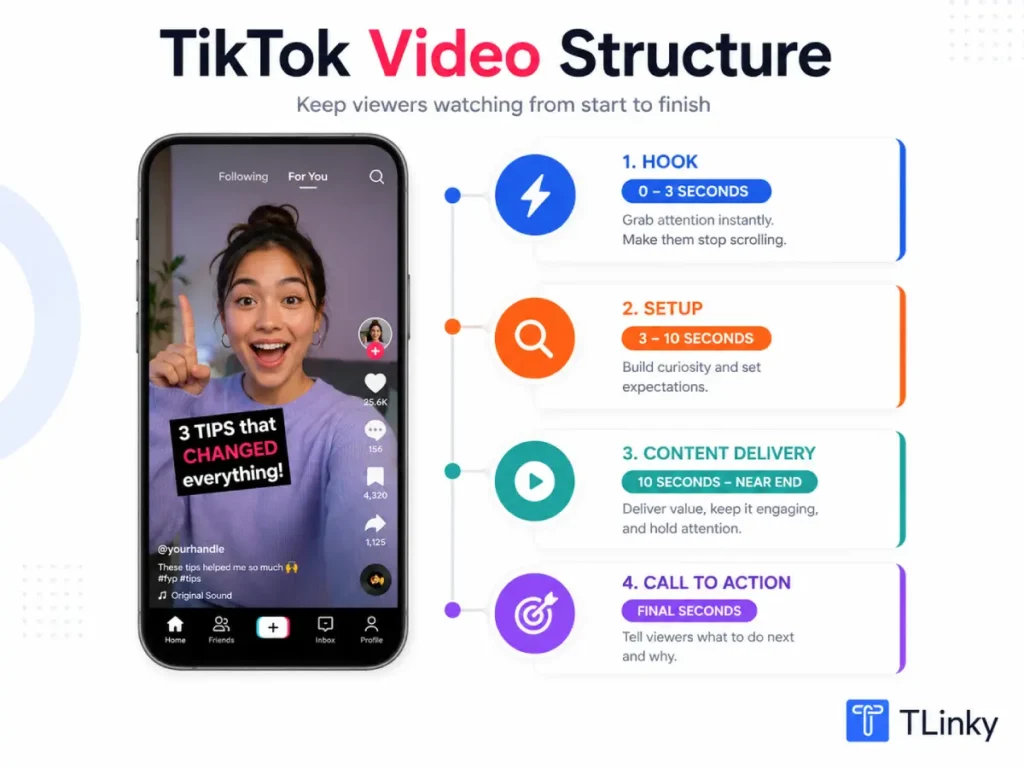
The hook is the first three seconds of your video. It determines whether a viewer continues watching or swipes away. TikTok’s algorithm uses early retention as a primary distribution signal, so a weak hook directly limits how many people see your video.
An effective hook does one of three things: it creates immediate curiosity (“The reason most people fail at this is actually surprising”), it speaks directly to a viewer’s situation (“If you have ever struggled with X, keep watching”), or it opens with a compelling visual that immediately signals interesting content is coming.
State your hook in the first sentence if you are speaking on camera. Do not open with your name, a greeting, or a slow introduction. Get directly to the reason someone should keep watching.
The 3-second hook guide covers the five most effective hook formulas with examples across different content types and niches.
Writing Your Caption and Selecting Hashtags
Caption Best Practices
Your caption appears below the video and is indexed by TikTok’s search algorithm. Write a caption that includes the specific phrase or question your video answers, using natural language.
A strong caption structure: state the main topic of the video, add a secondary detail or outcome, and include a call to action that gives viewers something to do. “Three ways to style a linen blazer for work without looking overdressed. Which one would you wear? Let me know below.”
Keep captions under 150 characters if possible. Most viewers see only the first line before tapping to expand. Make the first line count.
Choosing Hashtags
Use three to five relevant hashtags that match your content category. One broad hashtag, two to three niche-specific hashtags, and one trending hashtag when directly relevant covers the most important discovery signals.
Avoid hashtag stuffing. Twenty generic tags dilute your categorization signal without meaningfully expanding your reach. The best hashtags for TikTok guide covers the full hashtag strategy and how to research which tags your target audience actually uses.
The TikTok Hashtag Generator generates niche-specific hashtag suggestions based on your content topic.
Publishing Your TikTok Video
Privacy and Audience Settings
Before posting, check your privacy settings. Most creator and business accounts should post publicly to maximize distribution. Setting a video to “Friends Only” or “Private” limits algorithmic reach.
On the Post screen, you will also find options to allow or disable comments, duets, and stitches. Leaving all three enabled maximizes interaction potential. Comments drive engagement signals. Duets and stitches allow other creators to respond with their own content, which can extend your video’s reach significantly.
Cover Image Selection
Select a cover image that represents the most compelling visual moment in your video. The cover appears on your profile grid and in some TikTok search results. A strong cover image improves the click-through rate when someone lands on your profile and decides whether to watch.
Post Time
Post when your specific audience is most active. Check TikTok Analytics (Followers tab, Follower Activity section) to see the hours and days your followers use TikTok most frequently. Posting during peak activity increases the size of your initial viewer cohort, which improves the early engagement signals the algorithm uses to decide distribution.
The best time to post on TikTok guide covers how to identify and use your personal audience activity data.
How to Make Better TikTok Videos Over Time
Making your first ten TikTok videos is primarily a process of learning what your specific audience responds to. Do not optimize heavily before you have data.
After your first ten videos, open TikTok Analytics and look at the completion rate for each video. The videos with the highest completion rates have the strongest hooks and the most engaging content delivery. Identify what those videos have in common and apply those elements to future content.
The TikTok Analytics guide explains how to read retention curves, which show exactly where in your video viewers drop off. If 60% of viewers leave at the ten-second mark, something happens at that point that breaks engagement. Fixing that specific moment matters more than general improvements.
Reviewing your traffic sources (also in Analytics) shows how viewers found each video: For You Page, TikTok Search, hashtag pages, or your profile. Understanding which distribution channel is most active for your content tells you where to focus your optimization efforts.
Common Mistakes That Hurt Your Videos
A slow opening is the most common and most costly mistake in TikTok video creation. If your first three seconds do not give viewers a compelling reason to continue, the rest of your video does not matter because most people will not see it.
Posting videos without on-screen text or captions reduces accessibility and limits the keyword signals available to TikTok’s search algorithm. Adding text takes two to three minutes in editing and meaningfully improves discoverability.
Using the same hashtags on every video prevents the algorithm from categorizing individual videos accurately. Tailor your hashtag set to each video’s specific topic.
Not engaging with comments in the first hour after posting misses a window where comment activity boosts your video’s early performance signals. Even brief responses to early comments help.
FAQs
How long should a TikTok video be?
The optimal length depends on your content type and audience. Short videos (under 30 seconds) achieve the highest completion rates because the bar to finish the video is lower. Tutorial, educational, and story-based content performs well at 60 seconds to 3 minutes when the content justifies the length. Avoid extending videos just to hit a longer format. The rule is to end the video when the content ends, not at an arbitrary time.
Do you need editing software to make a TikTok video?
TikTok’s built-in editing tools handle everything most creators need: trimming, text, captions, sound, effects, and filters. Many top TikTok creators use nothing other than the in-app tools. External apps like CapCut (owned by ByteDance, TikTok’s parent company) add more advanced editing features like templates, transitions, and enhanced text animations if you want them, but they are not required.
Can you upload videos to TikTok from your camera roll?
Yes. On the create screen, tap the gallery icon to the left of the record button to upload video from your phone’s camera roll. You can upload a single clip or combine multiple clips from your gallery. Uploaded videos go through the same editing process as in-app recordings, so you can add text, sound, and effects after uploading. Maximum file size for uploads is 287.6 MB, and TikTok supports MP4 and MOV formats.
How do I get my TikTok video to go viral?
Viral reach comes from strong early engagement signals, primarily completion rate, shares, and re-watches. The most reliable way to improve these signals is to write a better hook that keeps viewers watching past the first three seconds. Create content that viewers want to share or save. Participate in trends early, before they peak. No technique guarantees viral reach, but improving your video’s completion rate by even ten percentage points meaningfully increases its distribution potential.
Why does my TikTok video have low views?
Low views in the first 24 hours usually mean one of three things: the hook was too weak (most viewers swiped away quickly), the video is new, and the algorithm has not finished distributing it to its initial cohort, or the account is new, and the algorithm has limited data about your content category and audience. Check your completion rate in Analytics. If it is below 30%, the hook and first ten seconds need improvement. If it is above 50% but views are still low, the video may still be in distribution, or your account may need more posting history for the algorithm to work with.
Wrapping Up
Making a TikTok video in 2026 comes down to a strong hook, clean on-screen text, at least one audio track, and a clear purpose that the video delivers on within the first thirty seconds. The technical tools are all built into TikTok’s app and take minutes to learn.
Post your first video today, even if it does not feel perfect. Real performance data from your actual audience is more valuable than any advice about what should theoretically work.
Use the TikTok Caption Analyzer to evaluate your captions before posting, and track your completion rate and traffic sources from the first post to inform every video you make after it.
For the strategy that turns individual videos into consistent audience growth, the how to get more views on TikTok guide covers the full picture of what the algorithm rewards and how to produce it reliably.
Sources
- TikTok Creator Academy, Filming 101: Thinking like a director
- TikTok Business Help Center, Content Creation Guide
- DataReportal, TikTok Users Stats Data and Trends, January 2025
- Pew Research Center, 8 Facts About Americans and TikTok, March 2026
- TikTok Newsroom, Platform and Creator Tool Updates 2026