
Facebook Caption Generator
Describe your photo or video, pick a persona, tone and call to action, and get 1 to 5 short Facebook captions you can copy in one click.
Grow your Business & Social Media Marketing
- Branded Link Shortener
- QR Code Generator
- Bio Page Builder
- Tracking & Analytics
- 16+ Integrations
Tools You May Need for Facebook Engagement
Facebook Caption Generator: what it writes
The Facebook Caption Generator writes short captions for a photo or video you’re about to post. You describe what the picture shows, pick who’s posting, a tone and a call to action, and it returns 1 to 5 caption options, each with a Copy button.
It works from your description only. The tool can’t see your image, so the more you say about the scene, the closer the captions get. It’s free, needs no sign-up and never posts anything for you.
How to get a caption that fits your photo
Getting a caption that fits your photo starts with the description, the most important of the form’s five fields:
- Visual Content Description. Write what’s in the frame and why you’re sharing it, in at least 10 characters. “Our head roaster pouring fresh beans into a cooling tray at 7 a.m.” gives the AI far more to work with than “coffee photo.”
- Posting Persona / Community Focus. Travel/Lifestyle, Food/Cooking Enthusiast, Small Business/Behind the Scenes, Parent/Family Life, Fitness/Health Focus or General Friend/Family.
- Desired Tone. Inspirational/Motivational, Humorous/Witty, Simple & Direct, or Reflective/Pensive.
- Call to Action (CTA). Ask for opinions or related media, tag a friend, react with a specific emoji, or ask a simple Yes/No question.
- Number of Captions. 1 to 5. The form suggests 3.
Then click the button. It’s labeled Generate Post, but it writes captions.
Three captions from one photo: our test
We tested the tool on November 2, 2026, with a behind-the-scenes photo from a small Austin coffee roastery: the head roaster pouring freshly roasted fall-blend beans into a cooling tray, steam rising in the morning light. We chose Small Business/Behind the Scenes, Simple & Direct, the Yes/No question CTA and 3 captions. They appeared in about 5.4 seconds.
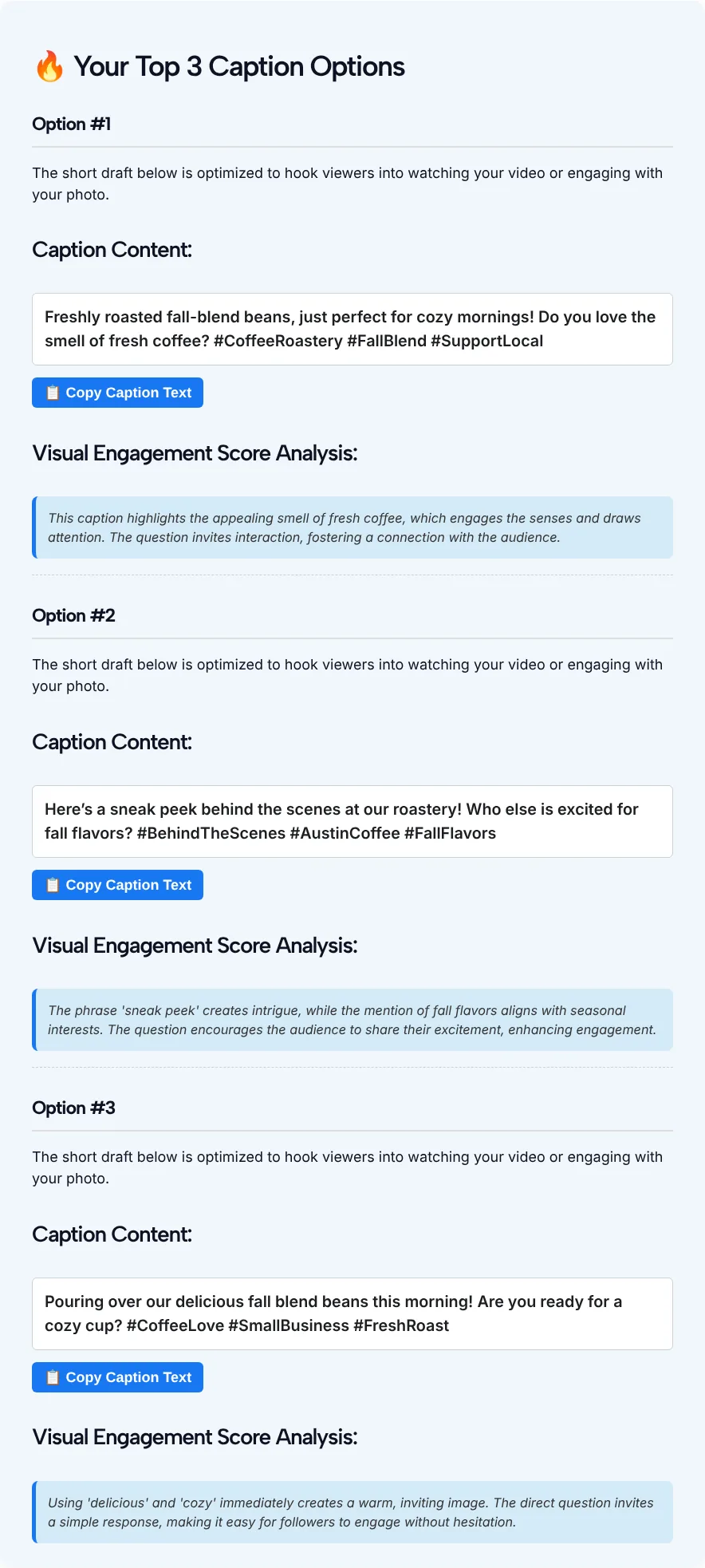
These are the three captions the tool gave us:
- “Freshly roasted fall-blend beans, just perfect for cozy mornings! Do you love the smell of fresh coffee? #CoffeeRoastery #FallBlend #SupportLocal”
- “Here’s a sneak peek behind the scenes at our roastery! Who else is excited for fall flavors? #BehindTheScenes #AustinCoffee #FallFlavors”
- “Pouring over our delicious fall blend beans this morning! Are you ready for a cozy cup? #CoffeeLove #SmallBusiness #FreshRoast”
Each caption came with exactly three hashtags, although the form has no hashtag setting. Two of the three followed our Yes/No CTA. The second one asked “Who else is excited for fall flavors?”, which can’t be answered with a yes or no.
Under each caption there’s a box called “Visual Engagement Score Analysis.” Despite the name, it contains no score. It’s a two-sentence note from the AI about why the caption might work, such as the line that “sneak peek” creates intrigue. Read it as commentary, not a measurement.
Hashtags in your Facebook caption
Hashtags on Facebook are clickable, as Meta explained when it introduced them in 2013: clicking one opens a feed of what other people and Pages are saying about that topic. Your post’s audience settings still decide who can see it.
The generator picks its three tags from your description, so check that each one is something people would actually search or follow. In our test #AustinCoffee was specific and useful, while #CoffeeLove is so broad that one more post in it is easy to miss. For more options to choose from, run your topic through our Facebook hashtag generator, which groups tags into clusters you can copy.
Make the caption sound like you
To make a caption sound like you, treat each draft as raw material and edit it before you post:
- Add a detail only you know. The name of the roaster, the blend, the time you start roasting. The AI only knows what you typed.
- Fix the call to action. If you picked a CTA, check that each caption actually uses it, as our test showed it can drift.
- Cut filler adjectives. Words like “delicious” and “cozy” appeared in our captions. Replace them with something concrete, like how the beans smell or sound.
- Keep links short. If the caption sends people to a product or menu, a short link is easier to read than a long URL.
Persona and tone pairings to start from
Persona and tone pairings work best when they match the post, so start from these five and adjust after the first run:
| What you’re posting | Persona | Tone | CTA |
|---|---|---|---|
| A new product or menu item | Small Business/Behind the Scenes | Simple & Direct | Ask a simple Yes/No question |
| A trip photo | Travel/Lifestyle | Reflective/Pensive | Ask for opinions/related media |
| A recipe or dinner shot | Food/Cooking Enthusiast | Humorous/Witty | Tag a friend who needs to see this |
| A family milestone | Parent/Family Life | Inspirational/Motivational | React with a specific emoji |
| A workout or race result | Fitness/Health Focus | Inspirational/Motivational | Ask for opinions/related media |
If you need a full post with more text than a caption, the Facebook post generator linked above writes longer drafts.
Facebook Caption Generator FAQ
Is the Facebook Caption Generator free?
Yes. It’s free and you don’t need an account. The captions appear on the same page, and each one has a Copy Caption Text button.
Does it look at my photo?
No. There’s no upload field. The tool writes from the text you type in the Visual Content Description box, so describe what’s in the picture, where it was taken and why you’re posting it.
Does it add hashtags?
In our test, yes. Every caption ended with three hashtags, even though the form has no hashtag option. Keep the ones that fit and delete the rest.
What is the Visual Engagement Score Analysis?
The Visual Engagement Score Analysis is a short note from the AI under each caption about why the wording might get a reaction. There’s no number or score in it, and it isn’t based on any data about your page.
How many captions can I get at once?
Between 1 and 5 per request. The form suggests 3, which gives you a few angles to compare without much reading.
Can I write captions in another language?
The form and its options are in English, and we only tested it in English. You can try writing your description in another language, but check the result carefully before you post it.