The ROI of a TikTok ad campaign is the net profit it brings in divided by everything it cost, while ROAS is the revenue from your ads divided by ad spend alone. Those are the definitions TikTok for Business uses in its ROAS guide, and the gap between them is where a “profitable” campaign can turn out to lose money.
So what is a good TikTok ad ROI? Any positive one. In ROAS terms, that means beating your breakeven ROAS, which is 1 divided by your profit margin. If your margin is 40%, every campaign above 2.5x makes money and every campaign below it loses money.
New to TikTok Ads? Get Up to $6,000 in Matching Ad Credit
Reach is the easy part to buy on TikTok (our TikTok statistics roundup covers the audience numbers). Profit is the hard part, and it starts with knowing which number you are looking at.
If you want the general finance side first, start with our guide to Return on Investment (ROI). For every other column in Ads Manager, see our list of key TikTok ad metrics.

Key Takeaways
- ROAS vs. ROI: ROAS is revenue from ads divided by ad cost; ROI is net profit divided by total costs, as TikTok for Business defines them.
- Good is personal: any ROAS above your breakeven (1 / profit margin) is good. A 40% margin needs at least 2.5x.
- GMV Max “ROI” is a revenue ratio: TikTok’s Product GMV Max best practices set recommended ROI as historical GMV divided by historical ad cost.
- Track with Pixel and Events API together, and send order value with every purchase.
- Compare like with like: each ad group has its own click and view attribution window.
- Wait out the learning phase: about 25 campaign results or 7 days, per TikTok’s learning phase page.
ROI vs. ROAS on TikTok: The Difference That Decides Profit
ROAS tells you whether your ads bring in more revenue than they cost, and ROI tells you whether the business made money after every cost. You need both, because a campaign can look strong on one and weak on the other.

TikTok gives the two formulas side by side in its guide to return on ad spend:
- ROAS = revenue from ads ÷ advertising cost
- ROI = net profit ÷ total costs, where total costs include product costs, shipping, staffing and creative production
ROAS is the number your TikTok Ads Manager reports. ROI needs numbers that live outside TikTok, like your cost of goods, so you work it out yourself.
One Campaign, Three Numbers
Here’s one example, start to finish. Say you spend $1,000 on TikTok ads, the campaign brings in $4,000 in sales, and the products you sold cost you $1,500 to make and ship.
| Metric | Formula | Result |
|---|---|---|
| ROAS | $4,000 ÷ $1,000 | 4x |
| Net profit | $4,000 – $1,000 – $1,500 | $1,500 |
| ROI on total costs | $1,500 ÷ ($1,000 + $1,500) | 60% |
| Profit per ad dollar | $1,500 ÷ $1,000 | 150% |
The last two rows are both called “ROI” around the web, which is why ROI figures are hard to compare. The 60% figure follows the ROI definition in TikTok’s ROAS guide, because it divides by all costs. If you divide by ad spend only, as the 150% row does, you answer a narrower question: how much profit each ad dollar produced.
We ran the same numbers through TLinky’s TikTok Ads ROI Calculator (linked with our other calculators below) on Nov 5, 2026 (Chromium, desktop 1280px). The tool returned $1,500 net profit, 60% ROI and 4x ROAS, so it uses the total-cost version.
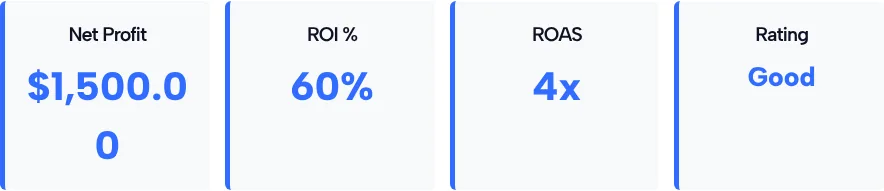
Notice what the 4x hides. If your product costs were $2,800 instead of $1,500, the same 4x ROAS would leave you $200 in profit. ROAS judges the ads, and ROI judges the business.
What Is a Good ROI or ROAS on TikTok?
A good TikTok ROI is any positive ROI, and a good ROAS is any ROAS above your breakeven ROAS. We found no all-advertiser average ROAS on TikTok’s help or business pages, and a single “good” number copied from a blog can’t tell you whether your own campaign makes money.
Your margin can. That’s why the breakeven figure matters more than any benchmark.
The Breakeven ROAS Formula
Breakeven ROAS is the lowest ROAS at which a campaign stops losing money.
Breakeven ROAS = 1 / Your Profit Margin
A worked example for one product:
- You sell a product for $100.
- Your total cost for that product (cost of goods, shipping, packaging) is $60.
- Your profit before ads is $40.
- Your profit margin is 40% (or 0.4).
Your Breakeven ROAS = 1 / 0.4 = 2.5
If your margin is 40%, any campaign below 2.5x ROAS loses money on this product. At 3x, you keep a profit, and every step above that is margin you can reinvest.
If you run the earlier example the same way, $1,500 in product costs on $4,000 in sales leaves a 62.5% margin, so breakeven ROAS is 1 / 0.625 = 1.6. That campaign’s 4x sits well above it.
TikTok Case Studies: A Range, Not a Benchmark
TikTok’s published results vary too widely to work as a benchmark. Peculiar Eyewear’s TikTok case study reports 2.3x ROAS from a Shopify and Pixel campaign, while Princess Polly’s case study reports 15x from a discount-code campaign. These are single brands that TikTok chose to feature, not averages, so read them as a range of what’s possible.
What TikTok Means by “ROI” in GMV Max
In GMV Max, TikTok’s “ROI” is a revenue ratio, not profit: TikTok’s Product GMV Max best practices calculate recommended ROI as historical non-LIVE GMV divided by historical ad cost, so it behaves like ROAS. If you sell through TikTok Shop, this is the “ROI target” you type into the campaign.
That matters because GMV Max is now the main way to advertise Shop products. TikTok’s GMV Max migration notice says that, starting July 2025, GMV Max became the default and only supported campaign type for TikTok Shop Ads.
Here’s how TikTok describes the setting:
- You choose an ROI target, and the campaign spends within that target’s range, per TikTok’s overview of GMV Max campaigns.
- The Product GMV Max best practices say lower ROI targets raise delivery while higher ones may limit spend, and ask you to keep each ROI setting for at least three full days before changing it.
To turn that into a profit check, treat the ROI target as a ROAS target. Work out your breakeven ROAS from your Shop margin after product costs, shipping, platform fees and any affiliate commission. Then keep the target above that number. A target of 4 with a breakeven of 2.5 leaves room for profit, while a target of 2 on the same product loses money on every sale the ads drive.
How to Measure ROI on TikTok Ads
To measure ROI on TikTok ads, track purchases with the TikTok Pixel and Events API, send the order value with each purchase, read ROAS in Ads Manager, and then subtract your product and other costs to get profit.
1. Connect the TikTok Pixel and Events API
The TikTok Pixel is a piece of code on your website that shares website events, like purchases, with TikTok. The Events API sends the same events from your server instead of the browser.
Use both. TikTok’s Events API help page says Pixel or Events API setup is required for the Web Conversions objective and recommends running both together with event deduplication. In its ROAS guide, TikTok reports that advertisers using both captured 19% more events and saw a 15% better cost per action than with one alone.
Our TikTok Pixel installation guide walks through the setup.
2. Track the Event That Earns Money
Optimize and report on the event closest to revenue, not page views. For a store, that’s Purchase. For lead generation, it’s Lead or a form event, and for subscriptions, StartTrial.
If your setup is older, you may still see CompletePayment. TikTok’s standard events update renamed CompletePayment to Purchase in May 2025, keeps old setups working, and asks new Pixels to use Purchase.
Send the order value and currency with each purchase. The standard events reference lists value and currency among the recommended parameters for Purchase. Without a value, a sale has no revenue figure for ROAS to use.
3. Tag Your Ad Links With UTMs
UTM tags let you check TikTok’s numbers against your own analytics. Google Analytics Help says to always include utm_source, utm_medium and utm_campaign when you add campaign parameters to a URL.
A TikTok ad link might end with ?utm_source=tiktok&utm_medium=paid_social&utm_campaign=spring_sale. Our beginner’s guide to UTM parameters explains each tag.
4. Find Your ROAS in TikTok Ads Manager
ROAS lives on the Campaigns page once you add it to your columns.
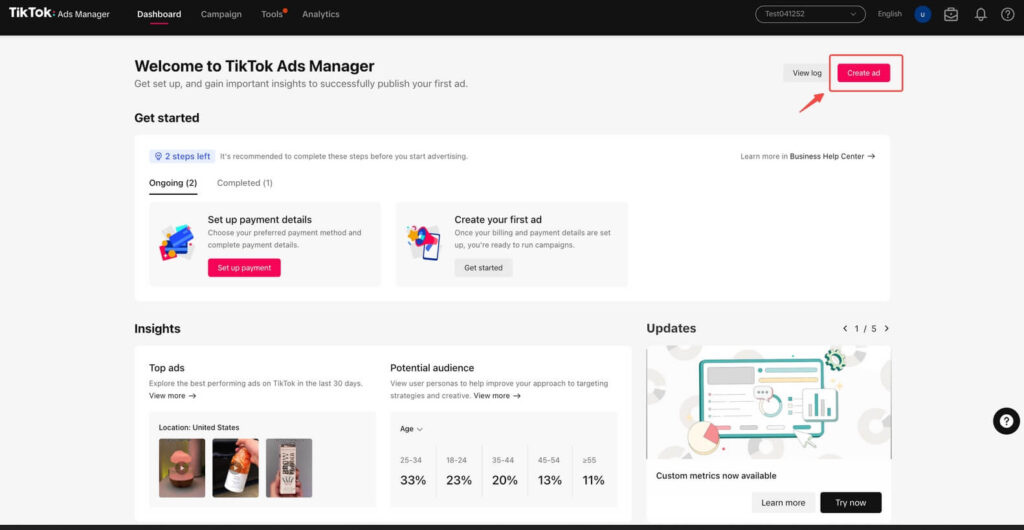
TikTok’s help page on viewing ad performance describes the path:
- Open the Campaigns page from the top navigation bar.
- Click the Campaign, Ad group or Ad tab.
- Open the Custom table dropdown on the top right.
- Click Custom Columns and add ROAS, your purchase value and cost per purchase.
5. Add a Profit Check as a Custom Metric
Ads Manager can’t see your product costs, but it can hold a formula. TikTok’s custom metrics help page lets you build a metric from existing columns, choose a Number, Percentage or Money format, and save it.
One useful formula: purchase value multiplied by your profit margin, minus cost. For example, with a 40% margin, a campaign with $4,000 in purchase value and $1,000 in cost shows $600 profit before other overhead. A negative number means the campaign sits below breakeven, so check it before you raise any budget. You can also run the numbers in these TLinky calculators; the ROI calculator is the one that takes your product costs:
Attribution Windows: Why Your Numbers Don’t Match
TikTok Ads Manager, TikTok Shop Seller Center and Google Analytics give different sales totals because each one credits sales by different rules. The attribution window is the biggest of those rules: how long after someone clicks or watches an ad a sale still counts for that ad.
For web campaigns, you pick the window per ad group. TikTok’s help page on ad group attribution windows lists these options and notes that you can’t change them after the ad group is published:
| Attribution type | Options in Ads Manager | Counts a sale when |
|---|---|---|
| Click-through | 1, 7, 14 or 28 days | someone clicked the ad, then bought within the window |
| View-through | Off, 1 or 7 days | someone watched the ad without clicking, then bought within the window |
TikTok Shop Ads follow fixed rules. TikTok’s Shop Ads attribution page gives clicks a 7-day window and views a 1-day window, credits the most recent ad with clicks ahead of views, and explains that Seller Center reports sales on the day they happen while Ads Manager reports sales inside the 7-day window.
How to Compare TikTok With Google Analytics
Google Analytics can only credit TikTok for visits that reach your site with tracking, so a sale from someone who watched an ad and later typed your URL usually shows up as direct or search traffic there. Expect TikTok’s view-through numbers to run higher than GA4’s TikTok numbers, and compare trends over time rather than totals.
TikTok makes the same point at a larger scale. In its ROAS guide, TikTok says research found it drove 788% more conversions than last-click attribution suggested. That’s TikTok’s own research, so treat it as a reason to look past last-click reports, not as a number to plug into your math.
Ask Buyers Where They Heard of You
A one-question post-purchase survey (“How did you hear about us?”) catches sales no pixel sees. The same TikTok ROAS guide names post-purchase surveys, along with Attribution Analytics, as ways to see the true impact of campaigns.
What Moves Your TikTok ROAS
When ROAS falls short of breakeven, the cause is usually one of five things: the creative, the offer, the audience, the landing page or the competition in your niche.
Your Creative
The video is the first thing people judge on TikTok. An ad that looks like a TV spot gets scrolled past, while one that looks like a regular TikTok post gets watched. TikTok’s own ROAS guide says authentic, lo-fi videos often outperform polished production.
In practice, that means a phone camera, good light, a clear voiceover and a UGC (user-generated content) style.
Your Price and Offer
TikTok is a discovery feed, so people often buy on impulse. Simple products at an easy price, with a clear offer and a real deadline, tend to convert faster than complex, high-ticket items that need research first.
Your Audience (Cold vs. Warm)
New audiences cost more to convert than people who already know you. Keep prospecting and retargeting in separate campaigns so a strong retargeting ROAS doesn’t hide a weak prospecting one, or the other way around.
Your Landing Page
A high click-through rate with a low ROAS usually points to the page, not the ad.

Slow pages, forms that are hard to fill on a phone and surprise shipping costs at checkout all push people to leave before they pay.
Your Niche
Crowded categories like fashion and skincare mean more advertisers bidding for the same people, which can raise your CPM (our breakdown of what TikTok ads cost covers CPM and CPC). Higher costs put more pressure on your conversion rate to keep ROAS above breakeven.
How to Improve TikTok Ad ROI
To improve TikTok ad ROI, fix the creative first, then the funnel, then the targeting. These six moves go after the most likely causes when ROAS sits below breakeven.
Test Your Hooks With a Split Test
Keep the offer and call to action the same and change only the first few seconds of each video. TikTok’s split test setup guide asks for a test schedule of at least 7 days and compares a control ad group with a test ad group on the key metric you choose. Pause the losing hook and put the budget behind the winner.
Build a Retargeting Campaign
Run prospecting to bring new people to your site, then show a different ad, often with a stronger offer, to people who visited or added to cart. TikTok’s Website Traffic audience guide explains how to build that audience under Tools > Create Audience > Custom Audience > Website Traffic, and notes that it needs the Pixel with the event set up.
Shorten the Path With TikTok Shop
TikTok Shop lets people check out inside the app, which removes the slow page load and the long checkout form. If you go this route, set your GMV Max ROI target above your breakeven ROAS, as covered earlier.
Run Spark Ads on Posts That Already Work
Spark Ads run organic TikTok posts as ads, and TikTok’s Spark Ads help page says the views, likes, comments, shares and follows from the ad are credited to the original post. Start with organic posts that already hold attention, yours or a creator’s with their authorization.
Try Broad Targeting
Narrow interest stacks can starve the algorithm of room to find buyers. TikTok’s ROAS guide says broad targeting often beats narrow targeting, with 15% lower cost per acquisition and 20% higher conversion rates.
Give the Learning Phase Time
New campaigns swing up and down before they settle. TikTok’s learning phase page says volatility usually starts to decline after about 25 campaign results or 7 days, and that pausing or making edits that restart learning can keep a campaign from leaving it. Judge ROAS after that point, not on day one.
Related guides:
👉 TikTok Ad Credit: How New Advertisers Get Matched Ad Credit
👉 Return on Ad Spend (ROAS): Formula, Benchmarks, and How to Improve It
👉 How to Analyze TikTok Ads Performance
👉How to Scale TikTok Ads Without Ruining Your ROAS
Frequently Asked Questions
What’s the difference between ROI and ROAS on TikTok?
ROAS divides the revenue from your ads by what you spent on them. For example, $4,000 in sales from $1,000 in spend is a 4x ROAS. ROI divides net profit by all your costs, including product costs and shipping, so it shows whether the business actually made money.
Why is my ROAS high, but I’m still losing money?
Your ROAS is probably below your breakeven ROAS. A 2.8x ROAS looks healthy, but if your margin is 33%, your breakeven is about 3x, so each sale the ads bring in costs more than it earns once product costs are paid.
How long should I wait before measuring the ROAS of a new campaign?
Wait until the campaign has had time to leave the learning phase. TikTok’s learning phase page says volatility usually starts to decline after about 25 campaign results or 7 days, so judging an ad after a day or two often means judging noise.
How do I measure TikTok ad ROI without a website?
For an app, TikTok’s attribution metrics glossary says you need the app set up in Events Manager and connected to a mobile measurement partner. For a marketplace store where you can’t add the Pixel, give TikTok buyers a unique discount code and count the orders that use it.
Can I track ROI for influencer campaigns on TikTok?
Yes. Give each creator a unique discount code or a link with its own UTM tags, then compare the revenue each one drives with what you paid them and your product costs.
The Bottom Line
Your TikTok ads pay off when ROAS stays above your breakeven ROAS (1 divided by your profit margin) and ROI stays positive after every cost. Work out your margin first, track purchases with the Pixel and Events API, and compare numbers only when they use the same attribution window. Then put your budget behind the campaigns that clear breakeven and fix or stop the ones that don’t.