
TikTok LIVE is one of the platform’s most underused tools for creators and small businesses.
Going live puts you in front of viewers in real time, allows direct conversation with your audience, and opens a direct income stream through virtual gifts.
Unlike recorded videos that compete for attention in the For You Page, a live stream sends notifications to your followers the moment you go live.
That instant reach makes TikTok LIVE particularly valuable for building community and creating urgency around limited offers or product launches.
In this guide, you will learn:
- What requirements you need to go live on TikTok
- How to start a TikTok LIVE session step by step
- Which LIVE features are available and how to use them
- How to build and grow a live audience
- How TikTok LIVE Shopping and gift income work
Get Free TikTok Ad Credit Up to $6000 [Limited Time Offer]

Key Takeaways
- To go live on TikTok, you need at least 1,000 followers and must be 18 years old or older. Accounts under 18 cannot receive gifts or access TikTok LIVE.
- TikTok LIVE sends real-time notifications to your followers when you start streaming, giving live content a distribution advantage over standard videos.
- Viewers can send virtual gifts during a live session, which convert to Diamonds that creators can redeem for cash. This is one of TikTok’s most accessible direct income streams.
- TikTok LIVE Shopping allows creators and businesses to showcase and sell products directly during a live stream, with viewers able to purchase without leaving the app.
- According to TikTok’s own creator resources, live sessions that run at least 30 minutes tend to outperform shorter sessions because they give more followers time to join and engage.
How Do You Go Live on TikTok?
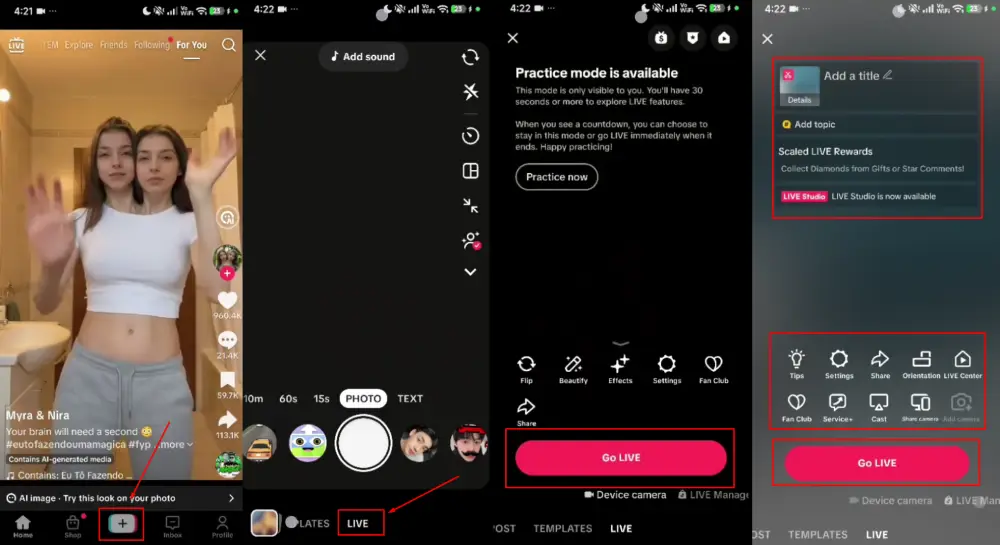
To go live on TikTok, open the app, tap the plus button to create content, and swipe to select LIVE from the options at the bottom of the screen. Add a title, choose your topic category, and tap Go Live. You need at least 1,000 followers and must be 18 or older. The LIVE option only appears if your account meets both requirements.
TikTok LIVE Requirements
Follower and Age Requirements
TikTok requires a minimum of 1,000 followers to access the LIVE feature. This threshold ensures a baseline audience before opening the live broadcast tool.
The minimum age for going live is 18. Accounts owned by users under 18 cannot access LIVE features even if they meet the follower requirement.
To receive virtual gifts during a live session, your account must also be verified as 18 or older through TikTok’s account settings.
Account and Content Requirements
Your account must be in good standing with TikTok’s Community Guidelines. Accounts with recent violations or active content warnings may have LIVE features temporarily restricted.
Your account must also not be set to private. Private accounts cannot broadcast live streams because live streams are inherently public.
How to Go Live on TikTok: Step by Step
Step 1: Open the Create Screen
Tap the plus button at the bottom center of the TikTok app to open the content creation screen. This is the same button you use to start recording a regular video.
Step 2: Select LIVE
At the bottom of the camera screen, you will see a row of options: Photo, Video, Templates, and LIVE. Swipe left or tap LIVE to open the live stream setup screen. If LIVE is not visible, your account does not yet meet the follower or age requirements.
Step 3: Set Your Title and Category
Add a descriptive title for your live session. A clear title helps viewers who see the notification decide whether to join. Something like “Answering your questions about my skincare routine” works better than a generic “come hang out” title.
Select the topic category that best matches your content. TikTok uses this to show your live stream to viewers who have watched similar live content before.
Step 4: Add Optional Features
Before going live, you can add effects, filters, or LIVE Shopping integration if you have TikTok Shop connected. You can also schedule a live session in advance using the Upcoming LIVES feature, which lets you promote it to your followers before it starts.
Step 5: Tap Go Live
When your setup is ready, tap Go Live. A countdown of three seconds begins, then your stream starts. Followers who are active on TikTok at that moment receive a push notification.
TikTok LIVE Features You Should Know
Virtual Gifts and Diamonds
Viewers can send virtual gifts during your live session using TikTok Coins, which they purchase in advance with real money. Gifts appear on screen as animations and convert to Diamonds in your account at a rate set by TikTok.
Diamonds can be redeemed for cash through PayPal or other supported payment methods.
The conversion rate fluctuates, but creators typically receive roughly $0.05 per Diamond, meaning a gift worth 1,000 Coins translates to approximately $5 after TikTok’s cut.
Gift income is most consistent in niches where live interaction is a core part of the content: Q&A sessions, performance streams, tutorial walkthroughs, and product reveals all generate strong gift activity.
Questions Feature
Viewers can submit questions during your live stream that appear as overlay prompts on your screen. This is useful for Q&A sessions, AMA (ask me anything) formats, and any live session where viewer questions drive the content.
Reading and answering questions keeps the session interactive and gives viewers a direct reason to stay in the stream longer.
Moderation Tools
TikTok LIVE includes moderation features that let you filter comments by keyword, add co-moderators to help manage the chat, mute or remove individual users, and set comment permissions (everyone, followers only, or nobody).
Setting up at least basic keyword filtering before your first stream prevents disruptive comments from appearing on screen during the broadcast.
Multi-Guest Feature
The Multi-Guest feature lets you invite other TikTok users to join your live stream as guests, splitting the screen and allowing real conversations. This is useful for interviews, collaborative content, debates, and joint Q&A sessions.
Inviting a guest with a complementary audience can expose your live stream to their followers, who receive a notification that the creator they follow has joined a live stream.
LIVE Shopping
TikTok LIVE Shopping lets sellers showcase products during a live session, with product cards appearing on screen that viewers can tap to purchase without leaving the stream. This format is extremely effective for product launches, demonstrations, and flash sales.
The TikTok Live Shopping Ads guide covers how to set up and promote live shopping events, including how to use paid promotion to drive live attendance.
How to Grow Your TikTok LIVE Audience
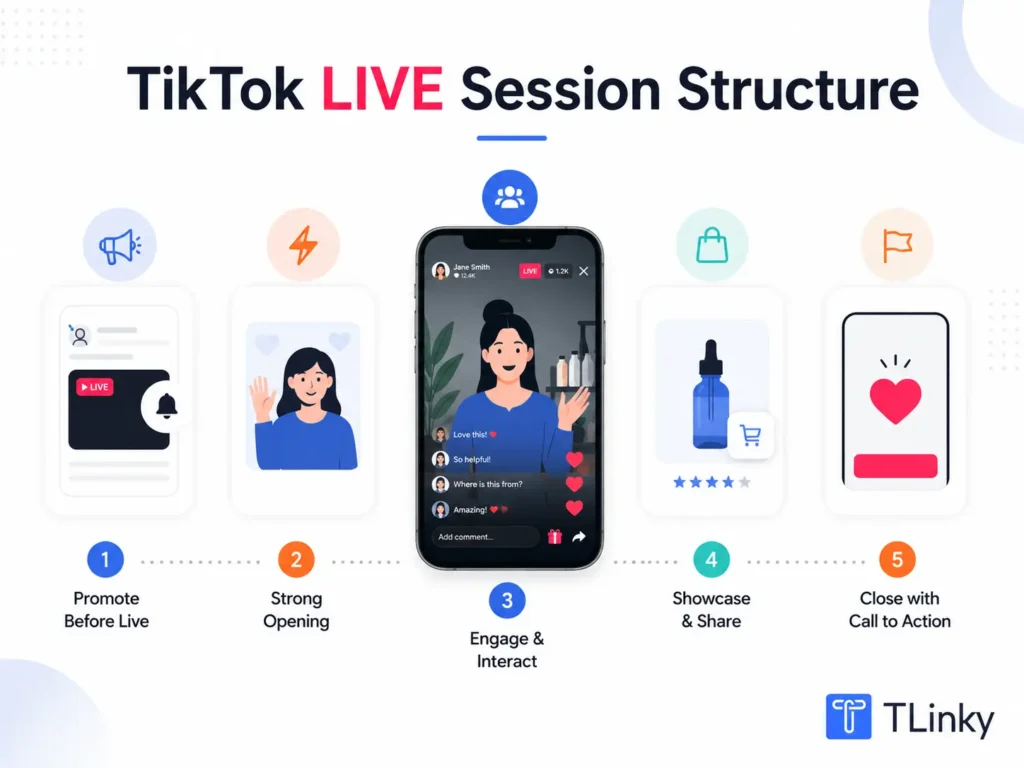
Promote Your Live Before You Start
Use regular TikTok videos to promote upcoming live sessions. Post a teaser video a day before announcing the topic, time, and what viewers will get by joining.
The Upcoming LIVES feature lets you create a formal schedule that followers can save and get reminders for.
Promoting through your regular content pipeline is the most effective way to ensure followers show up. An unannounced live depends entirely on the notification catching people at the right moment.
Go Live Consistently at the Same Time
Consistency in your live schedule trains your audience to expect you. A creator who goes live every Tuesday and Thursday at 7 PM builds an audience that plans for it. Inconsistent timing makes it harder for followers to develop the habit of joining.
Check your TikTok Analytics under the Followers tab to see which times your followers are most active. Build your live schedule around that data. The TikTok Analytics guide covers how to read follower activity data.
Stay Live for at Least 30 Minutes
Short live sessions of five to ten minutes give very few followers a chance to join. Many followers receive the notification but check in fifteen minutes after you have already started.
Staying live for at least 30 minutes ensures the notification has time to work and latecomers have something to join.
Aim for 30 to 60 minutes per session as your baseline, longer if the content supports sustained engagement.
Engage Actively With the Chat
Acknowledge viewers by name when they join, read comments aloud, and respond to questions in real time. Active chat engagement keeps viewers watching because they feel seen.
A live stream where the creator is clearly reading and responding to the chat creates a very different viewing experience from one where comments scroll unacknowledged.
Collaborate With Other Creators
Using the Multi-Guest feature to invite another creator exposes you to their audience. When you appear in another creator’s live, or they appear in yours, followers of both creators receive notifications about the joint session.
Collaborative live sessions with non-competing creators in adjacent niches are an effective way to grow your live audience faster than solo sessions alone.
TikTok LIVE for Business and Product Sales
Going live regularly gives businesses a direct, high-conversion content format. Live product demonstrations convert viewers to buyers at a higher rate than standard videos because the real-time format creates trust and urgency.
Use TikTok LIVE for product launches, Q&A sessions about your products, behind-the-scenes sessions from your production facility, and flash sales that are only available during the live stream.
The TikTok for business guide covers how live streaming fits into a broader TikTok business strategy alongside organic content and paid advertising.
For small business live shopping strategy specifically, the small business TikTok ideas guide includes live session formats that work well for product demonstrations and customer Q&A.
Technical Tips for Better TikTok Lives
Lighting makes the biggest technical difference in live stream quality. Natural light facing you (not behind you) or a ring light provides the clean, even illumination that makes faces easy to see and keeps viewers engaged visually.
Use a phone stand or tripod so your hands are free to demonstrate products, show materials, or gesture naturally during your stream. A camera that bobs and shakes is fatiguing to watch over a 30-minute session.
Connect to a stable Wi-Fi network rather than cellular data before going live. Cellular connections are more prone to interruption, which causes stream quality to drop and can disconnect your session entirely.
Test your audio before starting. A noisy background or muffled microphone makes live sessions difficult to follow. Many creators use a basic lapel microphone ($15 to $30) that significantly improves audio clarity over the built-in phone mic.
FAQs
Why is the LIVE option not showing up on my TikTok?
If the LIVE option is not visible in your create screen, your account likely does not yet meet the requirements. You need at least 1,000 followers and must be 18 or older. If you meet both requirements and still do not see the option, try updating the TikTok app to the latest version. In some cases, the LIVE feature rollout is staggered by region or account type. Contact TikTok support through the app if the option remains missing after updating.
Can you go live on TikTok from a computer?
TikTok LIVE is primarily a mobile feature, but TikTok does support streaming from a computer using approved third-party streaming software such as OBS Studio when connected through TikTok’s live stream API. This option is available to creator accounts with 1,000 or more followers. To set it up, go to TikTok Studio on desktop and navigate to the LIVE section to find your stream key and server URL for third-party software integration.
How much money can you make from TikTok LIVE gifts?
Gift income varies widely depending on your audience size, niche, and how actively your viewers engage during sessions. Creators with 5,000 to 20,000 followers who go live regularly might earn between $10 and $100 per session in gifts. Larger accounts or those in high-gift niches like entertainment, gaming, or talent performance can earn significantly more. Gift income is unpredictable and should be treated as a supplement to other monetization methods rather than a primary income source.
Does going live on TikTok help grow your follower count?
Going live can drive follower growth, but indirectly. Viewers who discover your live session through notifications or the LIVE discovery tab may choose to follow after joining. Active live sessions that generate strong engagement can also increase your overall account activity signals, which the TikTok algorithm uses to categorize and distribute your content. However, regular video content is generally more effective for follower growth than live sessions alone.
What should you talk about on TikTok LIVE?
The most successful live formats have a clear purpose that gives viewers a reason to stay. Q&A sessions where viewers submit questions, product demonstrations or reveals, tutorials performed in real time, behind-the-scenes business or creative process sessions, and collaborative interviews with guests all provide structure that sustains engagement. Avoid unstructured “just chatting” sessions until you have an established live audience that already knows and values your presence.
Wrapping Up
Going live on TikTok in 2026 requires meeting the 1,000-follower threshold, planning your sessions with a clear purpose, and showing up consistently so your audience knows when to find you.
The technical setup is straightforward; the growth comes from regular, structured sessions that give viewers a genuine reason to join and stay.
Start with one live session per week to build the habit and test what formats resonate with your specific audience. Use the gift income data and average viewer count from TikTok Analytics to understand which session types are most valuable.
For the content strategy that drives more followers to your live sessions, the how to get more views on TikTok guide covers the content fundamentals that build an engaged audience worth broadcasting to.
Sources
- TikTok LIVE Creator Documentation, Official TikTok Help Center
- TikTok Business Help Center
- TikTok Creator Academy, LIVE for your business: engage, convert, and grow
- DataReportal, TikTok Users Stats Data and Trends, January 2025
- Pew Research Center, 8 Facts About Americans and TikTok, March 2026