
Best Free Pinterest Hashtag Generator [AI Powered]
The Pinterest Hashtag Generator turns a short description of your Pin and its niche into three sets of hashtag ideas, with 3, 5, 10 or 20 tags in each set, to copy into your Pin description.
Grow your Business & Social Media Marketing
- Branded Link Shortener
- QR Code Generator
- Bio Page Builder
- Tracking & Analytics
- 16+ Integrations
What the Pinterest hashtag generator does
The Pinterest hashtag generator writes hashtag ideas for one Pin, based on what the image shows and the category it belongs to. You get three clusters that each take a different angle, such as inspiration, DIY or a specific style, so you can match the tags to the Pin you’re actually posting.
It’s made for people who pin regularly: food and lifestyle bloggers, home decor and fashion creators, Etsy and online shop owners, and social media managers handling a brand account. The tool is free, needs no account and doesn’t connect to Pinterest. You copy the tags and add them when you create or edit the Pin.
The suggestions come from an AI model, not from Pinterest’s own search data. You won’t see search volume, saves or trend numbers next to any tag, so use your own judgment, and Pinterest’s search bar, to pick the keepers.
How to get hashtags for a Pin
Describe the Pin, name its niche, pick a strategy and a count, then click Generate Hashtags:
- Pin Topic / Visual Description. Say what’s in the image, not just the subject. “Small home office with a white oak desk, neutral decor and hidden cable storage” beats “office ideas,” because the details turn into specific tags.
- Category / Niche. Home Decor, Fashion, Recipes, Travel or whatever fits your board.
- Pinterest Strategy. Visual Discovery & SEO, Aesthetic & Inspiration, Product & Shopping (E-commerce), or Trending / Seasonal Idea.
- Number of Hashtags. 3, 5, 10 or 20 per cluster. With three clusters, that’s 9, 15, 30 or 60 tags in total.
Both text fields are required. Clear wipes the form and the results. For a new batch, tweak the description or strategy and generate again.
The form labels 20 as “Maximum Allowed.” That’s the tool’s own wording. We couldn’t find a current Pinterest Help page that sets a hashtag limit, so don’t read it as a Pinterest rule.
Example: hashtags for a home office makeover Pin
Our test produced 30 tags in three clusters, and most of them matched the photo closely. On November 2, 2026, we described a small home office makeover with a white oak desk, cozy neutral decor and smart cable storage, chose Home Decor, Visual Discovery & SEO and 10 hashtags. The results came back in about 4.4 seconds.
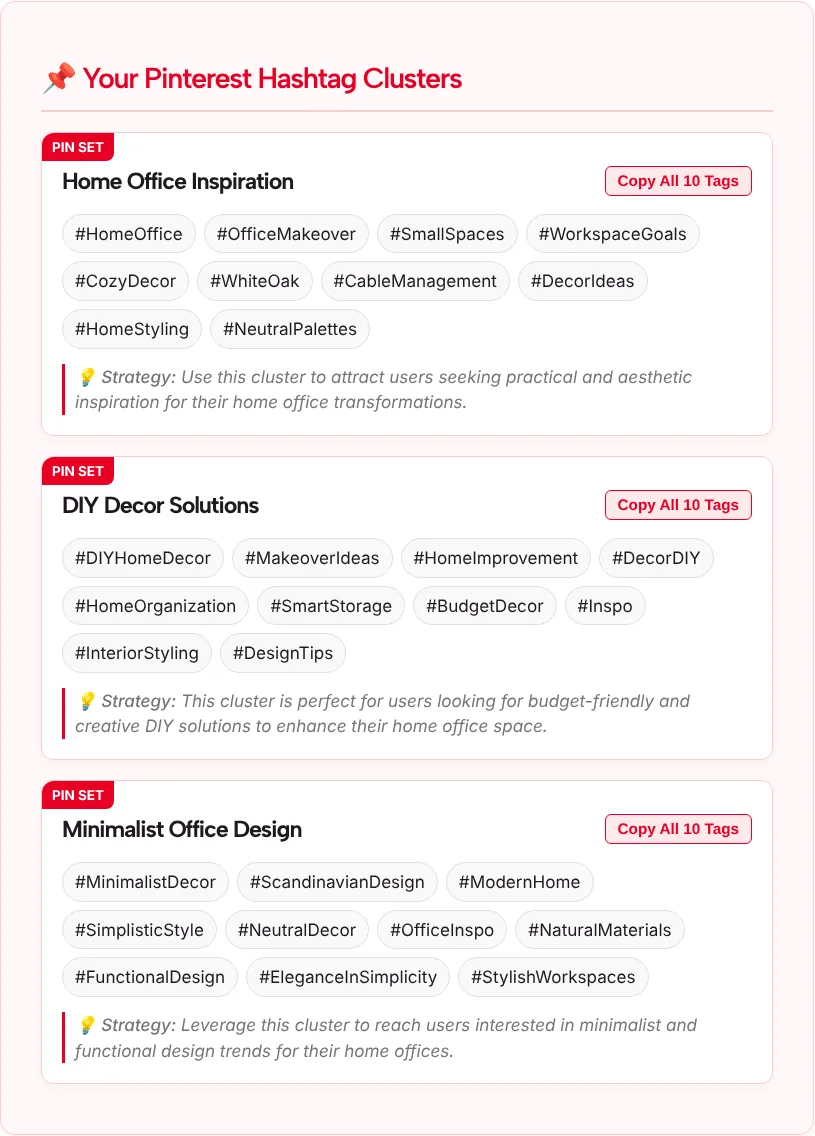
The three clusters were Home Office Inspiration, DIY Decor Solutions and Minimalist Office Design. Each had a Copy All 10 Tags button, clickable tags and a short tip.
The strong picks named things you can see in the Pin: #HomeOffice, #OfficeMakeover, #WhiteOak, #CableManagement and #SmartStorage. A few needed cutting:
- #Inspo is so general it could sit on any Pin in any niche.
- #SimplisticStyle reads as a criticism. “Simplistic” means oversimplified, which isn’t what a minimalist decor fan is looking for.
- #EleganceInSimplicity sounds like a slogan rather than something a person would type into search.
That’s the pattern to expect: a solid core of specific tags with a few vague or awkward ones mixed in. Plan on spending a minute pruning.
Do hashtags still matter on Pinterest?
Hashtags are optional on Pinterest, and a clear title and description are the safer place to put your effort. When we checked in November 2026, we couldn’t find a current Pinterest Help page that recommends a number of hashtags or says Pinterest treats them as search keywords. The help text inside this tool’s form says hashtags work as search keywords; take that as the tool’s view, not Pinterest policy.
What Pinterest’s Help Center does say is that you can search for Pins, boards or people from the search bar. That search has to match your Pin to the words people type, so plain, descriptive words in your title and description are the safe bet. A few hashtags at the end of the description can add context, but they won’t rescue a vague description.
Our advice: write the title and description first, then add the three to five most specific tags from one cluster.
Turn a cluster into a Pin description
Use the cluster as a word bank, not as a block to paste. Here’s how the test result could become a finished description:
Small home office makeover: a white oak desk, warm neutral decor and hidden cable storage that keeps the desk clear. #HomeOffice #OfficeMakeover #CableManagement
A few habits that help:
- Lift words into the sentence. “Cable management” and “white oak” work as plain words in the description too, not only as tags.
- Keep tags tied to the image. If the Pin doesn’t show storage ideas, drop #SmartStorage even if it sounds good.
- Search a tag in Pinterest before you use it. If the Pins that come up look nothing like yours, the tag is pointing at a different audience.
- Refresh seasonal tags. Tags from the Trending / Seasonal Idea strategy, like a holiday or a season, date quickly. Update them when you re-share the Pin next year.
- Name the product on shopping Pins. With Product & Shopping (E-commerce), add the item type and material in your topic, such as “white oak standing desk,” so the tags describe what you sell.
Which Pinterest strategy to choose
Choose the strategy that matches the reason the Pin exists. The four settings change the angle of the tags; they don’t pull any live data from Pinterest.
| Pin type | Strategy | Count |
|---|---|---|
| Blog post, recipe or how-to that sends people to a link | Visual Discovery & SEO | 5 |
| Mood board, outfit or room idea | Aesthetic & Inspiration | 5 |
| Product from your shop | Product & Shopping (E-commerce) | 3 or 5 |
| Holiday, back-to-school or other seasonal idea | Trending / Seasonal Idea | 5, refreshed each season |
Sharing the same photo on Instagram? Run it through the Instagram hashtag generator instead, since Instagram has its own hashtag limits and habits. For the bigger picture of getting Pins found, read our guide on how to rank Pins on Pinterest.
Tools You May Need for Visual Content Hashtags
Pinterest Hashtag Generator FAQ
Is the Pinterest hashtag generator free?
Yes. You can use it without an account, and nothing connects to your Pinterest profile. Describe your Pin, choose a niche, strategy and count, and three clusters of tags appear on the page with a Copy All button for each one.
Should I still use hashtags on Pinterest?
You can, but treat them as extras. We couldn’t find a current Pinterest Help page that recommends a number or says hashtags count as search keywords. Put most of your effort into a clear title and a descriptive Pin description, then add a few specific tags at the end.
How many hashtags will the tool give me?
You pick 3, 5, 10 or 20, and each of the three clusters gets that many. So the total is 9, 15, 30 or 60 tags. You don’t need all of them. The three to five that best describe your image are usually enough.
Does it show how popular a Pinterest hashtag is?
No. The tool shows no search volume, saves or trend numbers. An AI model writes the tags from your description. To check a tag, search it on Pinterest and see whether the Pins that come up look like yours.
Where do hashtags go on a Pin?
Put them at the end of the Pin description, after a sentence or two that describes the image in plain words. The Pin title should stay readable for people, so leave hashtags out of it.
Why did I get a vague tag like #Inspo?
The AI mixes broad tags in with specific ones. In our test, #Inspo and #SimplisticStyle appeared next to precise tags like #CableManagement. Delete the vague ones, or add more visual detail to your description and generate a new set.