
Getting a clickable link into your TikTok bio sounds simple until you actually try it. Either the website field is missing from Edit Profile, or the link shows up as plain text that nobody will bother copying into their browser.
TikTok controls who can add a working bio link. The rules differ based on account type.
Personal accounts require hitting a follower threshold before the field unlocks. Business accounts bypass that requirement but give something up in exchange.
In this guide, you will learn:
- Which TikTok accounts qualify for a clickable bio link in 2026
- How to add the link step by step on the mobile app
- What to actually link to and how to build a hub page that converts visitors
- How to track which videos are driving your bio link clicks
- How to extend your bio link reach offline with QR codes
Once the link is live, the real work is making it worth tapping. This guide covers both.
Key Takeaways
- Personal TikTok accounts need at least 1,000 followers before the website field appears in Edit Profile
- Business accounts can add a website link immediately with no follower minimum, but lose access to TikTok’s full music library
- The setup is mobile-only; the website field is not available on the desktop version of TikTok
- TikTok allows one clickable website link per profile; a link in bio page lets that single URL route visitors to multiple destinations
- Adding UTM parameters to your bio link shows exactly which videos are driving profile click-throughs
- A QR code linked to your bio page extends the same destination to packaging, print materials, and in-person spaces
Quick Answer
TikTok’s link in bio feature requires 1,000 followers on personal accounts before the website field unlocks in Edit Profile. Business accounts bypass this requirement entirely and can add a website link with any follower count. Open the TikTok mobile app, go to Edit Profile, enter your full URL including https:// in the Website field, and save. The link becomes clickable immediately after saving.
What Does “Link in Bio” Mean on TikTok?
A link in bio is a clickable URL displayed on your TikTok profile page, directly below your bio text. When a viewer taps it, the link opens inside TikTok’s built-in browser.
Unlike captions or comments, the bio link is persistent. Every video you post can drive profile visits, and those visitors always see the same link.
TikTok allows one clickable website link per profile. Captions and comments cannot contain working external links.
Get Free TikTok Ad Credit Up to $6000 [Limited Time Offer]
That single bio slot is your only direct bridge between TikTok content and anything outside the app. For anyone selling products, capturing leads, or driving bookings, everything must flow through that one link.
TikTok reaches billions of users worldwide, according to TikTok statistics and platform data. With that scale of daily active users, a well-used bio link is a meaningful traffic driver for any creator or brand that treats it strategically.
TikTok Link in Bio Requirements
TikTok applies different eligibility rules to personal and business accounts. These requirements have been consistent through 2026, though outdated tutorials with old screenshots still appear in search results.
Personal Accounts
Personal accounts require a minimum of 1,000 followers before the clickable website field appears in Edit Profile.
There is no manual workaround for this threshold on a personal account. Until you reach 1,000 followers, the website field simply does not appear.
You can link your Instagram or YouTube accounts from the social links section without needing 1,000 followers. Those are social account connections, not the same as a clickable external website link.
If you are still working toward the threshold, organic TikTok growth strategies cover the content and engagement approaches that move a follower count faster.
Business Accounts
Switching to a TikTok Business Account removes the follower requirement entirely. The website field is available immediately after setup, regardless of how many followers the account has.
The trade-off is music access. Business accounts lose TikTok’s full library of trending and copyrighted sounds, and are limited to the Commercial Music Library instead.
For creators whose content depends on trending audio, this is a real cost. TikTok frequently surfaces videos that use popular sounds, and losing that access can reduce organic reach.
For brands, local businesses, service providers, and e-commerce accounts where music is not central to the content, switching to a Business Account is usually the faster and more practical path.
Which Account Type Is Right for You?
| Your situation | Recommended path |
|---|---|
| Under 1,000 followers, content relies on trending music | Build toward 1,000 on a personal account |
| Under 1,000 followers, original audio or talking-head content | Switch to Business Account for immediate link access |
| Over 1,000 followers, currently on a personal account | Enable the website field directly from Edit Profile |
| Brand, local business, or e-commerce seller | Business Account from the start |
| Creator selling digital products or services | Personal account once eligible, or Business Account if you need the link now |
How to Add a Link to Your TikTok Bio
The process takes under two minutes once your account qualifies. The most common reason the option does not appear is that someone is trying to set it up on a desktop browser.
The website field is only available through the TikTok mobile app. Desktop editing does not include this option, regardless of account type or follower count.
Step-by-Step Setup on Mobile
- Open the TikTok app and tap your profile icon in the bottom right corner
- Tap “Edit profile” below your follower and following counts
- Scroll down to find the “Website” field
- Enter your full URL including the https:// prefix
- Tap “Save” to apply the change
- View your profile from a second device or a different account to confirm the link is tappable
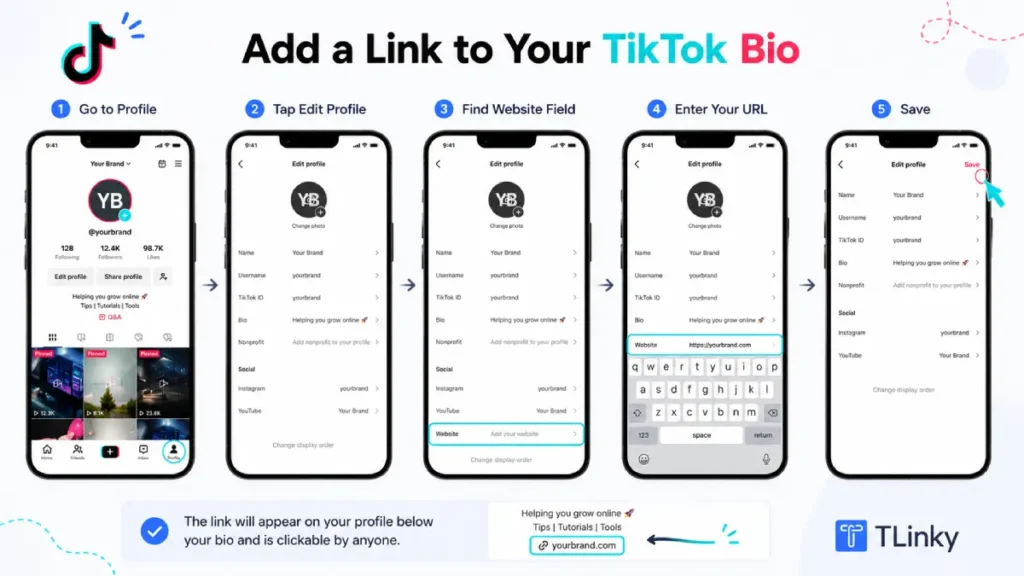
The https:// prefix is required. A URL entered without it appears as plain text rather than a clickable link, even though it saves without an error message.
For a step-by-step visual walkthrough with current app screenshots, adding a clickable link to your TikTok bio covers the exact interface.
What to Do If the Website Field Is Missing
If your account qualifies but the website field is not appearing, work through these fixes before assuming there is an account-level problem.
Update the TikTok app to the latest version first. Older app versions often do not display features that have been newly unlocked on an account.
Log out and log back in. TikTok’s system sometimes needs a session refresh to recognize a newly reached follower milestone or a recent account type switch.
Check whether you are on a personal or business account. Switching account types can cause the field to take up to 24 hours to appear in the new account state.
Confirm you are editing through the mobile app and not the desktop site. No version of the desktop site includes the website field.
If the field previously appeared and then disappeared, your follower count may have dropped below 1,000. Check your current count from your profile analytics page.
What to Link to From Your TikTok Bio
Most creators make the mistake of linking to their homepage. Homepages are designed for general audiences, not for someone who just watched a 30-second video with a specific hook.
TikTok traffic is impulse-driven. A viewer who taps your bio link is responding to something specific they just saw. If they land on a page with nothing to do with that video, most will leave immediately.
The most effective bio link destination matches the content you are currently posting. A product launch campaign should link to the product page. A lead magnet campaign should link directly to the sign-up page.
When you need to send traffic to multiple destinations at once, a link in bio page solves the problem. Instead of choosing between a shop, a newsletter, and a booking page, you put one hub URL in the bio and visitors can choose from everything.
TLinky’s link in bio tool creates mobile-optimized hub pages where you can list multiple links, products, or resources behind a single URL. That URL goes in your TikTok bio field, and visitors see a clean page organized around your current priorities.
How to Build a TikTok Link in Bio Page
A link in bio page is a short landing page built specifically for social media traffic. It typically includes your most important destination links, your other social profiles, and optionally some social proof like follower counts or testimonials.
Building an effective link in bio page covers the design decisions in detail. For TikTok traffic specifically, a few principles matter most.
Keep the page short and built for phones. Most visitors will arrive on a mobile device. If they have to scroll far to find what they came for, most will leave before finding it.
Put your highest-converting link first. Whatever action you most want visitors to take should appear before they need to scroll. An email sign-up buried below six other links rarely gets tapped.
Match the page to your current content. If this month’s videos focus on one product, the bio link page should lead with that product. A page reflecting content from three months ago creates a disconnect between the video and the destination.
TLinky’s link in bio for influencers and creators shows how creators structure hub pages when managing affiliate links, brand partnership pages, and audience-building at the same time.
Update the page whenever your content focus shifts. The bio link page is not a set-and-forget element. It should stay in sync with what your most recent videos are promising viewers.
How to Make Your Bio Link Convert
Getting someone to tap your bio link is the first conversion. Getting that visitor to take the next step on the destination page is the one that actually builds your business.
For a deeper look at turning that traffic into customers, see our guide on how to use a link in bio to drive more sales.
Your TikTok bio text is the main lever for driving link taps. Viewers who visit your profile after watching a video are already engaged. Your bio needs to tell them exactly what to do next.
Specific calls to action outperform vague ones. “Shop the collection” is stronger than “link below.” “Get the free guide” tells someone what they will find before they tap.
Check your TikTok bio character limit before writing your call to action. You have 80 characters for the bio text field. Every word needs to earn its place.
The destination page matters as much as the link itself. If your video mentions a specific product and the bio link leads to a general homepage, that mismatch breaks trust and drops the conversion rate. Match the promise in your content to what the link page delivers.
Use your TikTok analytics dashboard to identify which videos drive the most profile visits. Those are your highest-performing traffic drivers. Create more content in those formats and make sure your bio link reflects what those videos are offering.
Track Clicks with UTM Parameters and Link Analytics
Knowing that someone tapped your bio link is useful. Knowing which video caused that tap is far more valuable, because it tells you what to keep making.
UTM parameters are small tracking codes appended to any URL. When a visitor clicks your bio link and arrives at your destination page, your analytics platform logs exactly where they came from.
A basic UTM-tagged bio link looks like this:
https://yoursite.com/landing?utm_source=tiktok&utm_medium=bio&utm_campaign=launchweek
Your analytics tool records this as a visit from TikTok, through the bio placement, during a specific campaign.
UTM parameter best practices cover naming conventions and the common mistakes that produce messy, unreadable data. The main rule is consistency: use the same labels across every campaign so your reporting stays clean and comparable.
Link-in-bio pages with built-in analytics simplify this further. You can see total clicks per individual link on your hub page without configuring any separate website tracking.
Short links add another layer of insight. A branded short link created through TLinky includes click data, geographic breakdown, and device type directly in the TLinky dashboard. How URL shortening supports click tracking explains how this works without needing separate analytics tool configuration.
Use QR Codes to Extend Your Bio Link Offline
Your TikTok bio link does not have to live exclusively inside the app. A QR code lets the same destination reach people who have not found you on TikTok yet.
If you sell physical products, include a QR code on your packaging, receipts, or box inserts. When a customer scans it, they land on the same link in bio page your TikTok followers see.
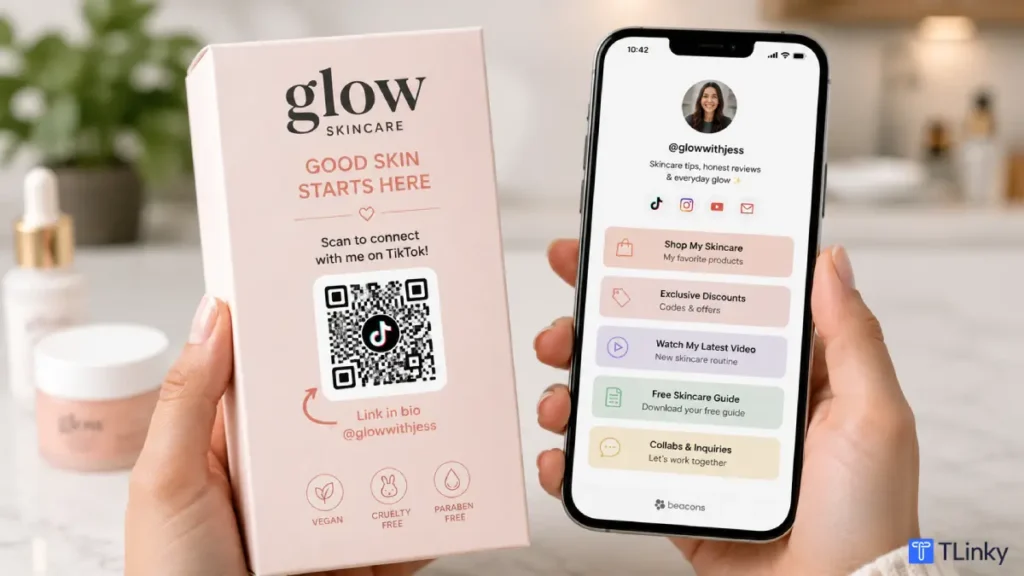
This works particularly well for businesses where in-person interactions happen before the TikTok follow. A customer who buys in person can scan a QR code on their receipt, land on your hub page, and follow your TikTok account in that same moment.
QR codes for social media covers how to set this up across different platforms, not just TikTok. The same logic applies whether the destination is an Instagram bio or a TikTok link in bio page.
Free trackable QR codes from TLinky create a QR code pointing to your bio link page and track how many times it is scanned, from where, and on which device.
If your bio link destination changes seasonally or by campaign, use a dynamic QR code rather than a static one. Static vs dynamic QR codes explains the key difference: a dynamic QR code lets you update the destination URL without reprinting the physical QR code.
Which Setup Works for Your Situation?
| You are a… | Start with… |
|---|---|
| New creator under 1,000 followers posting trend-driven content | Build audience first; pin a comment with your URL on each new video as a workaround |
| New creator under 1,000 followers with original audio or educational content | Switch to Business Account for immediate link access; music trade-off is minimal for your content type |
| Creator over 1,000 followers on a personal account | Enable the website field in Edit Profile; link to a hub page for maximum routing flexibility |
| Brand, local business, or service provider | Business Account with a dedicated link in bio page organized by current offer or product category |
| Affiliate marketer or digital product creator | Personal account once eligible, with UTM-tracked bio links routing to separate campaign pages |
| Creator selling online and in person | Link in bio page plus a trackable QR code on physical materials to capture offline traffic |
For a full comparison of link in bio tools before choosing one, best link in bio tools for TikTok creators covers TLinky, Linktree, and the main alternatives.
If you already use a bio.link page and want to understand the feature differences, the bio.link vs TLinky comparison walks through both platforms side by side.
The same setup principles apply if you manage multiple social profiles. Finding and using a link in bio on Instagram uses a similar structure if you are coordinating both accounts.
If you also run an Instagram account, note that Instagram’s setup works differently. Link in bio for Instagram covers the key differences: no follower requirement, up to five native links, and a Story link sticker available to all accounts.
FAQ
These are the questions creators and businesses ask most often about TikTok’s link in bio feature.
Does TikTok still require 1,000 followers to add a bio link in 2026?
Yes. As of 2026, personal TikTok accounts still require a minimum of 1,000 followers before the clickable website field appears in Edit Profile. This threshold has been consistent across multiple years with no announced changes.
There is no workaround that bypasses it on a personal account. Business accounts remove this requirement entirely and can add a website link with any follower count, including brand-new accounts with zero followers.
Can I add more than one link to my TikTok bio?
TikTok allows one clickable website link in the bio field per profile. You cannot stack multiple URLs directly in that field. The standard solution is a link in bio page: one URL that opens a hub page where you list multiple links, products, or resources.
If you are comparing options before committing to a tool, Linktree alternatives for TikTok reviews the main link in bio platforms available in 2026.
What do I lose when I switch to a TikTok Business Account?
Switching to a Business Account gives you immediate website link access but removes the full music library. Business accounts are restricted to TikTok’s Commercial Music Library, which contains significantly fewer tracks.
For creators whose content depends on trending or licensed sounds, this can reduce organic reach because TikTok frequently surfaces videos using popular audio. For brand accounts and businesses where music is not central to content strategy, the trade-off is usually manageable and worth the immediate link access.
How do I know if my bio link is actually getting clicks?
TikTok’s native analytics does not show bio link click data directly. Add UTM parameters to your bio link URL before entering it into the Website field; your analytics platform then records TikTok as a traffic source whenever someone clicks through.
If you use a link in bio platform or a short link tool, click tracking is typically built in. TLinky shows total clicks, device type, and geographic data for every short link and bio page you create, without requiring any separate analytics configuration.
What should I link to if I do not have a product yet?
Link to the action that builds the most durable asset for your current stage. An email newsletter sign-up is often the best choice because you own that list regardless of what happens to any social platform.
A page explaining what you do and inviting people to follow you across platforms also works. Avoid linking to anything under construction or blank. Even a one-page site with your name, what you offer, and a contact method creates a better first impression than a dead link.
Wrapping Up
Adding a link to your TikTok bio starts with the right account setup. Personal accounts unlock the website field at 1,000 followers. Business accounts get it immediately in exchange for music library access.
Both paths are valid. The right one depends on your content type and how urgently you need the link live.
Once the link is active, a link in bio page turns one URL into a flexible traffic hub. UTM tracking tells you which specific videos are driving the clicks. QR codes take the same destination into physical spaces your TikTok followers have not reached yet.
For creators using the bio link to promote affiliate offers, the redirect setup requires an extra step. URL shortener for affiliate marketing explains how to build branded short links that track commission-driving clicks without stripping affiliate network tracking parameters or violating program terms.
The bio link is one of TikTok’s most underused features. Most creators set it once and stop thinking about it. Treat it as an active part of your content strategy, and you will see the difference in your traffic and conversion data.
Sources
- TikTok, Add a Website to Your Profile, Official Support Documentation
- TikTok For Business, Commercial Music Library Overview
- DataReportal, Digital Global Overview Report