
Most bio link pages are a list. A profile photo, then five or six buttons stacked in whatever order they were added.
That works fine for organizing links. It does almost nothing to drive a sale.
A link in bio page built to sell behaves differently. It has one clear product in front, and a reason to act now.
It also has a way to capture the visitor even if they do not buy on the first click.
According to Linkfire’s analysis of over 2,800 artist bio link pages, clickable images and video blocks together accounted for more than half of all recorded clicks.
That is far more than plain text links pulled in.
In this article, you will learn:
- Why a link list and a sales funnel are not the same page
- How to pick and feature one hero product instead of six competing links
- How to use scheduling and email gates to capture visitors who are not ready to buy yet
- Where a direct in-page checkout button makes sense and where it does not
- How to track which links are actually driving revenue
Supercharge Your Social Media Presence with TLinky’s Link in Bio Builder!
Transform your social media bio into a dynamic hub of information. Create a captivating Link in Bio page that engages your audience and drives results.
Key Takeaways
- A bio link page with six equal-weight buttons asks visitors to make a decision. A page with one featured product removes that friction and converts more of the traffic you already have.
- Clickable images and embedded video drove the majority of clicks in Linkfire’s analysis of over 2,800 bio link pages, well ahead of plain text links.
- Scheduling a promotion to start and end automatically means a sale page does not quietly outlive the sale, which is one of the most common ways bio links lose trust.
- Gating a link behind an email capture step turns a visitor who is not ready to buy into a contact you can market to later, instead of a lost click.
- Click data by link, not just page-level traffic, is what tells you which specific offer is actually earning its spot at the top of the page.
Quick Answer
Driving sales from a link in bio means treating the page as a funnel, not a directory. Feature one product prominently instead of listing many, use scheduling for time-limited offers, capture emails from visitors who are not ready to buy, and track clicks per link so you know which offer to keep, move, or drop.
A Link List and a Sales Funnel Are Not the Same Page
A link list optimizes for coverage. Every channel, every product, every social profile gets a button so nothing is missing.
A sales funnel optimizes for one decision. It removes every choice that is not the one you want the visitor to make.
Most creators and small brands build a link list because it is easier. Then they wonder why traffic to the page never turns into revenue.
The page was never asked to sell anything specifically. Switching a bio page from a directory to a funnel does not require a redesign.
It requires deciding, before you touch the page, what single action you want most visitors to take.
The tips for building a link in bio page guide covers the setup basics if you are starting from scratch.
Pick One Hero Product Instead of Six Competing Links
A visitor scanning a bio page for two or three seconds does not evaluate six options. They either recognize the first thing that looks relevant, or they leave.
Choose the single product, offer, or destination that matters most right now. Put it first, and give the rest of your links less visual weight below it.
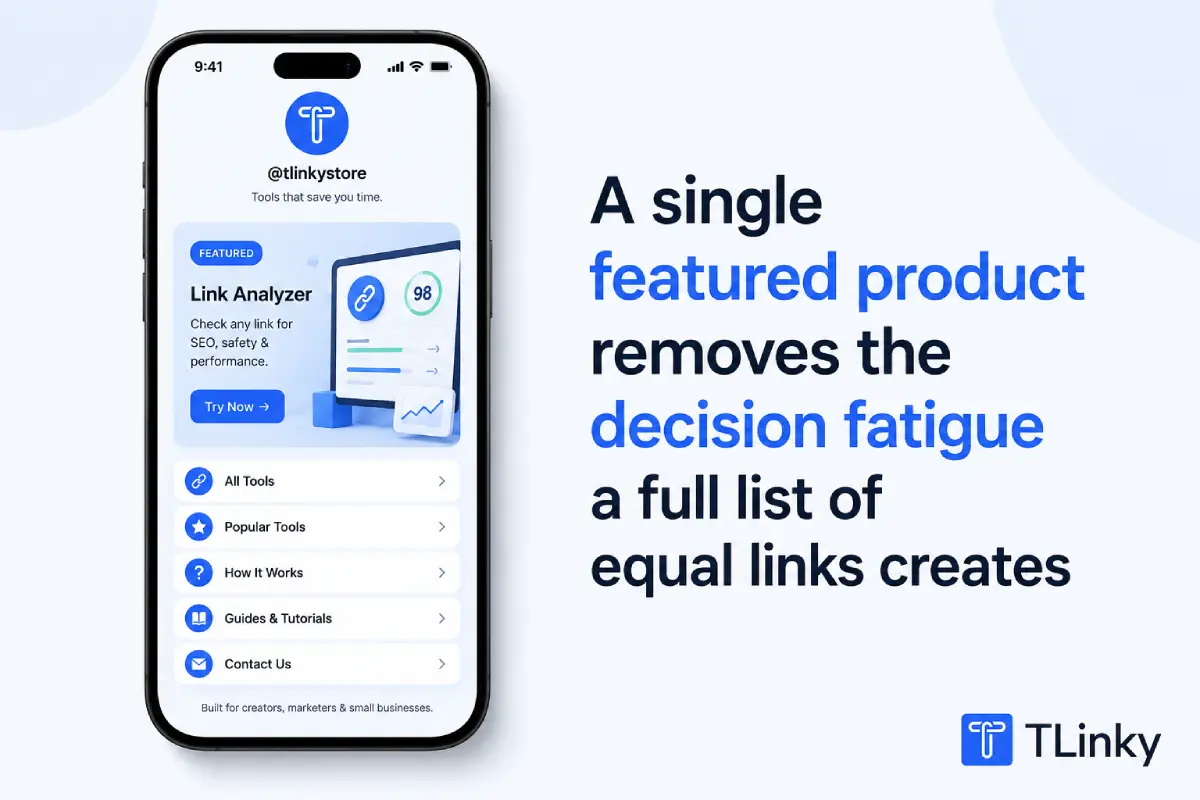
This does not mean deleting your other links. It means the page has a clear priority instead of six items competing for the same glance.
Once one offer is consistently converting, add a second featured item. Adding them all at once brings back the original problem.
Turn Your Best Offer Into a Featured Card, Not a Plain Text Link
A plain text link and a featured product card ask for the same click but do not get the same attention.
In TLinky’s Bio Page editor, the Link Widget includes a Featured toggle that makes a single button visually prominent against the rest of the page.
The Featured Link block goes further. It pairs a product image and headline with the destination link, closer to a small landing page card than a list item.
Use the image-based featured format for the one offer you chose above. Save the plain link style for secondary destinations like your other social profiles.
This matches what Linkfire found across thousands of real bio pages. Images and video consistently pulled more clicks than text-only links.
That is a reason to make your top offer visually distinct, not just first in the list.
Sellers running their own storefront can see how this plays out on the Link in Bio for ecommerce stores page.
Use Scheduling So a Promotion Does Not Outlive Itself
A discount code with no end date is a problem. Left at the top of a bio page a month after the sale ended, it looks abandoned.
That is one of the fastest ways to lose a visitor’s trust.
TLinky’s widget-level Schedule setting lets you set a start and end date on any block, including the Featured Link.
The promotion goes live and comes down automatically, without you needing to remember it later.
This removes a manual step that is easy to forget during a busy launch week. Set the dates once when you build the promotion, and move on.
When the promotion ends, the block simply stops showing. Your evergreen links underneath take its place without anyone needing to edit the page that day.
Capture the Visitor Who Is Not Ready to Buy Yet
Not every click on your featured offer is a buyer. Some visitors are curious, comparing options, or just not ready that day.
A bio link page that only offers “buy now” loses all of those visitors permanently. A page that also offers a lower-commitment next step keeps some of them.
- Add a standard Link block pointing to your main offer, the same block type used for a plain text link.
- In that block’s Advanced Settings, turn on Gate Access and select the Subscribe gate instead of leaving the link open.
- Visitors are asked for an email address before the redirect completes, giving you a way to reach them again later.
- Only gate your highest-intent link. Gating every link on the page frustrates visitors browsing casually and can lower overall clicks.
This works best on the one offer you are actively pushing, not as a blanket rule across the whole page.
Gate Access lives on the standard Link block, not on the image-based Featured Link card described above.
If an offer needs both the visual weight of a featured button and an email gate, use the Link block’s own Featured toggle instead of the separate Featured Link card.
A visitor who was already going to click your Instagram profile link does not need to hand over an email first.
The link in bio for Instagram guide covers how to set up that link specifically.
Sell Directly From the Page When It Makes Sense
Sending every visitor through an external checkout adds a step, and every extra step loses buyers before they finish.
TLinky’s Bio Page includes a PayPal Button block for low-cost digital products, one-off consultations, or small physical items. It takes a label, your PayPal email, an amount, and a currency.
A visitor can pay without ever leaving the page. This is not a replacement for a full storefront if you run a catalog with variants, shipping options, or inventory.
It is a fit for a single, simple offer where the entire transaction is one price and one product.
Where you do need a full storefront, keep the bio link pointed at your existing checkout instead of trying to recreate it with a simple button.
Track Which Links Are Actually Earning Their Spot
A featured product that gets clicks but never converts is taking the best position on your page from something that would perform better there.
Every Bio Page in TLinky has its own Statistics view, reachable from the three-dot menu on the Bio Pages list.
It tracks per-link clicks, not just total page views, so you can see which specific button is getting tapped.
Check this weekly while a promotion is live, and monthly for evergreen links. A featured item with a click rate far below your other links is a signal to swap it.
Pairing this with UTM tags on the destination URLs shows you the same story from the other side.
The UTM parameters best practices guide covers naming conventions worth adopting before your next campaign. The beginner’s guide to UTM parameters covers the basics first if you are new to tagging links.
That combination confirms whether those clicks are also turning into completed sales on your site, not just page visits.
Common Bio Link Sales Mistakes to Avoid
- Treating every link as equally important: A page with no visual hierarchy asks visitors to do the prioritizing you should have already done for them.
- Leaving expired promotions live: An old discount code or a sold-out drop still featured at the top signals that the page is not maintained.
- Gating every single link: Asking for an email before every click adds friction to visitors who were never going to convert on that link anyway.
- Never checking per-link click data: Page views alone hide which specific offer is doing the work and which one is just taking up space.
- Sending all traffic to a generic homepage: A bio link pointing at your homepage forces the visitor to find the offer themselves instead of landing on it directly.
Frequently Asked Questions
These questions come up most once someone decides to actually optimize a bio link page for sales rather than just organizing links.
How many links should be on a bio page meant to drive sales?
There is no fixed number, but fewer, clearly prioritized links outperform a long list. Most sales-focused pages work best with one featured offer and a small handful of secondary links below it.
Adding more links does not add more conversions once the page is cluttered. Each additional item competes with your featured offer for the same limited attention.
Can I sell a product directly from a link in bio page without a separate store?
Yes, for simple, single-price offers. A block like TLinky’s PayPal Button lets a visitor pay directly on the bio page without navigating to an external checkout.
This works well for digital downloads, single consultations, or one-off items. A catalog with multiple products, variants, or shipping options still needs a real storefront behind the bio link.
Does a link in bio page work for TikTok Shop or Shopify sellers?
Yes, though the bio page is a routing layer, not the storefront itself. It sends visitors to the specific product or collection page instead of a generic homepage.
Featuring the exact product being promoted in that week’s content, rather than a general shop link, keeps the bio page aligned with what viewers just watched.
The link in bio for TikTok guide covers platform-specific setup details.
What is the difference between a link in bio tool and a landing page builder?
A link in bio tool is built specifically for the single-URL, mobile-first constraint that social platforms create. A landing page builder is usually built for a single campaign with more layout control.
For most creators and small brands, a bio link tool with featured blocks, scheduling, and gating covers what a dedicated landing page would otherwise require, without a second tool to maintain.
How often should a bio link page be updated?
Update it whenever the featured offer changes, and review the rest of the page at least monthly. A page that never changes eventually stops matching what you are actually promoting.
Scheduling start and end dates on promotional blocks removes some of this manual work, since expired offers come down on their own instead of requiring a reminder.
Wrapping Up
A bio link page only sells when it is built to make one decision easy, not when it lists everything you have to offer.
Feature one offer at a time, use scheduling so promotions do not overstay their welcome, and capture the visitors who are not ready to buy yet instead of losing them entirely.
Start by picking the single product or offer your bio page should be selling this week, then feature it and check the click data in seven days.
The link in bio tools comparison for TikTok creators covers how to choose a tool if you are still deciding what to build the page in.
If your sales come through affiliate partnerships rather than a direct storefront, the URL shortener for affiliate marketing guide covers how to track that revenue path specifically.
For the other links across your social profiles, the benefits of using a URL shortening service guide covers what a shortener adds beyond a bio page alone.
Sources
- Linkfire: 4 Ways to Improve Your Link in Bio Conversions
- Sprout Social: Link in Bio, The Complete Guide to Maximizing Engagement in 2026