
Affiliate marketers spend hours optimizing content, researching products, and testing conversion angles. Then they paste a raw tracking URL into their content that is 90 characters long, packed with tracking codes, and looks like it was generated by a bot.
That link works technically. But it looks untrustworthy to readers, breaks in SMS and email, and tells you nothing about which content piece drove the click.
A properly configured URL shortener solves all three problems, and creates a fourth advantage most guides never mention: the ability to update your link destination after it is live without touching the published content.
In this guide, you will learn:
- Why a custom domain shortener outperforms generic tools for affiliate use cases
- Which affiliate networks restrict or prohibit link cloaking (and what actually counts as cloaking)
- How to build a trackable affiliate short link with UTM parameters in the right order
- Where short links belong in your affiliate workflow and where they can cause problems

Key Takeaways
- Shortening an affiliate link is not the same as cloaking it. A short link creates a transparent redirect to a destination URL. Cloaking permanently hides the destination from the user and the browser. Most networks permit shortening and prohibit cloaking.
- Amazon Associates prohibits cloaking affiliate links. A 302 redirect that resolves to the Amazon product page, with the Amazon URL visible in the browser address bar, is generally acceptable. A redirect that permanently masks the Amazon domain is not.
- Using a custom domain (like go.yourbrand.com) builds reader trust and lets you swap destinations without republishing content.
- UTM parameters track which content piece, platform, or campaign drove each click. This is separate from the affiliate network’s own tracking parameters, which handle commission attribution.
- A URL shortener with click analytics shows you which links are performing within hours, before affiliate network data typically refreshes.
Quick Answer
A URL shortener for affiliate marketing creates a shorter, cleaner redirect to your affiliate tracking link. Custom domain shorteners let you brand the link, track clicks independently, and update destinations without editing published content. The critical rule: your redirect must pass through the affiliate network’s tracking URL intact. Stripping tracking parameters or permanently hiding the destination may violate your network’s terms of service.
A Better Way to Share Links
Create short, branded links that are easier to share and track. It’s free to get started and only takes a few seconds.
Why Affiliates Need More Than a Basic Link Shortener
A generic shortener like bit.ly solves the length problem. For affiliate marketing, it creates several others.
Generic short domains are shared by millions of users. If another account on the same platform distributes abusive links, the domain can land on spam blocklists. Your legitimate affiliate links get blocked as collateral damage with no warning and no recourse.
Generic shorteners also give you limited control over destinations. When a product gets discontinued, or a merchant changes their URL structure, you have to find every place you published that link and manually replace it. With a shortener that allows editable destinations, a single dashboard update redirects all existing traffic.
The benefits of using a URL shortening service extend further than link aesthetics once you control your own domain. You own the redirect logic, the click analytics, and the ability to update destinations across all published content from one place.
Want to know what the numbers behind shortened links actually mean? See our URL shortener statistics and market data guide for key metrics, usage data, and industry insights.
Network Compliance: What Your Affiliate Program Actually Allows
This is the section most guides skip entirely, and it is the one that can get your account suspended if you get it wrong.
Affiliate networks have specific rules about how you present links to users. Those rules directly affect what type of link manipulation is permitted, and they vary by network. Reading these rules before you build your link system is not optional.
Amazon Associates and Link Cloaking
Amazon Associates explicitly prohibits cloaking affiliate links. Their Operating Agreement requires that affiliate links identify Amazon as the destination.
A redirect that permanently masks the Amazon domain and prevents it from appearing in the browser after the user lands on the product page violates this rule.
A standard 302 redirect that resolves to the Amazon product page is different. The redirect fires, the Amazon URL appears in the browser address bar, and the tracking cookie processes normally.
The practical distinction is this: if a reader can see amazon.com in their browser address bar after clicking your short link, the redirect is transparent. If your link permanently masks the destination and the user never sees the Amazon domain, that is cloaking.
How to Check Your Network’s Rules Before Shortening
Before setting up your links, read the operating agreement for every network you work with. Look specifically for language about link cloaking, link masking, framing, and redirect requirements.
Commission Junction, ShareASale, and Impact generally permit URL shortening as long as the redirect chain passes network tracking parameters through intact.
If a redirect strips the network’s tracking code from the URL, the conversion may not attribute correctly. You send the traffic but earn nothing on the sale. Always test the full redirect before publishing any affiliate link.
Custom Domain vs Generic Shortener: Which One to Use
For affiliate marketing, a custom domain shortener is almost always the better choice.
A custom domain link like links.yourbrand.com/product-name signals to the reader that the link comes from your brand before they click. A bit.ly or tinyurl.com link signals nothing.
Custom domains are also assets you control long-term. You can move your short links to a different URL shortener tool while keeping the same branded domain and the same published links, because the short link pattern stays the same even if the platform behind it changes.
TLinky’s URL shortener supports custom domains, click analytics, and editable destinations. You connect your own subdomain, create branded short links, and manage redirect targets from one dashboard. The redirect chain is transparent by default, which keeps you compliant with network rules that prohibit cloaking.
The link management tools that work best for affiliates share one key feature: editable destinations. That single feature eliminates the most time-consuming part of affiliate link maintenance, which is tracking down and manually replacing dead or outdated links across dozens of published posts.
How to Set Up a Trackable Affiliate Short Link
A well-structured affiliate short link has three components working together: the branded short URL, the affiliate tracking URL it points to, and UTM parameters appended to the destination to identify the traffic source in your own analytics.
Step 1: Choose Your Short Domain
Connect a subdomain of your own domain to your URL shortener. A subdomain like go.yourbrand.com or links.yourbrand.com works cleanly. Avoid using your root domain for short link redirects, as this can interfere with your main site’s analytics and make traffic source attribution harder to parse.
Step 2: Create the Short Link and Set the Destination
In your URL shortener dashboard, paste the full affiliate tracking URL as the destination. Do not remove or modify any portion of it.
The affiliate URL will look messy. That is intentional. Every parameter in that URL is part of the tracking chain. The shortener wraps this URL in your branded redirect; the affiliate URL stays intact underneath.
Step 3: Add UTM Parameters to the Destination URL
Before pasting the affiliate URL as your short link destination, append UTM parameters to the end of it. UTM parameters send traffic source data to your own analytics tool. They are independent of the network’s tracking parameters.
A destination URL with both affiliate tracking and UTM parameters looks like this:
https://www.merchant.com/product?affiliateid=yourcode&utm_source=yourblog&utm_medium=article&utm_campaign=product-review
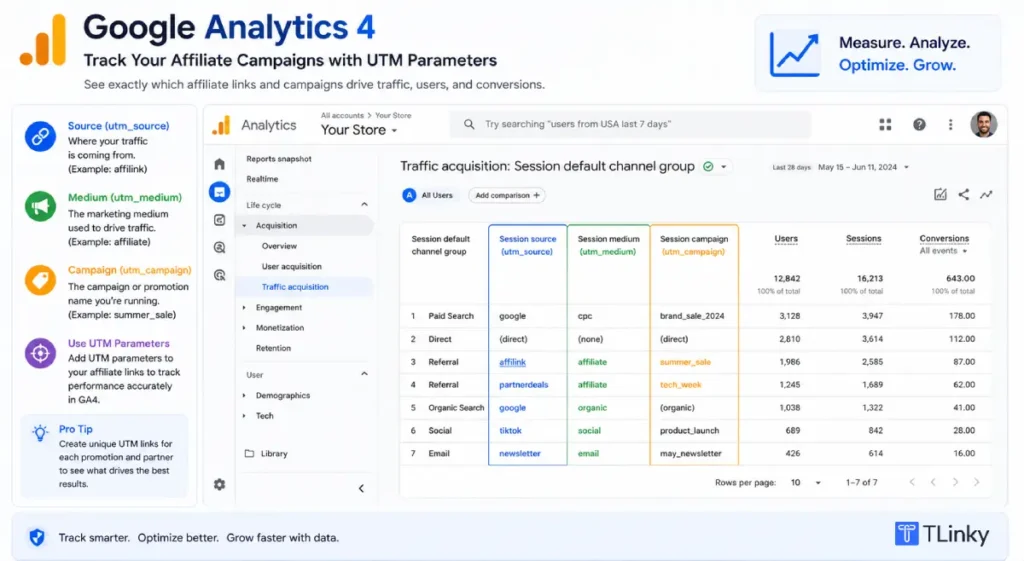
The affiliate parameters (affiliateid=yourcode) fire the network’s tracking cookie. The UTM parameters (utm_source, utm_medium, utm_campaign) tell Google Analytics 4 where the visitor came from. Both travel through the redirect together.
The UTM parameters best practices guide covers naming conventions that keep your data readable across campaigns. The beginners guide to UTM parameters walks through what each parameter does and how to build a consistent naming system from scratch.
Step 4: Test the Full Redirect Before Publishing
Click your short link from an incognito browser window and check three things.
First, the redirect must resolve to the correct merchant page. Second, the affiliate tracking parameters must be present in the URL bar on the destination page. Third, your analytics platform must record the session with the correct UTM values.
If any of these three checks fail, you have a redirect configuration problem. Fix it before publishing the link.
How UTM Parameters Work in an Affiliate Context
Your affiliate network tracks whether a click converted into a sale. UTM parameters track something different: which specific piece of your content sent the reader to that click in the first place.
Without UTM parameters, your analytics shows that users visited a merchant’s page from your site. With UTM parameters, it shows that a specific blog post, email edition, or social post drove those visits, which product link they clicked, and which campaign it belonged to.
This is the data that reveals which content is actually earning commissions.
A review post with 80 monthly clicks converting at 8% outperforms a roundup with 3,000 clicks converting at 0.2%. Without UTM parameters assigned at the content level, you cannot see that difference in your analytics dashboard. You just see a total click count that mixes everything together.
Where to Use Affiliate Short Links (and Where Not To)
Short links improve affiliate performance on most channels, but a few have constraints worth understanding before you build your system.
In blog posts and review articles, branded short links clean up anchor text and allow destination updates without editing the post. Assign UTM source values that match the page slug so you can trace commissions back to the exact article.
In email newsletters, short links prevent the line-break problem that occurs when a long affiliate URL wraps mid-link. Most email service providers add their own redirect layer on top of any link in your campaign.
This creates a double redirect and can cause problems with affiliate cookie firing. Test every affiliate email link through your ESP’s preview before sending to your full list.
On social media, branded short links avoid the trust problem of pasting raw affiliate URLs into bios or captions.
For TikTok, Instagram, and similar platforms, the tips for building a link in bio page covers how to structure a bio link hub when you are promoting multiple affiliate offers from a single bio slot.
On YouTube, affiliate networks generally allow branded short links in video descriptions. Avoid generic shorteners on YouTube, as descriptions containing unfamiliar redirect domains can reduce the visibility of your link in the description panel.
On paid ad platforms like Google Ads or Meta Ads, do not use affiliate short links without verifying the advertising network’s policies separately. Paid ad platforms have their own compliance requirements, which are independent of affiliate network rules, and these change frequently.
Redirect Types and What They Mean for SEO
If you are building an affiliate content site that you intend to rank in search, redirect type matters in a specific way.
A 301 redirect signals to search engines that the destination is permanent. 301 and 302 are both HTTP status codes that tell browsers and search engines how to handle a request. If you want to learn more about these response codes, read this guide to HTTP status codes.
Crawlers may pass link equity from pages that link to your short URL toward the merchant’s destination page over time.
A 302 redirect signals that the redirect is temporary. Search engines do not pass link equity through 302 redirects and retain the original short URL for indexing. For affiliate links pointing to external merchant pages, 302 is generally the more appropriate choice.
The reason: your branded short URL and the merchant’s product page are different entities with different purposes. The 302 signal preserves that distinction.
Most URL shorteners default to 301. If your shortener allows redirect type selection, choose 302 for affiliate links pointing to external merchants. The tips for creating effective short URLs covers this and other redirect configuration choices in more detail.
Google also recommends marking affiliate links with rel="sponsored" in the HTML of the page where the link appears. This applies to the HTML link element in your content, not to the short URL or the redirect itself.
Managing Multiple Affiliate Links Without Losing Track
Once you are running more than a dozen affiliate promotions, link organization becomes a real workflow problem.
Set up a naming convention from the start. A pattern like links.yourbrand.com/category-productname takes an extra ten seconds to create and saves hours of audit time later. Use tags in your URL shortener dashboard to group links by network, product category, or campaign so you can pull performance data by segment without manually sorting hundreds of records.
Schedule quarterly destination audits. When a merchant changes their page URL, discontinues a product, or ends their affiliate program, any short link pointing to the old destination becomes dead traffic. An editable-destination shortener lets you redirect that traffic to a replacement product in seconds.
The how to track Black Friday campaigns with short links article covers a practical high-volume link management workflow during seasonal campaigns. The same principles apply to any affiliate campaign where you are creating links at volume.
Using QR Codes to Extend Affiliate Links Offline
A URL shortener that generates QR codes from your short links extends affiliate reach to print, packaging, and in-person events.
If you create content about physical products, courses, or local services, a QR code on a handout, mailer, or product insert that redirects through your branded affiliate short link captures offline-to-online conversions in the same analytics dashboard as your digital clicks.
The key: use a dynamic short link as the QR code destination so you can update the redirect target without reprinting materials. If the QR code points to a short URL with an editable destination, swapping the product or updating a seasonal offer requires only a dashboard update.
The how to create a QR code for your website guide covers dynamic QR code setup, and the same logic applies when the QR destination is an affiliate short link.
Which Setup Fits Your Situation?
| You are a… | Start with… |
|---|---|
| New affiliate with a blog | TLinky free plan with a custom subdomain, 302 redirects, UTM parameters per link, organized by category from the start |
| Content creator on multiple social platforms | One branded short domain, one short link per offer, bio link hub for social, UTM source set per platform |
| Email newsletter affiliate | Short links tested through your ESP’s preview tool before every send, UTM source set to your newsletter name with campaign per edition |
| Review site targeting multiple countries | Geo-redirect short links that send visitors to the correct country’s merchant URL, single canonical short link per product |
| High-volume affiliate managing 100 or more links | Consistent naming convention, quarterly destination audits, UTM standards enforced across all content |
For creators running affiliate offers alongside a TikTok presence, how to make money on TikTok explains how TikTok Shop commissions and off-platform affiliate links serve different traffic flows, and when to use each approach for the same audience.
FAQ
Affiliate marketers ask the same questions about short links consistently. Here are the ones that come up most often when building a link management system from scratch.
Do affiliate short links hurt SEO?
Affiliate short links do not hurt SEO on their own. The concerns around affiliate content and search rankings relate to link volume, disclosure, and thin content, not to link length.
Using a 302 redirect from a branded custom domain is standard practice.
Google recommends adding rel="sponsored" to affiliate link HTML elements in your content pages, which is separate from the short URL or redirect configuration.
Does Amazon allow you to shorten affiliate links?
Amazon Associates permits transparent redirects that resolve to the Amazon product page. The redirect can pass through a custom domain, but the Amazon URL must be visible in the browser address bar after landing.
Amazon prohibits cloaking, meaning permanently masking the destination so users and browsers never see the Amazon domain.
A standard 302 redirect that lands cleanly on an Amazon product page meets the standard described in their Operating Agreement.
Check the current version of the agreement for your country’s program before building your link system.
Can I use a generic shortener like Bitly for affiliate links?
You can use Bitly for affiliate links on many networks, but it has meaningful practical drawbacks. Bitly’s free plan limits link creation and does not allow custom domains, so your links use the bit.ly shared domain.
That domain is shared with millions of users and can appear on spam filters.
For affiliate marketing at any real scale, a custom domain shortener gives you more control, stronger reader trust, and the ability to update link destinations after publishing.
What happens to my affiliate commission if the redirect fails?
The affiliate commission tracks through the network’s cookie, which fires when the user lands on the merchant’s page. If the redirect strips tracking parameters before reaching the merchant, the cookie may not fire, and no commission is recorded.
Always test the full redirect in an incognito browser window, confirm the affiliate tracking code appears in the URL bar on the merchant’s destination page, and retest any time you modify the link configuration.
How do I know which content is earning the most affiliate commissions?
UTM parameters tied to the content level are the most reliable way to connect your affiliate commissions back to specific articles, videos, or emails.
Once you have that tracking in place, reading and interpreting your click analytics can help you understand which links and channels are actually generating engagement.
Set the UTM campaign to the article slug or email edition name, and the UTM source to the platform.
The marketing terms glossary has definitions for UTM parameters, attribution models, and other tracking terms that appear regularly in affiliate analytics dashboards.
Wrapping Up
The foundation of affiliate link management is not the tool you choose. It is understanding the compliance rules of each network, building a redirect structure that keeps tracking intact through every hop, and using UTM parameters to connect your publishing decisions to actual commission data.
Start with one network, one custom domain, and a consistent UTM naming convention. Add link organization and destination audits as your affiliate portfolio grows. The ecommerce growth blueprint and the organic TikTok strategy both cover how content systems and tracking work together for creators building long-term affiliate income.
The goal is links that are short enough to share cleanly, transparent enough to comply with network rules, and instrumented well enough to tell you which content is actually working.
Sources
- Amazon Associates, Operating Agreement, Amazon Associates Program
- Google Search Central, Link spam policies for Google web search
- FTC, Endorsements, Influencers, and Reviews, Federal Trade Commission