
You can add a clickable website link to your TikTok profile once you have 1,000 followers or a Verified Business Account.
Those are the only two routes listed on TikTok’s Help Centre page on adding a website link.
The Verified Business Account route is where many older tutorials go wrong. A Verified Business Account is not the same as simply switching your profile to a Business account.
Below are TikTok’s current steps, what each eligibility route actually requires, and the checks to run when the Links option is missing.

How Do You Add a Link to Your TikTok Bio?
Open the TikTok app, tap Profile, then tap Edit profile. Next to Links, tap Add and follow the prompts to enter your website. The option appears only if your account has at least 1,000 followers or is a Verified Business Account. Visitors who tap the link see the page inside TikTok’s in-app browser.
Who Can Add a Link to a TikTok Bio?
TikTok’s Help Centre lists exactly two eligibility routes for a clickable website link. Your account needs to meet one of them, not both.
| Route | What you need | How long it takes | Best fit |
|---|---|---|---|
| Follower route | At least 1,000 followers on your account | Depends on your growth | Creators building an audience |
| Verified Business Account | A business that passed TikTok’s business verification | Typically 1 to 5 business days after you apply | Registered businesses with a license |
The 1,000-Follower Route
Any account that reaches 1,000 followers can add a website link. There is no fee and no application. The Links option simply becomes available in Edit profile.
If you are below that number, growing the account beats hunting for a workaround.
Building a repeatable organic TikTok strategy around a few content formats usually moves follower counts faster than random posting.
The Verified Business Account Route
The second route is business verification, an optional process described in TikTok’s Business Help Center article on business verification. TikTok says accounts of all types and sizes can apply.
Verification is separate from the blue checkmark, which TikTok reserves for high-profile accounts such as celebrities and major brands. Business verification only confirms that a registered business is real.
TikTok’s verification walkthrough says you need a valid business license matching the region where you operate, and the feature is only available to users aged 18 and over.
Business verification is available in dozens of markets, including the United States, United Kingdom, Canada, and Australia, according to TikTok’s own availability table.
Business Account vs. Verified Business Account
Many guides still say a Business account unlocks the link instantly. TikTok’s current help page names a Verified Business Account, so the switch alone may not be enough.
A Business account is an account type you can choose in settings. A Verified Business Account is a Business account that has also passed TikTok’s document review.
If you switched to a Business account and still see no Links option, verification is the missing step.
You can set up the account type first using a guide to creating a TikTok Business account, then apply for verification.
Verification can also be lost. TikTok says a verified account with Community Guidelines violations may enter re-verification and lose its verified-only features until restored.
Generate trending hashtags for your TikTok video or post using our AI-powered TikTok Hashtags Generator.
How to Add a Link to Your TikTok Bio, Step by Step
Once your account meets TikTok’s eligibility requirements, you can add a clickable website link to your profile by following these steps. (You’ll need at least 1,000 followers or a Verified Business Account to access this feature)
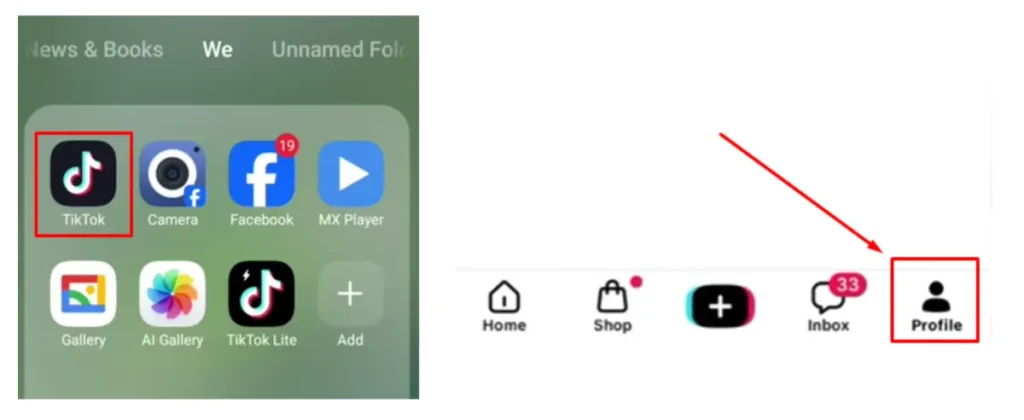
Step 1: Open the TikTok app and tap Profile at the bottom of the screen.
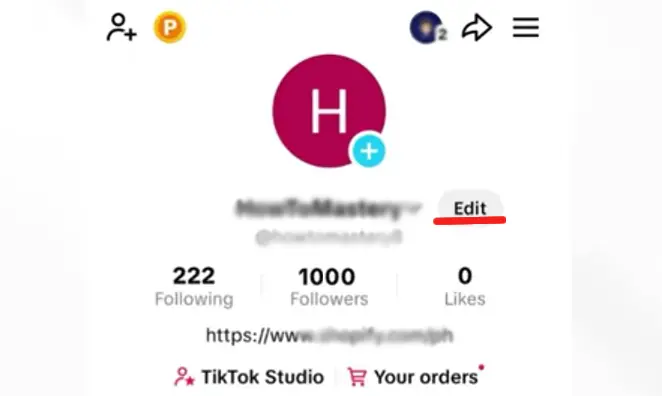
Step 2: Tap Edit profile.
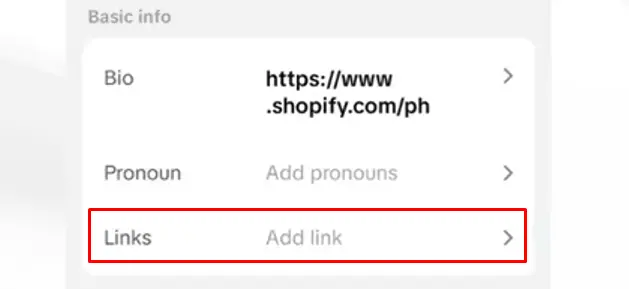
Step 3: Find Links and tap Add next to it.
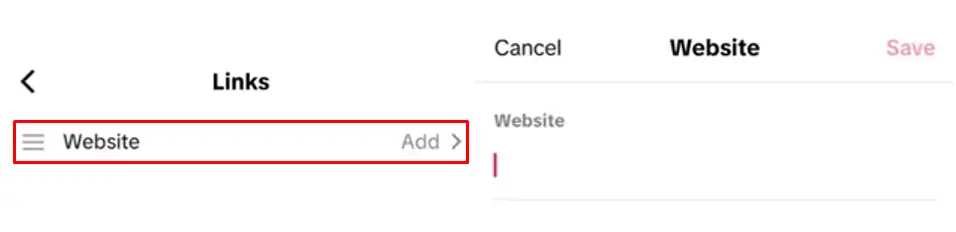
Step 4: Follow the on-screen steps to enter your website address.
Step 5: Save, then view your profile from another account to confirm the link opens.
Note: Older tutorials tell you to find a field labeled Website. TikTok’s current instructions describe a Links section instead, so look for that label.
How to Verify a Business Account for a Bio Link
If you are using the business route, the verification steps come from TikTok’s guide to verifying a TikTok account. Have your business license ready before you start.
- Go to your profile and tap the Menu icon in the top right corner.
- Tap Settings and privacy, then Account, then Business verification.
- Agree to the terms and tap Get started.
- Select your business’s country or region and add optional details such as phone and website.
- Upload your verification document and enter your legal business name and license ID exactly as they appear on it.
- Confirm your identity by SMS or voice call, then tap Submit.
TikTok says approval typically takes 1 to 5 business days. You get an in-app notification and a confirmation email when it is done.
Why You Can’t Add a Link to Your TikTok Bio
When the Links option is missing, the cause is almost always eligibility, not a bug. Work through these checks in order.
- Under 1,000 followers: The follower route stays locked until you reach 1,000. Check your current count on your profile.
- Business account but not verified: Switching account type is not the same as passing business verification. Check the Business verification page in Settings and privacy for your status.
- Verification still pending: Approval typically takes 1 to 5 business days, so the option may not appear the same day you apply.
- Verification lost: Community Guidelines violations can put a verified account into re-verification, which removes features reserved for verified accounts until it is restored.
- Old app version: Update TikTok from your app store. Older versions may not show the current Links layout.
- Outdated tutorial: If you are hunting for a Website field, look for Links instead.
Links TikTok Won’t Accept or Will Warn About
TikTok no longer supports profile links that open or log you into other social media apps. You can still link to those platforms’ websites.
For example, a link to your YouTube channel’s web address works, while a link built to launch another social app directly will not.
TikTok also limits how people browse chains of external links inside its in-app browser. Visitors may see a prompt to open the page in their phone’s own browser.
That prompt matters for link in bio pages. A hub page that sends visitors through several redirects is more likely to trigger it, so direct links give a smoother path.
Anyone who spots a suspicious profile link can report it. Tap the link, tap the More options button at the top, then tap Report and follow the steps.
What to Put in Your TikTok Bio Link
TikTok gives your profile one website link, so the destination decides whether profile visits turn into anything useful.
A single focused page works best when your videos push one action, like a product page or a newsletter signup.
A link in bio page works better when you need to offer several destinations from that one slot.
If you go the hub route, the TLinky Link in Bio builder creates one mobile page that lists your shop, content, and contact options behind a single URL.
Keep that page short and put your most important link first. These tips for building a link in bio page cover layout choices that keep visitors from bouncing.
Your bio text should give people a clear reason to tap the link, such as a free guide or this week’s offer.
Check the TikTok bio character limit before writing a call to action, because the bio text has room for only a short line.
Choosing destinations, tracking which videos drive taps, and extending the link offline with QR codes belong to a full link in bio strategy for TikTok, which goes further than setup.
FAQs
These answers cover the questions people ask most after trying to add a TikTok bio link.
Can you add a link to your TikTok bio without 1,000 followers?
Yes, if your account is a Verified Business Account. TikTok’s help page lists that as the only alternative to the 1,000-follower route.
Verification requires a valid business license and an applicant aged 18 or over. Approval typically takes 1 to 5 business days, according to TikTok’s verification guide.
Does switching to a Business account unlock the bio link?
Not on its own, based on TikTok’s current wording. The help page names a Verified Business Account, which means a Business account that has passed TikTok’s document review.
If you switched account type and still see no Links option, apply for business verification under Settings and privacy, then Account.
Is a Verified Business Account the same as the blue checkmark?
No. TikTok says business verification is different from the blue checkmark, which is reserved for high-profile accounts such as celebrities and major brands.
Business verification confirms that a registered business is authentic. Accounts of any size can apply, as long as the business has a valid license.
How many links can you add to a TikTok bio?
TikTok’s profile settings support one website link, plus a Lemon8 account where that option is available. You cannot stack several website URLs in the Links section.
To offer more destinations, point that single link to a link in bio page that lists everything visitors might need.
Why does my TikTok bio link open in a different browser?
Tapping a profile link opens TikTok’s in-app browser first. TikTok also uses safety measures that limit browsing through chains of external links inside that browser.
When those measures apply, visitors see a prompt to open the page in their device’s own browser instead. Direct links with fewer redirects reduce how often this happens.
Next Step
Check which route your account fits today. With 1,000 followers, you can open Edit profile and add your link now.
If you run a registered business below that number, start business verification today and plan for up to 5 business days.