
Free TikTok Username Generator [AI Powered]
Describe yourself or your brand, pick a style, tone and length preference, and get 5, 10 or 20 TikTok username ideas plus three tips for choosing one.
TikTok Username Generator AI
Craft the perfect, brand-aligned username with the power of AI.
AI is crafting the perfect TikTok usernames…
Grow your Business & Social Media Marketing
- Branded Link Shortener
- QR Code Generator
- Bio Page Builder
- Tracking & Analytics
- 16+ Integrations
More Free Tools for Setting Up Your TikTok
What you get from the TikTok username generator
The TikTok username generator turns a short description of you or your brand into 5, 10 or 20 username ideas, each on its own card with a character count. Click a card to copy the name. Under the list, three short tips help you choose. The tool doesn’t check whether a name is free on TikTok, so treat every result as an idea until TikTok accepts it.
How to use the TikTok username generator
To use the TikTok username generator, fill in seven fields. Only the description is required, and the rest have defaults:
- Account Type. Personal or Business.
- Category. One of 25, from Art & Crafts to Travel & Tourism. Personal Blog is the default.
- Short Description of Yourself/Brand. The one required field, at least 5 characters. Say what you make or post, where, and for whom.
- Preferred Style. Minimalist (Short & Clean), Creative & Unique (the default), Playful & Funny, Brandable/Professional, or Pun-based & Clever.
- Rare Username Preferences. No Preference, Short (Max 12 characters), Very Short (Max 8 characters), Use underscores/dots, or Include numbers/dates. Despite the label, this sets a length or character rule. It doesn’t find names nobody has claimed.
- Tone. 17 choices, including Friendly (the default), Luxury, Persuasive and Custom.
- Generate Limit. 5, 10 (the default) or 20 names.
Click Generate Usernames to get the list. Reset is there when you want to start over.
Ten names for an Austin coffee roaster
In our test on November 3, 2026, the generator returned ten names in 4.1 seconds. Our brief was a fictional small-batch coffee roaster in Austin, Texas, and we picked Business, Food & Beverage, Brandable/Professional, Short (Max 12 characters) and the Friendly tone.
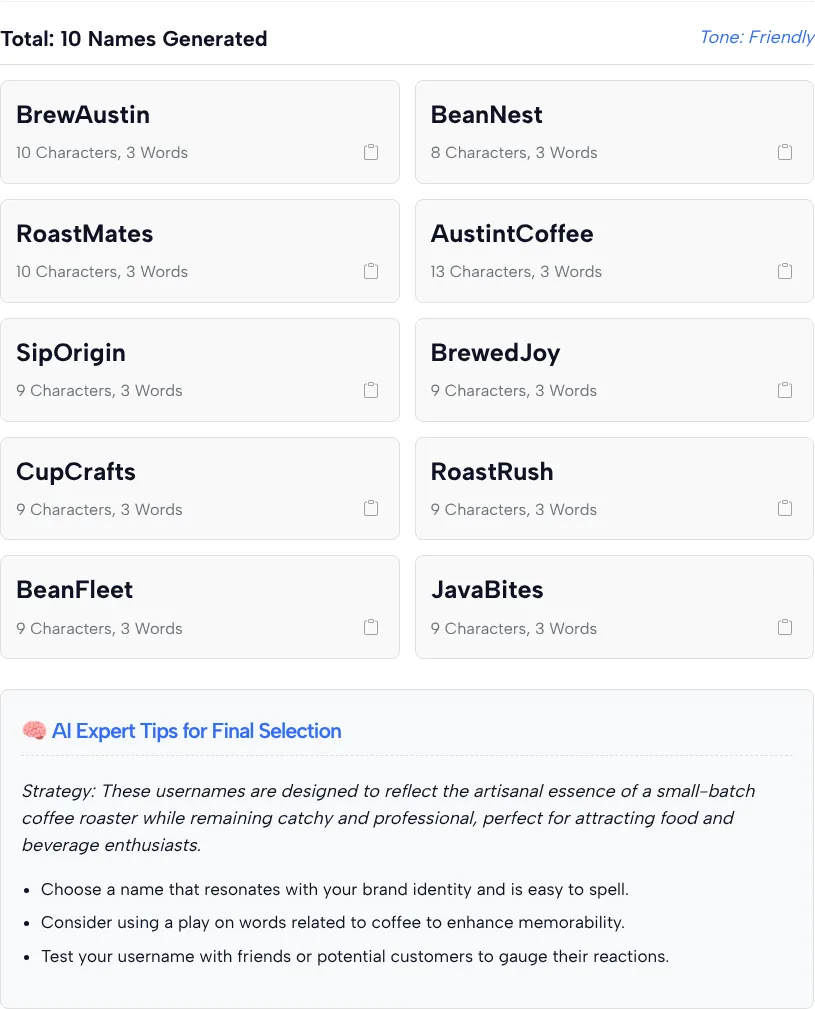
| Name | Characters shown on the card |
|---|---|
| BrewAustin | 10 |
| BeanNest | 8 |
| RoastMates | 10 |
| AustintCoffee | 13 |
| SipOrigin | 9 |
| BrewedJoy | 9 |
| CupCrafts | 9 |
| RoastRush | 9 |
| BeanFleet | 9 |
| JavaBites | 9 |
Most of the list is usable, but the details matter when you’re about to claim a name:
- One name breaks the length cap and has a typo. AustintCoffee has 13 characters even though we asked for 12 at most, and “Austint” isn’t a word. When length matters, count the characters yourself.
- The word count is wrong. Every card says “3 Words,” including BeanNest and BrewAustin, which are two words each. The character counts were right on all ten, so trust those and ignore the word count.
- All ten use letters only. No numbers, dots or _ symbols, which makes them easy to say out loud and type.
- Copying gives the plain name. Clicking BrewAustin copied “BrewAustin” with no @ sign. The card doesn’t show a “Copied” message, so paste once to check.
- The tips are general. Pick something easy to spell, try a play on coffee words, and test the name on friends or customers.
- One card isn’t a name. The sixth slot holds a TLinky promo for TikTok ad credit, not a username.
TikTok’s username rules and how to claim a name
TikTok decides which names you can actually use, and TikTok Support’s page on changing your username spells out the rules your pick has to pass:
- A username needs 2 to 24 characters.
- Only letters, numbers, periods and the _ symbol are allowed, and a period can’t be the last character.
- You can change your username once every 30 days.
- Changing your username also changes your profile link.
- A name that’s taken, or held by a suspended or deactivated account, can’t be used.
- Your username is the @ tag in your profile link. Your nickname is the separate display name people see across TikTok.
To claim a name, follow the steps on TikTok Support’s username page in the TikTok app:
- Tap Profile at the bottom.
- Tap Edit profile.
- Tap Username and type the name you picked.
- Tap Save.
The generator’s options mostly fit TikTok’s rules. Both length caps sit well inside the 24-character limit on TikTok Support’s username page, and the dots-and-_ option sticks to the two symbols that page allows. Two things still need your eye: a period at the very end, and a name that runs past the cap you chose, like AustintCoffee did.
Settings that fit your kind of account
The best settings depend on who will be typing your name. Start from the row closest to your situation:
| Your situation | Settings to try |
|---|---|
| A shop or service people search for by name | Business, your category, Brandable/Professional, No Preference |
| A creator account built around your personality | Personal, Creative & Unique or Playful & Funny, a tone that sounds like you |
| You want a name that’s easy to say on camera | Minimalist (Short & Clean) with Very Short (Max 8 characters) |
| Your first choice turned out to be taken | The dots-and-_ option or Include numbers/dates, then check the result in the app |
Before you lock in a name
Pick the name you can live with for a while, since you can’t swap it again right away. A quick final check:
- Say it once, out loud. If a friend can’t type it after hearing it, keep looking.
- Skip lookalike letters. A lowercase l next to a capital I, or a 0 next to an O, trips people up.
- Match your other profiles. If the same name works on the other apps you use, people can find you from one to the next.
- Don’t expect the name to do the reach work. TikTok’s newsroom post on how the For You feed recommends videos lists your interactions, video details such as captions, sounds and hashtags, and device and account settings, and a username isn’t on that list. Our guide to the TikTok For You page covers what does count.
Once the name is set, the next thing visitors look at is your bio and its link. TLinky’s Link in Bio turns that single link into a page with everything you want people to find. When you start posting, the TikTok comment generator can help you draft replies, and the TikTok earnings calculator gives a rough idea of what an account your size might earn. You’ll find the rest in TLinky’s TikTok tools.
Picking a TikTok username: your questions answered
Does the TikTok username generator check if a name is taken?
No. The generator only suggests names and never looks them up on TikTok. Copy the one you like, open Edit profile in the TikTok app and type it into the Username field. If TikTok won’t save it, try the next idea on your list.
What does Rare Username Preferences mean?
Rare Username Preferences is a length or character rule, not a promise of rare or unclaimed names. You can ask for names of up to 12 or 8 characters, names with dots or the _ symbol, or names with numbers such as 22 or 99. Count the length yourself, because in our test one name went over the 12-character cap.
Why does every name say 3 Words?
The word counter on the cards is off. In our test every card said 3 Words, even BeanNest and BrewAustin, which are two words each. The character counts were right on all ten cards we checked, so rely on those and ignore the word count.
Should I choose Personal or Business as the account type?
Choose Business if the name is for a shop, product or service, and Personal for a creator or private account. The account type is one of the inputs the generator uses, along with category and style. Running the form once with each setting is a quick way to compare two lists.
Can I use these names on Instagram or YouTube too?
Yes, the names are plain text you can use anywhere. Each app has its own rules for length and symbols, so test the name in each app’s profile settings before you print it on packaging or a business card. A letters-only name, like the ten in our test, is the easiest to reuse.
How many TikTok username ideas can I get at once?
Up to 20 per run, set in the Generate Limit field (5, 10 or 20). The form has no sign-up field, so when the list feels thin you can change the description, style or tone and click Generate Usernames again.