
TikTok Comment Generator
Describe a TikTok video, choose what you want the comment to do, and get 5, 8 or 10 comment drafts you can copy with one click.
Grow your Business & Social Media Marketing
- Branded Link Shortener
- QR Code Generator
- Bio Page Builder
- Tracking & Analytics
- 16+ Integrations
More TikTok Tools for Your Posts and Profile
What the TikTok comment generator writes for you
The TikTok Comment Generator writes comment drafts from a description you type: say what the video shows, pick a goal, and it returns 5, 8 or 10 comments you can copy. It doesn’t open TikTok, read a video link or post anything. Every comment still goes up by your hand, from your own account.
That’s worth knowing if you came here looking for a TikTok comment bot or an auto commenter. This isn’t one, and the section on TikTok’s rules below explains why a drafting tool is the safer choice.
Fill in four fields, then click Generate Comments
Four fields drive the generator, and only the persona field is optional:
- Video Topic or Description. Say what happens in the video in a sentence or two. The form needs at least 10 characters, and details help: “we roast a 5-pound batch of Ethiopian beans” gives the tool more to work with than “coffee video.”
- Comment Goal. Pick one of five: drive conversation and replies, be funny or relatable, promote a product or link, give a strong opinion, or express amazement or shock.
- Specific Tone or Persona (Optional). Write who is commenting, such as “As a regular customer who loves light roasts” or “As a skeptical Gen Z user.”
- Number of Comments to Generate. Choose 5, 8 or 10.
Click Generate Comments. When the list appears, click any comment to copy it. Clear empties the form for the next video.
Our test: five comments on a coffee roasting video
In our test on November 3, 2026, the generator returned five comments in 4.1 seconds. Our test video was an imaginary Austin coffee roaster filming a 5-pound batch of Ethiopian beans and tasting the first cup, chose the Engagement goal and used the persona “As a regular customer who loves light roasts.”
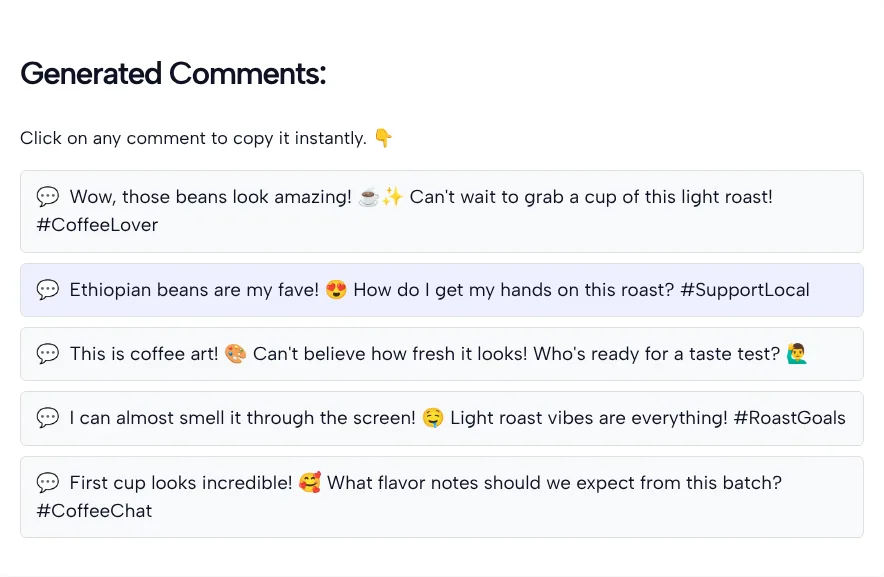
The screenshot shows all five comments word for word. Three of them ask something: “How do I get my hands on this roast?”, “Who’s ready for a taste test?” and “What flavor notes should we expect from this batch?” The other two are plain praise, such as “I can almost smell it through the screen.”
Here’s how we’d turn two of the drafts into comments a real customer might post. In the second row the question was already good, so we cut the opener and the #CoffeeChat tag; a light roast fan would ask it just like that.
| Draft from the generator | Our edit |
|---|---|
| “This is coffee art” plus “Who’s ready for a taste test?” | “Those beans went from green to that light cinnamon color fast. Who gets the first bag from this batch?” |
| “First cup looks incredible!” plus “What flavor notes should we expect from this batch? #CoffeeChat” | “What flavor notes should we expect from this batch?” |
A closer look at the batch:
- Emojis everywhere, hashtags on four of five. We didn’t ask for either. The form has no switch for them, so you delete what you don’t want after pasting.
- Three of five include a question. Those give the creator something to answer, which plain praise doesn’t.
- The praise is generic. “Those beans look amazing” fits almost any coffee video. The drafts that mention the light roast or the first cup are the ones that sound like someone watched.
- Copying worked. Clicking the first comment changed its label to “Copied!” and put the exact text on our clipboard.
- One line in the list isn’t a comment. After the third comment there’s a promo line for TLinky’s TikTok ad credit. Skip it when you copy.
Which comment goal to pick
Pick the comment goal by what you want to happen after you post. Each of the five options pulls the drafts in a different direction:
| Goal (as the form names it) | Use it when | Watch for |
|---|---|---|
| Drive conversation and replies (Engagement) | You want the creator or other viewers to answer you | Keep only the questions you’d really like answered |
| Be funny, witty, or highly relatable | The video is light and the comments are already joking | A joke about the wrong detail shows you didn’t watch |
| Promote a product/link (Call to Action) | You’re replying on your own video, for example pointing people to the link in your bio | The same promo pasted on strangers’ videos reads as spam |
| Provide a strong, engaging opinion | You know the topic and can back the opinion up in replies | Tone it down until it’s a view you’d defend |
| Express amazement or shock | The video shows a real result, reveal or skill | Several “no way!” drafts sound alike, so keep one |
Why TikTok cares how a comment gets posted
TikTok treats comments as real signals, so it acts against fake ones. TikTok’s newsroom post on how TikTok recommends videos lists the comments you post among the interactions that shape your For You feed, next to the videos you like or share and the accounts you follow.
The TikTok Community Guidelines on integrity and authenticity don’t allow spam or services that artificially inflate engagement, strictly prohibit automation tools and scripts that get around TikTok’s systems, and say TikTok removes fake likes, followers and other inflated signals.
TikTok also screens comments as you post them: TikTok Support’s comments guide says a prompt may ask you to reconsider a comment that could be inappropriate, and that inappropriate comments could be removed.
So use the generator the way you’d use a notepad. Read each draft, change it to fit the video, and post it yourself, one video at a time. Don’t paste one draft across a dozen videos.
Make a draft sound like you wrote it
To make a generated comment sound like yours, add one thing only a real viewer would know, then trim the rest. A few edits do most of the work:
- Name a moment. Swap “those beans look amazing” for the part you noticed, like the color change halfway through the roast.
- Cut most hashtags. Four of our five drafts ended with one. In a comment, a hashtag tends to read like a caption, so keep it only if it adds something.
- Keep one emoji. Three in a short comment is a lot. Pick the one that matches how you’d react.
- Ask what you want to know. If a draft asks something you don’t care about, cut it. A question you want answered is worth more than three you don’t.
- Use your own words. If you’d never say “vibes,” change it. People who know you will notice.
If you also need hashtags for your own video, the TikTok hashtag generator is built for captions, not comments.
Who the TikTok comment generator helps
The generator helps anyone who comments often enough that the blank comment box slows them down:
- Creators answering their own comments. Try describing the comment you’re replying to in the topic field and picking Engagement for a few ways to start a reply.
- Small brands commenting on creators in their niche. Pick Engagement or Humor rather than Call to Action, so the comment reads like a fan’s, not an ad.
- Social media managers. Draft comments for several client accounts, then edit each one into that brand’s voice before posting.
- New accounts. If you’re still setting up the profile, start with the TikTok username generator, then come back here once you’re commenting.
For more help with your account, browse the full set of TikTok tools on TLinky.
TikTok comment generator: common questions
Does the TikTok comment generator post comments for me?
No. The generator only writes text. You copy a comment, open the video in the TikTok app and post it yourself from your own account. The TikTok Community Guidelines strictly prohibit automation tools and scripts and say they can lead to content removal or account bans.
Is this a TikTok comment bot or an auto commenter?
No. A comment bot logs in and posts for you, and this tool has no TikTok login or posting step at all. You get 5, 8 or 10 drafts to read, edit and post by hand, one video at a time.
Can it make a fake TikTok comment image?
No. The output is plain text in a list you can copy, not a picture. If you need a mock-up of a TikTok comment for a slide, a lesson or a design, use an image editor. This generator only writes the words.
Will these comments help my video reach more people?
Nobody can promise that, and the generator doesn’t try to. What it does is get you past a blank comment box. A comment that mentions something real from the video is the kind worth posting, so edit each draft before you use it.
Why do the comments come with hashtags and emojis?
The generator adds them on its own. In our test every comment had emojis and four of five ended with a hashtag, even though we didn’t ask for either. The form has no setting to turn them off, so delete what you don’t want after you paste.
Do I need an account to use the TikTok comment generator?
No sign-up is needed. The form has no login, email or payment field: describe the video, pick a goal and a number of comments, and click Generate Comments. Clear resets the form when you move on to the next video.