
TikTok Bio Generator
Type your niche, pick one of seven vibes and add an optional call to action and keywords to get five TikTok bio drafts, each with a character count and a Copy button.
Grow your Business & Social Media Marketing
- Branded Link Shortener
- QR Code Generator
- Bio Page Builder
- Tracking & Analytics
- 16+ Integrations
More Free Tools for Your TikTok Profile
What the TikTok bio generator writes
The TikTok Bio Generator turns a few words about your account into five short bio drafts. You type your niche, pick a vibe, and add a call to action and keywords if you want them. Each draft comes with a character count and a Copy button.
The generator doesn’t sign in to TikTok or touch your profile. You choose a draft, edit it, and paste it in yourself.
The four fields, in order
Two fields are required and two are optional:
- Your Niche. Say what the account is about in a few words. “Small-batch soy candle maker” gives the AI far more to work with than “candles.”
- Vibe / Tone. Pick one of seven: Funny / Comedic, Professional / Expert, Inspirational / Motivational, Aesthetic / Artsy, Edgy / Sarcastic, Wholesome / Friendly or Chaotic / High-Energy.
- Call to Action (Optional). Write the one thing a visitor should do next, such as “Shop the fall scents below” or “Follow for weekly tips.”
- Other Keywords (Optional). Add a city, a product type or a phrase people know you by, separated by commas.
Click Generate Bios for the drafts. Reset clears all four fields so you can try another vibe.
Our test: five bios for an Ohio candle shop
In our test on November 4, 2026, the generator returned five bios in 5.1 seconds. We filled in the form for a made-up Ohio soy candle brand: “Small-batch soy candle maker” as the niche, the Funny / Comedic vibe, “Shop the fall scents below” as the call to action and “Ohio, handmade, gifts” as keywords.
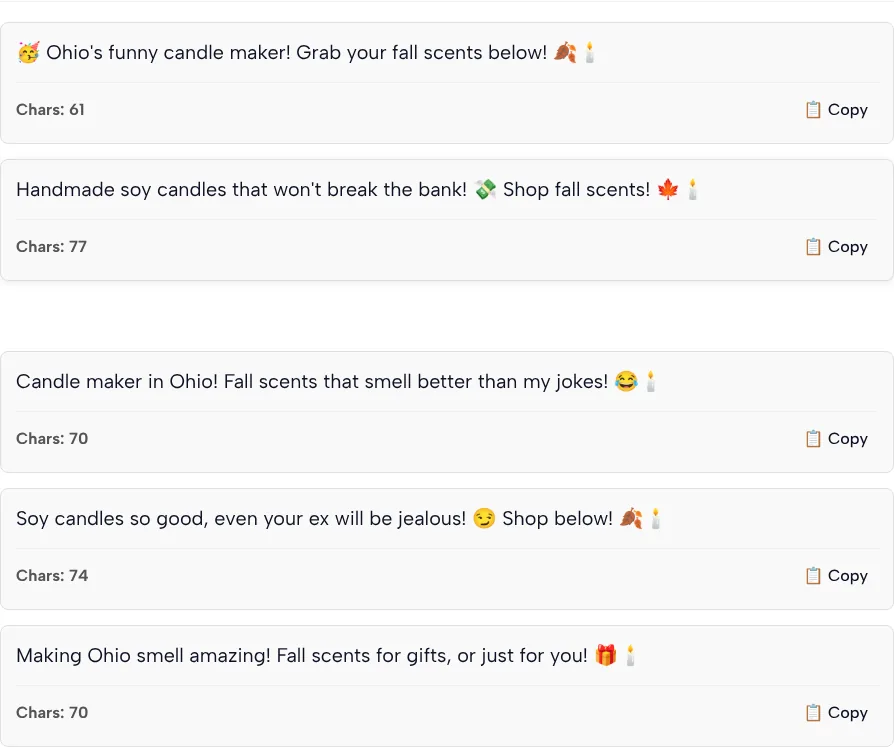
The full bios are in the screenshot. Here is how each one opens, with the count the tool showed next to our own recount:
| Bio | Opens with | Tool’s count | Our count |
|---|---|---|---|
| 1 | 🥳 Ohio’s funny candle maker | 61 | 61 |
| 2 | Handmade soy candles that won’t break the bank | 77 | 71 |
| 3 | Candle maker in Ohio | 70 | 70 |
| 4 | Soy candles so good, even your ex will be jealous | 74 | 68 |
| 5 | Making Ohio smell amazing | 70 | 70 |
We counted every letter, space and punctuation mark, and each emoji by its Unicode code points (the candle emoji is two: the candle plus an invisible style marker). What we noticed:
- Two counts ran high. The tool said 77 and 74 for the second and fourth bios; we got 71 and 68. A count that runs high won’t push you over a limit, but don’t treat it as final.
- The joke went one step too far once. The line “even your ex will be jealous” may amuse your followers and put off someone shopping for a gift. Read every Funny draft as a stranger would.
- Only three bios kept a call to action. We asked for “Shop the fall scents below.” Bio 1 says “Grab your fall scents below,” bio 2 says “Shop fall scents” and bio 4 says “Shop below,” while bios 3 and 5 skip the ask entirely.
- Keywords were used loosely. Ohio shows up in three bios, handmade in one and gifts in one.
- The style repeats. Every bio has two exclamation marks and ends with the candle emoji.
- Copy works. Clicking Copy on the first bio changed the label to “Copied!” and put that bio on our clipboard.
- One row isn’t a bio. The tool places TLinky’s free TikTok ad credit offer between bio 2 and bio 3, so don’t mistake it for a sixth draft.
TikTok’s bio limit and link rules
Your bio has to fit in 80 characters, according to TikTok Support’s page on changing your account bio, which also lists the steps on tiktok.com: open your profile, choose Edit profile, then Bio, enter the new text and save.
The clickable link is a separate field, and not every account gets one. TikTok Support’s guide to adding a website link says you can add a website to your profile once you have at least 1,000 followers, or if you have a Verified Business Account, and it recommends direct links because TikTok limits how far people can browse chains of outside links in its in-app browser.
Until your account qualifies, a bio that says “link below” points at nothing. Use a call to action that works without a link, such as “Follow for new scents every Friday,” and switch it once you can add a link.
When your bio does point to a link, make the next tap count. If you use a page like TLinky’s link in bio, put the products or pages people came for right on that page, so nobody has to click through a second chain of links to find them.
Edit a draft into your own bio
Treat each draft as raw material. We reworked two of ours like this:
| Generated | Our edit | Why |
|---|---|---|
| Bio 4: “Soy candles so good, even your ex will be jealous” plus “Shop below” | Small-batch soy candles poured in Ohio 🕯️ Fall scents below | Swaps the risky joke for what you sell and where you make it |
| Bio 3: “Candle maker in Ohio” plus “Fall scents that smell better than my jokes” | Ohio candle maker. Bad jokes, good fall scents 🕯️ | Keeps the humor, drops the exclamation marks |
A few habits help with any draft:
- Lead with what you post or sell. Visitors decide in a glance whether your account is for them.
- Keep one ask. “Shop,” “follow” and “DM us” in the same line compete with each other.
- Use one or two emojis, not a row of them. Each one also eats into the character budget.
- Say only what’s true. If a draft calls your products the best in town, cut it unless you can back it up.
If you post on more than one app, keep the same niche wording everywhere so people recognize you.
Which vibe fits which account
Pick the vibe that matches how your videos already sound. Our test used only Funny / Comedic, so this table is our guide to when each option makes sense, not a review of its output:
| Vibe (as the form lists it) | Good fit for | Watch for |
|---|---|---|
| Funny / Comedic | Skits, jokes, behind-the-scenes clips | Jokes that need context to land |
| Professional / Expert | Coaches, consultants, local services | Lines that sound like a résumé |
| Inspirational / Motivational | Fitness, wellness, study accounts | Slogans that say nothing about you |
| Aesthetic / Artsy | Design, fashion, photography | Emoji-heavy lines with little meaning |
| Edgy / Sarcastic | Commentary and opinion accounts | Lines that read as rude to new visitors |
| Wholesome / Friendly | Family, pets, small local shops | Bland lines anyone could use |
| Chaotic / High-Energy | Gaming, challenges, fast-cut videos | Symbols and caps that are hard to read |
Run the form two or three times with different vibes and keep the best line from each batch. Mixing a clear first half from one draft with a friendly ask from another often works better than any single draft.
TikTok bio generator questions
Does the TikTok bio generator change my profile?
No. The generator only writes text on this page and never connects to your TikTok account. Copy the draft you like, edit it, and paste it into your profile yourself.
Why is the character count different from mine?
We can’t see how the tool counts, and emoji make any count tricky because many are stored as more than one character. In our test, three of the five counts matched our recount and two were six higher than ours. Paste the bio into TikTok before you rely on the number.
Can I get a bio without emojis?
There’s no setting for it. The form has no emoji option, and every draft in our test used emojis, so delete them by hand if your brand doesn’t use them.
Which vibe should a business account pick?
Most shops and service businesses do well with Professional / Expert or Wholesome / Friendly, because new visitors know right away what you offer. Pick Funny / Comedic only if your videos are funny too, and read each draft as a customer would.
Why didn’t all my keywords show up?
The Other Keywords field nudges the AI; it doesn’t force every word in. We entered Ohio, handmade and gifts, and only Ohio appeared in more than one bio. Add any word that must be there when you edit the draft.
Can I use these bios on Instagram or YouTube?
Yes. The drafts are plain text, so you can paste them anywhere. Each app sets its own bio length and layout, so check how the line looks there before you save it.