
TikTok Earnings Calculator
Enter your followers, average monthly views and main audience region to get a rough monthly TikTok earnings range, the part the tool counts as view pay, and five money-making tips.
Grow your Business & Social Media Marketing
- Branded Link Shortener
- QR Code Generator
- Bio Page Builder
- Tracking & Analytics
- 16+ Integrations
More TikTok Calculators for Creators and Sellers
What the TikTok earnings calculator tells you
The TikTok Earnings Calculator turns three numbers (followers, average monthly views and audience region) into a rough monthly earnings range. In our test, 50,000 followers and 1,000,000 monthly views with a U.S., Canada and UK audience came back as $140 to $1,540 a month. Read that as a ballpark built on the tool’s own rates, not as a payout figure from TikTok.
Fill in three fields and click Calculate
All three fields are required, and the first two have minimums:
- Your Current Followers (1,000+). The form won’t accept fewer than 1,000.
- Average Monthly Views (10,000+). Your typical view total for a month, at least 10,000.
- Primary Monetization Region. USA, Canada, United Kingdom; Europe (Western), Australia; or Asia, South America, Other Regions.
Click Calculate Earnings & Get Tips. The result shows a monthly range, the part the tool labels as Creator Fund earnings, five money-making tips and a short summary. Clear resets the form.
Our test: 50,000 followers and a million views
In our test on November 3, 2026, the calculator took 4.9 seconds to return $140 to $1,540 a month, with $40 of that labeled as estimated Creator Fund earnings.
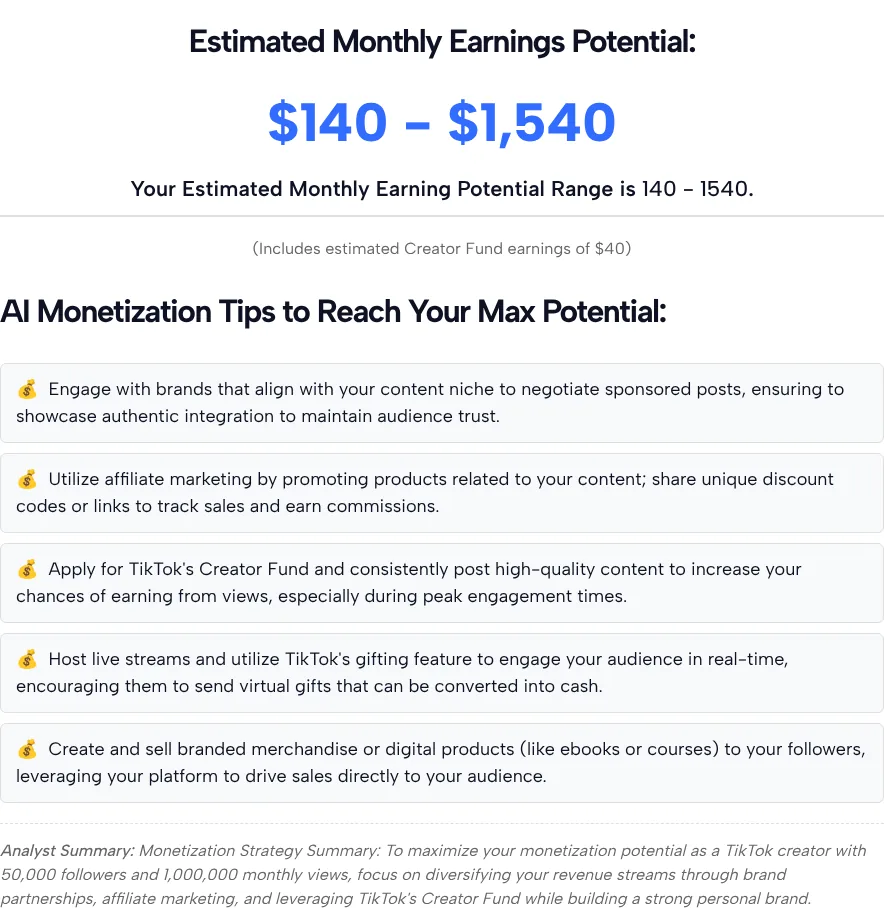
The five tips were general advice for any creator: look for brand deals in your niche, use affiliate links with tracking codes, apply to the Creator Fund, go LIVE and accept gifts, and sell merchandise or digital products. The summary under them repeated our numbers and the same advice.
How the calculator builds its number
The calculator adds two parts: a small amount for views and a much larger band for brand deals that depends on followers. We sent the form four real requests and worked the math back from the answers:
- View pay. In our test runs, the tool paid $0.04 per 1,000 views for the USA, Canada and UK option, so 1,000 x $0.04 = $40 for a million views. Asia, South America and other regions got $30 for the same million views in our test runs. We didn’t test the Europe and Australia option.
- Brand deals. On top of view pay, the band in our test runs was $100 to $1,500 at 50,000 followers and $1,500 to $5,000 at 100,000 followers.
- The total. The low end of the range is view pay plus the bottom of the band, so in our test $40 + $100 = $140.
Two checks show how the parts behave:
- More views barely move it. With views doubled to 2,000,000 at 50,000 followers, view pay in our test rose to $80 and the range to $180 to $1,580.
- More followers move it a lot. In our test at 100,000 followers instead of 50,000, with views unchanged, the range jumped to $1,540 to $5,040. We only tested two follower counts, so we can’t say exactly where the jump happens, but the low end rose more than tenfold.
So in this calculator, followers drive the result far more than views. Every rate above is the tool’s own assumption; it doesn’t cite a source for any of them.
What TikTok says it actually pays for
TikTok pays creators for views through its Creator Rewards Program, and the TikTok Creator Academy page on the Creator Rewards Program, last updated September 11, 2026, sets these requirements:
- You must be at least 18 and use a Personal account. Business accounts don’t qualify.
- You need at least 10,000 followers and 100,000 video views in the last 30 days.
- You must be based in the United States, United Kingdom, Germany, Japan, South Korea, France, Mexico or Brazil.
- Eligible videos are original, over 1 minute long, and reach at least 1,000 views on the For You feed.
- Only qualified views count: at least five seconds of watch time, one view per account, and no paid views.
Set those rules next to the calculator and three gaps show up. The calculator takes accounts far smaller than the program’s follower minimum, it counts every view rather than qualified views on longer videos, and its region list includes Canada and Australia, which aren’t on the program’s country list.
Payouts aren’t automatic even when you qualify. TikTok’s Rewards Policy says meeting the requirements doesn’t entitle you to a reward, keeps the decision on whether and how much to pay with TikTok, and lists factors for LIVE rewards such as Diamonds collected, LIVE duration and viewer engagement.
What the estimate leaves out
The estimate leaves out anything beyond three numbers, so a lot of real TikTok income never reaches it:
- Your niche and audience. Two accounts with the same followers get the same brand-deal band, whether they post about finance or about pets.
- Engagement and video length. Comments, shares, watch time and whether your videos run past a minute aren’t inputs. If replying to comments eats your time, the TikTok comment generator drafts replies you can edit.
- Sales. Affiliate commissions, TikTok Shop orders and your own products don’t show up. If you sell through TikTok Shop, the TikTok Shop fee calculator shows what fees come out of each sale.
- Costs. Taxes, payment fees and the cost of making content aren’t subtracted.
Ways to use your TikTok income estimate
A TikTok income estimate is most useful for comparing scenarios, not for budgeting. A few practical ways to use it:
- Test what growth is worth. Run your numbers twice: once with more views, once with more followers. In this tool, crossing a follower threshold moves the range far more than extra views do.
- Sanity-check a goal. Look at the view-pay line on its own. In our test it was $40 of the $140 low end, so most of the range depends on brand deals that haven’t been signed.
- Plan where followers go next. Brand deals, affiliate links and your own products all need one place for followers to click, and TLinky’s Link in Bio gives them that page.
It’s one of several TikTok tools on TLinky for creators who want rough numbers before making a decision.
TikTok money calculator questions
How accurate is the TikTok earnings calculator?
Treat the result as a rough range, not a forecast. The view rates and brand-deal bands are the tool’s own assumptions rather than TikTok numbers, and the result ignores your niche, engagement and video length. Use it to compare scenarios, such as more views versus more followers, and not to budget real income.
Why does the result mention the Creator Fund?
Creator Fund is the label the tool uses for its view-pay line, and the tool doesn’t link it to a TikTok source. Read it as estimated view pay. Before you count on any money from views, check the eligibility rules for TikTok’s current creator program in the TikTok app.
Can I use the calculator with fewer than 1,000 followers?
No. If you enter fewer than 1,000 followers or 10,000 monthly views, the form won’t calculate an estimate. Below those numbers, posting regularly and growing the account matters more than any estimate, and the range wouldn’t tell you much yet.
Does the audience region change the result much?
Only the small view-pay part changes. In our test runs, a million views gave $40 with the USA, Canada and UK option and $30 with Other Regions, while the brand-deal band stayed the same, so the whole range moved by just $10.
How can I raise my TikTok income?
Spread your TikTok income across more than one source. The calculator’s own tips point the same way: brand deals in your niche, affiliate links with tracking codes, LIVE gifts and your own products. Whichever you choose, give followers one clear link to act on and track which videos send them there.
Does the calculator look up my TikTok account?
No. The form has no username or login field, so the calculator only knows the three numbers you type. Take your follower count and last month’s views from your own TikTok analytics, enter them, and pick the region where most of your viewers live.