
LinkedIn Resume Generator
The LinkedIn Resume Generator turns the work history you paste in and a job post you want into a first-draft resume. Add your role, experience and the target job description, pick a format, and you get a Professional Summary, Experience, Skills and Education to copy or download as text. It’s free, but check every line before you send it.
Grow your Business & Social Media Marketing
- Branded Link Shortener
- QR Code Generator
- Bio Page Builder
- Tracking & Analytics
- 16+ Integrations
Tools You May Need for LinkedIn Career Growth
What Is the LinkedIn Resume Generator?
TLinky’s resume generator is a free AI writing tool that drafts a resume aimed at one specific job. You give it your work history and the job post, and it rewrites your experience in the language of that post.
“LinkedIn resume” here means a resume built from the details you already keep on your LinkedIn profile. The tool does not connect to LinkedIn or import your profile. You copy your experience, skills and education from your profile, or type them, into the form yourself.
If you only need a straight copy of your profile, LinkedIn can make one. Per LinkedIn Help, you can save a profile as a resume-style PDF from the More or Resources button on your profile, on desktop only. Use this tool when you want a version written for a particular job instead.
How to Use the LinkedIn Resume Generator
To use it, fill in the form’s six fields. Three of them are required.
- Current or Target Role (required): the job title you hold or want, such as B2B SaaS Marketing Manager. It needs at least 3 characters.
- Work Experience (required): each role with company, location, dates and what you did. Include your real numbers. The form asks for at least 50 characters.
- Key Skills (optional): a comma-separated list of skills and tools.
- Education History (optional): degree, school and year.
- Target Job Description (required): paste the job post you’re applying to. The tool shapes the whole draft around it.
- Resume Format Style: ATS-Friendly (the default), Standard or Modern. These change how the draft is worded and laid out, not whether it gets through a screening system.
Click Generate Resume. In our test the draft appeared in about 6 seconds. Clear empties the form so you can start a version for the next job.
What You Get From the Resume Generator
You get one resume draft with four sections: Professional Summary, Experience, Skills and Education. Each job gets its own bullet points, and your skills are sorted into Hard Skills, Soft Skills and Tools/Technology. There’s no setting for several versions at once and no score.
Two buttons sit under the result. Copy Resume Content copies the text, and Download as Text saves a plain .txt file named Targeted_Resume.txt. There’s no PDF or Word export.
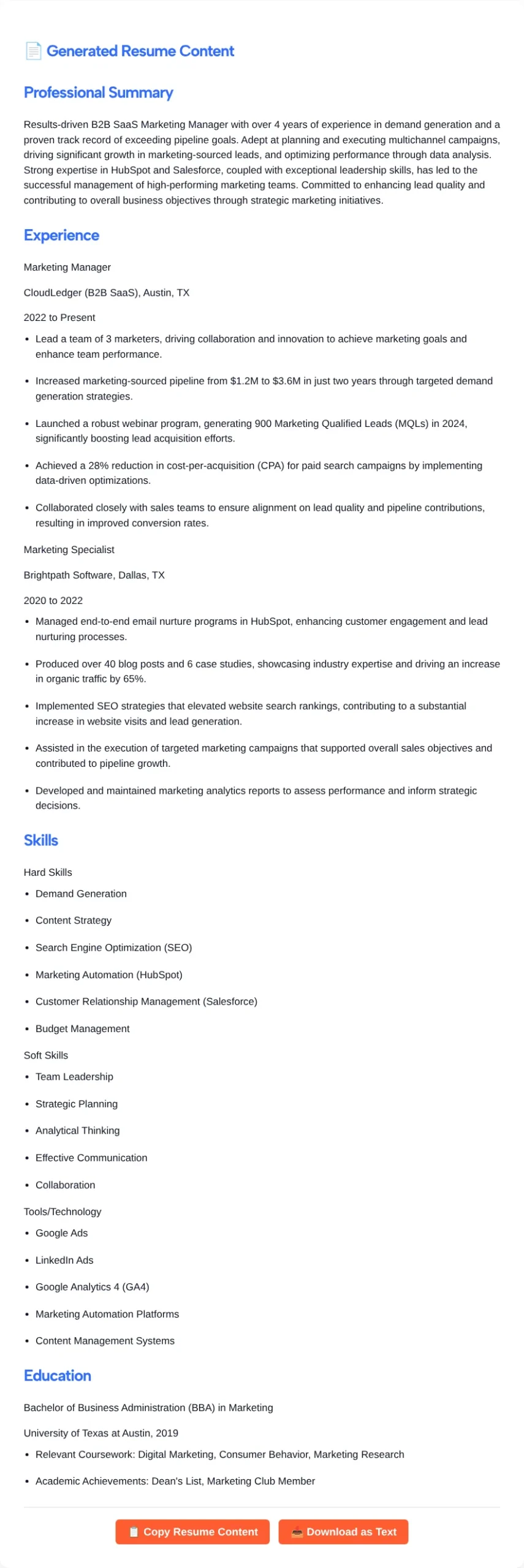
In our November 2026 test we entered two marketing jobs (2020 to present) and a Senior Demand Generation Manager job post, with the ATS-Friendly style. In our test, the draft kept our real figures in the bullets: a team of 3, pipeline growth from $1.2M to $3.6M, 900 MQLs from a webinar program and a 28% lower paid search CPA. It also expanded our short notes into full bullets that start with an action verb, which saves typing, though some of the added wording needs trimming.
Check Every Line Before You Send It
Check the draft line by line, because in our test the tool got facts wrong and added things we never gave it.
- Wrong numbers. The summary said “over 4 years of experience.” Our input covered about 6 years, from 2020 to the present.
- Wrong math. In an earlier run of our test with the same inputs, it called the pipeline growth from $1.2M to $3.6M a 100% increase. Tripling is a 200% increase.
- Invented extras. The Education section gained “Relevant Coursework” and a Dean’s List mention we never entered. One bullet credited us with SEO work that raised search rankings and site visits, which our text never said.
- Details lifted from the job post. A bullet about working with sales on lead quality came from the target job description, not our experience. The earlier run of our test went further and gave us a $1M+ budget, the figure from the job post.
Before you send it anywhere:
- Compare every number, date, title and company name with your own records.
- Delete any line that describes work you didn’t do, even when it matches the job post.
- Swap stock phrases like “results-driven” and “proven track record” for specifics only you can give.
- Add your name, phone, email and city at the top. The draft has no contact section.
- Keep the job post’s key terms only where they’re true for you.
Turn the Text Into a File You Can Upload
Paste the downloaded text into Google Docs or Word, add your contact details, format it and save it as a PDF or Word file. LinkedIn Help says a resume you upload with Easy Apply must be a Microsoft Word or PDF file, and it recommends keeping the file under 2MB. LinkedIn stores your four most recently uploaded resumes so you can reuse them on later applications.
If you picked ATS-Friendly, keep the layout plain when you format it: simple headings, one column and a standard font. That’s a formatting choice that makes the page easy for any reader to scan. The tool doesn’t test your file against an applicant tracking system.
Then bring your profile in line with the resume. The headline and summary tools near the top of this page cover those two sections, and the LinkedIn post generator can draft a short note telling your network you’re looking.
Who the Resume Generator Helps
- Job seekers applying to several roles who want a fresh draft for each post instead of one generic resume.
- Career changers who need past work described in the new field’s terms. Check that every claim still holds.
- People with a long LinkedIn history who need it cut down to the parts one job cares about.
- Recent graduates with internships and projects to turn into short, specific bullets.
It’s a poor fit if you want a designed template or a file you can submit without editing.
FAQ
Does the LinkedIn Resume Generator import my LinkedIn profile?
No. It doesn’t connect to LinkedIn or read a profile URL. You paste your experience, skills and education into the form yourself. For a plain copy of your whole profile, LinkedIn’s own Save to PDF option does that on desktop.
Is the resume ATS-optimized?
ATS-Friendly is a writing and layout style you can pick, not a test. The tool gives no ATS score and can’t predict where a company’s system places you. What you control is a simple file and the job post’s real terms, used only where they’re true for you.
Can I download the resume as a PDF or Word file?
Not directly. Download as Text saves a .txt file. Paste it into Word or Google Docs, format it and export a PDF or .docx, the two formats LinkedIn’s Easy Apply accepts.
Why does my resume include things I didn’t write?
In our test the AI filled gaps with typical resume lines and borrowed details from the job post. It added coursework, a Dean’s List mention and an SEO result we never gave it. Delete anything that isn’t true before you apply.
How much experience text should I paste?
Paste every role you want on the resume, with titles, company names, dates and real results. The form needs at least 50 characters, but a few lines per job give the tool real material and may leave it less to make up.
Is the LinkedIn Resume Generator free?
Yes. It’s free to use on TLinky, and you don’t need an account. Each click on Generate Resume returns one draft, so click again whenever you want another version.