
LinkedIn Job Description Generator
The LinkedIn Job Description Generator writes a draft job post from four things you know: the job title, a line about your company, the main duties and the must-have qualifications. Choose a tone and up to three versions, and each draft comes back in five parts you can copy into LinkedIn and finish there.
Grow your Business & Social Media Marketing
- Branded Link Shortener
- QR Code Generator
- Bio Page Builder
- Tracking & Analytics
- 16+ Integrations
Tools You May Need for LinkedIn Hiring
What Is the LinkedIn Job Description Generator?
TLinky’s job description tool is a free AI writer that turns your notes about an open role into a structured job post. It’s built for hiring managers, recruiters and founders who need a clean first draft for LinkedIn without starting from a blank page.
You supply the facts about the job, and the tool arranges them into readable sections with bullet lists. It does not post anything to LinkedIn, suggest a salary or check your wording for bias. You copy the result into LinkedIn’s job posting form, or your careers page, and finish it there.
How to Write a Job Post With the Generator
Fill in four text fields, set two options and click Generate Job Posts.
- Job Title (required): the exact title candidates will search for, such as Content Marketing Manager. It needs at least 5 characters.
- Company Mission/Culture: the form labels this field optional, but the browser won’t submit the form while it’s empty. Add at least one sentence about what your company does and how the team works.
- Key Responsibilities (required): the form suggests listing 5 to 7 core duties. Plain statements are enough.
- Must-Have Qualifications (required): only the real requirements, such as years of experience, skills, tools or certifications.
- Post Tone: Professional (the default), Innovative, Energetic or Corporate.
- Number of Options: 1, 2 or 3 versions of the post.
In our test, one version came back in about 5 seconds. Clear resets the form for the next role.
What the Job Description Generator Returns
Each version the generator returns is a full post split into five labeled parts, with its own Copy button that copies the text with bullets:
- Summary: a short paragraph that pitches the role.
- Company Intro: a few lines built from your mission and culture note.
- What You Will Do: your duties as bullet points.
- What You Will Bring: your qualifications as bullet points.
- Call-to-Action: a closing line that asks people to apply.
There’s no score, no character count and no regenerate button. Submit the form again when you want new wording.
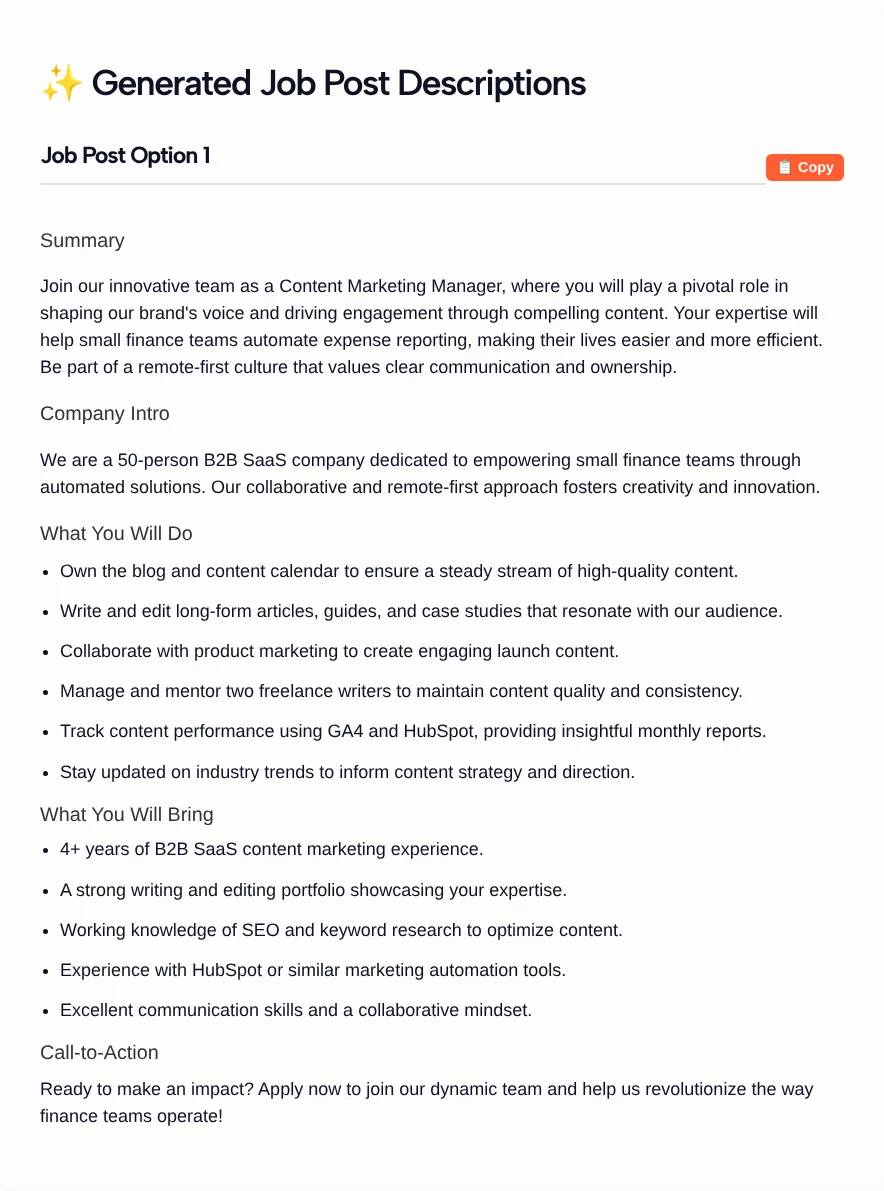
For our November 2026 test we described a Content Marketing Manager role at a 50-person B2B SaaS company, with five duties, four qualifications and the Professional tone. The draft kept our specifics, such as managing two freelance writers and “4+ years of B2B SaaS content marketing experience,” and the whole post ran to about 227 words.
Review the Draft Against the Real Role
Read every bullet against the actual job before you post, because the tool adds lines you didn’t ask for. In our test it slipped in a sixth duty, “Stay updated on industry trends to inform content strategy and direction,” and a fifth qualification, “Excellent communication skills and a collaborative mindset.” Neither was in our input.
Extra lines like these look harmless, but each requirement in a post can change who decides to apply. Keep only what the role needs.
Three more edits to make:
- Replace stock praise. Our draft opened with “Join our innovative team” and closed with “Ready to make an impact?” Swap those for something true about your team.
- Check the company facts. The Company Intro restates your input, so a wrong headcount or product description carries straight through.
- Explain the next step. Say how the hiring process works or who to contact, if you can share it.
What LinkedIn Asks a Job Post to Include
LinkedIn’s Quality job post guidelines name several details the generator has no field for, so add them yourself before you publish:
- Location: the primary location must be plainly visible in the description, along with any relocation or travel requirements.
- Job type: full-time, part-time, contract and so on, when it’s known.
- Paid or unpaid: volunteer, internship and other unpaid roles must say so clearly.
- Benefits and perks: LinkedIn suggests listing them in the Job Description field, with examples like 401k, flex time or stock options.
- A title that matches the duties: a job shouldn’t advertise a position the description doesn’t support.
- One role per post: you can hire several people for the same role, but one post can’t cover two different roles.
The guidelines also say posts can’t discriminate based on protected characteristics, and they suggest using between 500 and 600 words in the job description. Our test draft was about 227 words, so plan on adding the details above rather than posting the draft as it comes.
That help page gives a word range, not a character limit, so we don’t quote a character limit here.
Who Uses the Job Description Generator
- Founders and small teams hiring without an HR department.
- Hiring managers who know the role well but don’t want to write the post from scratch.
- Recruiters and agencies drafting posts for several roles who want the same structure each time.
- HR teams turning an internal role brief into something candidates will actually read.
To announce the opening in the LinkedIn feed as well, the post generator in the related tools above has a Recruitment/Hiring goal.
FAQ
What does the LinkedIn Job Description Generator need from me?
A job title, a short note on your company’s mission or culture, the key responsibilities and the must-have qualifications. You also pick a tone (Professional, Innovative, Energetic or Corporate) and 1, 2 or 3 versions. There are no fields for location, salary or work type.
Why won’t the form submit when the culture field is empty?
The Company Mission/Culture field is labeled optional, but the browser treats it as required. Type at least one line about your company, such as what you sell and how the team works, and the form goes through. That line also feeds the Company Intro section.
Is the generated job post ready to publish on LinkedIn?
Not as it comes. Check it against the real role, delete any duty or requirement the tool added, and add the location, job type and benefits that LinkedIn’s quality guidelines ask for. Then paste it into the job description field when you post the job.
Can I get more than one version of the post?
Yes. Set Number of Options to 2 or 3 and you get separate versions, each with its own Copy button. For fresh wording after that, submit the form again, since there’s no regenerate button.
Does the tool check for biased language or keyword ranking?
No. It doesn’t scan for biased wording, score the post or predict how it ranks. LinkedIn’s Recruiter help notes that job seekers most often search using keywords, so use the title and skill terms candidates would type, and read the post for anything that shuts people out unfairly.
Is the job description tool free?
Yes. It’s free on TLinky and needs no account. Your drafts appear on the same page, ready to copy.