
LinkedIn Headline Generator
Turn your role, skills and value into 3 to 10 LinkedIn headline options. Each one shows its character count against the 220 limit, with a Copy button.
Grow your Business & Social Media Marketing
- Branded Link Shortener
- QR Code Generator
- Bio Page Builder
- Tracking & Analytics
- 16+ Integrations
Tools You May Need for LinkedIn Profile Optimization
What the LinkedIn Headline Generator Does
The LinkedIn Headline Generator turns your job title, one or two skills and a short value statement into 3 to 10 headline options. Every option shows its length against LinkedIn’s 220-character maximum and has its own Copy button, so you can tell at a glance which lines fit.
It’s made for people who want a say in the details. You can add years of experience and a degree, then pick a style and a tone. The tool is free, and you don’t need to sign up.
How to Fill In the Form
The form has three required fields: Core Role / Title, Key Skill 1 and Unique Value Proposition (UVP). Everything else is optional or has a default.
- Core Role / Title. The title you want people to see first, like “Marketing Director.”
- Key Skill 1 and Key Skill 2. Your two most searchable skills. Only the first is required.
- Unique Value Proposition. What you help people or companies achieve. Add a result only if it’s true and you can talk about it.
- Years of Experience and Highest Education/Degree. Both optional. The form’s placeholders show the format: “5 Years” and “Master of Science.”
- Headline Options. Any number from 3 to 10. The default is 5.
- Headline Style and Tone. Three styles and four tones, covered further down.
Then click Generate Headlines. The role and Skill 1 need at least 3 characters each and the UVP at least 5, or the form shows a warning. Clear resets every field.
What We Got in Our Test
In our test on November 2, 2026, the generator returned five headline options in about 6 seconds. We used a B2B SaaS marketing manager profile: skills Demand Generation and Content Marketing, the UVP “Growing marketing-sourced pipeline 3x through content and paid campaigns,” 6 years of experience, a BBA in Marketing, Value-Driven style and Professional tone.
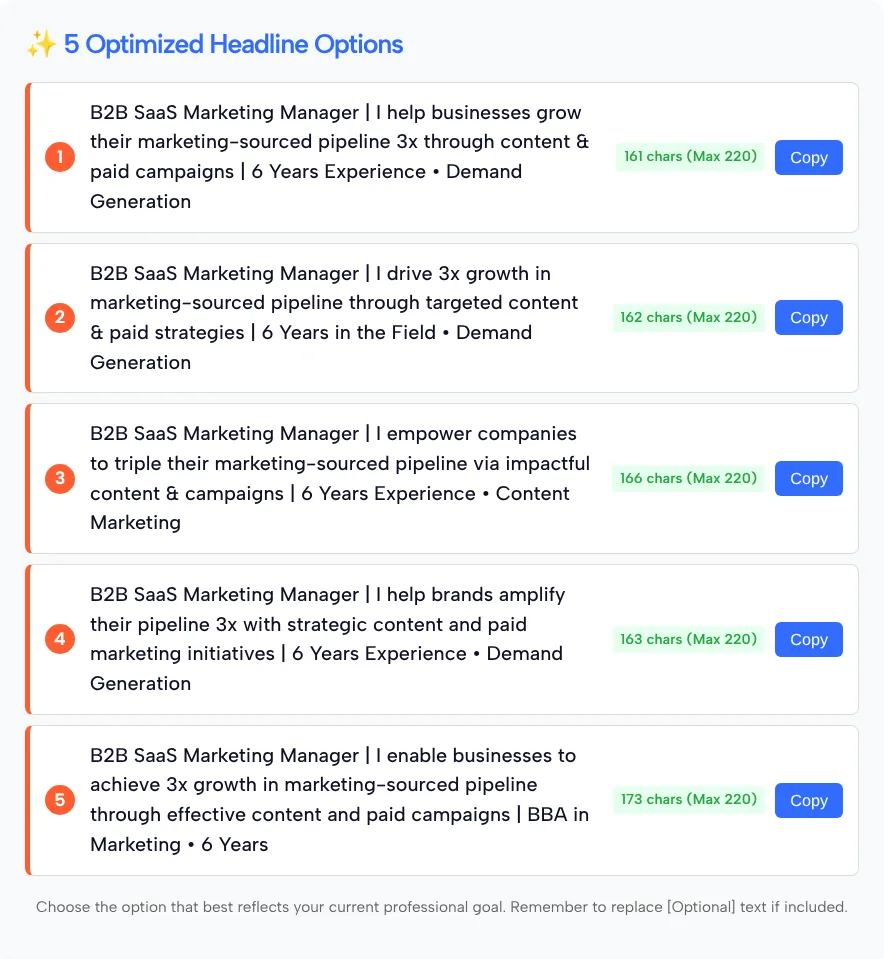
Here are two of the five options, with the counts the tool showed:
- B2B SaaS Marketing Manager | I help businesses grow their marketing-sourced pipeline 3x through content & paid campaigns | 6 Years Experience • Demand Generation (161 chars)
- B2B SaaS Marketing Manager | I enable businesses to achieve 3x growth in marketing-sourced pipeline through effective content and paid campaigns | BBA in Marketing • 6 Years (173 chars)
We recounted every line, and each badge was exact. The five options ran from 161 to 173 characters, comfortably under the 220 maximum.
One thing to expect: the five were close variations of a single pattern (role, an “I help” style sentence, then experience and a skill). For lines that differ more, run it again with a different style or tone. Under the list, the tool reminds you to replace any [Optional] text if it shows up. There’s no score and no regenerate button.
LinkedIn Headline Length: Making 220 Characters Count
In our test, each option’s badge showed its length against a 220-character maximum. LinkedIn doesn’t publish a headline character limit in its Help Center, so check that your line fits when you paste it into your profile. What LinkedIn Help does confirm is where the line appears: below your name in your profile’s introduction section, and in search results.
You don’t need every character. Our test lines used 161 to 173 and still fit a role, a value statement and experience. A few habits help more than length:
- Lead with what people search for. Your title and top skill should come before any slogan.
- Stick to one separator. Vertical bars or bullets both work. Mixing three kinds looks cluttered.
- Use numbers you can defend. “3x pipeline” belongs in your headline only if you can explain how you got it.
- Cut filler words. “Passionate,” “results-driven” and “dynamic” take up space and tell the reader nothing.
Style and Tone: Which Settings to Use
Style decides what the headline puts first; tone decides how it sounds. The three styles:
- Value-Driven (default): opens with what you help people achieve. A good match for consultants, freelancers and sales roles.
- SEO/Keyword Focused: moves the search terms for your field up front. Useful when you’re job hunting.
- Creative/Brand: more personality and a looser structure. Suits creators and founders with a recognizable voice.
Professional is the default tone. Try Authoritative if you lead a team or a practice, Energetic for creative or early-career roles, and Humble if you’d rather understate. Our test used only Value-Driven with Professional, so compare the other settings yourself.
Who the Headline Generator Is For
The headline generator fits people who already know what they want to say and want it shaped into one tight line with a length check:
- Job seekers who want their target title and top skills in the headline.
- Consultants and freelancers who sell an outcome and want it stated plainly.
- Managers and executives who want years of experience or a degree in view.
- Recent graduates who can lean on the education field while their experience is short.
If you’d rather start from a plain description of your role and audience, the Bio Generator in the buttons above asks fewer questions.
FAQ
How many characters can a LinkedIn headline have?
LinkedIn doesn’t publish the limit in its Help Center. In our test, the generator counted each option against a 220-character maximum. The badge on each option counts toward that 220 maximum.
Are the character counts accurate?
They were in our test. We counted all five lines ourselves, and every one matched its badge.
How is this different from the LinkedIn Bio Generator?
Both write the line under your name. The Bio Generator takes your role, expertise and an optional audience and returns 1, 3 or 5 lines with no character count. This tool adds skill, experience, education and tone fields, returns 3 to 10 options, and counts each one.
Does it check how my headline performs in LinkedIn search?
No. It doesn’t score headlines or connect to your LinkedIn account. It writes options from what you type, and choosing the keywords is up to you.
Should I include years of experience or my degree?
Add them when they set you apart for the jobs or clients you want. Both fields are optional, so leave them empty when they don’t help.
Is the headline generator free?
Yes. It’s free to use, and there’s no account to create.