
Instagram DM Generator
The Instagram DM Generator writes 3 to 10 Instagram message drafts from who you are messaging, your goal, a tone and any details you add.
Grow your Business & Social Media Marketing
- Branded Link Shortener
- QR Code Generator
- Bio Page Builder
- Tracking & Analytics
- 16+ Integrations
Tools You May Need for Instagram Communication Tools
What is the Instagram DM Generator?
The Instagram DM Generator is a free tool that drafts direct messages for you. You tell it who you’re writing to, what you want from the conversation and how you want to sound, and it returns 3 to 10 message templates you can copy, fill in and send yourself.
It doesn’t connect to your Instagram account and it never sends anything. Every draft comes back with placeholders like [Name] and [Your Name], so you still choose who gets the message and what it finally says.
Top Features of the Instagram DM Generator
Everything the tool does comes from five fields and two buttons:
| Feature | What it does |
|---|---|
| Recipient Type | Who the drafts are written for: Brand/Company (Official Account), Fellow Creator (Networking), Potential Customer/Client, or Friend/Casual Follower. |
| DM Tone/Style | Professional (the default), Sincere / Appreciative, Witty / Clever, Funny / Humorous, Casual / Friendly, or Urgent / Time-Sensitive. |
| Number of Messages | Anywhere from 3 to 10 drafts per request. The form starts at 3. |
| Message Goal | One line on what you want, such as “Pitch a collaboration for your new product.” This field is required. |
| Key Details / Context | Optional facts the AI can use: your niche, follower count, a post you liked, a deadline. |
| Copy by click | Click any draft box to copy the whole message. |
There’s no login, no scheduling and no bulk sending. It’s a writing aid for one conversation at a time.
Our test: a sponsored Reel pitch to a yoga mat brand
We tried the tool on November 3, 2026, as a fictional yoga teacher in Denver pitching a brand. We picked Brand/Company and Professional, asked for 3 messages, and set the goal to “Pitch a sponsored Reel collaboration for their new eco-friendly yoga mat.” In the details box we wrote that the teacher has 12k followers and that her morning flow Reels get steady saves.
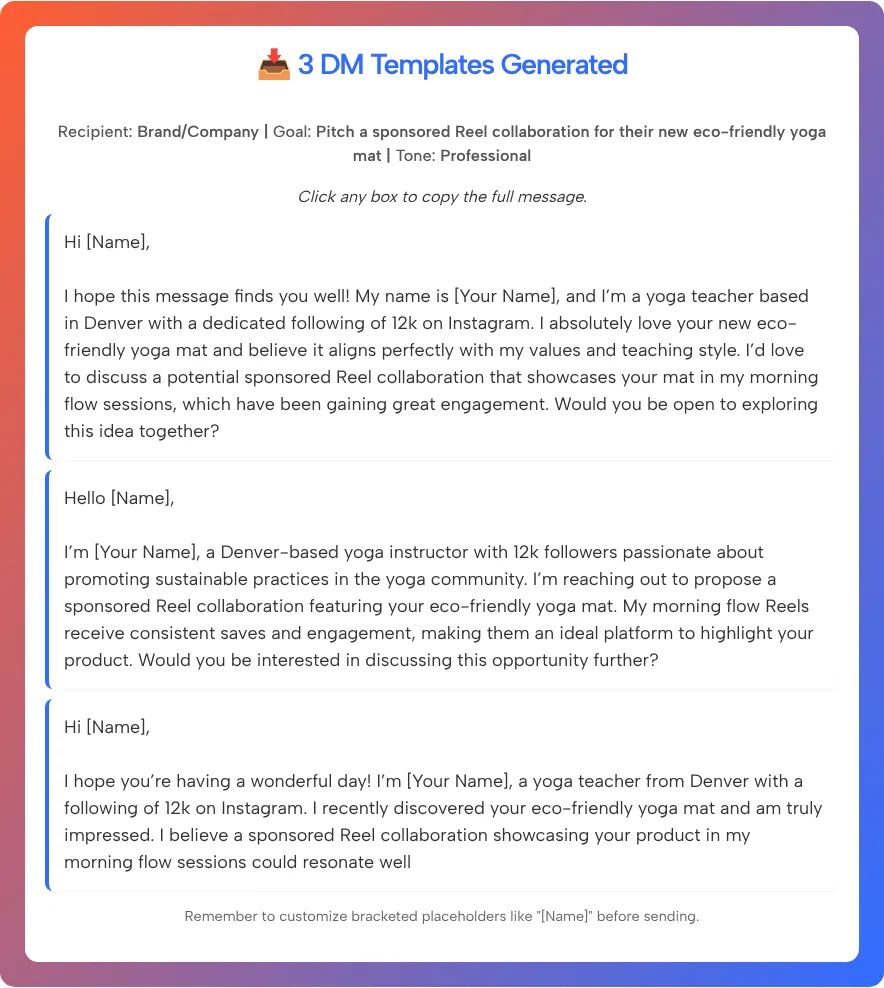
The drafts appeared in about 3.8 seconds. This is the second of the three, exactly as the tool wrote it:
Hello [Name], I’m [Your Name], a Denver-based yoga instructor with 12k followers passionate about promoting sustainable practices in the yoga community. I’m reaching out to propose a sponsored Reel collaboration featuring your eco-friendly yoga mat. My morning flow Reels receive consistent saves and engagement, making them an ideal platform to highlight your product. Would you be interested in discussing this opportunity further?
What stood out in our test:
- It used our details. All three drafts mentioned Denver, the 12k followers and the morning flow Reels, so the Key Details box clearly matters.
- The drafts ran long. Each one was roughly 80 to 100 words, which is a lot for a first message on a phone screen.
- One draft was cut off. The third message stopped mid-sentence (“could resonate well”) with no question at the end. If that happens to you, finish the sentence yourself or run the tool again.
- The openings were stock phrases. “I hope this message finds you well” and “I hope you’re having a wonderful day” are easy to cut.
Get Started: From Goal to Copied DM
You can go from a blank form to a message you’re ready to edit in a few steps:
- Pick the recipient. Choose the Recipient Type that matches the account you’re messaging.
- Pick a tone. Professional suits a first pitch to a company; Casual / Friendly suits someone who already knows you.
- Set the count. Ask for 3 drafts to compare, or up to 10 if you want more angles.
- Write the goal in one line. Be specific: “Ask to stock our candles in your shop” works better than “sales.”
- Add the details only you know. Your niche, numbers you can back up, and why you chose this person.
- Click Generate DMs. Click a draft to copy it, or use Clear to start over.
The form won’t run without a recipient, a tone and a goal.
Before you send a brand pitch
Treat each draft as a first pass. These edits make a pitch read like it came from a person:
- Replace every bracket. The tool reminds you to fill in “[Name]” before sending. A message that still says [Name] tells the reader it was a template.
- Cut it to the point. Keep who you are, why them, what you’re proposing and one question. Our test drafts repeated themselves, so there was room to trim.
- Mention something real. Name a product, post or campaign you actually saw. The AI can’t look at the brand’s profile.
- Only use numbers you can show. If you mention followers or saves, be ready to share screenshots of your insights.
- Send it to one person at a time. Pasting the same draft to dozens of accounts is how a pitch starts to look like spam.
If the pitch turns into a paid deal, plan the disclosure early: Instagram’s Help Center says its branded content policies require creators to use the paid partnership label to tag the brand they work with, and that brand needs a professional account on Instagram.
When a brand asks what you charge, our Instagram money calculator gives a rough starting figure, based on the tool’s own assumptions rather than market data. A brand you pitch may look at your profile before replying, so it helps to have a clear bio in place; the Instagram bio generator can draft one. If your message includes a link to a media kit or a past Reel, a short link from TLinky’s URL shortener is easier to read in a DM and shows you how many people clicked.
Ideal Use Cases for the Instagram DM Generator
The four recipient types cover most messages people struggle to start:
- Brand collaboration pitches. Use Brand/Company with Professional or Sincere / Appreciative, and put your niche and results in the details box.
- Networking with other creators. Fellow Creator with Casual / Friendly or Witty / Clever works for collab ideas, shoutout swaps or a thank-you.
- Replying to a potential client. Potential Customer/Client with Professional helps when someone asks about your service and you want a clear, polite answer.
- Event or launch invites. Urgent / Time-Sensitive fits a real deadline, like a workshop with limited seats. Don’t use it to invent urgency.
- Thanking a follower. Friend/Casual Follower with Sincere / Appreciative is a quick way to answer someone who supported your work.
Frequently Asked Questions (FAQs)
Do I need to log in to Instagram to use the DM generator?
No. The form only asks for the recipient type, tone, number of messages, your goal and optional details. It never connects to your account, and you send the message yourself from the Instagram app.
Why do the drafts say [Name] and [Your Name]?
The tool doesn’t know who you are or who you’re writing to, so it leaves brackets for you to fill. Replace every one before you send. A leftover bracket is the quickest way to show that a message came from a template.
One of my messages stopped mid-sentence. What happened?
The tool sometimes cuts a draft off before its last sentence ends. In our test the third of three drafts stopped mid-sentence. Finish it yourself, use one of the complete drafts, or click Generate DMs again for a new set.
How many DMs can I generate at once?
Between 3 and 10 per request. The form starts at 3, which is enough to compare a few openings without reading a wall of text. You can run it again for a new set.
Can I use it for personal messages, not just business?
Yes. Pick Friend/Casual Follower as the recipient and a tone like Casual / Friendly or Funny / Humorous. Add a few personal details in the context box. In our test the drafts used every detail we gave them, so the more specific you are, the less generic the message.
Will these messages get a reply?
No tool can promise that. A reply depends on who you write to and what you offer. The drafts give you a structure; a specific reason for contacting that person is what makes the message worth answering.