
Instagram Caption Generator
Describe your post and who it’s for, pick a tone, length and hashtag count, and get 3 to 15 Instagram captions plus one hashtag block to copy.
Grow your Business & Social Media Marketing
- Branded Link Shortener
- QR Code Generator
- Bio Page Builder
- Tracking & Analytics
- 16+ Integrations
Tools You May Also Need for Instagram Content Creation
What the Instagram caption generator writes
Type a sentence or two about your post, and this Instagram caption generator returns 3 to 15 captions to choose from. With them comes one shared block of hashtags and a one-line tip. Each caption has its own Copy button, and the hashtag block has a Copy All button.
It can’t see your photo or video, because there’s no upload field. Everything it knows comes from your description and the settings you pick. The tool is free on this page, and the form doesn’t ask you to sign in.
Filling in the six fields
Only the first field is required. Target Audience is optional, and the other four start with a default, so a good description and one click are enough for a first try:
- Post Theme / Topic. Say what the post shows and what you want people to do. “Variegated Monstera just arrived, limited stock, local pickup this weekend” gives the AI far more to work with than “new plant.”
- Target Audience. Optional free text, such as “plant lovers in Portland” or “first-time runners.”
- Desired Tone. Engaging (Standard), Inspirational/Motivational, Humorous/Witty, Educational/Informative, Product Launch/Sales-focused or Personal Storytelling.
- Caption Length. Short (1-2 sentences), Medium (3-5 sentences), which is the default, or Long (paragraphs).
- Number of Captions. 3, 5, 8, 10 or 15. The form starts at 5.
- Number of Hashtags. 5, 10, 15 or 20. The form starts at 15 and calls it “Recommended,” but 5 is the better choice today (more on that below).
Click Generate Captions to get your results. Clear empties the form so you can start over.
Our test: five captions for a plant shop’s new arrival
We tried the generator on November 3, 2026, with a post for a fictional Portland plant shop. The description announced a variegated Monstera Thai Constellation with limited stock and local pickup this weekend. We set the audience to “Plant lovers in Portland, ages 25 to 40,” kept the Engaging tone and Medium length, and asked for 5 captions and 10 hashtags. The results showed up in about 5.8 seconds.
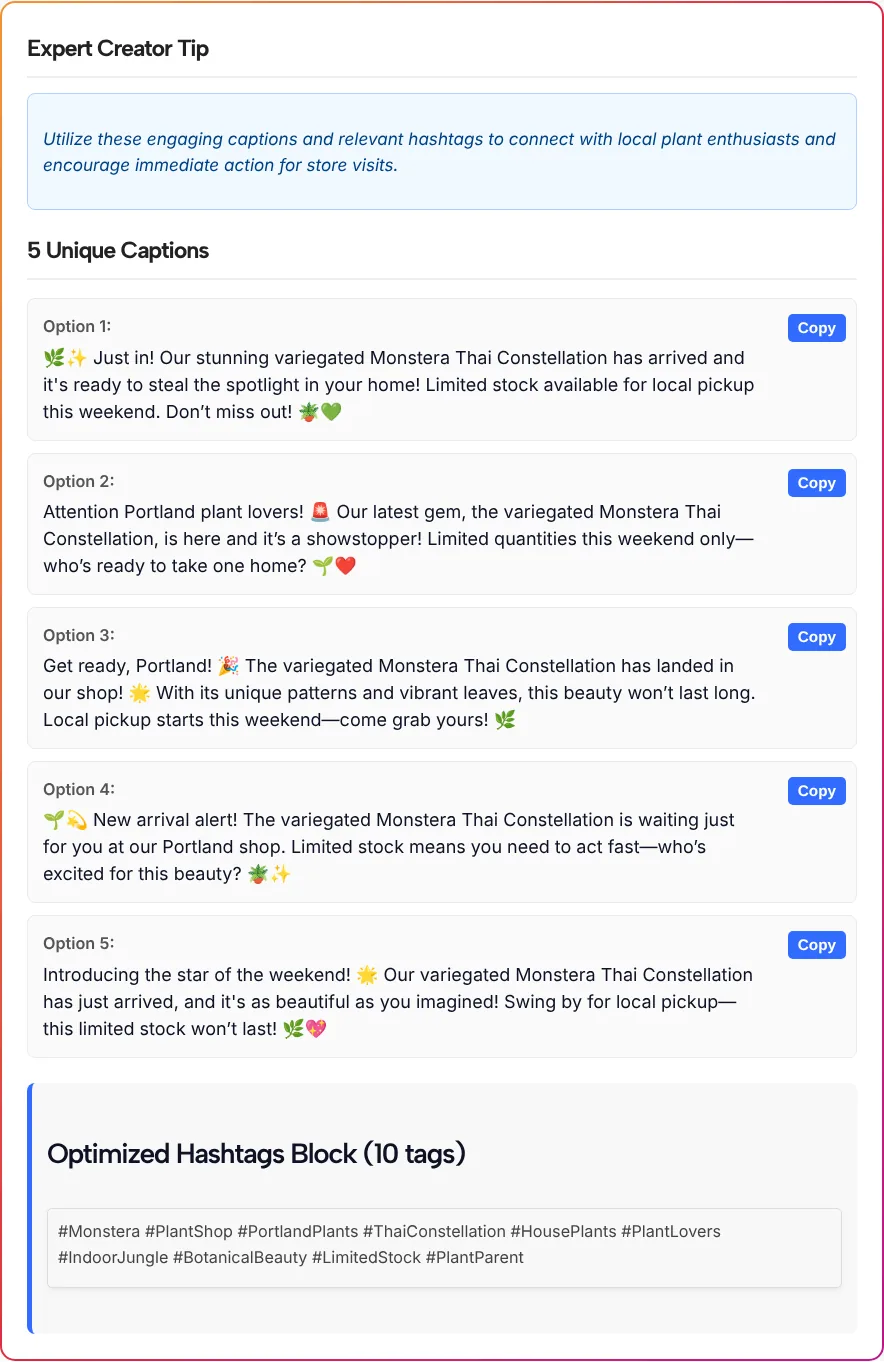
At the top sat an “Expert Creator Tip,” a single general sentence about connecting with local plant fans. Below it came five numbered captions and a hashtag block with these 10 tags:
#Monstera #PlantShop #PortlandPlants #ThaiConstellation #HousePlants #PlantLovers #IndoorJungle #BotanicalBeauty #LimitedStock #PlantParent
Here’s what stood out:
- No invented details. Every caption named the plant, and none made up a price or a date. Only three of the five mentioned local pickup, though, so check that the details you care about made it in.
- The wording is generic. Phrases like “steal the spotlight,” “showstopper” and “star of the weekend” could sit on any product post.
- It’s loud. All five used exclamation marks, up to three per caption, plus three or four emojis each. Four of the five also used long dashes.
- Copy worked. The button switched to “Copied!” and pasted the caption text exactly. Hashtags aren’t part of each caption, so copy the block separately.
How many hashtags to keep
Keep five hashtags at most. As Social Media Today reported in December 2025, Instagram said it would gradually limit the hashtags in a caption for a post or Reel to five. The form hasn’t caught up yet: it still starts at 15 and offers up to 20.
So set the count to 5, or pick the five most specific tags from a longer block. In our test, #PortlandPlants and #ThaiConstellation describe this exact post, while #PlantLovers or #BotanicalBeauty would fit any plant photo. If you’d like a bigger pool to choose from, our Instagram hashtag generator sorts suggestions into clusters you can compare.
Edit the draft before you post
A generated caption is a first draft. A few minutes of editing makes it sound like your account instead of everyone’s:
- Put the reason to act first. As Instagram for Business recommends, place important announcements at the very beginning of a caption. In our test, the stock and pickup details usually came after the opening line, so we’d move them up.
- Swap stock phrases for real details. Replace “showstopper” with something only you know, like how many plants came in or what the leaves look like up close.
- Tone down the punctuation. One exclamation mark and one or two emojis usually read as friendlier than five of each.
- Fix the dashes. If your brand voice doesn’t use long dashes, turn them into periods or commas.
- Mind the length on Long. Meta’s developer documentation lists 2,200 characters as the maximum caption length, so trim storytelling drafts that run past that.
- Back up “link in bio.” If the caption sends people to your bio, make sure the link there leads to the product or booking page. A link-in-bio page lets you list several destinations, like the new arrival, your pickup hours and your shop.
Tone and length pairings to start from
Match the tone and length to what the post is doing, and switch if the first results miss:
| What you’re posting | Desired Tone | Caption Length |
|---|---|---|
| A restock or new product | Product Launch/Sales-focused | Short |
| How you started, or a behind-the-scenes moment | Personal Storytelling | Long |
| A tip, a how-to or a myth you want to correct | Educational/Informative | Medium |
| A milestone or a thank-you to followers | Inspirational/Motivational | Medium |
| A casual photo or a meme-style post | Humorous/Witty | Short |
If the post is a Reel, our Instagram Reel script writer drafts what you say on camera, and the caption can carry the details people need afterward.
Instagram caption generator questions
Can I write captions for a Reel or a carousel?
Yes. The form doesn’t ask for the post type, so mention it in Post Theme / Topic, for example “carousel of five plant care tips” or “Reel showing the repotting.” We tested a single new-arrival post, so check that Reel captions don’t repeat what you already say on screen.
Can it read my photo or video?
No. There’s no upload option, so the AI only knows what you type into the form and the settings you pick. Describe what’s in the shot, the one detail that matters most and what you want people to do next.
How many captions and hashtags can I get?
You can ask for 3, 5, 8, 10 or 15 captions and 5, 10, 15 or 20 hashtags in one run. All the captions share a single hashtag block, so you choose the tags once for the post.
Should I use the 15 hashtags the form recommends?
No. Instagram said in December 2025 that it would gradually limit captions on posts and Reels to five hashtags, as Social Media Today reported. Set the count to 5, or keep the five most specific tags from a longer block.
What is the Expert Creator Tip?
The Expert Creator Tip is one sentence of general advice the AI writes above your captions. It isn’t based on your account or any performance data, so treat it as a reminder rather than a strategy.
Why do my captions sound alike?
All of them come from the same description and settings. Add a detail the AI doesn’t have yet, such as a price, a time or a customer quote, or switch the tone, and generate again for a different set.