
Instagram Story Generator
Enter a short topic and a goal, and get 3 to 8 Instagram Story concepts, each with a suggested sticker, a headline to copy and an idea for the background.
Grow your Business & Social Media Marketing
- Branded Link Shortener
- QR Code Generator
- Bio Page Builder
- Tracking & Analytics
- 16+ Integrations
Tools You May Need for Instagram Content Creation
How the Instagram Story Generator works
It turns a short topic and one goal into 3 to 8 Story concepts. Each concept is a card with a focus line, a phone mockup, the sticker it suggests, a headline you can copy, answer options when the sticker needs them, and an idea for the background.
The cards follow fixed patterns. In our test the tool placed the start of our topic into ready-made lines such as “How excited are you for…” instead of writing new copy, so think of it as a quick way to choose a sticker and a starting headline, not a finished Story.
Keep the topic under about 30 characters
Type a short topic, because the generator cuts it to roughly 30 characters inside the headline, often in the middle of a word. In our test we entered “Weekend sale at our Portland plant shop: 20 percent off all pothos and snake plants,” and the slider card came back as “How excited are you for Weeken.”
The quiz card read “Think you know Weekend sale at?” and one of its two answers was cut to “Need to learn m.” The poll card, “Quick Question: Are you ready?”, didn’t use the topic at all.
Two fixes work:
- Shorten the topic first. “Weekend plant sale” or “New pothos drop” fits comfortably.
- Edit the headline before you post. Treat the copied text as a draft and finish the sentence yourself in the Instagram app.
Generate concepts in four steps
- What is the Story Topic? Type the subject in a few words. Save the details, like the discount, for the Story itself.
- What is the Primary Goal? The menu starts on “Select a Goal,” so pick one of the six options: Maximize Engagement (Polls/Quizzes), Promote New Product/Service (Link Click), Drive Sales (Conversion), Launch a New Event (Countdown), Collect Questions (Q&A Sticker) or Share Educational Content (Retention).
- How many concepts to generate? Anything from 3 to 8. The default is 3.
- Click Generate Story Ideas. Our three cards appeared in about 1.8 seconds.
Under each card, Copy Story Text copies the headline. In our test the clipboard held only “How excited are you for Weeken,” not the answer options or the visual idea, so copy those by hand if you need them.
Our test: three cards for a weekend plant sale
We picked Maximize Engagement and 3 concepts on November 3, 2026. The tool returned a Sentiment Slider card, a Test Your Knowledge card with a quiz sticker, and a Quick Poll Starter card.
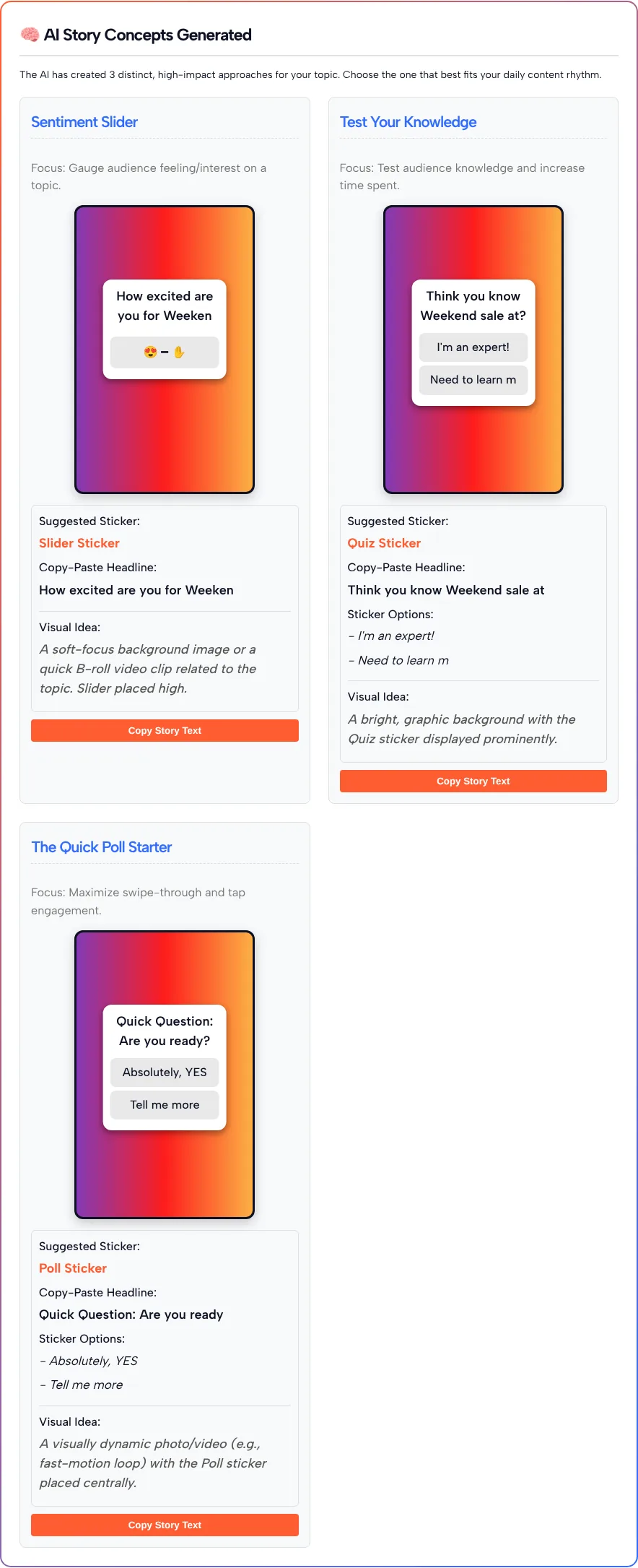
The visual ideas were general: “a soft-focus background image or a quick B-roll video clip related to the topic” for the slider, and “a bright, graphic background” for the quiz. The phone mockup is a gradient preview, not an image you can upload. You still shoot or design the background and add the sticker inside Instagram.
What helped was the pairing of goal and sticker. If you’re unsure whether a poll, a quiz or a slider fits your topic, three cards side by side make the choice quick.
The stickers it suggests, as Instagram describes them
The generator names the sticker, but Instagram decides how it works. Here’s what Instagram said when it introduced each one:
- Poll. As Instagram explained when it launched polls in Stories in 2017, friends and followers vote on your question and see the results as they come in, and you can open the viewers list to see who voted for which option.
- Emoji slider. Instagram’s emoji slider announcement from 2018 describes it as a way to ask more nuanced questions about how friends feel about something, with responses shown as an average.
- Questions. According to Instagram’s questions sticker announcement from 2018, friends submit questions through the sticker, you can answer one in a new Story, and their photo and username aren’t shown when you share a response.
- Link. In its 2021 update on links in Stories, Instagram said all creators and businesses can use the link sticker, while new accounts and accounts that repeatedly share content that breaks its Community Guidelines, such as hate speech or misinformation, don’t get access.
- Quiz and countdown. The generator suggests these for engagement and event goals. We couldn’t open a current Instagram page that describes them, so check how they work in the sticker tray of your app before you plan a Story around one.
These announcements are a few years old, and the sticker tray in your app may look different today. A link sticker also sits on a single Story. If you want the same link to stay easy to find after the Story is gone, put it on a link in bio page and mention it in your Stories.
Which goal to choose
Each goal option names the sticker it’s built around. Only the Maximize Engagement goal went through our test, so the table below goes by each option’s label:
| Goal option | Sticker named in the option | Use it when you want to |
|---|---|---|
| Maximize Engagement (Polls/Quizzes) | Poll or quiz | Get quick taps and opinions |
| Promote New Product/Service (Link Click) | Link | Send people to a product page |
| Drive Sales (Conversion) | None named | Push a sale or offer |
| Launch a New Event (Countdown) | Countdown | Build up to a launch or live session |
| Collect Questions (Q&A Sticker) | Questions | Gather questions for a Q&A |
| Share Educational Content (Retention) | None named | Teach something in a few frames |
For a feed post on the same topic, the post generator and caption generator linked above write longer text.
Instagram Story Generator FAQ
Why is my Story headline cut off?
The generator cuts the topic to about 30 characters when it builds the headline, so a long topic ends mid-word. Keep the topic short, or finish the headline yourself before you post.
Does the Instagram Story Generator make the Story image?
No. The phone mockup is a preview of where the sticker and headline go. You create the photo, video or background yourself and add the text and sticker in the Instagram app.
Can it add the sticker to my Story for me?
No. It suggests which sticker to use and what to write on it. You add the sticker from the sticker tray in Instagram.
How many Story ideas can I generate at once?
Between 3 and 8 concepts per request. The form starts at 3, which is enough to compare a poll, a quiz and a slider for the same topic.
What does the Copy Story Text button copy?
The headline only. In our test it copied the cut-off headline and left out the answer options and the visual idea.
Is the Story Generator free to use?
Yes. It runs on this page with no account, and the concepts appear below the form.