
Instagram Comment Generator
Describe an Instagram post, pick a tone and get 5 to 15 short comment ideas that you can copy, edit and post yourself.
Grow your Business & Social Media Marketing
- Branded Link Shortener
- QR Code Generator
- Bio Page Builder
- Tracking & Analytics
- 16+ Integrations
Tools You May Need for Instagram Engagement Tools
What the Instagram Comment Generator writes
The Instagram Comment Generator writes short comment ideas for a post you describe in a sentence. You choose one of five tones and how many comments you want, from 5 to 15, and the list appears below the form. Click any comment to copy it.
It works only from your description. The tool doesn’t open Instagram, read the post, see the photo or post anything for you, so the comments can only be as specific as what you type.
Describe the post, pick a tone, copy a comment
There are three fields and two buttons:
- Post Topic / Description. Say what the post shows and anything that stands out. The placeholder example is “My new puppy playing in the garden.” Adding a detail, like the puppy chasing a hose, gives the comments something real to mention.
- Comment Tone/Style. Complimentary, Question-based (Engaging), Funny / Witty, Excited / Enthusiastic, or Relatable / Shared Experience.
- Number of Comments (5-15). The form starts at 6.
Click Generate Comments, then click the comment you like to copy it. Clear resets the form.
Six comments for a friend’s first sourdough loaf
We tested the generator on November 3, 2026, with this description: “A friend posted a photo of her first sourdough loaf, slightly lopsided but with a great crust.” We picked the Complimentary tone and 6 comments, and the list appeared in about 3.3 seconds.
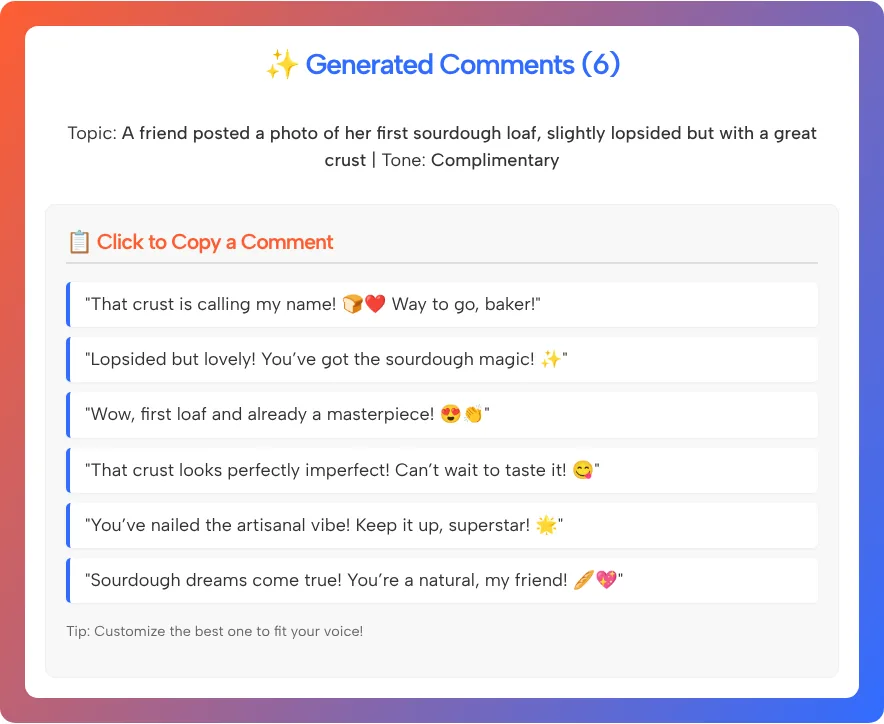
All six were compliments, and the screenshot shows them word for word. A few examples: “That crust is calling my name!”, “Lopsided but lovely!” and “Wow, first loaf and already a masterpiece!” Each comment came with one or two emojis.
They’re friendly and safe to post on a friend’s photo. They’re also generic: most of them would fit any bread picture, and every one used exclamation marks and emojis. The ones that feel most personal picked up words from our description, “lopsided” and “crust.” That’s the clearest lesson from the test: the detail you type is the detail you get back.
The tool’s own tip under the list says to customize the best one to fit your voice, and we agree.
Edit the comment so it’s about this post
A generated comment reads better once it mentions something you actually noticed. Here’s how we’d rework two of the comments from our test, using the kind of detail you’d spot in the photo itself:
- Generated: “Wow, first loaf and already a masterpiece!” Our edit: “First loaf and you already got that dark, crackly crust? What flour did you use?”
- Generated: “You’ve nailed the artisanal vibe!” Our edit: “Lopsided or not, that crust looks better than my third try. Are you baking again this weekend?”
Four habits to keep:
- Name one real detail. The color, the place, the caption, the thing they’re proud of.
- Ask a real question when you want a reply. The Question-based tone writes these for you, but a question about the actual post works best.
- Cut the extra emojis. One is plenty. Six comments with two emojis each start to look like a template.
- Sound like yourself. If you’d never say “superstar” in person, don’t say it in a comment.
Comment like a person, not a script
Use the generator for ideas on posts you actually care about, and post each comment by hand. Instagram’s Community Guidelines FAQ lists creating or submitting unwanted comments, likes or other commercial or harassing messages as spam that isn’t allowed on Instagram.
So skip the copy-and-paste spree. The same line under dozens of posts helps nobody and reads as spam to the people who see it. We also can’t promise that any comment will bring you followers, reach or a better spot in the comment section, because the tool doesn’t measure any of that. What it does well is get you past a blank comment box.
Which tone fits which post
Our test covered the Complimentary tone alone. Treat this table as a starting guide built from the option names:
| Tone option | Good for | Check before posting |
|---|---|---|
| Complimentary | A friend’s milestone, a creator’s finished work | That it mentions something specific |
| Question-based (Engaging) | Posts where you’re curious about the how or why | That the question makes sense for this post |
| Funny / Witty | Casual posts, pets, everyday mishaps | That the joke can’t be read as mocking |
| Excited / Enthusiastic | Launches, announcements, good news | That it doesn’t sound over the top |
| Relatable / Shared Experience | Posts about common struggles or routines | That the shared experience is true for you |
If you’re writing a caption for your own post rather than a comment on someone else’s, the caption generator linked above is the better fit. For a private reply, the DM generator is also linked above.
Instagram Comment Generator FAQ
Can the Instagram Comment Generator read a post from its link?
No. There’s no field for a link or an image. Type a short description of the post instead, including one or two details you noticed.
Does it post comments on Instagram for me?
No. It only writes comment ideas on this page. You copy one, edit it if you like, and post it yourself in the Instagram app.
Will these comments get me more followers or reach?
We can’t promise that, and the tool doesn’t measure it. A comment that mentions something specific about the post is more likely to start a real conversation than generic praise.
How many comments can I generate at once?
From 5 to 15 per request. The form starts at 6, which gives you enough variety to pick one and edit it.
Can I use it to reply to comments on my own posts?
It’s built for describing a post, but you can describe the comment you’re answering in the topic field instead. We haven’t tested replies, so read the results carefully before you use them.
Does it write comments in other languages?
The form and tone options are in English, and we only tested it in English. You can try a description in another language, but check every comment before you post it.