
Instagram Bio Generator
Describe what you do, pick a goal, tone and emoji level, and get 3, 5 or 7 Instagram bio drafts, each with a character count out of 150 and a Copy button.
Grow your Business & Social Media Marketing
- Branded Link Shortener
- QR Code Generator
- Bio Page Builder
- Tracking & Analytics
- 16+ Integrations
Tools You May Need for Instagram Profile Optimization
What the Instagram Bio Generator writes for you
The Instagram Bio Generator turns a few words about you or your business into short bio drafts you can paste into your profile. You choose a goal, a tone and how many emojis you want, and it returns 3, 5 or 7 options, each with a character count out of 150 and a Copy button.
The count matters because Instagram Help says you can write a bio of up to 150 characters on your profile. There’s no sign-up field on the form, and the tool never connects to your Instagram account, so nothing changes on your profile until you paste a draft yourself.
Five settings, one required field
Only the first field is required. The other four have defaults, so you can type your keywords and click the button, then change one setting at a time if the drafts miss.
- Keywords / Value Proposition. Say what you offer, who it’s for and what makes you different. Specific words give specific bios: our test used “Houseplant shop in Portland, Oregon, rare tropical plants, plant care tips, local pickup and shipping.”
- Primary Purpose / Goal. Establish Authority / Build Community (the default), Sell a Specific Product (E-commerce), Drive Traffic to a Blog or YouTube, or Book Services / Consultations. Pick the one that matches what you want visitors to do next.
- Desired Tone. Professional / Authoritative (default), Witty / Humorous, Inspirational / Motivational or Minimalist / Clean.
- Emoji Usage. Moderate (Recommended), High (Fun/Witty Accounts) or None (Strictly Professional).
- Number of Bio Options. 3, 5 or 7. The form starts at 5.
Click Generate Bio Options to get the drafts. Clear is there to reset the form when you start over for a second account.
A test run for a Portland plant shop
We ran the tool on November 3, 2026, for a made-up houseplant shop in Portland, Oregon. We picked Sell a Specific Product, Witty / Humorous, Moderate emojis and 5 options. Five bios came back in about 4.3 seconds, under a short “Expert Profile Tip” about the name field and the link in bio.
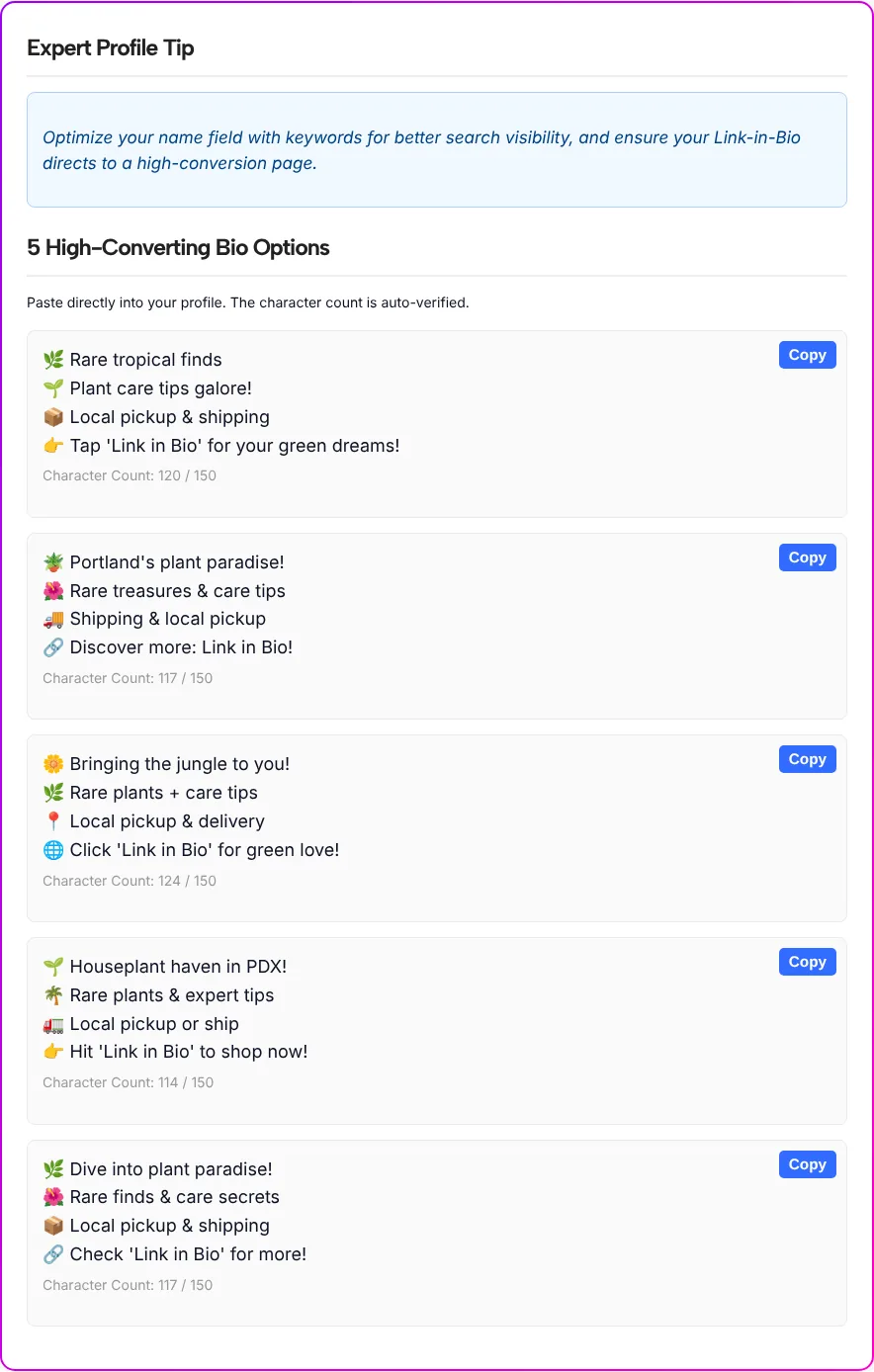
Every draft had four lines, each starting with an emoji, and the counts ran from 114 to 124 out of 150. This is the one we’d start from (the slashes mark line breaks): “🌱 Houseplant haven in PDX! / 🌴 Rare plants & expert tips / 🚛 Local pickup or ship / 👉 Hit ‘Link in Bio’ to shop now!”
What we noticed while reading the results:
- The endings repeat. All five bios closed with a “Link in Bio” line, such as “👉 Tap ‘Link in Bio’ for your green dreams!” and “🔗 Check ‘Link in Bio’ for more!” Plan to rewrite that line in your own words.
- The count runs a little high. The tool counts each emoji as two characters. Our first draft is 116 characters long, line breaks included, and the tool showed 120. We don’t know how Instagram itself counts emojis, so treat the number as a close estimate and let Instagram’s bio field have the final word.
- Copy keeps the line breaks. The button copied the bio as four lines and switched to “Copied!” so you know it worked.
- The heading is the tool’s label. Results appear under “High-Converting Bio Options,” but nothing in the tool measures conversions. Judge the drafts by how they read.
Point the last line somewhere useful
The last line of almost every draft asks people to tap your link, so the link has to open a page that matches the promise. “Shop now” only works if the tap lands where people can actually shop, not on a home page they have to dig through.
If you send people to more than one place, like a shop, care guides and pickup hours, TLinky’s Link in Bio page collects them on one page you can update without touching your bio. One more edit worth making: on your own profile, visitors are already reading your bio, so “Shop the link below” reads more naturally than “Link in Bio.”
Edit the draft until it sounds like your account
A generated bio is a starting point, and a few quick edits make it sound like your account:
- Add one detail only you know. The plant you’re known for, the neighborhood, the day new stock arrives. The tool only knows the keywords you typed.
- Mix lines from different drafts. Take the first line from one option and the third from another, then check the total again.
- Read it out loud. If a line sounds like an ad, cut the adjective and keep the noun.
- Rewrite the call to action. Say what people get when they tap, such as “Shop rare plants” or “Book a fitting.”
- Go easy on fancy fonts. The font generator in the buttons above can style a line, but keep the words people might search for in plain text.
Once the bio is set, a short note on your profile can announce what’s new. The Instagram Note Generator writes those in the same quick way.
Match the purpose setting to your account
The Primary Purpose setting is the one to get right first, since it names what you want visitors to do. Use this table as a starting point and adjust after the first run:
| Your account | Primary Purpose / Goal | Tone to try first | What to put in the keywords |
|---|---|---|---|
| Online or local shop | Sell a Specific Product (E-commerce) | Witty / Humorous | What you sell, your city, shipping or pickup |
| Coach, salon, photographer | Book Services / Consultations | Professional / Authoritative | Your service, who it’s for, where you work |
| Blogger, YouTuber, podcaster | Drive Traffic to a Blog or YouTube | Inspirational / Motivational | Your topic and the format people get |
| Creator or community page | Establish Authority / Build Community | Minimalist / Clean | Your niche and the experience you can back up |
Instagram bio questions, answered
How long can an Instagram bio be?
Up to 150 characters, as Instagram Help confirms for the bio on your profile. The generator shows a count out of 150 under each draft, and in our test every draft stayed well below it.
Why is the character count higher than the text looks?
The counter counts each emoji as two characters. Our first test bio was 116 characters long with line breaks, and the tool showed 120. Instagram’s own bio field has the final word, so check a draft there if it sits close to the limit.
Can I get a bio with no emojis at all?
Yes. Set Emoji Usage to None (Strictly Professional). We tested the Moderate setting, so read the first results closely and rerun if they still feel too busy.
Why do all my drafts end with Link in Bio?
In our test, all five drafts closed with a line pointing to the link in bio, even with the Sell a Specific Product goal. Keep the idea, rewrite the words, and say what people get when they tap.
Will a keyword-heavy bio get my profile found in Instagram search?
We can’t promise that, and neither the tool nor our test measures search results. Use the words your audience would use to describe you, mainly so visitors understand your account at a glance.
Does the tool post the bio to my profile?
No. It only shows drafts on this page. Click Copy, paste the bio into the bio field of your Instagram profile and save it yourself.