
Facebook Post Generator
The Facebook Post Generator turns one topic into a Facebook post draft with emojis, a call to action and hashtags, shaped by the persona, format and CTA you pick.
Grow your Business & Social Media Marketing
- Branded Link Shortener
- QR Code Generator
- Bio Page Builder
- Tracking & Analytics
- 16+ Integrations
Tools You May Need for Facebook Content Creation
What is the Facebook Post Generator?
The Facebook Post Generator is a free TLinky tool that writes one Facebook post draft from a topic you type. You tell it who’s posting, what kind of post you want and what you’d like readers to do, and it returns a draft with line breaks, emojis, a call to action and hashtags.
It’s made for the feed: a shop announcing a new product, a coach sharing a quick tip, a parent telling a short story. It doesn’t connect to your Facebook account, so nothing gets posted until you copy the text and paste it yourself.
How to use the Facebook Post Generator
To get a draft, describe your topic, choose three settings and click Generate Post. Here’s what each field does:
- Write your core topic. Put the idea, story or question in the big box, with at least 10 characters. Specifics help: a product name, a price, a day of the week.
- Choose your posting persona. Pick the voice the post should have: Small Business Owner, Community Leader/Organizer, Parent/Family Life Focus, Hobbyist/Niche Enthusiast, Wellness/Health Coach or General Friend/Family.
- Pick a post format. Personal Story/Relatable Anecdote, Open-Ended Question for Engagement, Quick Tip/Life Hack or Product/Service Launch (Soft Sell).
- Set the call to action. Ask for opinions/experiences, share this post with a friend, react with a specific emoji, or visit a link in the comments.
- Click Generate Post, then Copy Post Text. The draft appears below the form with its own copy button. Clear resets the form.
You get one post per click. If you want to compare versions, change one setting and generate again.
What you get: one draft, ready to edit
Each run returns one post in a “Post Content” box, a Copy Post Text button and a short note headed “Engagement Predictor Analysis.”
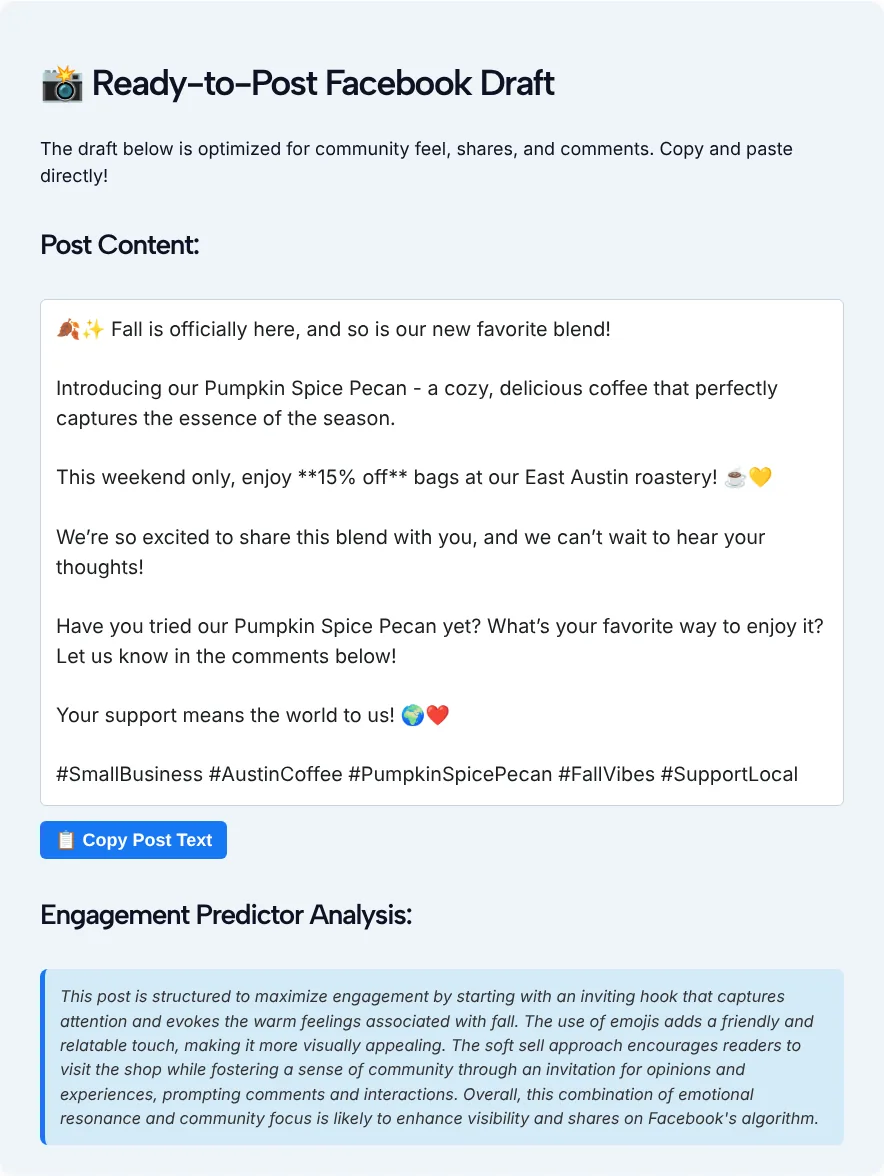
In our test on November 2, 2026, we described a small Austin roastery launching a fall blend, Pumpkin Spice Pecan, with 15% off bags that weekend. We chose Small Business Owner, Product/Service Launch (Soft Sell) and Ask for opinions/experiences. The draft appeared in about 5.9 seconds and opened with “🍂✨ Fall is officially here, and so is our new favorite blend!”
It then named the blend, repeated the weekend offer and closed with the question we asked for: “Have you tried our Pumpkin Spice Pecan yet? What’s your favorite way to enjoy it? Let us know in the comments below!” Five hashtags sat at the end: #SmallBusiness, #AustinCoffee, #PumpkinSpicePecan, #FallVibes and #SupportLocal.
Despite its name, the Engagement Predictor Analysis doesn’t predict anything. It’s a paragraph of AI commentary on why the draft might work, with no number or score. Read it as the tool’s opinion, not as data about your audience.
Match the format to the job
Choose the format by what the post needs to do, then pick a call to action that fits it. These pairings are a sensible start:
- Launching something: Product/Service Launch (Soft Sell) with “Ask for opinions/experiences.” The soft sell keeps the offer in one line, and the question gives people an easy reason to comment.
- Starting a conversation in a group: Open-Ended Question for Engagement with “Share this post with a friend” or the opinions CTA.
- Teaching something small: Quick Tip/Life Hack with “React with a specific emoji,” so readers can agree without typing.
- Telling a story: Personal Story/Relatable Anecdote with the opinions CTA, so readers answer with stories of their own.
- Sending people to a page: any format with “Visit a link in the comments.” A short, readable link from the TLinky URL shortener looks better in a comment than a long tracking URL.
We tested the launch setup only, so try the others with a topic you know well before you rely on them.
Check the hashtags before you post
The tool picks hashtags for you, so look at them the way a stranger would. Hashtags on Facebook are clickable: as Meta explained when it introduced them in 2013, clicking one shows a feed of what other people and Pages are saying about that topic.
That’s why a tag should match what someone would actually browse. In our draft, #AustinCoffee and #PumpkinSpicePecan point to the real subject, while #FallVibes is broad enough to fit almost any post. If you want more options to choose from, our Facebook hashtag generator builds sets of tags around a topic and niche.
Edit the draft so it sounds like you
Read the draft as a first pass from a helpful stranger. In our test it had the right structure, but it needed a few edits before we’d post it:
- Delete stray asterisks. In our test, the draft put two asterisks on each side of “15% off,” and they came along when we used Copy Post Text. Remove them before you paste.
- Cut the extra cheer. Lines like “Your support means the world to us!” could close any post. Swap it for a detail only you know, such as the farm the beans came from.
- Check every fact. The tool repeats what you type, so make sure the discount, the dates and the address match your real offer.
- Trim the emojis. Two or three that add meaning beat a string of them at the end of each line.
- Keep one question. If the draft asks two or three, keep the one you most want people to answer.
Who uses the Facebook Post Generator?
The Facebook Post Generator is built for the six kinds of posters in its persona menu, and each one changes the voice of the draft:
| Persona | A typical post |
|---|---|
| Small Business Owner | A new product, a weekend offer, a behind-the-scenes moment |
| Community Leader/Organizer | An event reminder or a call for volunteers |
| Parent/Family Life Focus | A relatable moment from family life |
| Hobbyist/Niche Enthusiast | A project update or a question for fellow fans |
| Wellness/Health Coach | A quick tip or a check-in with clients |
| General Friend/Family | Personal news you want to share with people you know |
If your Page posts several kinds of content, switch the persona per post instead of writing everything in one voice.
Facebook Post Generator FAQ
Is the Facebook Post Generator free?
Yes. It’s one of TLinky’s free tools and you don’t need an account. Type a topic, pick the settings and the draft appears on the same page.
Does it post to my Facebook Page or profile?
No. The tool has no connection to Facebook. It only writes a draft. You copy it with the Copy Post Text button, edit it and publish it from Facebook yourself.
How many posts do I get per click?
One. The form has no option for more. To compare versions, change the format or the call to action and generate again.
Does the Engagement Predictor tell me how a post will perform?
No. Despite the name, it’s a short paragraph of AI commentary about the draft’s tone and structure. It gives no number or score, and it knows nothing about your audience or past posts.
Why does my draft have asterisks in it?
The AI sometimes marks words for bold with double asterisks, and the page shows them as plain characters. In our test they showed up around the discount and stayed in the copied text, so delete them before you post.
Can I use it for Facebook Stories or ads?
No, it writes feed posts only. TLinky has separate Facebook tools for Story ideas and ad copy, linked near the top of this page.