
Facebook Ad Copy Generator
Describe your offer and your audience’s pain point, pick a goal, and get 1 to 5 Facebook ad copy variations, each with primary text, a headline and a link description.
Grow your Business & Social Media Marketing
- Branded Link Shortener
- QR Code Generator
- Bio Page Builder
- Tracking & Analytics
- 16+ Integrations
Tools You May Need for Facebook Marketing
What the Facebook Ad Copy Generator does
The Facebook Ad Copy Generator writes complete ad copy sets from two short descriptions: what you sell and the problem it solves for your audience. Each set has the three text fields you fill in when you build a Facebook ad: primary text, a headline and a link description.
You choose the ad goal and how many variations you want, from 1 to 5. Every field gets its own Copy button, so you can move one piece at a time into Ads Manager. The tool is free, needs no account and never connects to your ad account.
How to write Facebook ad copy with the generator
Fill in four fields and click Generate Ad Copy:
- Product or Offer Details. Say what you sell, the main features and the core benefit. Include the facts you want in the ad, such as price, shipping terms or a real deadline, because the tool only knows what you type here.
- Audience Pain Point. Describe the problem your buyer has in their words, for example “store-bought coffee tastes stale by the time it reaches the shelf.”
- Ad Goal / Tone. Pick Direct Conversion, Lead Generation, Urgency, Social Proof or Problem/Solution. The section below explains when each one fits.
- Number of Variations. Choose 1 to 5. The form starts on 3, which is enough to compare angles without a wall of text.
Both text boxes are required. Clear empties the form and sets the goal back to Direct Conversion with 3 variations. There’s no regenerate button, so to get new versions you change a field and click Generate again.
Example output from our coffee bundle test
We tested the generator on November 2, 2026, with a made-up offer: a fall bundle from a small Austin coffee roaster with two 12 oz bags, roasted to order and shipped free in the U.S. The pain point was stale, flat grocery store coffee. We picked Urgency and 3 variations, and the results appeared in about 7.9 seconds.
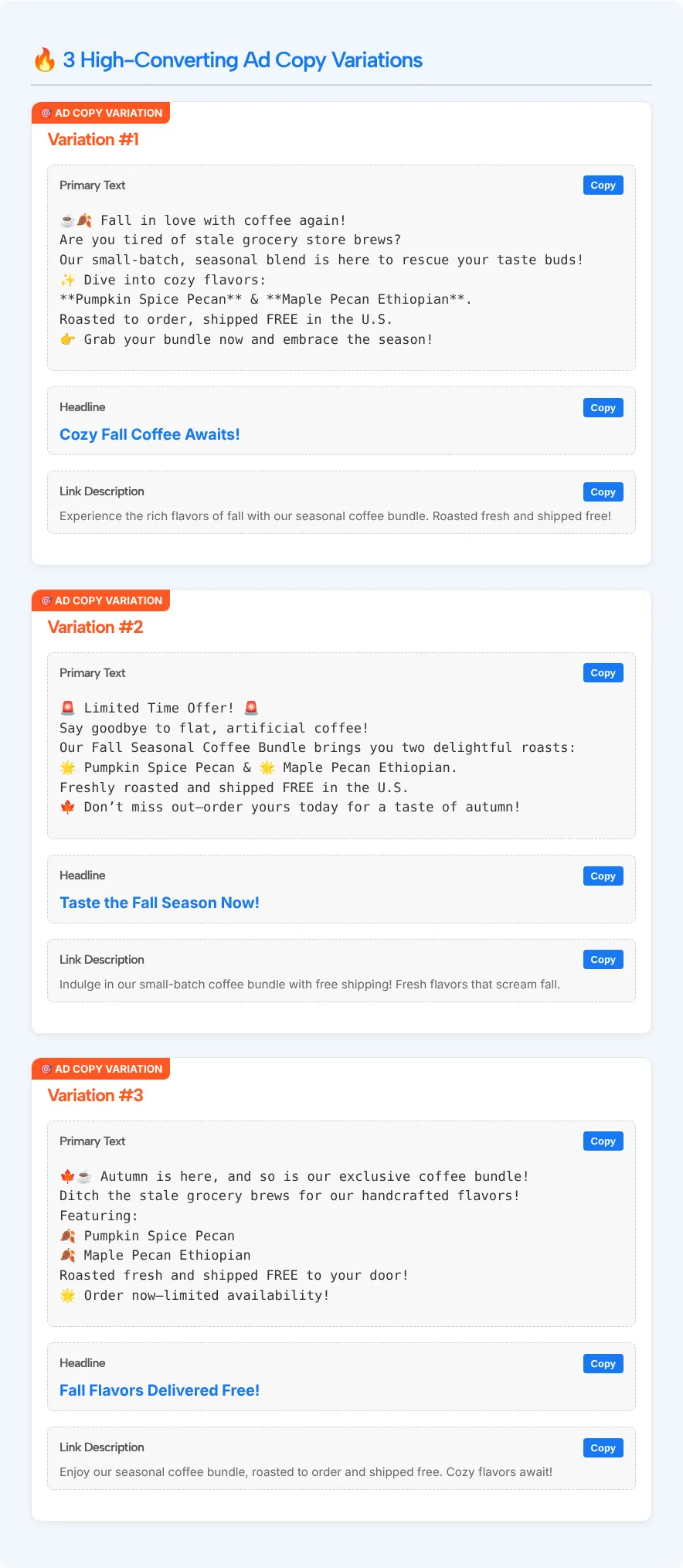
Each variation came back in the same three parts. Here is the third one:
- Primary text: opens with “Autumn is here, and so is our exclusive coffee bundle!”, lists the two blends, promises “Roasted fresh and shipped FREE to your door!” and ends by telling readers to order now because of “limited availability.”
- Headline: “Fall Flavors Delivered Free!”
- Link description: “Enjoy our seasonal coffee bundle, roasted to order and shipped free. Cozy flavors await!”
The primary text keeps its emojis and line breaks in a fixed-width box, which makes the copy easy to scan before you paste it. The headlines ran 24 to 28 characters. The tool shows no character count, score or performance prediction.
Check every claim before the ad goes live
Read each variation against your real offer before you paste it anywhere. In our test, the AI added three claims we never gave it: “small-batch”, “handcrafted” and “limited availability”. Our roaster had no stock limit, so that last line would have been false in a live ad.
Three fixes covered almost everything in our results:
- Delete invented claims. Words like exclusive, limited, handcrafted or award-winning need to be true for your business. If they aren’t, cut them or swap in a fact you can back up.
- Remove stray asterisks. The first variation wrapped both blend names in double asterisks, the Markdown sign for bold. The page doesn’t turn them into bold text, and the Copy button copies them too, so they’d show up in your ad as plain symbols.
- Trim the link description. Ours ran 88 to 100 characters, while the headlines were less than a third of that. Preview the ad before you publish and cut each field to what actually shows on the placements you use.
Meta’s Ads Guide has the current ad specifications and best practices for every placement, and it states that all ads must comply with Meta’s Advertising Policies. Look them up there before you launch, because the generator doesn’t check them.
Once the copy is final, tag the destination link with our UTM builder so your analytics shows which variation brought each visit.
Which Ad Goal / Tone to choose
Pick the goal that matches what you want the reader to do after they see the ad:
| Ad Goal / Tone | Good fit for | What to give the tool |
|---|---|---|
| Direct Conversion (Sales focus) | A product page or checkout | Price, the main benefit, shipping or return terms |
| Lead Generation (Free offer/webinar focus) | A free guide, trial or webinar sign-up | What people get, how long it takes, the date if there is one |
| Urgency (Limited time offer/FOMO focus) | A sale or launch with a real end date | The exact deadline or stock limit, so the AI doesn’t invent one |
| Social Proof (Customer story focus) | Retargeting people who already know you | A real review or customer quote you have permission to use |
| Problem/Solution (Educational focus) | Cold audiences who don’t know the product | The problem in detail and how the product fixes it |
Social Proof and Urgency need the most care. With no real quote or deadline in your input, the tool can only make one up, and you’d be the one publishing it.
Running Stories ads as well as feed ads? Our Facebook story ideas generator suggests a visual scene, on-screen text and a sticker call to action for each story idea.
Facebook Ad Copy Generator FAQ
Is the Facebook Ad Copy Generator free?
Yes. It’s free to use and you don’t need an account. You fill in the form, the variations appear on the same page, and you copy the parts you want.
How many ad copy variations can I get at once?
Between 1 and 5 per request. Each variation includes primary text, a headline and a link description, and every one of those fields has its own Copy button.
Does it publish ads or connect to Ads Manager?
No. The tool has no link to your Facebook or Meta accounts. It only writes text on the page. You paste the copy into Ads Manager yourself, set the budget and audience there, and publish when you’re ready.
Can I trust everything the AI writes?
Not without checking it. In our test it added claims we never gave it, such as “small-batch” and “limited availability”, and left Markdown asterisks around product names. Compare every line with your real offer and fix anything you can’t back up before the ad runs.
Does the copy include emojis?
In our test, yes. All three primary texts used emojis and short lines. If emojis don’t suit your brand, delete them after you copy the text, or say so in the Product or Offer Details box.
Can I use the headlines for Google Ads?
You can reuse the ideas, but the tool writes for Facebook’s three ad fields and doesn’t check Google’s requirements. Rewrite the copy to fit Google’s own rules before you use it there.