
Free AI Facebook Story Ideas Generator
TLinky’s Facebook Story Ideas Generator is a free AI tool that turns your offer, audience, goal and tone into 3 Facebook Story concepts, each with a visual scene, on-screen copy and a CTA sticker idea.
Grow your Business & Social Media Marketing
- Branded Link Shortener
- QR Code Generator
- Bio Page Builder
- Tracking & Analytics
- 16+ Integrations
Tools You May Need for Facebook Content Creation
What is the Facebook Story Ideas Generator?
The Facebook Story Ideas Generator works from two short descriptions you type, one of your offer and one of your audience, and returns 3 Facebook Story concepts. You pick a goal and a tone, and each concept comes back with three parts:
- Visual Scene: what to film, photograph or animate.
- On-Screen Copy: the short line of text that sits on top of the scene.
- CTA Sticker: an idea for the sticker that asks viewers to act, such as a link or a poll.
It writes ideas, not media. You still shoot the video or make the graphic, and you post the Story from Facebook yourself.
Why Use an AI Facebook Story Ideas Generator?
An AI Facebook Story ideas generator is useful when you know what you’re promoting but not how to show it. Stories don’t stay up long: when Meta introduced Facebook Stories in 2017, it said friends can view a story for 24 hours and that it won’t appear in News Feed unless you post it there too. If you post them often, you need fresh angles often.
- Three angles at once: each run gives you three different takes on the same offer, so you can pick one or post them across a weekend.
- A brief someone else can follow: the Visual Scene and On-Screen Copy lines are short enough to hand to a designer or to read before you hit record.
- A sticker idea tied to your goal: the concepts suggest how viewers should respond, from tapping a link to answering a poll.
- A way past a blank screen: even when you don’t use a concept as written, it gives you something to react to.
How the AI Generates Your Facebook Story Concepts
The AI builds the concepts from your four inputs: what you’re offering, who it’s for, the goal you pick and the tone you want. A detailed offer gives it more to work with, because the concepts reuse the facts you type.
Each concept gets its own name and angle. In our test, one focused on the product, one on the shipping offer and one on the local shop, so the three weren’t copies of each other.
What our test returned
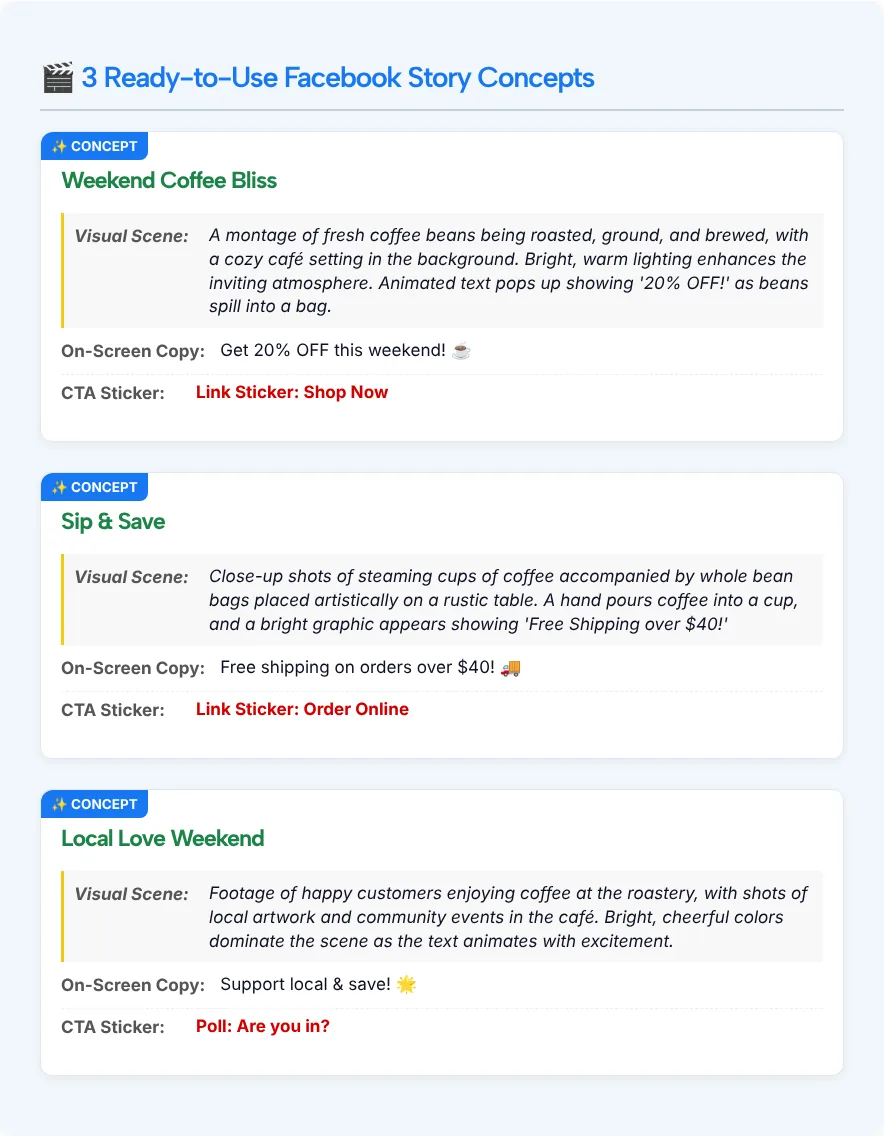
On November 2, 2026, we described a weekend sale at a small Austin coffee roastery in our test: 20% off whole-bean bags and free shipping on online orders over $40. We set the audience to coffee drinkers who buy specialty beans online, chose the Sales goal and the Enthusiastic tone. Three concepts came back in about 5.4 seconds:
| Concept | Angle | CTA Sticker |
|---|---|---|
| Weekend Coffee Bliss | The discount | Link Sticker: Shop Now |
| Sip & Save | The shipping offer | Link Sticker: Order Online |
| Local Love Weekend | The local shop | Poll: Are you in? |
For the On-Screen Copy, the tool returned “Get 20% OFF this weekend! ☕️”, “Free shipping on orders over $40! 🚚” and “Support local & save! 🌟” as the three lines.
Each concept also had a Visual Scene. For Weekend Coffee Bliss, the tool returned a montage of beans being roasted, ground and brewed in a cozy café, with the discount popping up on screen as the beans spill into a bag.
Key Features of the Facebook Story Ideas Generator
The key features are the four settings you control and the three-part format every concept follows:
- 3 concepts per run: the results heading always says 3, and our test returned 3 distinct ideas.
- Visual Scene direction: a few sentences on what the viewer sees, written as a brief.
- On-Screen Copy: one short line, usually with an emoji, that repeats the main offer.
- CTA sticker ideas: a suggestion such as “Link Sticker: Shop Now” or “Poll: Are you in?”
- Four goals: Drive Direct Sales / Conversions, Drive Website Traffic (Link Click), Maximize Story Engagement (Polls/Quizzes) and Build Brand Awareness / Followers.
- Four tones: Enthusiastic & Energetic, Informative & Educational, Sophisticated & Luxurious, and Lighthearted & Humorous.
Two limits are worth knowing. There are no copy buttons, so you select the text yourself. And the output is text only: no images, video or templates.
Who Is This Tool For?
This tool is for anyone who posts Facebook Stories for a business or brand and wants a quicker start on ideas. A few common cases:
- Online shops that want a fresh angle for a sale or a new product, with a link sticker idea that points to the shop.
- Social media managers who post Stories most days and want three options to choose from before planning the week.
- Ad teams sketching Story concepts before they spend time on production.
- Small business owners who film on a phone and want a simple shot list.
- Agencies drafting first ideas for a client call.
- Creators who need a clear outline before filming a brand partnership.
How to Use the Facebook Story Ideas Generator
To use the Facebook Story Ideas Generator, fill in four fields and click Generate Stories:
- Describe your product or service. Be specific. “Waterproof smartwatch for triathletes” gives the AI more to work with than “smartwatch.” Include the offer, price or dates if you have them.
- Define your target audience. Say who they are and what they care about, such as “busy parents who want quick, healthy meals.”
- Select your story objective. Choose Sales, Website Traffic, Engagement (polls and quizzes) or Brand Awareness.
- Choose your tone of voice. Enthusiastic, Informative, Luxurious or Humorous.
- Click Generate Stories. The 3 concepts appear below the form. Clear empties the fields for a new idea.
Before you film: make the concept yours
Treat each concept as a first draft. A few checks keep it accurate and in your own voice:
- Check the numbers. The concepts repeat your offer, so make sure the discount and the dates match what you’re actually running.
- Match the sticker to the goal. In our test, the Sales goal still produced a poll for one concept. If you need clicks, swap it for a link idea.
- Plan scenes you can shoot. “Footage of happy customers enjoying coffee at the roastery” only works if you have that footage. Replace it with something you can film today.
- Say the copy out loud. Shorten any line you couldn’t read in a glance, and drop extra emojis.
- Use the stickers your app offers. The tool suggests ideas but can’t see your Facebook account, so pick from the stickers you see when you create the Story.
Frequently Asked Questions
How long does a Facebook Story stay up?
When Meta introduced Facebook Stories, its 2017 announcement said friends can view a story for 24 hours. The generator doesn’t set a length for your Story, so keep each concept to one simple idea.
Do Facebook Stories help with reach and engagement?
Stories can help, because they give you another place to show up besides the feed, and the CTA sticker ideas in each concept invite people to tap or vote instead of just watching. How much they help depends on your audience, so compare your Story views and replies over a few weeks.
What should I post on Facebook Stories for my business?
Start with what you’re already promoting: a sale, a new product, a behind-the-scenes moment or a question for customers. Type that offer into the generator with your audience and goal, and it returns 3 concepts built around it.
Can I use the same concept on Instagram Stories?
Yes, the concepts are plain text, so nothing ties them to one app. Check the sticker idea against what the other app offers before you post, and adjust the copy if your Instagram audience is different.
Does the generator make images or videos?
No. Each concept is text: a Visual Scene description, a line of On-Screen Copy and a CTA sticker idea. You create the photo, video or graphic yourself, or hand the concept to a designer.
How do I write a good Facebook Story script for my product?
Keep it to one message: show the product, put one short line of text on screen and end with one clear action. The concepts from this tool follow that pattern, so use one as your starting script and edit it to fit what you can film.
Is an AI story generator better than hiring a content strategist?
No, it does a smaller job. A strategist plans your brand and campaigns, while this tool gives you three quick Story ideas for one offer. It’s useful for the daily brainstorming, not for deciding what to promote.