
Facebook Nickname Generator
The Facebook Nickname Generator turns your name, one interest and a style into 8 nickname ideas you can copy with a click.
Grow your Business & Social Media Marketing
- Branded Link Shortener
- QR Code Generator
- Bio Page Builder
- Tracking & Analytics
- 16+ Integrations
Tools You May Need for Facebook Profile Customization
What is the Facebook Nickname Generator?
The Facebook Nickname Generator is a free TLinky tool that mixes your name with something you love and returns 8 short nickname ideas. You give it three things: a name, a topic or vibe, and a style. It does the wordplay, and you pick the one that feels right.
It’s built for personal nicknames, the kind you’d use as an alias, a handle in a group chat or a fun name for your Facebook profile. It doesn’t create Facebook Page names, and it doesn’t change anything on your account. Nothing is posted for you.
How to use the Facebook name generator
To use the Facebook name generator, fill in two short boxes, choose a style and click Generate Nicknames. It takes about a minute, most of it spent typing.
- Enter your name. The first box takes your real name or a brand name, like “Alex Johnson” or “The Coding Den”. The tool builds every idea around it.
- Add a topic or vibe. Type the interest you want the nickname to hint at, such as cat lover, crypto investor or travel photographer. Both boxes are required.
- Pick a style. Choose Cool & Modern, Funny & Quirky, Professional & Authoritative or Mysterious & Subtle. Cool & Modern is selected when the page loads.
- Click Generate Nicknames. The ideas show up under the form. Use Clear to empty the form and start over.
- Click a nickname to copy it. Each idea sits on its own tile. A small “Copied!” tag tells you it’s on your clipboard.
What you get: 8 nickname ideas on click-to-copy tiles
You get a grid of 8 one-word nicknames that blend your name with your topic. There’s no separate copy button or “copy all”; you click the tile you want.
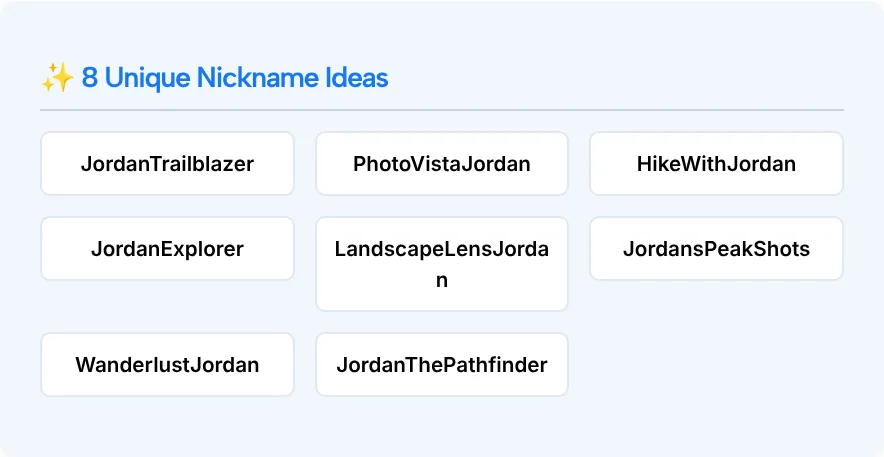
In our test on November 2, 2026, we typed “Jordan”, the topic “Hiking and landscape photography” and kept the Cool & Modern style. The list came back in about 3.9 seconds:
| Nickname | What it plays on |
|---|---|
| JordanTrailblazer | hiking |
| PhotoVistaJordan | photography |
| HikeWithJordan | hiking |
| JordanExplorer | hiking |
| LandscapeLensJordan | landscape photography |
| JordansPeakShots | both |
| WanderlustJordan | travel |
| JordanThePathfinder | hiking |
Every idea kept the name and joined the words without spaces. That works well as a handle. For a display name you’ll likely want to split it up, so “LandscapeLensJordan” becomes “Landscape Lens Jordan” or just “Lens Jordan.”
One small thing: the heading above the grid always reads “8 Unique Nickname Ideas.” It’s fixed text on the page, and in our test the tool did return 8.
Which style should you pick?
Pick the style that matches where people will see the name. The form gives each option a short description, and that’s a good guide:
| Style | What the form says | A good fit for |
|---|---|---|
| Cool & Modern | Short, catchy | A handle, a gaming tag, a fresh alias |
| Funny & Quirky | Puns, unexpected | Friends, group chats, a fan account |
| Professional & Authoritative | Expert vibe | A creator or expert profile, a side project |
| Mysterious & Subtle | Intriguing, low-key | An alias that doesn’t give much away |
We tested Cool & Modern only. If the first set feels too safe, run the same name and topic through Funny & Quirky and compare.
Nicknames for Facebook: where they fit and where they don’t
A generated nickname is best used as a nickname: an alias, a handle or a playful name friends call you. Your main profile name is a different matter.
Facebook’s help page on what names are allowed on Facebook asks for the name you use in everyday life. It doesn’t allow symbols, numbers, unusual capitalization, repeating characters or punctuation, characters from more than one language, titles of any kind, words or phrases in place of a name, or offensive words. A nickname can be your first or middle name only when it’s a variation of your real name, like Bob for Robert.
The same page says you can also list another name on your account, such as a nickname. So a CamelCase idea like JordanTrailblazer doesn’t belong in the name field: add it as another name, or use it in your bio or as a handle on other apps.
If you’re naming a Facebook Page, treat the list as raw material: type the brand name into the first box and the tool returns wordplay to build on, while our business name generator is made for naming the brand itself.
The same ideas travel well outside Facebook. They work as gaming tags too, and if you want a matching handle on Instagram, the Instagram username generator works the same way.
Make the nickname sound like you
To make a nickname sound like you, treat the 8 ideas as a shortlist and edit the one you like best. These quick changes help most:
- Say it out loud. If you’d feel odd introducing yourself with it, skip it. JordanThePathfinder looks fine written down but is a mouthful to say.
- Trim the name part. Some of the best ideas work without your name at all. “PeakShots” is shorter and easier to remember than “JordansPeakShots.”
- Narrow the topic. “Film photography” or “desert hikes” gives the tool more to play with than a broad word like “photography.”
- Check it’s free where you’ll use it. The tool doesn’t check whether a name or handle is already taken on any site.
- Keep it easy to spell. People should be able to find you after hearing the name once.
Facebook Nickname Generator FAQ
Is the Facebook Nickname Generator free?
Yes. It’s one of TLinky’s free tools and there’s no account to create. Type a name and a topic, pick a style, and the ideas appear on the same page.
Can it create a Facebook Page name?
Not directly. It makes personal nicknames that mix a name with an interest. If you type a brand name into the first box, the results can spark ideas for a Page, but the business name generator mentioned above is the better fit for naming a business.
Can I use a generated nickname as my Facebook profile name?
Usually not as it comes out. The ideas are joined words with capitals in the middle, which clashes with the Facebook name rules covered above. Use them as an alias or handle instead, or split them into normal words.
How many nicknames do I get each time?
Eight. They show up as tiles in a grid, and you click a tile to copy that nickname. To see a different set, change the topic or the style and click Generate Nicknames again.
Does the tool check whether a nickname is taken?
No. It only suggests names. Search for the name on the site where you plan to use it before you settle on it.
Which style gives the most creative results?
Cool & Modern is a safe start: it gave us short blends like HikeWithJordan. Funny & Quirky asks for puns, so try it when you want something playful for friends, and compare the two sets.