
You signed up for TikTok Ads, saw an ad credit offer, and now the credit is missing, stuck, or not lowering your bill. In most cases the cause is a setting, a date, or a spending rule you can check yourself.
TikTok gives some new advertisers spend-based ad credit when the offer shows at signup. What follows picks up after signup: where the credit lives in Ads Manager, how to redeem it, and what to check when it won’t apply.
New to TikTok Ads? Get Up to $6,000 in Matching Ad Credit
The menu paths, statuses and rules below were checked against TikTok’s own help pages and Coupon Terms on November 10, 2026.

Quick Answer
To redeem TikTok ad credit, open TikTok Ads Manager and go to Tools, then Billing, then Promotions. Credit from your signup offer shows there by itself. Other credits are registered through the ad credit icon in the top-right corner, and some must be assigned to a campaign before they work.
If the credit doesn’t apply, check these five things first:
- Credit type: assignable credit does nothing until an admin assigns it to a campaign.
- Status: credit marked Not yet active, Suspended, Expired or Invalid can’t be used.
- Counted spend: only paid bills or used top-ups move you toward a spend tier. Tax doesn’t.
- Payment method: a failed payment can get the offer removed from your account.
- Dates: spend after the 30-day window, or credit past its valid dates, doesn’t count.
Where TikTok Ad Credit Shows in Ads Manager
Your ad credit shows on the Promotions page in TikTok Ads Manager. Per TikTok’s guide to managing ad credits, you hover over Tools at the top, click Billing under Settings, then open the Payment module and the Promotions page.
Some TikTok help pages call the same spot Tools, then Payments, then Promotions. The label can differ between accounts, but the Promotions page is the one you want either way.
There’s also a shortcut. The ad credit icon in the top-right corner of Ads Manager lists the new and ongoing credits you can register for. TikTok notes the icon may not appear for every account, and some advertisers get credits without registering at all.
For TikTok Shop Sellers
Shop sellers track their credit in Seller Center instead. Go to TikTok Seller Center and open Marketing, then Shop Ads, then Ads Dashboard, then Coupon Progress.
Most sellers get an advertiser account automatically. An eligible offer shows up as a banner once that account is connected, and in some regions you have to join the offer by hand.
What Each Credit Status Means
The status on the Promotions page tells you what to do next. These are the labels from TikTok’s ad credit help article, with the action that fits each one.
| Status | What it means | What to do |
|---|---|---|
| Ready to use | Active and available for eligible campaigns | Make sure it covers your campaign type |
| Not yet active | It hasn’t reached its start date | Wait for the date shown in Valid dates |
| Expiring soon | It expires within 7 days | Spend it on a live campaign or lose it |
| Suspended | Paused because of unusual account activity | Click Appeal and send the documents asked for |
| Expired | Past its valid period | Nothing to do; it can’t be used |
| Invalid | Cancelled under governance and risk policies | It can’t be appealed |
Credit that has expired or been used up moves to the Not available tab, which also shows the reason.
How to Redeem TikTok Ad Credit Step by Step
Redeeming TikTok ad credit takes four steps. The first one decides whether the new advertiser offer reaches your account at all.
1. Start Your Signup From the Offer Page
Visit the official TikTok for Business website and register while the offer is on screen. TikTok’s new advertiser program page says that if an offer is displayed during registration, the credit is issued as soon as the account is created. If the banner disappears before you register, the offer is no longer valid.
Advertisers without a TikTok Shop can also start from the TikTok Ads Manager signup page or the TikTok ad credit offer page.
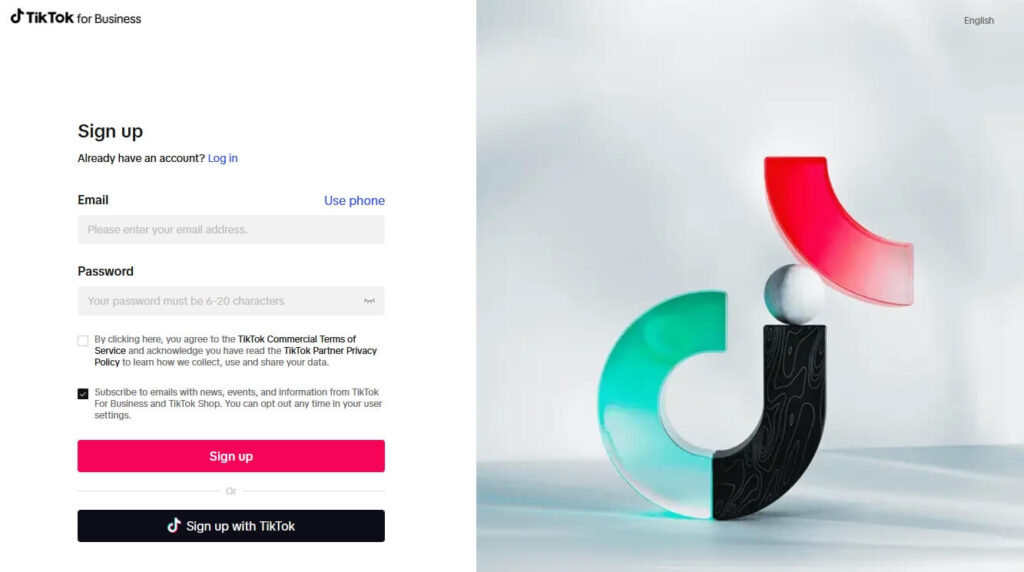
Enter your business name, website URL (optional), industry, and phone number. Then accept TikTok’s terms and click Continue.

2. Verify Your Email and Sign In
Confirm your email from the link TikTok sends, then sign in to Ads Manager to finish your advertiser setup.

3. Register or Assign the Credit
Open the ad credit icon in the top-right corner, read the terms under See details, and click Register. TikTok’s registration guide says the button reads Create campaign instead if you already registered or the credit was assigned to you automatically.
Then check the credit type on the Promotions page. Free credit applies to your campaigns on its own. Assignable credit has to be assigned to a campaign first, and conditional credit only applies once its conditions are met, such as a spend threshold.
4. Launch a Campaign and Spend Within the Window

Choose your objective and set your budget, targeting, and campaign settings. For the spend-based offer, TikTok’s offer page says spend must be completed within 30 days, counted from the day you register.
Lower-tier rewards are paid after that earning window closes. Per the new advertiser program page, advertisers who reach the highest tier get their reward within 1 to 3 business days.

Only chase a tier you’d spend on TikTok ads in your first month anyway. Don’t stretch your budget just to reach the next one.
Check the Current TikTok Ad Credit Offer
Common Mistakes That Prevent Credit From Applying
When TikTok ad credit doesn’t apply, one of the eight problems below is usually behind it. Each one comes with a quick check in Ads Manager or Seller Center, so you can rule it out fast.
The Offer Wasn’t Showing When You Registered
The new advertiser credit is tied to the signup page, not a code you type in later. If you created the account from a page with no offer banner, or the banner was gone by the time you finished, TikTok treats the offer as no longer valid.
Opening a second account for the same business is not a safe fix. TikTok says accounts that look very similar to existing advertisers may not qualify.
Your Spend Didn’t Count Toward the Tier
Not every dollar in your dashboard counts. TikTok’s Coupon Terms say only the paid bill amount or the used top-up amount counts for spend-match offers, and tax and credit costs are left out.
So a total that looks just over a tier can fall short once tax and credit-funded spend come out. Leave yourself some room above the tier you’re aiming for.
The credit also covers future ads only. Charges from before the offer reached your account can’t be paid with it.
A Payment Failed or Billing Isn’t Finished
A failed payment can cost you the offer. The Coupon Terms say TikTok can remove the offer from your account if any payment fails, and can cancel credit it already granted.
Open Tools, then Billing, and confirm your payment method works and your last bill went through. If you pay with top-ups, remember that only the part you actually spend counts.
The Credit Was Never Assigned to a Campaign
Assignable credit sits unused until someone assigns it. Open View Details for that credit on the Promotions page and assign it to the campaign you’re running.
Only users with admin permission in Ads Manager can assign or unassign ad credit. If you aren’t the admin, ask the person who is.
The Credit Doesn’t Cover Your Ad Product or Country
Some credits only work for certain ad products or countries. View Details on the Promotions page shows those limits, and the See details panel under the ad credit icon lists them as Targeted products.
If your campaign uses a product outside that list, the credit won’t touch it. Switch to a campaign type the credit supports, or save it for one that does.
Your Account Doesn’t Qualify
The new advertiser offer comes with account rules. Your Ads Manager account must be registered in your local region, the offer can be redeemed once per advertiser, and accounts very similar to existing advertisers may be left out.
Shop sellers should also confirm the advertiser account is connected in Seller Center. The offer banner only appears after that connection.
The Window Closed or the Credit Expired
Two dates matter. Spend for the new advertiser offer must happen inside the earning window that starts when you register (step 4 above), and anything after it doesn’t count. Once credit is issued, it’s usable until the end of its valid dates, and whatever is left then expires.
Watch for the Expiring soon label, which TikTok shows when a credit has 7 days left.
The Credit Was Suspended or Marked Invalid
Suspended credit is paused because TikTok saw unusual activity on the account. Click Appeal on the Promotions page and submit the documents the verification page asks for.
Invalid credit was cancelled under TikTok’s governance and risk policies, and it can’t be appealed. Ads or content that break TikTok’s policies can also lead TikTok to withhold or withdraw credit.
If you met every condition and the credit still didn’t arrive by the date in your notice, the Coupon Terms say you can appeal to TikTok Customer Support, who will check your eligibility.
For planning and tracking campaigns, try our AI-powered TikTok marketing tools.
Get started with TikTok Ads
Set up your advertiser account, explore available ad credit offers, and create your first campaign inside TikTok Ads Manager.
What Happens to Ad Credit After a Refund or When You Stop Ads
Ad credit has no cash value, so it never comes back to you as money. TikTok’s Coupon Terms call the credit non-refundable and non-transferable, with no cash or other alternative.
In practice, that means:
- If you stop advertising, leftover credit stays until its valid dates end, then expires.
- When credit runs out mid-campaign, TikTok doesn’t send a notice. Further costs go to your credit balance, cash balance or payment method.
- Cash or credit balances can’t be turned into ad credit.
- If an offer was applied by mistake or the account falls out of good standing, TikTok can cancel credit it already granted.
TikTok’s help pages don’t say how a refund of your own ad spend affects progress toward a tier. If you get a refund or a chargeback during the 30-day window, ask support whether your progress changes before you count on that tier.
To stop charges once the credit is gone, pause or stop your campaigns. The Coupon Terms note you can do that at any time.
Frequently Asked Questions
Do I need a code to redeem TikTok ad credit?
No. The new advertiser offer is tied to the signup page, not a code. If it shows when you create a new advertiser account, the credit is issued once the account is created. Other credits are registered through the ad credit icon in Ads Manager.
How long does TikTok ad credit take to show up?
Signup credit from the new advertiser offer appears as soon as the account is created. Lower-tier rewards for spending are issued after the earning window closes, and TikTok says advertisers who reach the highest tier get their reward within 1 to 3 business days.
Why does my TikTok ad credit say Not yet active?
Not yet active means the credit hasn’t reached its start date. Open the Promotions page in TikTok Ads Manager and check the Valid dates column. The credit becomes usable on the first day shown there, so there’s nothing to fix until that date arrives.
Does tax count toward the spend needed for ad credit?
No. TikTok’s Coupon Terms say that for spend-match offers, only the paid bill amount or the used top-up amount counts toward a tier. Tax and credit costs are left out, so your counted spend can be lower than the total shown in your dashboard.
Who can assign ad credit to a campaign?
Only users with admin permission in TikTok Ads Manager can assign or unassign ad credit. If your credit is the assignable type and you aren’t an admin, ask the account admin to open View Details on the Promotions page and assign it to your campaign.
Can expired TikTok ad credit be restored?
TikTok’s help pages list no way to restore expired ad credit. Once the valid dates pass, the credit moves to the Not available tab in TikTok Ads Manager. The Appeal option shown there is only for suspended credit, not for credit that expired.
Wrapping Up
When TikTok ad credit doesn’t apply, the answer is usually on the Promotions page: the status, the credit type, or the dates. Start there, then check billing and which spend counts.
If you’re still setting up, the TikTok Ads Manager walkthrough and our account setup guide cover the account side. Read up on rejected ad fixes so a policy problem doesn’t eat your window, and plan the spend with the ads budget planner.