
Your affiliate network dashboard tells you how many clicks you got and how many converted. It does not tell you which YouTube video, email, or Instagram post sent that traffic. That gap costs affiliates real money every time they scale something that isn’t working.
Tracking affiliate links properly means reading three data sources together: your network dashboard, your own analytics platform, and the SubID fields built into most affiliate networks. Most guides explain one of these. This one covers all three and shows you how they connect.
The global affiliate marketing industry reached $20.07 billion in 2026, according to Business Research Insights.
A large share of that revenue is being attributed incorrectly because affiliates are making content and scaling channel decisions based on incomplete click data.
In this article, you will learn:
- How affiliate link tracking actually works at a technical level
- The three tracking layers and what each one tells you
- How to add UTM parameters and SubIDs to your affiliate links
- How to track affiliate link clicks in Google Analytics 4
- How to use TLinky to build tracking into every link you create
- Why your click counts don’t always match and what gap is acceptable

Quick Answer
Tracking affiliate links means combining three data sources: your affiliate network’s dashboard (clicks and commissions), UTM parameters fed into Google Analytics 4 (source, medium, and campaign data), and SubIDs embedded in the affiliate URL itself (granular placement-level data). Each layer answers a different question. Using all three tells you which piece of content, on which platform, sent the traffic that converted.
How Affiliate Link Tracking Works
When someone clicks your affiliate link, a chain of events fires in sequence.
First, your link receives the click, whether raw or shortened. If you have a URL shortener in place, it logs the click and captures the visitor’s country, device, and referrer before the redirect fires.
Second, the redirect sends the visitor’s browser to the affiliate network’s tracking URL. The network writes a cookie to the visitor’s browser containing your publisher ID and a timestamp.
Third, if the visitor completes a purchase within the cookie window, the merchant’s confirmation page fires a pixel that reads the cookie and attributes the sale to your account.
A Better Way to Share Links
Create short, branded links that are easier to share and track. It’s free to get started and only takes a few seconds.
Your network dashboard shows the result: a click count and a conversion count. It does not show where the click came from unless you told it where to look using SubIDs.
Understanding how link shorteners work within this chain clarifies where your own tracking layer fits. The redirect you control happens before the network sees the visit, which is exactly where you can capture data the network never will.
The Three Layers of Affiliate Link Tracking
Most affiliates use one layer and wonder why their data is incomplete. The full picture requires three.
Layer 1: The affiliate network dashboard
Your network dashboard shows total clicks, total conversions, conversion rate, earnings per click, and total commissions. This is the ground truth for revenue attribution. The network controls this data, and only the network can credit you with a commission.
What it cannot tell you: which platform, page, or piece of content sent the traffic. Every click from YouTube, email, and Instagram looks identical inside the dashboard unless you specifically tagged each link differently.
Layer 2: UTM parameters in Google Analytics 4
UTM parameters are tags you add to the end of a URL. When Google Analytics 4 sees a session that arrived via a tagged URL, it attributes that session to the source, medium, and campaign you specified.
For affiliate links, you cannot append UTMs to the affiliate URL itself, because the network strips or ignores unknown parameters on their tracking URLs. Instead, you append UTMs to your redirect link, the TLinky short link, so GA4 reads the tag before the visitor gets handed to the network.
This gives you session-level data in your own GA4 account: which platform sent the visit, how many pages they viewed, how long they stayed, and whether they returned.
What it cannot tell you: whether that session converted to a commission. GA4 does not receive conversion data from the merchant’s server.
Layer 3: SubIDs in the affiliate network URL
A SubID is a custom parameter built into the affiliate network’s tracking URL. When someone converts, the network passes your SubID value back in the conversion report, letting you see which specific link generated the sale.
This is the only way to get placement-level attribution inside your affiliate network’s dashboard. You set the SubID value yourself; the network stores it and returns it on conversion.
SubID tracking and UTM tracking answer different questions. UTMs tell you what happened in your analytics. SubIDs tell you what converted in the network. Neither replaces the other, and most high-performing affiliates use both on every link.
Method 1: Reading Your Network Dashboard Correctly
The affiliate network dashboard is the authoritative source for commission attribution. But reading it correctly requires knowing what the numbers actually mean.
Clicks count every time your tracking URL was hit. One person clicking the same link three times counts as three clicks.
Unique clicks count one per visitor, based on a combination of IP address and cookie. This is a closer measure of actual reach.
Conversion rate is conversions divided by clicks. Because “clicks” includes repeat visits from the same person, the number often looks low.
EPC (Earnings Per Click) is your best single efficiency metric. It tells you how much revenue each click generates on average, which makes it easy to compare performance across different programs and channels.
Your network dashboard is also where SubID data appears. If you tagged your links correctly, the conversion report shows which SubID value was attached to each sale. If you did not tag them, every sale reports with a blank SubID and the platform attribution is lost.
Most major networks retain affiliate tracking cookies for 30 days. Amazon Associates uses a 24-hour window, which is the shortest cookie window among the major programs.
Method 2: Adding UTM Parameters to Your Affiliate Links
UTM parameters are the standard way to feed campaign attribution into Google Analytics 4. You append them to the link a visitor clicks before they reach the affiliate network, specifically to your TLinky short link.
The five standard UTM parameters are:
-
utm_source: The platform or channel (email, youtube, instagram, newsletter) -
utm_medium: The category (affiliate, social, email, cpc) -
utm_campaign: The specific campaign or content topic (vpn-review, june-sale, hosting-comparison) -
utm_content: The specific placement within a campaign (video-description, email-cta, sidebar) -
utm_term: Used for paid search; rarely needed for affiliate tracking
For affiliate link tracking, you realistically need utm_source, utm_medium, and utm_campaign on every link. The utm_content field becomes valuable when you are running the same campaign across multiple placements and need to compare them inside GA4.
For a complete setup reference, the UTM parameters best practices guide covers naming conventions and how to keep your GA4 data clean across multiple campaigns.
How to add UTMs in TLinky
Open the Customize panel on any TLinky link (gear icon) and click Parameters. The Parameter Builder lets you add one row per parameter: name in the left field, value in the right field.
Add utm_source with the platform value, utm_medium set to affiliate, and utm_campaign set to the campaign name.
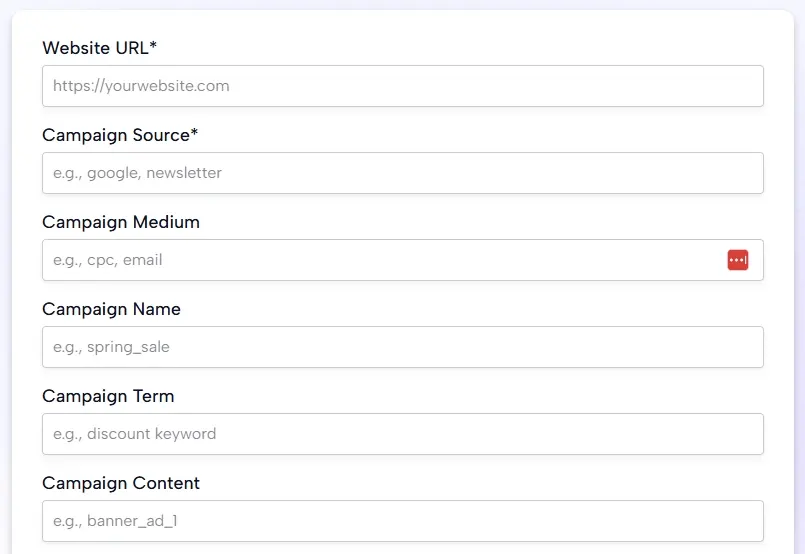
To avoid entering these manually on every link, go to Link Management > Parameter Templates and save a template per channel. When you create your next YouTube affiliate link, open the Parameter Builder, select the YouTube template, and all three fields fill automatically.
See the guide to UTM parameters for beginners if you are setting these up for the first time.
Method 3: SubID Tracking for Conversion-Level Attribution
SubIDs are where most affiliates leave data on the table. You can see clicks in your dashboard but not which specific link generated a commission unless you used SubIDs.
Each affiliate network uses a different parameter name.
The most common ones:
-
Awin:
clickrefandclickref2(ShareASale closed in October 2025 and its merchants migrated to Awin) -
Commission Junction (CJ):
sid -
Impact:
subId1,subId2,subId3,subId4,subId5 -
Rakuten Advertising:
u1 -
ClickBank:
tid
To use SubID tracking, you add the parameter and your chosen value directly to the affiliate tracking URL the network gave you.
For an Awin link it looks like this: https://www.awin1.com/cread.php?awinmid=12345&awinaffid=67890&clickref=youtube-vpn-review&ued=https%3A%2F%2Fexample.com
The clickref value youtube-vpn-review tells you the placement. When someone converts from that link, the conversion report in your Awin dashboard shows youtube-vpn-review as the clickref, so you know exactly which piece of content drove the sale.
SubID naming conventions
Use a consistent naming format from the start. A good structure: [platform]-[content-type]-[topic]. For example: youtube-review-vpn, email-newsletter-june, instagram-story-hosting.
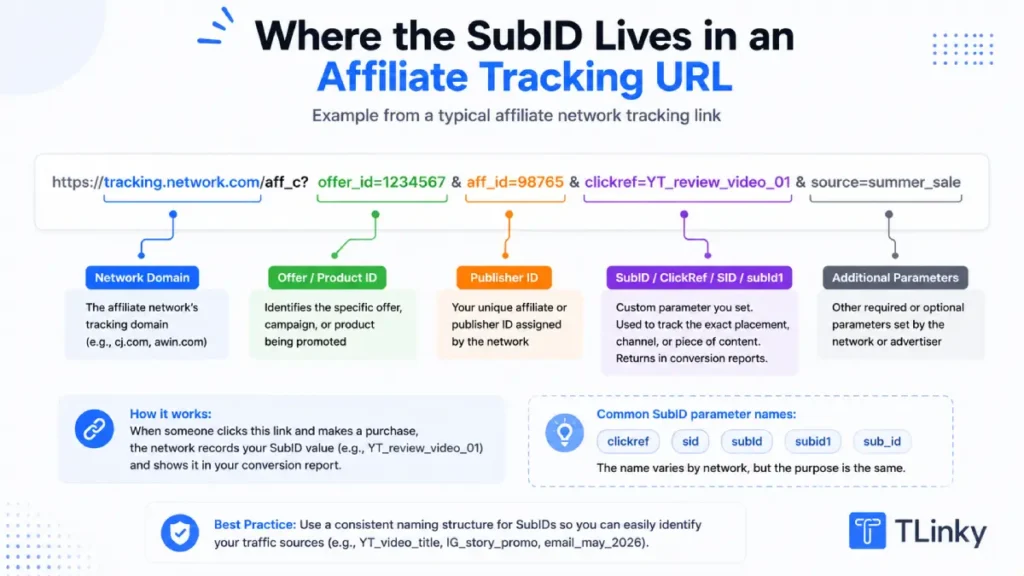
Stick to alphanumeric characters, hyphens, and underscores only. Spaces, ampersands, and special characters break the parameter silently without any error. The SubID simply does not get stored, and the conversion reports blank.
How to Track Affiliate Links in Google Analytics 4
GA4 gives you three ways to see affiliate link click data, depending on how much setup you want to do.
Option 1: UTM attribution in Traffic Acquisition
If you added UTM parameters to your TLinky links, GA4 automatically categorizes the resulting sessions under the source and medium you specified.
In GA4, go to Reports > Acquisition > Traffic Acquisition. Filter by Session medium = affiliate. You will see all sessions where the visitor arrived via a link tagged with utm_medium=affiliate, broken down by source (the platform) and campaign.
This tells you which platforms are sending affiliate traffic and how those sessions behave: pages per session, session duration, and whether they returned.
Option 2: Outbound click tracking via Enhanced Measurement
GA4’s Enhanced Measurement includes automatic outbound click tracking. Enable it by going to Admin > Data Streams > your stream > Enhanced Measurement, then toggle on Outbound Clicks.
Once enabled, GA4 fires an outbound_click event every time a visitor clicks a link that leaves your domain. You can see these events in Reports > Engagement > Events.
This captures affiliate link clicks even when the visitor arrived without a UTM tag. The event includes the link_url dimension, so you can filter by merchant domain to see which affiliate destinations are getting clicked.
Option 3: Custom GA4 events for affiliate links
For the most specific setup, create a custom event in GA4 that fires only when a visitor clicks a link to a specific affiliate destination.
Go to Admin > Events > Create Event. Set the first condition: Event Name equals click. Add a second condition: link_url contains the merchant’s domain (for example, amazon.com or hostinger.com).
Name the event something like affiliate_link_click_amazon. GA4 now reports this as a distinct event rather than bundling it with all outbound clicks.
If you run a WordPress site, MonsterInsights automates this setup with a dedicated affiliate link tracking feature that creates the custom events without requiring manual GA4 configuration.
For tracking social media metrics across platforms where affiliate links appear, GA4’s custom events combined with UTM source tags give you the most detailed breakdown by platform.
How TLinky Builds Tracking Into Every Affiliate Link
TLinky sits at the redirect layer, between your content and the affiliate network, which is where you have the most control over what gets tracked.
Every TLinky link you create captures click data automatically: total clicks, unique clicks, clicks by country, clicks by device type, and clicks by referrer. This happens without any additional setup on your part.
Adding UTM parameters in the Customize panel routes the session data into GA4 at the same time.
For tracking Black Friday campaigns or seasonal campaigns with multiple affiliate links running simultaneously, TLinky’s Campaigns feature groups related links under a single rotator URL. You share one URL and TLinky distributes traffic across all the affiliate links in the campaign while logging which specific link each click went to.
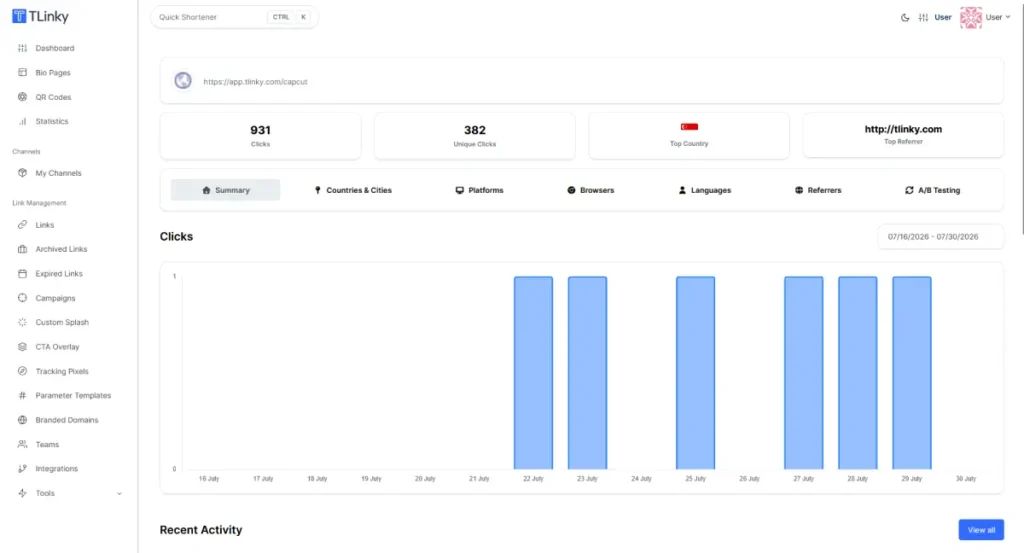
The A/B Testing feature inside Customize lets you split traffic between two affiliate offers without creating separate links. Both variants report under the same short URL, and the A/B Testing tab in your link statistics shows the click distribution and which destination is earning more clicks over time.
Using link management tools to organize affiliate links by channel (using TLinky’s Channels feature) and by campaign keeps your dashboard readable when you have dozens of active affiliate relationships running at the same time.
The full setup process, including SubID integration, UTM Parameter Templates, and pixel assignment, is covered in the URL shortener for affiliate marketing guide.
Why Your Click Numbers Don’t Match
If you compare your affiliate network’s click count to your GA4 session count for the same link, the numbers will not be the same. This is expected.
A 5 to 10 percent discrepancy between ad platform and analytics tool is considered normal, according to tracking specialists at Tapfiliate and Cometly. The gap has multiple causes, and none of them indicate that your commissions are at risk.
The most common reasons for the gap:
Browser privacy features: Safari’s Intelligent Tracking Prevention (ITP) and Firefox’s Enhanced Tracking Protection block some analytics scripts. The network’s tracking cookie fires but GA4 may not receive the session.
Ad blockers: An estimated 40 percent of desktop users run some form of ad blocking. GA4 is blocked more often than network tracking pixels because GA4’s domain is more commonly in blocklists.
Session counting differences: GA4 counts one session per visitor per 30-minute window. Multiple clicks on the same link within the same session count as one GA4 session but multiple clicks in the network dashboard.
Bot traffic: Search crawlers and monitoring bots occasionally trigger network tracking URLs. GA4’s filters catch most bots; network dashboards catch fewer.
Cross-device journeys: Someone who clicks on mobile but converts on desktop appears as two separate events in some tracking systems and one in others.
A gap larger than 25 to 30 percent is worth investigating. The first thing to check is whether the destination URL in TLinky is set exactly as provided by the network, with all required parameters intact. The second thing to check is whether a browser extension or cookie banner is blocking GA4 before it fires.
A gap in the other direction, where GA4 shows more sessions than the network shows clicks, usually indicates that UTM-tagged direct traffic (someone sharing your TLinky link in a message, for example) is being counted as affiliate traffic in GA4 but never reaching the network’s tracking URL.
Tracking Affiliate Links Without a URL Shortener
You can track affiliate links without a URL shortener by relying entirely on UTMs and network SubIDs. The setup works, but with limitations.
Without a redirect layer you control, you have no pre-conversion click data of your own. You depend entirely on what the network logs and what GA4 receives via UTM tags after the session begins. Clicks that happen before the session loads (rare but possible in some email clients) are not captured.
You also cannot add tracking pixels, run A/B tests between two offers, or set geo targeting rules without a redirect layer.
For affiliates with a small number of links and a single channel, direct UTM tagging on affiliate redirect URLs may be sufficient. For anyone managing multiple programs across multiple platforms, a redirect layer adds tracking capabilities that UTMs alone cannot provide.
The best UTM builder tools comparison covers free options for generating tagged URLs quickly if you want to start without a dedicated URL shortener.
FAQ
These questions come up most often when affiliates start building out their tracking setup.
What is the difference between UTM tracking and SubID tracking?
UTM parameters track sessions in your own analytics platform. They tell you which platform, campaign, and content piece sent a visitor to your content.
SubIDs track conversions inside your affiliate network. They tell you which specific link or placement generated a commission.
UTMs fire when someone clicks your link and a session starts in GA4. SubIDs fire when someone converts, and the network records the sale.
Neither replaces the other. UTMs give you behavior data. SubIDs give you attribution data. Serious affiliates use both on every link.
Why does my affiliate network show more clicks than Google Analytics?
This is normal. Ad blockers, Safari’s privacy features, and differences in how sessions are counted all contribute to the gap.
A 10 to 20 percent gap between network dashboard clicks and GA4 sessions is expected and does not affect your commission attribution.
The network’s cookie fires independently of GA4, so clicks that GA4 misses are still tracked by the network and still credit your account on conversion.
If your gap is consistently above 30 percent, check whether your GA4 measurement code is loading correctly on the page where your affiliate links appear.
Can I track which specific piece of content drove an affiliate sale?
Yes, using SubID tracking. When you add a SubID to your affiliate network URL before sharing it, the network stores that value and returns it in the conversion report when a sale happens.
Set the SubID to a descriptive label, such as youtube-vpn-review-june or email-newsletter-cta-top, so the conversion report tells you exactly which content piece drove the commission.
Use your network’s specific parameter name: clickref for Awin, sid for Commission Junction, subId1 for Impact, and u1 for Rakuten Advertising.
Do all affiliate networks support SubID tracking?
Most major networks do. Awin, Commission Junction, Impact, Rakuten Advertising, and ClickBank all support SubID parameters.
The parameter name and number of SubID fields available vary by network. Impact allows up to five SubID fields (subId1 through subId5).
Awin uses clickref and clickref2. Check your network’s publisher documentation for the exact parameter name before building your links.
Amazon Associates does not offer a SubID field in the same way. The only way to differentiate Amazon affiliate links by placement is to create separate tracking IDs in your Associates account, which serves the same purpose but requires a different setup.
Should I use a URL shortener for affiliate tracking or just UTM tags?
UTM tags alone work for session-level attribution in GA4 but give you no pre-conversion click data of your own and no ability to update the destination URL after the link is published.
A URL shortener adds a redirect layer that logs every click before the network or GA4 sees it, lets you update the destination without changing the link, and supports pixels, A/B testing, and geo targeting at the link level.
For affiliates managing more than a handful of links across multiple channels, the benefits of a URL shortening service extend well beyond analytics. The ability to redirect a broken or expired affiliate offer without republishing the link alone justifies the setup.
Wrapping Up
The three layers of affiliate link tracking (network dashboard, UTM parameters, and SubIDs) each answer a question the other two cannot.
Your network dashboard tells you what converted. GA4 tells you where the visitor came from and how they behaved. SubIDs tell you which specific link or placement generated the sale.
Most affiliates stop at the first layer. The ones who use all three know which channel to double down on, which content type earns the highest EPC, and which offers to retire before they waste more promotional effort on them.
The setup is not complex. It is mostly a matter of adding the right parameters to every link before you share it. Start with TLinky’s URL shortener to add click tracking, UTM parameters, and affiliate pixels to every link you create from a single dashboard.
Sources
- Business Research Insights, Affiliate marketing Market Size, Share, Growth, and Industry Analysis
- Tapfiliate, How Tracking Affiliate Programs Actually Works
- Cometly, Track Affiliate Marketing Conversions Accurately Guide
- Analytics Mania, Track Affiliate Link Clicks with Google Analytics 4
- Affluent, The Definitive Affiliate Sub-Campaign SubID Tracking Guide
- Awin, Publisher Help: Link Parameters