
Affiliate links don’t look like links people want to click. They’re long, full of tracking IDs, and they make the commission relationship obvious before a visitor ever reaches the destination.
A URL shortener for affiliate marketing solves that. It turns a parameter-heavy URL into a clean, branded link you’d actually share in public.
The global affiliate marketing industry is valued at over $20.07 billion in 2026, according to Business Research Insights.
Most affiliates spend their energy on content, creative, and audience growth. The link itself gets almost no attention, even though it’s the exact moment where a click either happens or it doesn’t.
Short, branded links consistently outperform raw affiliate URLs. When a link starts with your own domain name instead of a random character string, it looks deliberate rather than automated.
That matters in email, in social posts, on YouTube, and in every other channel where you’re pushing an offer.
In this article, you will learn:
- Why raw affiliate links underperform and what to do about it
- Which features actually matter in a URL shortener for affiliate campaigns
- How to use TLinky to shorten, track, and optimize affiliate links step by step
- Which affiliate networks allow URL shortening and which ones explicitly prohibit it
Quick Answer
A URL shortener for affiliate marketing creates a short redirect link that points to your affiliate URL. When someone clicks it, the tool logs the visit and forwards the visitor to your affiliate destination with all original tracking parameters intact. You get a branded link plus per-click analytics, retargeting pixels, and UTM tagging. Most affiliate networks permit this. Amazon Associates does not.
Why Raw Affiliate Links Underperform
A standard affiliate link from a major network contains your publisher ID, the merchant ID, a creative placement code, and sometimes a session token.
That string often runs 100 or more characters and makes the commission relationship visible to anyone who hovers over the link before clicking.
In email, those parameter strings trigger spam filters more often than plain URLs.
On social media, the visible URL looks like bot-generated content rather than a personal recommendation.
A Better Way to Share Links
Create short, branded links that are easier to share and track. It’s free to get started and only takes a few seconds.
In YouTube descriptions, long affiliate links are unreadable when spoken aloud and don’t fit neatly into any description format.
There is also a practical security issue. If your raw affiliate link is visible, competitors can manually strip your publisher ID and replace it with theirs before completing a purchase.
A short, branded link obscures the underlying structure and makes that substitution meaningfully harder to pull off.
What URL Shorteners Do for Affiliate Links
Understanding how link shorteners work is helpful before building your setup. A URL shortener creates a redirect.
When someone clicks your short link, the tool records the click data first. Then it sends the visitor’s browser to your full affiliate URL with all its original parameters preserved.
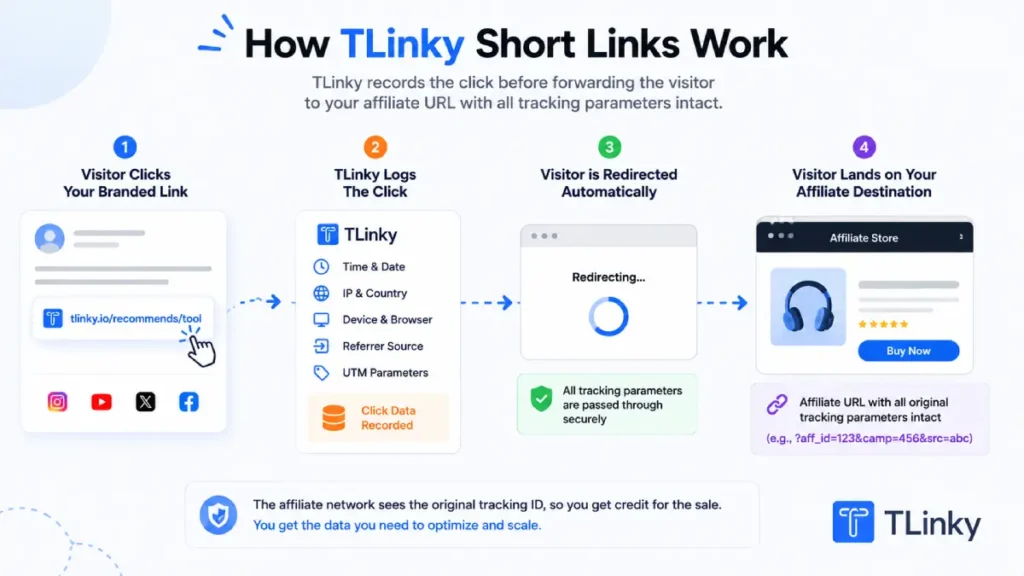
From the affiliate network’s perspective, the click came through your tracking ID and is attributed to your account the same way it would be from a direct click. You keep your commission eligibility.
You also gain a separate layer of click analytics that most affiliate dashboards don’t provide, such as clicks by country, device type, referrer source, and time of day.
Key Features an Affiliate URL Shortener Needs
Not every URL shortener is suited to affiliate work. These six features separate tools built for campaign-level tracking from basic link-shortening utilities.
Custom domain and branded short links
A link from your own domain builds trust that a generic short URL cannot. Readers recognize your brand before they click, which reduces skepticism about where the link goes.
Most affiliate programs allow branded short links as long as the redirect resolves to the correct affiliate destination URL. Custom domain support is the first thing to check before choosing a tool.
Click analytics and traffic data
You need to know which platforms and audiences send the most clicks. Look for per-link reporting that breaks down clicks by country, device type, referrer source, and time period.
Without that granularity, you cannot distinguish between a channel that sends volume and a channel that sends the clicks that actually convert. Tracking this through your link and social analytics dashboard makes the difference visible.
UTM parameter templates
UTM parameters push campaign attribution data into Google Analytics. A good shortener integrates UTM field entry into the link creation workflow and lets you save parameter sets as templates.
You need to understand UTM parameters to use them consistently. Once you do, saving a template per channel means every affiliate link you create from that channel is tagged automatically without manual editing.
Retargeting pixel support
When someone clicks your affiliate link, most will not convert on the first visit.
A tracking pixel that fires on click adds that visitor to a custom audience in Facebook Ads or Google Ads. You can then reach them again with retargeting ads at a lower cost than reaching new users cold.
This is only possible if your URL shortener supports pixel embedding at the link level.
A/B testing and link rotation
A rotator link splits incoming traffic between two or more destinations. For affiliates, this means you can test two different offers, two merchants, or two landing pages against the same audience without a separate testing platform.
The one that earns more clicks over time wins. You shift the split or retire the weaker link and move on.
Geo and device targeting
Multi-region affiliate programs have separate tracking links for different countries. Geo targeting lets a single short link redirect visitors to the correct regional offer based on their location.
Device targeting does the same for mobile versus desktop landing pages. Both reduce the number of links you need to create and simplify your link management as campaigns scale.
How to Use TLinky for Affiliate Marketing
TLinky is a URL shortener with branded domains, click analytics, UTM parameter templates, tracking pixels, geo targeting, and link rotation built into one platform. Here is how to configure it for affiliate campaigns.
Step 1: Shorten your affiliate link with a custom alias
On the TLinky dashboard, paste your affiliate URL into the “Paste a long link” field. Use the Domain dropdown to choose which domain your short link uses.
If you have connected a branded domain (set up under Link Management > Branded Domains), select it here. Otherwise, TLinky’s default domain is available immediately.
In the Custom field, type an alias that describes the offer, such as vpn-deal or host-trial. Then click Shorten to generate the link.
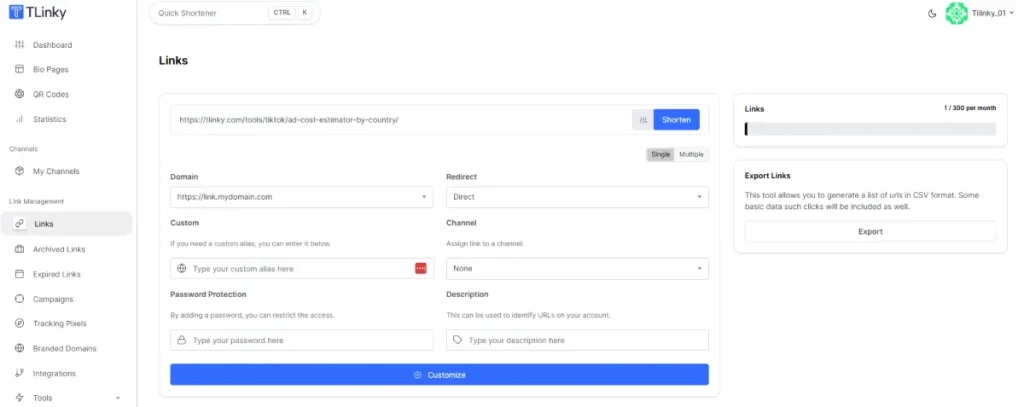
You can also press Ctrl+K from anywhere in the dashboard to open the Quick Shortener modal, which has the same fields.
For creating effective short URLs, keep the alias specific to the offer. A generic alias like /link1 is harder to identify in your dashboard later.
An alias tied to the campaign name or offer makes your Links list readable when you have dozens of affiliate links across multiple programs.
Step 2: Add UTM parameters using the Parameter Builder or a saved template
After pasting your URL, click the Customize button (gear icon) to expand the Customize panel. Click Parameters to open the Parameter Builder.
Add one row per parameter. Set the name to utm_source and the value to the platform you are sharing on, such as email or youtube. Add a second row for utm_medium set to affiliate, and a third for utm_campaign set to your campaign name.
TLinky appends these parameters to the destination URL automatically when someone clicks the link.
To avoid filling this in manually each time, save parameter sets as templates. Go to Link Management > Parameter Templates and click Create Template.
Name the template after the channel, such as “Email Affiliate,” and fill in your standard UTM values.
In future link creation sessions, open the Parameter Builder inside the Customize panel and select the saved template from the dropdown. It pre-fills all your UTM fields instantly.
This keeps your Google Analytics 4 attribution consistent across every link in the campaign without manual entry. Full setup guidance is in the UTM parameters best practices guide.
Step 3: Add a tracking pixel to the link
Pixels must be added to your account before you can assign them to links. Go to Link Management > Tracking Pixels and click Add Pixel.
Choose your platform from the Pixel Provider dropdown. Options include Facebook, Google Ads, Google Analytics, Google Tag Manager, LinkedIn, and Twitter.
Give the pixel a name you will recognize, then paste the pixel ID from your ad platform into the Pixel Tag field and click Save.
Once the pixel is saved, open the link’s Customize panel and click Pixels. A dropdown lists all pixels in your account by the names you assigned.
Select the pixel for this link. TLinky fires it on click, before the redirect sends the visitor to your affiliate destination.
That visitor is added to your custom audience in Facebook Ads or Google Ads and becomes retargetable from that point on.
For affiliates who also run paid campaigns, this is one of the more valuable features. Every visitor who clicked your affiliate link but did not convert becomes part of a warm audience you can reach again at a lower cost than cold traffic.
Step 4: Set up geo targeting for multi-region affiliate programs
If your affiliate program provides separate tracking links for different countries, open the Customize panel and click Geo Targeting.
Click + Add to create a targeting rule. Select the Country from the dropdown. If you need state-level targeting, select a specific state in the second dropdown, or leave it set to “All States.”
Enter the regional affiliate URL in the URL field for that row, then add another row for each additional country you need to target.
Add one row per region. TLinky uses your primary destination URL as the default for all visitors who do not match any targeting rule.
A visitor from the United States gets the US affiliate URL. A visitor from the United Kingdom gets the UK URL. Everyone else hits the default. You manage one short link rather than separate links per country.
Step 5: Split affiliate offer traffic with A/B Testing
To test two affiliate offers against the same audience, open the Customize panel and click A/B Testing.
Click + Add to enter a second destination URL, then set a percentage (enter 50 to send half your traffic to that variant).
TLinky automatically includes your default link in the rotation pool. With one variant added at 50%, traffic splits evenly between the two destinations.
Leave the Percentage field blank if you want equal distribution across all variants without specifying splits manually.
After the test runs for a few weeks, open the link’s statistics page and click the A/B Testing tab. It shows each destination URL, its click count, and its share of total traffic. Use that data to commit to the better-performing offer.
Note: A/B Testing will not activate for visitors who are already being intercepted by a Geo Targeting or Device Targeting rule set on the same link. Those visitors go to their targeted destination rather than entering the rotation.
Step 6: Organize links with Channels and Campaigns
TLinky has two separate organizational features. Channels and Campaigns serve different purposes.
Channels separate links by platform. When creating any short link, use the Channel dropdown in the shortening form to assign it to a channel you have created, such as “Email,” “Instagram,” or “YouTube.”
This lets you filter your Links list by platform and see which channels are sending the most traffic without relying solely on UTM tags.
Campaigns are found under Link Management > Campaigns. Click Create a Campaign, name it, choose a domain, and set a rotator slug.
Each campaign generates two URLs: a campaign list URL and a rotator URL in the format /r/[your-slug]. The rotator URL distributes traffic across all links assigned to that campaign.
For affiliate marketers running a bundle of related offers, create one campaign, add all the affiliate links, and share the single rotator URL. TLinky splits traffic across the full link set automatically.
This structure becomes essential when you’re running multiple affiliate programs and link types simultaneously. Unsorted link dashboards become difficult to work with quickly. Setting up Channels for platforms and Campaigns for promotions from the start keeps reporting clean without any extra steps later.
How to Read Your Affiliate Click Analytics
After sharing TLinky links, your dashboard shows per-link click data for each URL you have created. Here is what each data point tells you.
Total clicks show raw click volume. Use this to compare campaign performance at a glance.
Unique clicks count one click per visitor. This is closer to actual reach, especially on channels where the same person might click multiple times.
Clicks by country tell you where your traffic originates. Useful for confirming geo targeting is routing correctly and for spotting unexpectedly active markets.
Clicks by device tell you whether your affiliate traffic skews mobile or desktop. This informs landing page decisions, especially for merchants whose checkout experiences differ between devices.
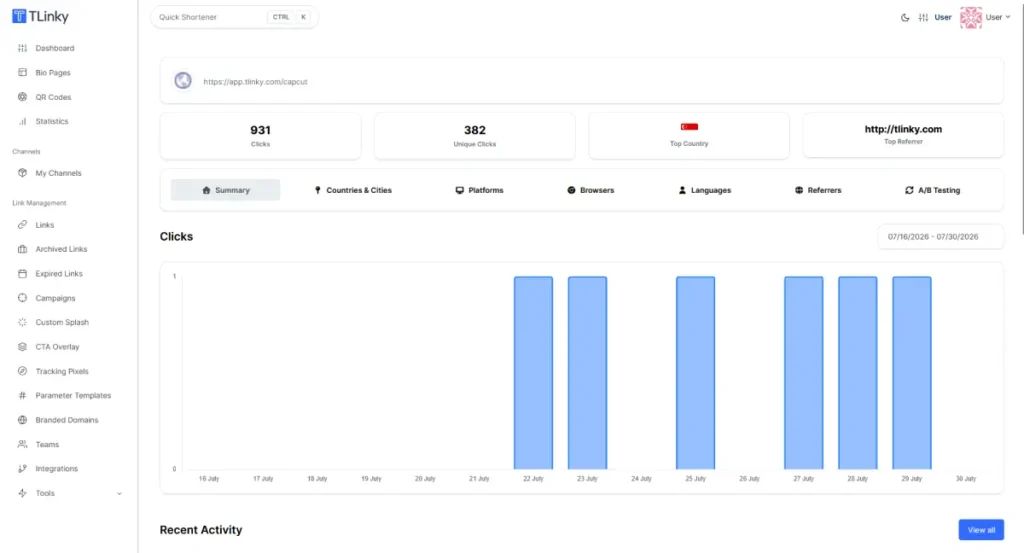
Clicks by referrer show which platform or content piece is actually sending traffic. This frequently surfaces surprises. A forum post, a search result, or a podcast episode mention can outperform your main promotional channels without you noticing unless you check referrer data.
Clicks over time help you identify the peak engagement window for each channel, which is useful for timing future promotional pushes.
This data supplements your affiliate network’s dashboard rather than replacing it. Your network tracks conversions and commissions. TLinky tracks pre-conversion click behavior.
Together, they let you calculate a click-to-conversion rate by channel, which is a number most affiliates never know about their own campaigns.
For deeper attribution, connect TLinky’s UTM parameter tags to Google Analytics 4 using the UTM builder tool. GA4 then shows session-level and conversion data attributed to each campaign tag, closing the gap between a link click and a completed purchase.
URL Shortener Policies by Affiliate Network
Most guides on this topic skip network policy entirely, which leaves affiliates exposed to commission withholding or account termination.
Policies vary significantly by network. The consequences for violations are severe enough to check before shortening any link at scale.
Amazon Associates
Amazon Associates explicitly prohibits using third-party URL shorteners on Amazon affiliate links. The Amazon Associates Operating Agreement states that links to Amazon must not obscure the destination.
Amazon’s own shortener, amzn.to, is the only approved method for shortening Amazon affiliate links.
If you promote Amazon products, use amzn.to for those links and TLinky for affiliate programs that do permit URL shortening. Using TLinky or any other third-party shortener on Amazon affiliate links puts your account and commission history at risk.
Awin, ShareASale, Commission Junction, and ClickBank
Major networks including Awin, ShareASale, Commission Junction, and ClickBank generally do not prohibit URL shorteners, provided the redirect resolves to the correct affiliate destination and your publisher ID is preserved.
A standard redirect from a TLinky short link to your affiliate URL handles this correctly.
Policies do get updated, so check the current publisher agreement for any network before shortening links at scale. The relevant section is usually labeled “Approved Promotional Methods” or “Link Usage.”
If the policy is ambiguous, contact the network’s publisher support team directly before proceeding.
What to do before shortening any affiliate link
Every affiliate program has its own terms. Read the agreement before you start, even for programs you have been in for a long time. Look specifically for language about link shortening, link cloaking, link redirection, or approved promotional formats.
Getting this right means you can use TLinky’s full feature set for the programs that permit it. Getting it wrong means losing commission history from a program you may have been building for months.
FAQ
The questions below come up frequently when affiliates first start using URL shorteners for their campaigns.
Can you use a URL shortener for affiliate links?
Yes, most affiliate networks allow URL shorteners. When someone clicks a TLinky short link, TLinky redirects the visitor to your affiliate URL and passes all the original tracking parameters along in the redirect chain. Your publisher ID is preserved, and the network attributes the click to your account correctly.
The major exception is Amazon Associates, which prohibits third-party URL shorteners entirely. Amazon requires that links not obscure the destination URL. Amazon’s own amzn.to shortener is the only approved option.
For all other major affiliate networks, short links work correctly as long as the redirect preserves your affiliate tracking parameters.
Do URL shorteners break affiliate tracking?
No, not when the redirect is configured correctly. TLinky uses a standard redirect that passes the visitor’s browser to your full affiliate URL with all its original parameters intact.
The affiliate network sees the same click it would have seen from a direct click on the raw affiliate URL, and commissions are attributed normally.
Tracking discrepancies can occur when a URL shortener modifies the destination URL during the redirect or strips query string parameters. These issues are uncommon with reputable URL shorteners.
If you notice a gap between TLinky’s click count and your network’s reported clicks, verify that your destination URL in TLinky is set exactly as provided by the network, including all required parameters.
Is link cloaking the same as URL shortening?
Not exactly, though the terms overlap enough to cause confusion. Link cloaking typically refers to masking the destination URL so visitors cannot determine where the link leads before they arrive. URL shortening creates a redirect but does not necessarily hide the destination from a visitor who inspects the link.
The distinction matters most with Amazon, which prohibits any method that makes the Amazon destination non-obvious.
Other networks phrase their policies around “obscuring” or “masking” the destination, which may or may not apply to a straightforward redirect depending on how the policy is written.
When a network’s agreement uses either term and the meaning is unclear, contact publisher support before proceeding.
How do I track affiliate links without a URL shortener?
You can append UTM parameters to your affiliate destination URL and track sessions in Google Analytics 4. This requires that the affiliate network’s redirect preserves query strings, which most do.
You then view the data in GA4 under Traffic Acquisition, filtered by your source and medium tags. The best UTM builder tools can automate the parameter construction.
The limitation is that UTM parameters only track what happens after a click reaches a page you control.
If your affiliate link sends traffic directly to the merchant’s site, you have no visibility into that traffic unless you have a redirect on your end to log the click first.
A URL shortener fills that gap and lets you combine click logging with UTM attribution in the same tool.
Should I use a branded domain for affiliate links?
Yes, especially if you are sharing links publicly across email, social media, or video. A branded domain tells readers the link comes from a trusted source they recognize.
Generic short domains from shared URL shorteners have an increasingly poor reputation because they are used by spammers alongside legitimate marketers.
The benefits of using a URL shortening service with a branded domain include link equity that stays attached to your domain rather than a shared pool, and protection if a shared short domain gets flagged by spam filters.
Setting up a branded domain in TLinky requires access to your domain’s DNS settings and takes around 10 to 15 minutes to configure.
Is there a difference between using a URL shortener for affiliate marketing versus email marketing?
The core setup is the same in both cases: you create a short link, add UTM parameters, and track clicks. The differences are in how you name your UTM tags and which link behaviors matter most.
In email, deliverability is a priority. Some email service providers flag links on shared short domains, which is another reason branded domains matter for affiliate marketers who also send email campaigns.
For campaigns that span both channels, see the URL shortener for email marketing guide for the email-specific configuration and UTM conventions.
Wrapping Up
The case for using a URL shortener in affiliate marketing is not really about shorter links. It is about the data and control you gain between your audience and the affiliate destination.
Click analytics by channel, retargeting pixels that fire before the redirect, geo routing for multi-region programs, and A/B testing across offers all sit at that single redirect point.
None of that is available when you paste a raw affiliate link and hope for the best. In our testing, the combination of branded links and per-channel UTM tagging alone shows affiliates which channels are actually generating commission-eligible traffic versus which ones are simply generating clicks.
The one constraint that overrides everything else is the affiliate network’s policy. Amazon Associates is the most significant exception, and ignoring it costs commissions.
For every other major network, getting TLinky configured correctly means you can use the full tracking stack without restriction. Get started with TLinky’s URL shortener to set up your first branded affiliate link.
Sources
- Business Research Insights, Affiliate marketing Market Size, Share, Growth, and Industry Analysis
- Amazon Associates, Operating Agreement