
You can paste the same short link everywhere and assume it works the same way. Most guides let you believe that. It does not.
Each social platform has different rules for where links are clickable, how link previews are generated, whether your branded domain survives their redirect chain, and what data you actually see in analytics afterward. Setting up a URL shortener for social media without knowing these differences means you will misread your click data, create broken previews, and miss attribution that you needed.
There are 5.79 billion social media users globally as of April 2026, according to DataReportal. The platforms those users spend time on handle links in fundamentally different ways.
In this guide, you will learn:
- Which platforms allow clickable links in captions and which restrict links to the bio only
- Why X/Twitter’s t.co wrapping changes how you should think about branded short links
- How social preview cards are generated and what goes wrong when a shortener does not pass OG tags correctly
- How to set up UTM parameters per platform so your analytics actually tell you which posts drove traffic
Key Takeaways
- Instagram does not allow clickable links in captions for most accounts. As of March 2026, Meta Verified subscribers can test caption links with a cap of 10 linked posts per month, but this is a limited feature, not a general rollout.
- X (Twitter) wraps every URL through its own t.co system, so all links count as 23 characters regardless of length. A branded short link does not save characters on X, but it still delivers branding, independent click analytics, and editable destinations.
- LinkedIn generates rich link preview cards by crawling the URL you paste. If your short link does not pass Open Graph meta tags from the destination page, LinkedIn will show a blank or incorrectly branded preview card.
- YouTube is the most link-permissive platform. Every link in a video description is clickable, including long tracking URLs with affiliate codes and UTM strings.
- One UTM source value per platform is the minimum setup needed to see which social channel is actually driving traffic to your site.
Quick Answer
A URL shortener for social media lets you create shorter, branded, trackable links for posts, bios, and profiles across platforms. How you use it depends on the platform: Instagram and TikTok restrict clickable links to the bio, X wraps all links through t.co so character savings do not apply, LinkedIn uses link preview cards that require proper Open Graph tag passthrough, and YouTube allows full clickable links in descriptions. Set a unique UTM source value per platform so your analytics distinguish traffic by channel.
Why URL Shorteners Work Differently on Each Platform
The reason short links behave differently across social platforms comes down to three variables: where links are allowed to appear, whether the platform adds its own redirect layer on top of yours, and how the platform generates the preview card shown to users before they click.
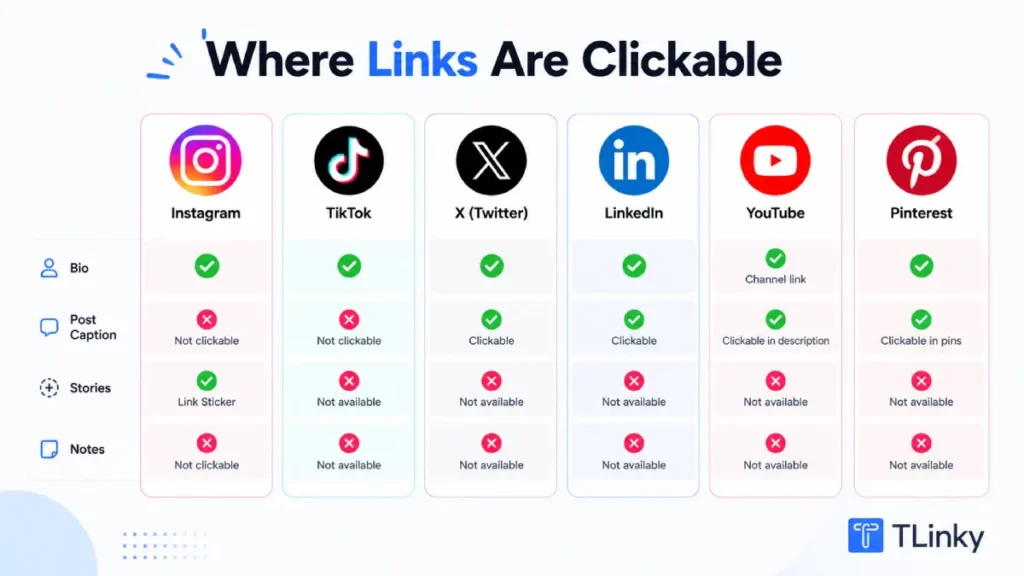
Understanding these three factors for each platform tells you where a branded short link adds real value and where it is mainly cosmetic.
A Better Way to Share Links
Create short, branded links that are easier to share and track. It’s free to get started and only takes a few seconds.
Instagram: The Bio-Only Reality
For most Instagram accounts in 2026, links in post captions are not clickable. You can type a full URL into a caption, and it will display as plain text. Users cannot tap it and be redirected. The only reliably clickable link on a standard Instagram account is the bio link.
Instagram does allow up to 5 links in the bio, which makes the bio the most important placement for any short link you create for the platform. A branded short link in the bio is preferable to a raw destination URL because it is readable, trustworthy, and editable if the destination changes.
As of March 2026, Instagram is testing clickable links in captions for a limited group of Meta Verified creators with professional accounts. This feature is capped at 10 linked posts per month and is not available to general accounts. It may expand or change after testing is complete, so check the current status before planning campaigns around it.
For most creators and brands, the practical setup is a bio link hub: one short link in the bio that points to a link in bio page listing all your current destinations. Instagram Stories do allow a Link Sticker that goes directly to a URL, and that placement supports short links cleanly.
The how to find link in bio on Instagram article covers the bio link slot in detail, and the tips for building a link in bio page cover how to structure the landing page behind that bio link for maximum conversion.
TikTok: One Clickable Link, One Shot
TikTok gives personal accounts one bio link slot. Business accounts get the same, though the eligibility requirements and interface differ slightly by region. TikTok captions support up to 4,000 characters as of 2024, but URLs typed into captions are not clickable. The bio slot is the only place a short link works as a redirect.
TikTok also restricts bio links for newer accounts in some markets. Your account may need to meet a minimum follower threshold or age requirement before the bio link slot becomes available. Check TikTok’s current eligibility rules in your region before planning a campaign around the bio link.
Because you have one bio link and multiple destinations to cover (courses, affiliate offers, latest videos, shop, newsletter), a link-in-bio page behind your short link is the standard solution. The how to add a link to TikTok bio guide covers the full setup process, including eligibility requirements.
For tracking which specific TikTok videos drive clicks to your bio link, the short link in your bio carries one UTM source value, but it will not tell you which video generated the traffic. TikTok’s own analytics show profile visits per video, and connecting that to external click data requires comparing the two data sources separately.
X (Twitter): Character Count Is Not the Real Reason to Shorten
X wraps every URL posted through its platform in its own t.co redirect. Every URL, regardless of length, counts as exactly 23 characters toward the 280-character post limit. A short link and a 200-character affiliate URL both cost 23 characters. Using a branded shortener to save characters on X has no effect because t.co handles the character normalization automatically.
This is the thing most guides about short links on X get wrong. They say “use a URL shortener to save characters” without explaining that this is no longer needed since X implemented t.co universally.
The reasons to use a branded short link on X are different.
First, the branded domain appears in the link preview card as the displayed URL before the t.co redirect fires. A link showing go.yourbrand.com/post-name builds more trust than a raw destination URL in that card.
Second, your own shortener’s analytics give you real-time click data independent of X’s native analytics, which have their own measurement methodology and reporting delays.
Third, an editable destination lets you update where the link goes after a post is live, which matters when a promoted post outlives its original landing page.
LinkedIn: Rich Previews and Where Short Links Fit
LinkedIn is a platform where the link preview card significantly influences click-through rates. When you paste a URL into a LinkedIn post, LinkedIn crawls the URL and builds a preview card from the Open Graph meta tags it finds: the og:title, og:description, and og:image tags on the destination page.
When you use a short link, LinkedIn crawls your short URL first. If your URL shortener properly passes through (or itself serves) the Open Graph tags from the final destination page, LinkedIn builds the correct preview. If it does not, LinkedIn may show a blank preview or the meta tags from your shortener’s default page, not your destination.
Before using a short link for LinkedIn content that depends on a strong preview card, test it. Paste the short link into LinkedIn’s post composer and check whether the correct image, title, and description appear. Most quality URL shorteners pass OG tags through correctly, but verify this for the shortener you are using.
The benefit of branded short links on LinkedIn is the same as on X: your domain shows in the preview card before clicking, and you get independent click analytics. LinkedIn posts with preview cards tend to receive more engagement than posts with bare text, so the preview card quality matters more on LinkedIn than on most other platforms.
For B2B content where your LinkedIn profile is a primary lead generation channel, consistent branded links across posts create a visible, professional identity that appears in every preview card. The social media metrics guide covers which analytics to track when LinkedIn is part of your distribution mix.
YouTube: The Most Link-Friendly Platform
YouTube descriptions support fully clickable links with no character restrictions and no added redirect layer from YouTube. Every link you place in a video description works as a normal hyperlink. This makes YouTube the most straightforward platform for URL shortener use.
Branded short links in YouTube descriptions work well for three reasons. First, a clean short link reads better than a 150-character affiliate tracking URL in a description that viewers scan on mobile. Second, if the destination URL changes (a product page goes out of stock, a course page moves), an editable destination short link lets you update the redirect without editing dozens of older video descriptions. Third, click data in your shortener dashboard reflects true user clicks, separated from YouTube’s own analytics for description clicks.
The main setup rule for YouTube is to keep branded short links consistent across videos in a series or campaign. A viewer who sees links.yourbrand.com/main-course in every video in a playlist quickly learns to look for that link pattern.
Pinterest: Pinnable Links and Profile Links
Pinterest is a platform where links are central to the content format. Every pin can contain a destination URL, and clicking a pin on Pinterest goes directly to that URL. This makes Pinterest link-native in a way that Instagram and TikTok are not.
Branded short links work on Pinterest pin URLs, but consider how they affect the visual presentation. Pinterest crawls the destination page for pin images and meta information. If you use a short link as the pin URL, Pinterest will follow the redirect and crawl the destination, so your pin preview will normally show the destination page’s content correctly.
The profile link on Pinterest works like a bio link on other platforms: one clickable link in your profile that goes to any destination. For creators who manage multiple Pinterest boards pointing to different offers, a link in bio page behind the profile link provides the same aggregation benefit as on Instagram.
The Social Preview Problem Most Marketers Miss
When you paste a link into Facebook, LinkedIn, X, or most other platforms that generate preview cards, the platform sends a crawler to that URL to extract the Open Graph tags that build the card. The platform reads whatever is at the end of the redirect chain.
The issue: some URL shorteners do not correctly forward or serve the destination page’s OG tags. If your shortener’s redirect URL serves its own default meta tags instead of passing through the destination’s og:title, og:image, and og:description, your preview card shows the wrong content. This is a real operational problem that causes social posts to display broken or generic preview cards.
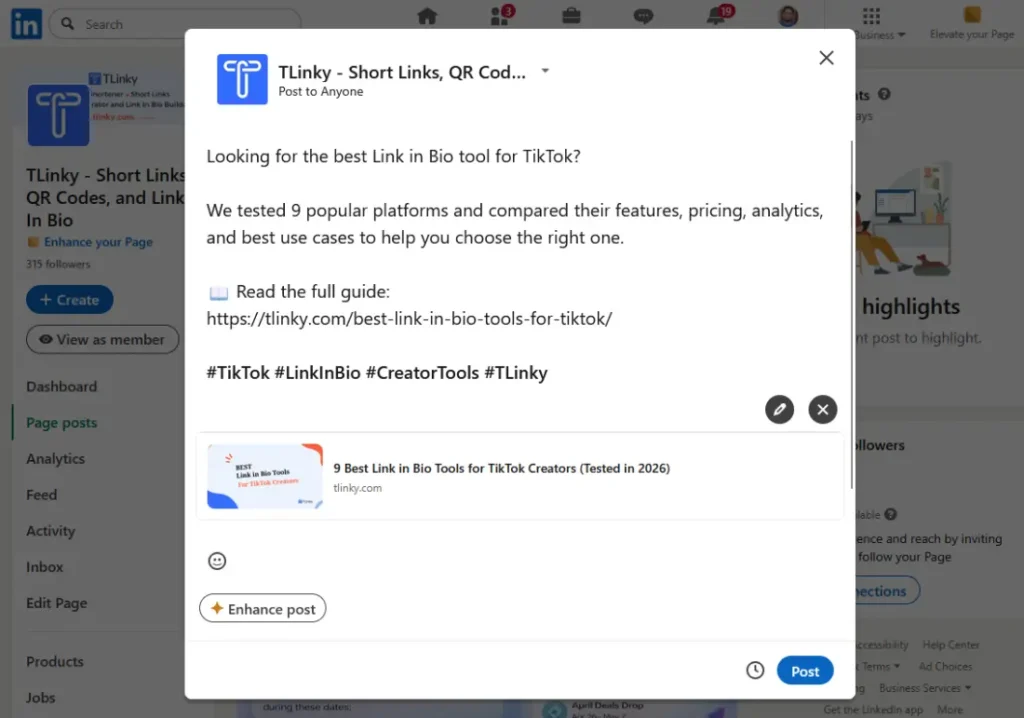
To check whether your shortener handles OG tags correctly: paste a short link into a Facebook post composer, LinkedIn post composer, or use a tool like Meta’s Sharing Debugger to inspect what tags are resolved at your short URL. If the image, title, and description match your destination page, the passthrough is working. If they do not, either your shortener does not support OG tag passthrough, or you need to enable it in your settings.
This is one of the reasons choosing a quality URL shortener matters more for social media use than for email or affiliate use cases, where preview cards are not involved.
UTM Setup Per Platform
Short links on social media without UTM parameters tell you how many clicks happened. With UTM parameters, they tell you which platform, which post type, and which campaign drove those clicks to your website.
If you want to understand the broader data behind shortened links, see our guide to URL shortener statistics and the metrics worth tracking.
The minimum UTM setup for social media is one source value per platform. Set utm_source=instagram, utm_source=tiktok, utm_source=x, and so on for each platform where you distribute links. This alone separates traffic by social channel in your Google Analytics 4 acquisition report, which otherwise groups many social sources under “social” without platform distinction.
For campaigns where you are running content on multiple platforms simultaneously, add utm_campaign as a consistent campaign name across all platforms. This lets you see total campaign-level traffic and filter by source to compare how each platform performed within the same campaign.
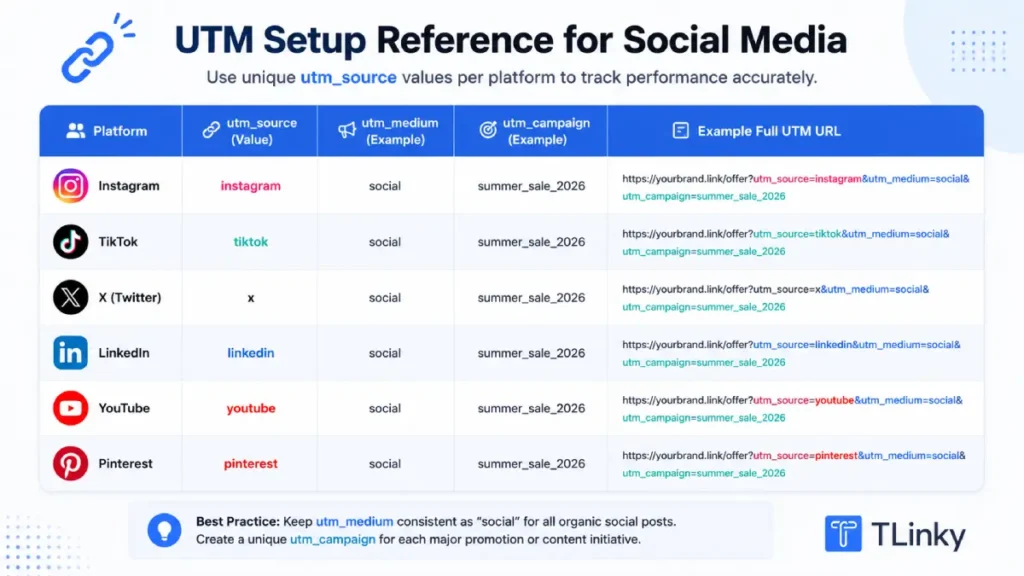
For testing specific posts or content types, utm_content lets you track whether a bio link, a Story link, or a specific post drove the click. Set a distinct utm_content value for each placement type rather than reusing the same content parameter across different posts.
The UTM parameters best practices guide covers naming conventions that keep this data readable when you are running campaigns across four or five platforms at once. The UTM builder tool lets you construct and save consistent UTM strings without manual entry. For understanding what each UTM parameter does before you build out your system, the beginner’s guide to UTM parameters covers each field with examples.
Which Setup Fits Your Situation?
| You are a… | Start with… |
|---|---|
| Creator on Instagram and TikTok | One branded short link pointing to a link in bio page; UTM source set per platform; update destinations from dashboard without touching bio |
| B2B marketer on LinkedIn | Branded domain short links for every post; test OG tag passthrough before publishing; UTM source=linkedin plus utm_campaign per content series |
| Content creator on YouTube | Branded short links in all video descriptions; editable destinations so older video links stay current; UTM source=youtube plus utm_content per video series |
| Brand running multi-platform campaigns | One short link per campaign per platform; consistent utm_campaign value across all platforms; distinct utm_source per channel to compare performance |
| Social media manager handling 10+ accounts | One branded domain; naming convention by account and platform; UTM standards enforced across all links before any content publishes |
For teams managing affiliate offers across social channels, the URL shortener for affiliate marketing guide covers the compliance and redirect rules that apply when affiliate networks are part of the link chain. For email campaigns that run alongside social content, the URL shortener for email marketing covers deliverability rules and bot click filtering, both of which behave differently than social link clicks.
FAQ
Social media managers, creators, and marketers ask a consistent set of questions when setting up URL shorteners across platforms. Here are the ones that come up most often.
Do I need a different short link for each social platform?
You do not need a different short link for the same destination, but you need different UTM parameters per platform appended to the destination URL. One branded short link can serve as the bio link on both Instagram and TikTok, but each platform version should pass a different utm_source value so your analytics distinguish the traffic source.
Create separate short links when you are testing different content types on the same platform, running platform-specific campaigns with different offers, or when you need separate click counts per channel rather than a combined total.
Does a URL shortener hurt reach on Instagram or TikTok?
There is no verified evidence that using a URL shortener in a bio link reduces post reach on Instagram or TikTok. Reach on both platforms is determined by content quality and engagement signals, not by what the bio link points to. Links in captions are not clickable on most accounts anyway, so the bio link placement has no relationship to how the algorithm distributes your content.
How do I see which social platforms are driving the most website traffic?
Set a unique utm_source value for each platform and append it to the destination URL inside each short link. In Google Analytics 4, go to Reports, then Acquisition, then Traffic Acquisition. Filter by Session source to see traffic from each platform side by side.
Without UTM parameters, GA4 groups social traffic imprecisely and may label some social referrals as direct traffic when the referrer header is stripped. UTMs override this by sending explicit source data with every session.
Can I use the same short link in both my Instagram bio and my TikTok bio?
You can use the same short URL on both platforms if you do not need separate click counts per platform. If you do need separate per-platform data, create two short links pointing to the same destination URL but with different utm_source values in the destination URL: one with utm_source=instagram and one with utm_source=tiktok. The links will look different but land on the same page with platform attribution intact.
Do short links affect how X (Twitter) generates link previews?
X generates link preview cards by following the URL to the final destination and reading its Open Graph meta tags. A short link that uses a proper 301 or 302 redirect to the destination will produce the same preview card as the raw URL. X also displays the resolved domain (your branded domain, not the destination) in the card’s displayed URL, which is a branding advantage of using a custom domain shortener on X.
Wrapping Up
The mistake most marketers make with URL shorteners on social media is treating all platforms the same. Instagram and TikTok restrict clickable links to the bio. X wraps everything through t.co, so character savings are irrelevant.
LinkedIn depends on correct Open Graph tag passthrough for its preview cards to work. YouTube is fully link-permissive. Getting these rules right before you build your link system saves hours of debugging and prevents misread analytics.
Start with one branded domain, consistent UTM naming per platform, and the platform-specific placement rules covered here. Add link in bio page infrastructure for Instagram and TikTok.
Test LinkedIn preview cards before any post goes live. The best social media marketing tools guide covers how short link management fits into a broader social media tool stack if you are building out your setup. The benefits of using a URL shortening service cover the foundational reasons branded short links outperform generic ones.
If you have not yet connected your own domain to TLinky, Branded Short Links walks through the full setup: DNS configuration, Domain Root and 404 redirect setup, and how to select your branded domain when shortening each link.
The goal is links that are consistent enough to build brand recognition, instrumented well enough to show which platforms are worth your time, and flexible enough to update without republishing content.
Sources
- DataReportal and We Are Social, Digital 2026 Global Overview Report, April 2026
- Instagram, Meta Help Center, Adding a Link to Your Instagram Profile, 2026
- PetaPixel, Instagram Begins Testing Clickable Links in Post Captions, March 2026
- X Help Center, How to Use Links on X, 2026