
If you share links with bit.ly or tlinky.one in the URL, you are leaving trust on the table. Branded short links replace that generic prefix with your own domain, so every link you publish looks like it came from you.
This guide walks through the full setup in TLinky: connecting your domain, configuring DNS, setting your root and 404 redirects, and creating your first branded link. The steps use real screenshots taken from the TLinky dashboard.
Here is what you will learn:
- What a branded short link is and how it differs from a generic short URL
- How to choose between a root domain and a subdomain for your links
- How to add your domain to TLinky and configure every form field correctly
- How to set up your DNS A record and enable SSL
- How to set Domain Root and 404 redirects so no traffic gets lost
- How to create your first branded link and write slugs that are easy to share

What is a branded short link?
A branded short link is a shortened URL that uses your own domain instead of a shared third-party domain. Instead of sharing tlinky.one/abc123, you share something like go.yourbrand.com/summer-sale.
The domain in the middle is your branded short domain. The slug at the end is the custom text you choose. Both are under your control.
Why branded links get more clicks
Recipients can see your domain before they click. That recognition reduces friction, because links from unfamiliar domains get ignored or filtered by email security tools.
According to research published by Bitly, branded links generate up to 34% higher click-through rates than links on shared short domains. The mechanism is simple: people click what they recognize.
A Better Way to Share Links
Create short, branded links that are easier to share and track. It’s free to get started and only takes a few seconds.
Branded links also give you independent analytics. You can explore the available data in our guide to URL shortener statistics, which covers the key metrics and usage data behind shortened links. Because the click passes through your domain, you own the data no matter what happens to your URL shortener account. That data connects directly to your campaign tracking and your social media metrics reports.
For businesses already using TLinky’s URL shortener, adding a branded domain takes the same short links you already create and puts your brand on every one of them.
Choosing a short domain for your brand
You need a domain before you can set anything up in TLinky. This does not have to be your main website domain. Most brands register a shorter, separate domain just for links.
Root domain vs subdomain
A root domain means your links look like brand.io/slug. A subdomain means they look like go.yourbrand.com/slug.
Both work. The subdomain option is faster if you already own a domain, because you add one DNS record on go.yourbrand.com without touching your main website’s DNS configuration. Link analytics stay separate from your main website traffic by default.
A root domain gives you a cleaner, more memorable URL. Brands like Spotify use spoti.fi because the short domain itself is recognizable. If you want that level of polish and you have budget for a second domain, register a dedicated one.
What makes a good short domain name
Keep the domain under 10 characters if possible. Avoid hyphens in the domain itself (hyphens in the slug are fine). Use only letters your audience can spell from a spoken URL.
If you choose a subdomain prefix, go., link., or l. are the most common. They read naturally before a brand name and are short enough to add very little length to the full URL.
Step 1: Add your domain to TLinky
Log in to TLinky and go to Branded Domains in the left sidebar, under Link Management.
You will see every domain connected to your account, along with your plan’s domain limit.
Click Add Domain in the top right corner.
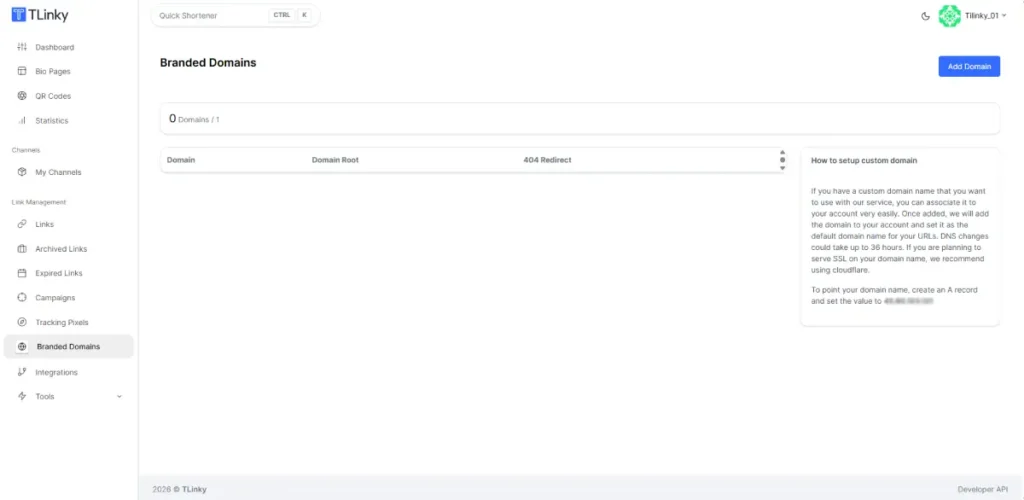
Navigate the Branded Domains page
The Branded Domains list shows each connected domain, its Domain Root redirect, its 404 redirect, and whether the domain is Active or Inactive. You will also see how many domains you have used against your plan limit, for example 2 / 5 on a standard plan.
This page is where you return if you need to update a redirect or check a domain’s status after DNS changes.
Filling in the domain form
The new domain form has fields that are worth understanding before you save.
The Domain URL field is where you enter the domain or subdomain you are connecting, for example go.yourbrand.com. Do not include http:// or a trailing slash.
Below the domain field, you will see two tabs: Custom Redirect and Bio Page. Select Custom Redirect for standard branded short links. The Bio Page tab connects the domain to a TLinky link in bio page instead, which is a different use case.
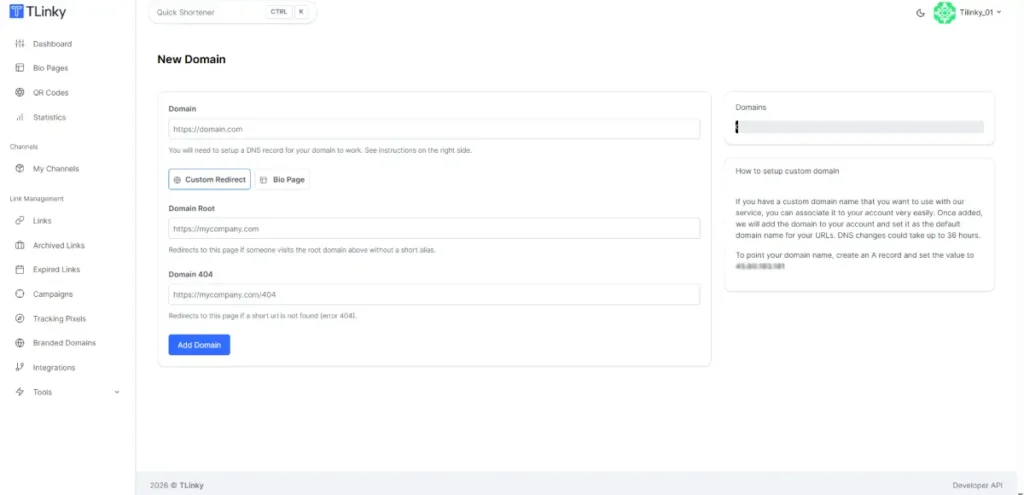
The Domain Root field sets where someone lands if they visit your short domain with no slug. If someone types go.yourbrand.com with nothing after it, they land on whatever URL you enter here. Your homepage or a dedicated landing page are both good choices.
The Domain 404 field sets where someone lands if they enter a slug that does not exist. Instead of seeing a browser error, they get redirected somewhere useful. Your homepage or a help page work well here.
Fill in all four fields and click Save.
Step 2: Configure your DNS
After saving the domain in TLinky, point your domain to TLinky’s servers by creating a DNS A record with your domain registrar or DNS provider.
Creating the A record
In your DNS settings, create a new A record with these values:
- Host: the subdomain you are using (for example
go), or@if you are pointing a root domain - Type: A
- Points to:
127.0.0.1(The server IP is shown in the Branded Domains section of the TLinky dashboard. Users copy it directly from there when configuring their DNS record.) - TTL: any standard value; 3600 seconds is typical
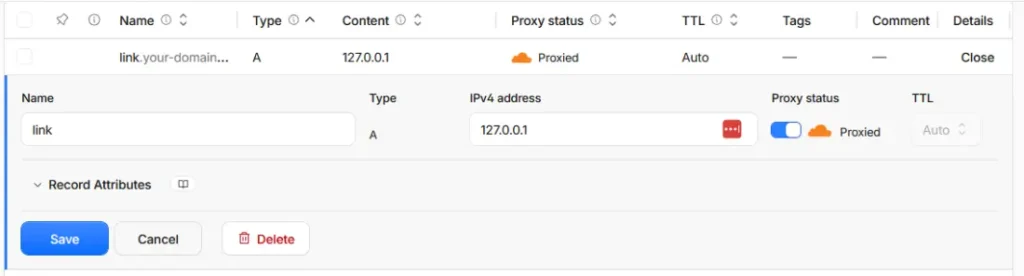
Save the record. The specific steps for creating an A record vary by registrar. Look for a DNS Management or DNS Zone section in your domain account dashboard.
Enabling SSL
TLinky recommends using Cloudflare for DNS management and SSL. If your domain is on Cloudflare with the proxy enabled, SSL is handled automatically after the A record resolves. You do not need to generate or install a certificate.
If you are not using Cloudflare, check your domain registrar for SSL provisioning options. Many registrars include free SSL through Let’s Encrypt.
Some require a paid certificate. Without SSL, browsers will flag your short links as insecure, which defeats the trust advantage of using a branded domain.
Step 3: Wait for DNS propagation and verify
DNS changes can take a few minutes or up to 36 hours to propagate, depending on your domain provider’s TTL settings and global DNS cache timers.
Go back to Branded Domains in TLinky and check the status column. Once TLinky confirms DNS is resolving correctly, the status changes from Pending to Active.

You can check propagation progress using a free tool like dnschecker.org to see which regions have picked up the change. Do not create branded links on this domain until the status shows Active. Links created before propagation completes will not resolve.
Step 4: Create your first branded short link
With your domain active, creating a branded link works the same as creating any short link in TLinky. The only difference is selecting your branded domain before you shorten.
Open the Shorten Link panel in your TLinky dashboard. You will see a domain dropdown that lists every domain available on your account, including your branded domains alongside default TLinky domains.
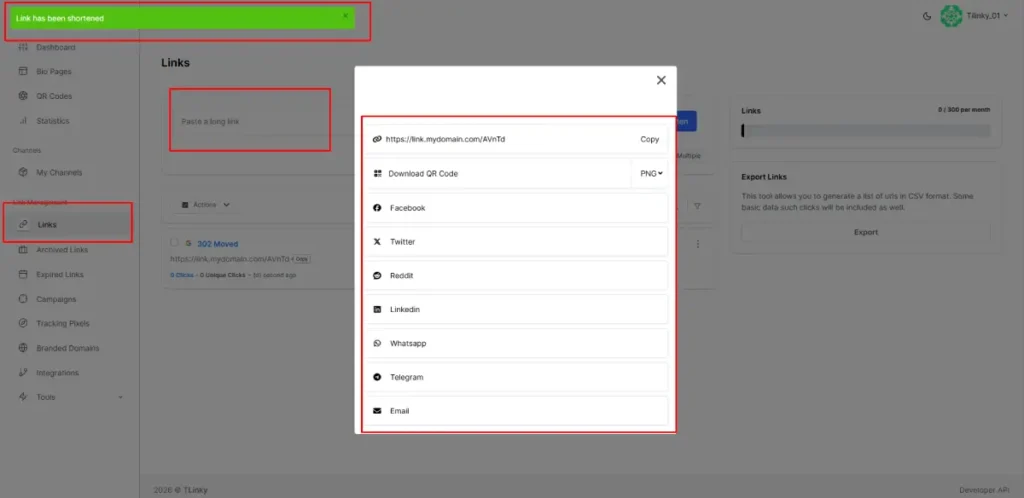
Select your branded domain from the dropdown. Paste the destination URL you want to shorten. Enter a custom slug in the slug field. Click Shorten.
Your branded link is now live. It appears in your links list with your custom domain and slug, and all click data is tracked independently in your TLinky analytics.
Writing an effective slug
The slug is the text that appears after the last slash in your branded link. A slug like /summer-sale tells the reader exactly what they are about to see. A slug like /abc123 tells them nothing.
Keep slugs to two to four words maximum. Use hyphens between words, not underscores. Lowercase only. Avoid special characters.
For campaigns, name the slug after the campaign: /launch-day, /email-offer, /conference-25. For product or evergreen links, use the destination’s topic: /pricing, /free-trial, /demo. For more detailed guidance, tips for creating effective short URLs covers slug length, readability, and what to avoid.
One advantage of TLinky’s editable destinations: if you use the same slug year after year, you can update the destination URL without changing the slug. Everyone with the old link lands on the new destination automatically.
Using branded links across your marketing channels
Branded short links work differently across channels, and the setup decisions you make now will affect performance in each one.
For email campaigns, branded links build trust with recipients who can see the domain before clicking. Combining your branded domain with UTM parameters gives you both brand recognition and granular tracking. The TLinky UTM builder generates the full tagged URL you can then shorten with your branded domain. For a complete picture of how short links fit into email workflows, URL shortener for email marketing covers link placement, click tracking, and deliverability considerations.
For social media, branded links solve a specific problem: on platforms where link previews generate from the destination URL, your short link still displays your branded domain in the link bar even though the preview card draws from the destination page’s Open Graph tags.
For platform-specific details on where links are clickable and how previews behave on Instagram, TikTok, LinkedIn, and others, URL shortener for social media covers each platform separately.
For affiliate marketing, branded links give you a clean link that does not look like a generic affiliate redirect. The redirect still passes through to the merchant correctly. For guidance on affiliate-specific tracking setups and network compatibility, URL shortener for affiliate marketing has the details.
Managing multiple branded domains in TLinky
TLinky allows up to 5 branded domains per account on standard plans. You can see your current count in the Branded Domains page header.
Different domains for different marketing channels are worth considering. One domain for email campaigns, a second for social media, and a third for your affiliate program means each channel has its own analytics stream. You can see click performance by channel without filtering UTM parameters every time.
For broader link management tools that help you organize links by campaign, folder, or team, TLinky’s dashboard keeps your branded short links, QR codes, and link in bio pages under the same account.
FAQ
These are the questions that come up most often when setting up branded short links for the first time.
Do branded short links affect SEO?
Branded short links do not directly affect search rankings. The short URL is a redirect, typically a 302, and 302 redirects do not pass link equity to the destination page.
What branded links do affect is click-through rate in email, social media, and ads. A higher CTR brings more traffic to your pages, which can indirectly support SEO through engagement signals. The branding value is in the click, not in the link equity.
Can I use my existing website domain for short links?
You can use a subdomain of your existing domain, for example go.yourbrand.com, without affecting your main website at yourbrand.com. A single DNS A record on the subdomain is all you need.
Avoid using your main website root domain (yourbrand.com) as your short domain. It creates DNS conflicts with your website’s existing A or CNAME records and mixes your link traffic with your website traffic in analytics.
What happens if someone visits my short domain without a slug?
They land on whatever URL you set in the Domain Root field when you added the domain to TLinky. If you left that field blank, the result varies by configuration.
Setting a useful Domain Root redirect is worth doing before you share your branded domain anywhere. A link mentioned in a podcast or printed in a brochure will often be typed in at the root by curious visitors. Redirect them somewhere helpful rather than a DNS error.
Can I transfer my branded domain if I switch URL shorteners?
Your domain is your own. You can reconnect it to a different URL shortener by updating the DNS A record to point to the new provider’s IP address. Any previously created short links on that domain will only continue to work if the new provider has the slug data, so make sure to export your links before switching tools.
For a comparison of URL shorteners that support custom domains, Best Link Shorteners lists the options with their custom domain support clearly noted.
Sources