
Instagram gives you more link options than any other major social platform, but most people are still using just one. The native links field now supports up to five destinations, Stories get a tappable link sticker, and all of it is available with no follower requirement.
This guide covers everything in one place: how to add and manage your bio links, how the Story link sticker works, what to actually link to, and how to track whether any of it is driving results.
In this guide, you will learn:
- Exactly how Instagram’s link in bio works in 2026 and what has changed
- How to add one link or up to five natively, on mobile and on desktop
- How to add a clickable link to Instagram Stories with the link sticker
- Whether to use native links or a dedicated link in bio page
- How to track clicks with UTM parameters and Instagram Insights
- How QR codes let your bio link reach people who are not on Instagram yet
Key Takeaways
- Instagram allows up to five external links in the bio natively, with no follower requirement for any account type
- The bio links field is separate from your bio text; each link gets its own title that visitors see instead of the raw URL
- The Link sticker in Instagram Stories is available to all accounts in 2026, with no minimum follower count
- URLs typed into regular feed captions are not clickable; bio links and Story stickers are the two main clickable link channels
- Native links work well for a few evergreen destinations; a link in bio page works better when you rotate offers or need detailed click analytics
- UTM parameters on your bio link URLs show exactly which Instagram content is driving traffic to your website
Quick Answer
Instagram’s link in bio is a dedicated Links field in your profile, separate from the bio text. Go to Edit Profile, tap the Links row, and select Add External Link. You can add up to five links with no follower requirement. Each link gets a custom title visitors see instead of the raw URL. The Story Link sticker adds a tappable URL to individual Stories and is available to all accounts.
What Is the Link in Bio on Instagram?
The phrase “link in bio” refers to the clickable URLs that appear on your Instagram profile page, below your bio text and above your post grid.
When a follower visits your profile and taps one of those links, it opens in Instagram’s built-in browser without leaving the app.
The bio links field is the only permanently clickable spot on an Instagram profile. URLs typed into post captions appear as plain text and cannot be tapped.
Supercharge Your Social Media Presence with TLinky’s Link in Bio Builder!
Transform your social media bio into a dynamic hub of information. Create a captivating Link in Bio page that engages your audience and drives results.
That is why creators tell their followers to visit the link in bio. It is the only route from an Instagram post to an external website.
Instagram expanded the links field significantly in recent years. The platform now supports up to five external links per profile, each with its own title.
Understanding why Instagram matters for businesses and creators starts with this links field. It is the primary channel for converting followers into customers, subscribers, or leads.
Instagram Bio Link Requirements in 2026
Unlike TikTok, Instagram does not require a minimum follower count to use the bio link feature. Any personal, Creator, or Business account can add external links from day one.
Creator and Business accounts get slightly more from the links field. They have access to Instagram Insights data on link taps, which personal accounts do not. Switching to a professional account is free and does not change your username, posts, or followers.
The Links field is entirely separate from your bio text. Your bio text (up to 150 characters) goes in its own field. Links live in a dedicated section below it. The two do not share a character limit.
For details on writing the bio text that works alongside your links, crafting a strong Instagram bio covers the character limit, formatting options, and copy approaches that drive profile engagement.
How to Add a Link to Your Instagram Bio
The Links field sits in Edit Profile, below your bio text. The setup takes under a minute once you know where to look.
Step-by-Step on Mobile
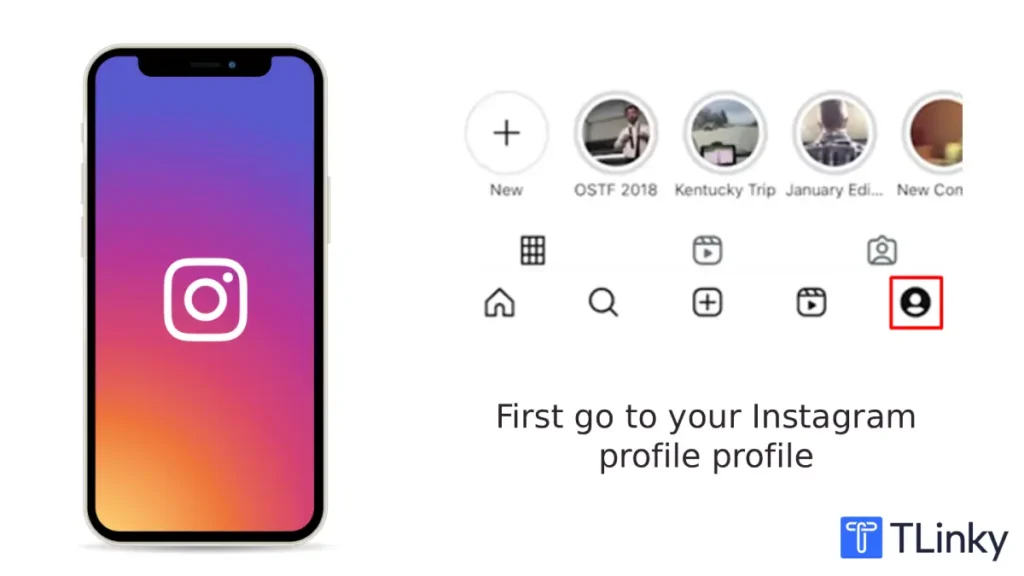
1. Open the Instagram app and tap your profile icon in the bottom right corner
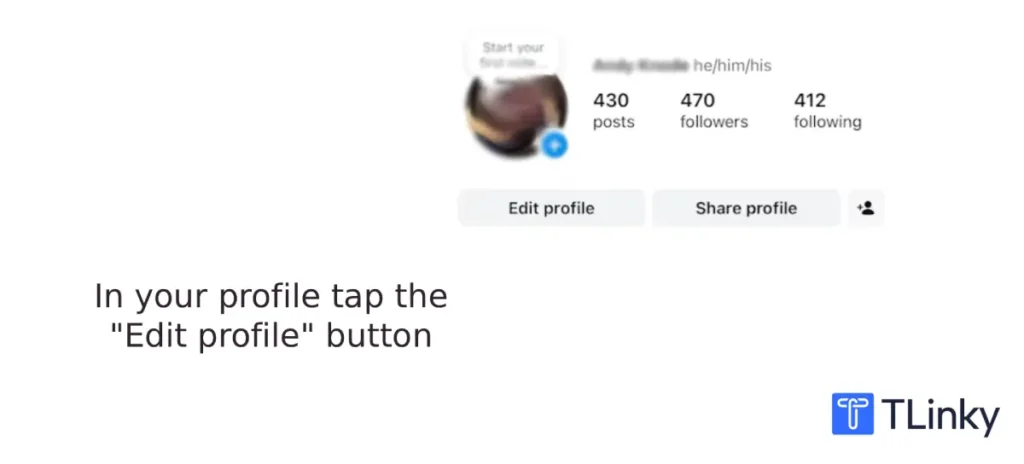
2. Tap “Edit profile” below your follower and following counts
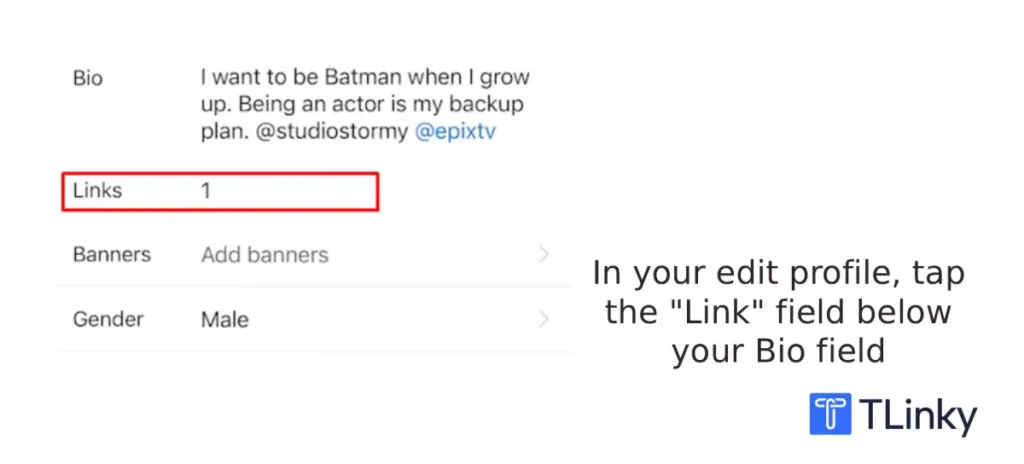
3. Tap the “Links” row (below the Bio field)
4. Tap “Add external link”
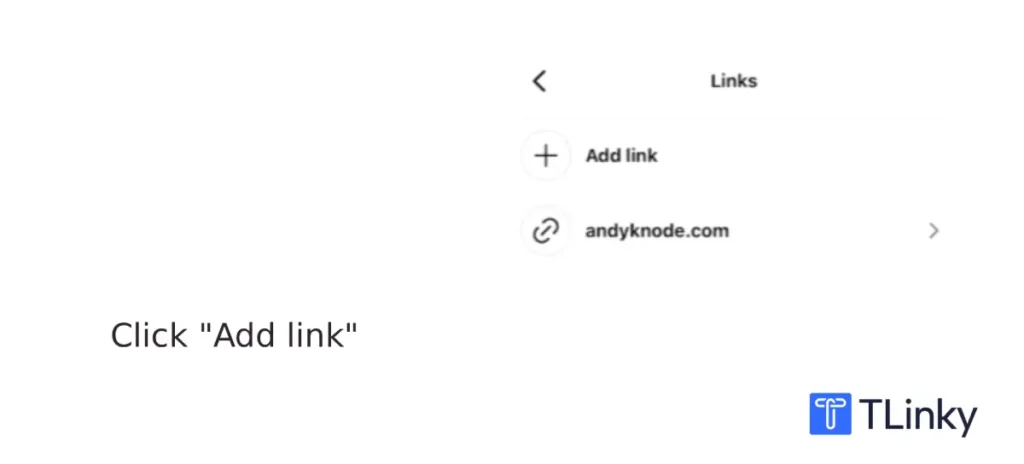
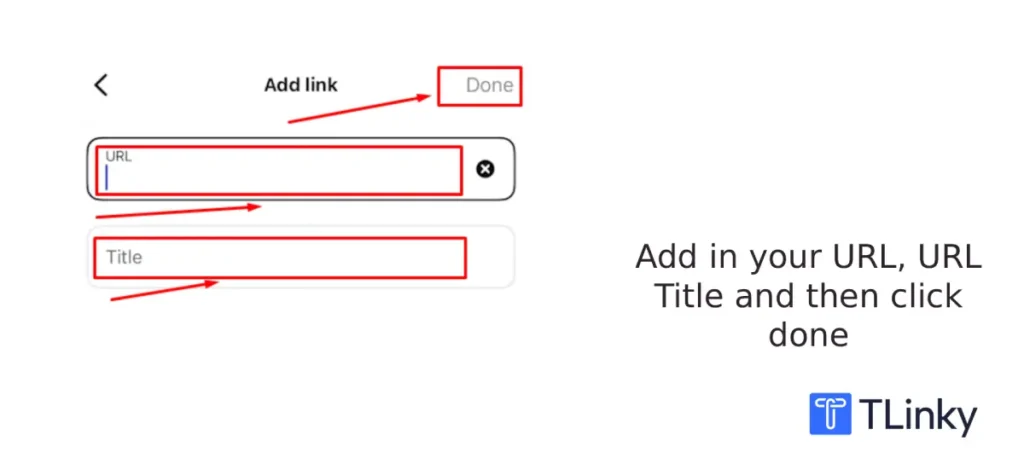
5. Paste your full URL, including the https:// prefix
6. Add a short title; this is what visitors see instead of the raw URL
7. Tap “Done” and then “Save”
The link appears as a tappable chip below your bio text. Visitors see the title you wrote, not the URL.
How to Add Links on Desktop
Desktop setup follows the same path. Go to your Instagram profile in a browser, click “Edit profile,” find the Links section, and add your URL there. The desktop experience for link management is the same as mobile, which makes Instagram more flexible than TikTok on this point.
How to Add Multiple Links Natively (Up to 5)
To add more than one link, repeat the process. Go back to Edit Profile, tap Links, and tap “Add external link” again. Instagram stacks your links in the order you add them.
The first link in your list receives the most visibility. When multiple links are present, Instagram shows the first one prominently and the rest are accessible with one additional tap. Put your highest-priority destination at the top.
How to Reorder Your Bio Links
You can drag your links into any order from the Links editing screen. Tap and hold the drag handle next to any link to move it. The order you set is the order visitors see them.
Update the order whenever your content priorities change. A product you featured in last month’s Reels should not be sitting at the top of the list if you are now promoting something different.
How to Add a Link to an Instagram Story
The Story Link sticker adds a tappable URL to any individual Story. Unlike the permanent bio link, Story links are tied to specific content and disappear with the Story after 24 hours (or stay accessible through Story Highlights).
The Link sticker is available to all Instagram accounts in 2026, with no minimum follower requirement. This changed from an earlier era when only accounts with 10,000 or more followers could add links to Stories.
Using the Link Sticker
- Open the Stories camera or create a Story from your camera roll
- Tap the Sticker icon at the top of the screen
- Select the “Link” sticker
- Paste your URL
- Optionally, edit the sticker label text so it says something descriptive instead of the raw link
- Place the sticker on your Story and position it where it reads clearly
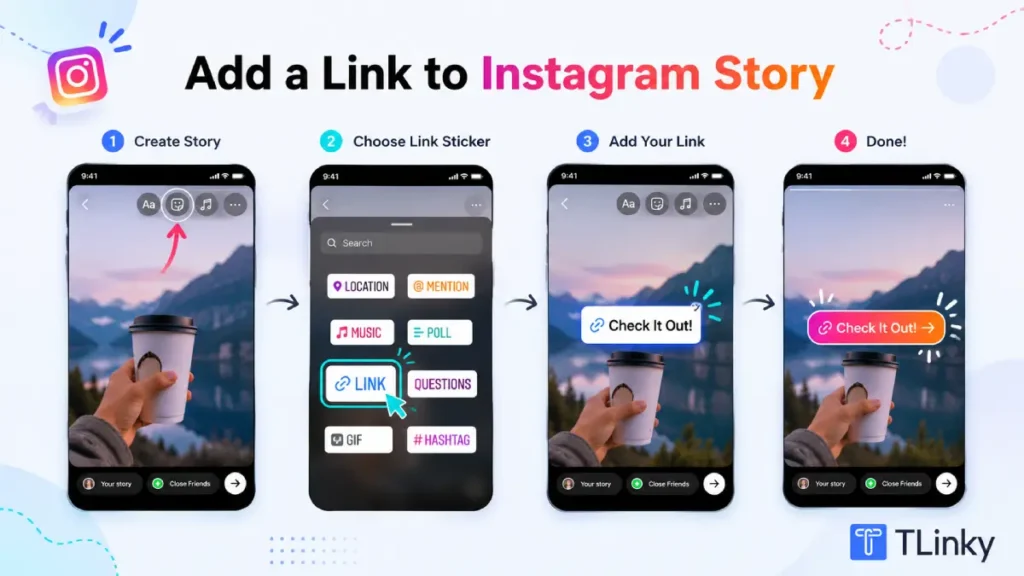
Story links convert well because they catch a viewer at a specific moment of attention. A tutorial Story with a link sticker pointing to a product page often outperforms a static bio link because the viewer is already engaged by what they just watched.
What Happens to Links in Instagram Captions?
URLs typed into Instagram feed captions are not clickable. They display as plain text that a viewer would have to manually copy into their browser, which almost no one does.
This applies to Reels captions and carousel captions as well. The only clickable links in organic Instagram content are the bio links field and the Story link sticker.
The workaround creators use for specific posts is to write “link in bio” in the caption and update the bio link to match the post. For multiple destinations simultaneously, a link in bio page behind one bio URL solves the problem.
Should You Use 5 Native Links or a Link in Bio Page?
Instagram’s native multi-link support reduced the need for third-party link in bio tools, but the two approaches have different strengths.
Native links work well when you have a small number of stable destinations that do not change often. A course page, a booking link, a newsletter sign-up, and a YouTube channel are good candidates.
If your four or five destinations are consistent, native links are simpler and keep visitors inside Instagram’s tap flow.
A link in bio page makes more sense when you frequently change your promotional focus, need per-link click analytics, want email capture on the landing page, or need more than five destinations. Tools like TLinky let you update the hub page without touching your Instagram bio URL.
TLinky’s link in bio tool creates a single URL that opens a mobile-optimized hub page with as many links, products, or resources as you need. That one URL goes in the Instagram Links field and stays consistent, while the hub page content updates whenever your priorities shift.
For a comparison of link in bio tools available in 2026, Linktree alternatives covers the main options and their differences.
| What you need | Best approach |
|---|---|
| 5 or fewer stable, evergreen destinations | Native Instagram links (simpler, no extra tool) |
| 6 or more destinations | Link in bio page with one hub URL |
| Frequent offer rotation | Link in bio page (update hub without changing bio URL) |
| Per-link click data | Link in bio page with built-in analytics |
| Email capture from bio visitors | Link in bio page with an embedded form |
| Branded short link that matches your domain | Branded short link (TLinky or similar) as the bio URL |
What to Link to From Your Instagram Bio
What you link to matters more than how many links you have. Sending traffic to the wrong destination wastes the attention your content earns.
Instagram traffic is interest-driven. Followers visit your profile because your content gave them a reason to. If they tap a bio link and land on a page unrelated to what they just watched, they leave immediately.
Your highest-converting destinations match what you are actively posting about. A product launch campaign should link to the product page. A lead magnet campaign should point to the sign-up page. Seasonal offers should appear at the top of your links list during the relevant period.
TLinky’s link in bio for e-commerce stores shows how product-focused accounts structure their hub pages to match their current promotional calendar.
For creators managing affiliate links, brand deals, and audience building at the same time, link in bio for influencers covers how to organize multiple destinations without overwhelming visitors.
How to Build an Instagram Link in Bio Page
A link in bio page is a short, mobile-first landing page designed to route Instagram profile traffic to multiple destinations with a single tap.
Building an effective link in bio page covers the structural decisions in detail. For Instagram traffic specifically, these principles matter most.
Keep it short. Most visitors arrive on a phone with limited patience. The links they want most should be visible without scrolling.
Write each link title as an action. “Shop the collection,” “Book a free call,” and “Get the free guide” work better than “My website” or “Click here.”
Keep the page in sync with your content. If your most recent Reels are about a specific product, that product link should be first. A hub page reflecting content from several months ago sends a mixed message.
Update it before you update your Stories. When you are running a campaign and sending Story viewers to a specific destination, make sure the bio page already reflects that destination before the Story goes live.
The bio.link vs TLinky comparison walks through feature differences if you are deciding which platform to use for your hub page.
How to Make Your Bio Link Convert
The most common mistake on Instagram is adding a link and then never mentioning it in content.
Instagram’s algorithm does not tell your followers where your link is. Every post and Reel that could send someone to your bio needs to explicitly say so, and it needs to give a reason specific enough to be worth the tap.
“Link in bio” alone is weak. “Grab the free guide in my bio” is specific. “The early access code is in my bio until Sunday” creates urgency. The more specific the reason, the higher the click rate.
If your goal goes beyond clicks and you want to turn that bio traffic into purchases, learn how to use a link in bio to drive more sales.
Your profile bio text is another lever. A single line like “Free weekly tips in bio” or “New collection now live, see below” tells profile visitors what to expect before they tap anything.
For copy ideas that pair well with your link placement, Instagram bio caption ideas covers approaches for different account types.
Instagram Insights shows link taps per day for Creator and Business accounts. Check which Reels or Stories produced spikes in link taps. That tells you what type of content drives the most profile visits and what messaging works.
If you want to know where the bio link is located on a profile you are visiting rather than your own, finding the link in bio section on Instagram covers exactly where it appears and how to tap it.
Track Clicks with UTM Parameters and Instagram Insights
Instagram Insights tells you how many people tapped your bio link on any given day. It does not tell you which post or Reel drove them there, or what they did after they arrived.
UTM parameters fill those gaps. A UTM-tagged URL includes tracking code that your website analytics records when someone arrives. If you tag your Instagram bio link separately from other traffic sources, you can see exactly how much traffic and how many conversions come from Instagram profile clicks.
A basic UTM-tagged bio link looks like this:
https://yoursite.com/product?utm_source=instagram&utm_medium=bio&utm_campaign=springlaunch
Your analytics platform records this as Instagram bio traffic during a specific campaign.
UTM parameter best practices cover naming conventions and the mistakes that produce confusing data. Consistency matters: using the same source and medium labels every time keeps your data clean and comparable across campaigns.
If you use a short link through TLinky as your bio URL, you get click data including geographic location, device type, and click count in the TLinky dashboard without requiring any website analytics setup. How URL shortening supports click tracking explains how this works.
For accounts running multiple campaigns simultaneously, Story-specific UTM parameters let you separate Story link sticker traffic from bio link traffic, so you can see which channel is driving more conversions.
Use QR Codes to Extend Your Bio Link Offline
Your Instagram bio link does not have to exist only inside the app. A QR code linked to your bio hub page brings the same destination to people who are not on Instagram yet.
For businesses with physical locations or products, print your bio link as a QR code on packaging, receipts, business cards, or in-store displays. When someone scans the code, they land on the same page your Instagram followers reach from the bio.
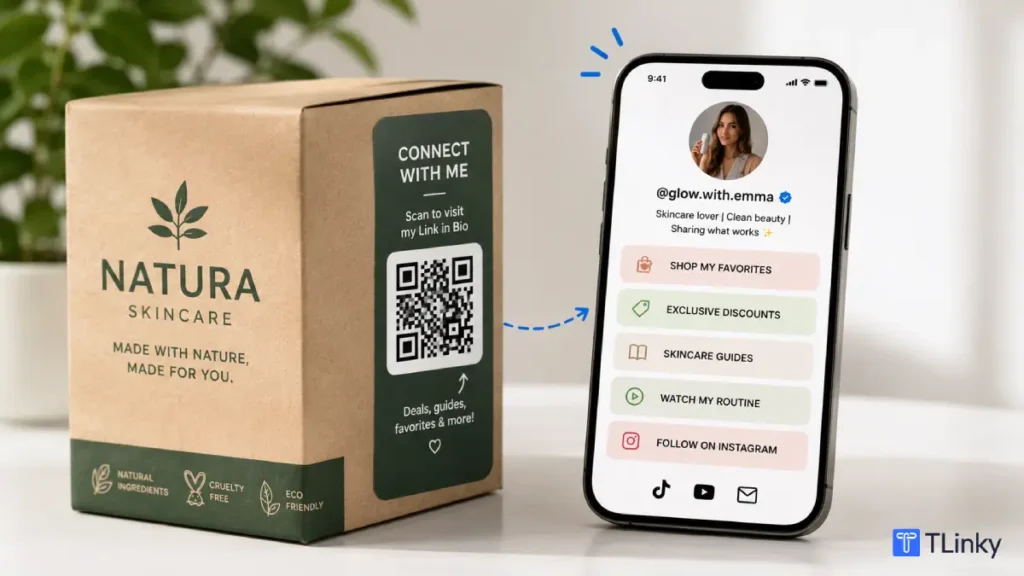
This creates a seamless loop. An in-store customer who scans your QR code lands on your link in bio page, follows your Instagram account, and becomes part of your audience before they have even left the building.
QR codes for social media growth covers how to connect QR codes to Instagram and other platforms. The setup is the same whether the destination is your Instagram profile or your link in bio hub page.
Free trackable QR codes from TLinky generate QR codes that track scans, locations, and devices. You can see how much offline traffic your QR code is driving to the same destination as your Instagram bio link.
If you update your bio link destination seasonally or by campaign, use a dynamic QR code. The difference between static and dynamic QR codes explains why a dynamic code lets you change the destination URL without reprinting any physical materials.
Which Setup Works for Your Situation?
| You are a… | Best approach |
|---|---|
| Individual creator or freelancer with 2 to 4 stable links | Native Instagram links with clear, action-driven titles |
| Brand or business with frequent offer rotation | Link in bio page updated per campaign; one URL stays in the bio |
| E-commerce seller with a product catalog | Link in bio page organized by product category or featured collection |
| Creator managing affiliate links and brand deals | Link in bio page with click tracking per destination |
| Coach, consultant, or service provider | Native booking link or DM link as the primary bio destination; Story stickers for specific campaigns |
| Business with physical locations or products | Bio link page plus a trackable QR code on physical materials for offline traffic |
| Managing both Instagram and TikTok | Same link in bio page URL across both platforms; one hub, two channels |
For creators who want to compare link in bio tools before choosing one, best link in bio tools for TikTok creators reviews the major options; most of these tools work across Instagram and TikTok.
If you are managing a link in bio strategy across both platforms, link in bio for TikTok covers the setup and requirements on TikTok, which has different rules from Instagram.
FAQ
These are the questions Instagram users and creators ask most often about the link in bio feature.
How many links can I add to my Instagram bio?
Instagram allows up to five external links per profile natively, with no follower requirement. Each link has its own title and appears as a tappable chip below your bio text.
If you need more than five destinations, or want per-link click tracking and email capture, use a link in bio page. One URL goes in the bio field, and the hub page behind it can hold as many destinations as you need.
Do I need a certain number of followers to add a link to my Instagram bio?
No. Instagram does not require a minimum follower count to add bio links. Any personal, Creator, or Business account can add up to five external links from day one.
This is different from TikTok, which requires 1,000 followers on personal accounts before the website field unlocks. On Instagram, the link feature is available immediately.
What is the difference between a bio link and a Story link sticker?
The bio link lives permanently on your profile and is visible any time someone visits your page. The Story link sticker adds a tappable URL to a specific Story and disappears after 24 hours unless saved to a Highlight.
Bio links work best for consistent destinations like a product page or newsletter. Story stickers work best for campaign-specific or time-sensitive links tied to content you are posting right now.
How do I track how many people click my Instagram bio link?
Instagram Insights shows external link taps per day for Creator and Business accounts, accessible through the Professional dashboard. For more detailed tracking, add UTM parameters to your bio link URLs.
Your website analytics then records Instagram as a traffic source with campaign-level detail. If you use a link in bio platform or a TLinky short link, per-link click data is typically included without any separate analytics configuration.
Should I use a Linktree or put links directly in my Instagram bio?
Use native links when you have five or fewer stable destinations and do not need click analytics. Native links are simpler and keep visitors inside Instagram’s tap experience.
Use a link in bio tool when you rotate offers frequently, need per-destination click data, want email capture on the landing page, or run the same hub across multiple social platforms. Many creators start with native links and move to a dedicated page as their needs grow.
Wrapping Up
Instagram gives you more native link flexibility than any other major social platform. Up to five links in the bio, a Story link sticker available to all accounts, and no follower requirement to get started.
The technical setup is straightforward. The harder part is making that one profile tap worth something. Match your link destinations to your current content, update them as your focus shifts, and track performance so you know what is actually driving clicks.
For accounts that also post on TikTok, a single link in bio hub page can serve both platforms with one URL, one page, and one set of analytics.
Sources
- Instagram Help Center, Add a Website to Your Instagram Profile
- Meta for Business, Instagram Creator and Business Account Features
- DataReportal, Digital Global Overview Report