
Getting a clickable link into your TikTok bio sounds simple until you actually try it. Either the Links option is missing from Edit Profile, or the link shows up as plain text that nobody will bother copying into their browser.
TikTok controls who can add a working bio link. You need either 1,000 followers or a Verified Business Account, meaning a Business account that has passed TikTok’s business verification.
In this guide, you will learn:
- Which TikTok accounts qualify for a clickable bio link in 2026
- Where the link sits in Edit profile and how to check that it works
- What to actually link to and how to build a hub page that converts visitors
- How to track which videos are driving your bio link clicks
Once the link is live, the real work is making it worth tapping. This guide covers both.
Key Takeaways
- TikTok accounts need at least 1,000 followers before the Links option appears in Edit profile
- A Verified Business Account can add a website link with no follower minimum, but Business accounts lose access to TikTok’s full music library
- TikTok’s official setup steps are written for the mobile app
- TikTok allows one clickable website link per profile; a link in bio page lets that single URL route visitors to multiple destinations
- Adding UTM parameters to your bio link shows exactly which videos are driving profile click-throughs
Quick Answer
TikTok lets you add a clickable bio link once your account has 1,000 followers or is a Verified Business Account. In the TikTok app, tap Profile, then Edit profile, then Add next to Links, and follow the steps. Visitors who tap the link open it in TikTok’s in-app browser, so link to a page built for phones.
Get Free TikTok Ad Credit Up to $6000 [Limited Time Offer]
What Does Link in Bio Mean on TikTok?
A link in bio is a clickable URL displayed on your TikTok profile page, directly below your bio text. When a viewer taps it, the link opens inside TikTok’s built-in browser.
Unlike captions or comments, the bio link is persistent. Every video you post can drive profile visits, and those visitors always see the same link.
TikTok allows one clickable website link per profile. Captions and comments cannot contain working external links.
Get Free TikTok Ad Credit Up to $6000 [Limited Time Offer]
That single bio slot is your only direct bridge between TikTok content and anything outside the app. For anyone selling products, capturing leads, or driving bookings, everything must flow through that one link.
TikTok Link in Bio Requirements
TikTok lists two routes to a clickable bio link on its Help Centre page about adding a website link. Outdated tutorials with old screenshots still describe a different rule.
Personal Accounts
Personal accounts need at least 1,000 followers before the Links option for a website appears in Edit profile.
There is no manual workaround for this threshold on a personal account. Until you reach 1,000 followers or verify a business, the option does not appear.
A link built to launch another social app will not work on a TikTok profile anymore, though a link to that platform’s website still does.
If you are still working toward the threshold, organic TikTok growth strategies cover the content and engagement approaches that move a follower count faster.
Business Accounts
TikTok’s help page names a Verified Business Account, not just a Business account, as the alternative to 1,000 followers.
Verification means submitting a business license, and TikTok’s business verification guide explains which features it unlocks.
The trade-off is music access. Business accounts lose TikTok’s full library of trending and copyrighted sounds, and are limited to the Commercial Music Library instead.
For creators whose content depends on trending audio, this is a real cost. TikTok frequently surfaces videos that use popular sounds, and losing that access can reduce organic reach.
For registered brands, local businesses, and e-commerce sellers where music is not central to the content, a verified Business account is usually the faster path.
Which Account Type Is Right for You?
| Your situation | Recommended path |
|---|---|
| Under 1,000 followers, content relies on trending music | Build toward 1,000 on a personal account |
| Under 1,000 followers, registered business with a license | Switch to a Business account and apply for business verification |
| Over 1,000 followers, currently on a personal account | Add the link from Edit profile, under Links |
| Brand, local business, or e-commerce seller | Verified Business Account from the start |
| Creator without a business license | Personal account until you reach 1,000 followers |
Where the Bio Link Lives in Edit Profile
Once your account qualifies, the link sits in the Links section of Edit profile. Tap Add there, enter your page address, and save it from the TikTok app.
Screenshots in older tutorials show a box labeled Website, which current app versions have replaced. If the Links option never appears, adding a clickable link to your TikTok bio covers each eligibility fix, including business verification.
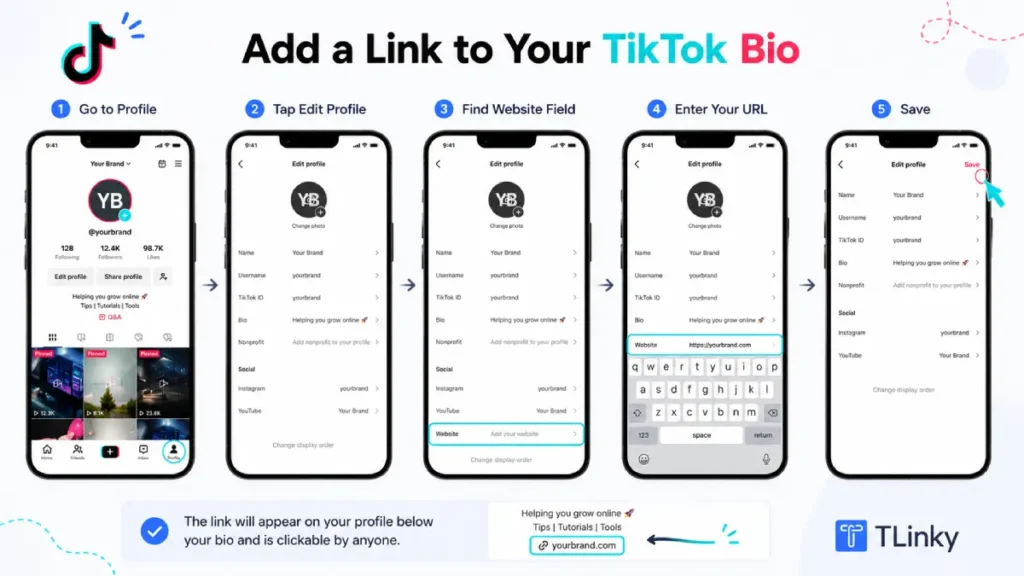
Before you share the profile, open it from a second account and tap the link. That quick check catches typos and broken pages before your audience finds them.
What to Link to From Your TikTok Bio
Most creators make the mistake of linking to their homepage. Homepages are designed for general audiences, not for someone who just watched a 30-second video with a specific hook.
TikTok traffic is impulse-driven. A viewer who taps your bio link is responding to something specific they just saw. If they land on a page with nothing to do with that video, most will leave immediately.
The most effective bio link destination matches the content you are currently posting. A product launch campaign should link to the product page. A lead magnet campaign should link directly to the sign-up page.
When you need to send traffic to multiple destinations at once, a link in bio page solves the problem. Instead of choosing between a shop, a newsletter, and a booking page, you put one hub URL in the bio and visitors can choose from everything.
TLinky’s link in bio tool creates mobile-optimized hub pages where you can list multiple links, products, or resources behind a single URL. That URL goes in your TikTok bio field, and visitors see a clean page organized around your current priorities.
How to Build a TikTok Link in Bio Page
A link in bio page is a short landing page built specifically for social media traffic. It typically includes your most important destination links, your other social profiles, and optionally some social proof like follower counts or testimonials.
Building an effective link in bio page covers the design decisions in detail. For TikTok traffic specifically, a few principles matter most.
Keep the page short and built for phones. Most visitors will arrive on a mobile device. If they have to scroll far to find what they came for, most will leave before finding it.
Put your highest-converting link first. Whatever action you most want visitors to take should appear before they need to scroll. An email sign-up buried below six other links rarely gets tapped.
Match the page to your current content. If this month’s videos focus on one product, the bio link page should lead with that product. A page reflecting content from three months ago creates a disconnect between the video and the destination.
TLinky’s link in bio for influencers and creators shows how creators structure hub pages when managing affiliate links, brand partnership pages, and audience-building at the same time.
Update the page whenever your content focus shifts. The bio link page is not a set-and-forget element. It should stay in sync with what your most recent videos are promising viewers.
How to Make Your Bio Link Convert
Getting someone to tap your bio link is the first conversion. Getting that visitor to take the next step on the destination page is the one that actually builds your business.
Your TikTok bio text is the main lever for driving link taps. Viewers who visit your profile after watching a video are already engaged. Your bio needs to tell them exactly what to do next.
Specific calls to action outperform vague ones. “Shop the collection” is stronger than “link below.” “Get the free guide” tells someone what they will find before they tap.
Check your TikTok bio character limit before writing your call to action. You have 80 characters for the bio text field. Every word needs to earn its place.
The destination page matters as much as the link itself. If your video mentions a specific product and the bio link leads to a general homepage, that mismatch breaks trust and drops the conversion rate. Match the promise in your content to what the link page delivers.
Use your TikTok analytics dashboard to identify which videos drive the most profile visits. Those are your highest-performing traffic drivers. Create more content in those formats and make sure your bio link reflects what those videos are offering.
Track Clicks with UTM Parameters and Link Analytics
Knowing that someone tapped your bio link is useful. Knowing which video caused that tap is far more valuable, because it tells you what to keep making.
UTM parameters are small tracking codes appended to any URL. When a visitor clicks your bio link and arrives at your destination page, your analytics platform logs exactly where they came from.
A basic UTM-tagged bio link looks like this:
https://yoursite.com/landing?utm_source=tiktok&utm_medium=bio&utm_campaign=launchweek
Your analytics tool records this as a visit from TikTok, through the bio placement, during a specific campaign.
UTM parameter best practices covers naming conventions and the common mistakes that produce messy, unreadable data. The main rule is consistency: use the same labels across every campaign so your reporting stays clean and comparable.
Link-in-bio pages with built-in analytics simplify this further. You can see total clicks per individual link on your hub page without configuring any separate website tracking.
Short links add another layer of insight. A branded short link created through TLinky shows click data, geographic breakdown, and device type in the TLinky dashboard.
Which Setup Works for Your Situation?
| You are a… | Start with… |
|---|---|
| New creator under 1,000 followers posting trend-driven content | Build audience first; pin a comment with your URL on each new video as a workaround |
| New account under 1,000 followers run by a registered business | Verify a Business account for link access; the music trade-off is minimal for talking-head or educational content |
| Creator over 1,000 followers on a personal account | Add the link under Links in Edit profile; point it to a hub page for routing flexibility |
| Brand, local business, or service provider | Verified Business Account with a link in bio page organized by current offer or product category |
| Affiliate marketer or digital product creator | Personal account once eligible, with UTM-tracked bio links routing to separate campaign pages |
| Seller with a TikTok Shop and an outside store | Link in bio page that puts the outside store first and lists TikTok Shop products separately |
For a full comparison of link in bio tools before choosing one, best link in bio tools for TikTok creators covers TLinky, Linktree, and the main alternatives.
If you also run an Instagram account, note that Instagram’s setup works differently. Link in bio for Instagram covers the key differences: no follower requirement, up to five native links, and a Story link sticker available to all accounts.
FAQs
These are the questions creators and businesses ask most often about TikTok’s link in bio feature.
Does TikTok still require 1,000 followers to add a bio link in 2026?
Yes, unless the account is a Verified Business Account. TikTok’s Help Centre lists 1,000 followers and business verification as the only two routes to a clickable website link.
Switching to a Business account alone is not enough under that wording. The business also needs to pass TikTok’s verification, which requires a valid business license.
Can I add more than one link to my TikTok bio?
TikTok allows one clickable website link in the bio field per profile. You cannot stack multiple URLs directly in that field. The standard solution is a link in bio page: one URL that opens a hub page where you list multiple links, products, or resources.
What do I lose when I switch to a TikTok Business Account?
You lose the full music library. Business accounts are limited to TikTok’s Commercial Music Library, which has fewer tracks than the library personal accounts use.
For creators who rely on trending sounds, that can cost reach. For brands where music is not central, the trade-off is usually worth it, especially once business verification unlocks the bio link.
How do I know if my bio link is actually getting clicks?
TikTok’s native analytics does not show bio link click data directly. Add UTM parameters to your bio link URL before adding it under Links in Edit profile; your analytics platform then records TikTok as a traffic source whenever someone clicks through.
If you use a link in bio platform or a short link tool, click tracking is typically built in. TLinky shows total clicks, device type, and geographic data for every short link and bio page you create, without requiring any separate analytics configuration.
What should I link to if I do not have a product yet?
Link to the action that builds the most durable asset for your current stage. An email newsletter sign-up is often the best choice because you own that list regardless of what happens to any social platform.
A page explaining what you do and inviting people to follow you across platforms also works. Avoid linking to anything under construction or blank. Even a one-page site with your name, what you offer, and a contact method creates a better first impression than a dead link.
Wrapping Up
Adding a link to your TikTok bio starts with the right account setup. Accounts unlock the bio link at 1,000 followers. Verified Business Accounts get it sooner, in exchange for a smaller music library.
Both paths are valid. The right one depends on your content type and how urgently you need the link live.
Once the link is active, a link in bio page turns one URL into a flexible traffic hub. UTM tracking tells you which specific videos are driving the clicks.
The bio link is one of TikTok’s most underused features. Most creators set it once and stop thinking about it. Treat it as an active part of your content strategy, and you will see the difference in your traffic and conversion data.
Sources
- TikTok Help Centre, Adding a website link to your profile, 2026
- TikTok For Business, Commercial Music Library Overview, 2026