
Instagram Post Generator
Enter a topic, choose Reel, carousel or single photo, a goal and a tone, and get 1, 3 or 5 Instagram post ideas, each with a visual outline, caption and hashtags.
Grow your Business & Social Media Marketing
- Branded Link Shortener
- QR Code Generator
- Bio Page Builder
- Tracking & Analytics
- 16+ Integrations
Tools You May Need for Instagram Content Creation
What this AI Instagram post generator gives you
From one topic, the AI Instagram post generator plans 1, 3 or 5 post ideas, and each idea arrives as a small package. You get a visual concept or slide outline, a caption, a set of hashtags and a one-line engagement strategy, with Copy buttons for the outline, caption and hashtags. A short “Expert Content Strategy Tip” sits above the ideas.
Think of it as a content idea generator for Instagram that also drafts the words. It doesn’t design graphics or make a mockup of your post. You still shoot the video or build the slides, using the outline as your plan. It’s free on this page, and the form doesn’t ask you to sign in.
Setting up a request: topic, format, goal and tone
The form has five fields, and only the topic is required:
- Post Topic / Subject. The more specific, the better. Name the products, steps or examples you want in the post, because the AI only knows what you type.
- Post Format. Reel / Short Video, Carousel or Static Photo / Single Graphic. Carousel is selected by default.
- Primary Goal. Educate / Inform (the default), Sell / Promote a Product, Entertain / Be Witty, or Inspire / Motivate.
- Desired Tone. Professional (the default), Casual / Friendly, Witty / Humorous or Inspirational.
- Number of Post Ideas. 1, 3 or 5. The form starts at 3.
Some options carry labels in parentheses, such as “Best for Reach” next to Reel or “Go Viral” next to Entertain. Those are the form’s own labels, not results the tool measures or promises.
Click Generate Post Ideas when you’re ready, or Clear to reset the form.
What came back for a carousel about low-light plants
On November 3, 2026, we asked for a carousel from a fictional Portland plant shop with the topic “Three low-light houseplants that survive a dark apartment.” We picked Educate, Casual / Friendly and 3 ideas. All three ideas loaded in about 7.4 seconds.
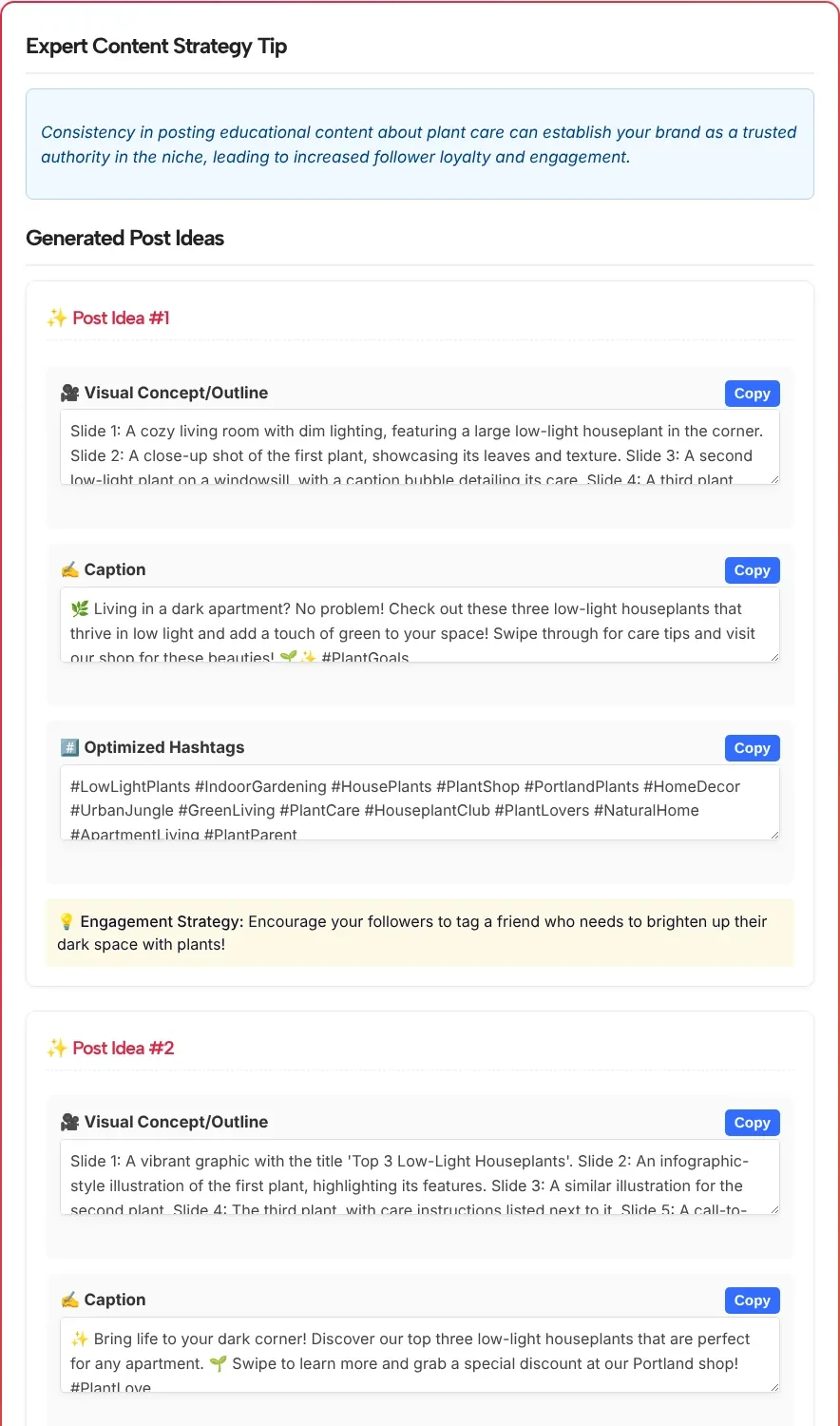
Each idea came with a five-slide outline. The first one opened with “Slide 1: A cozy living room with dim lighting, featuring a large low-light houseplant in the corner” and ended with a slide inviting viewers to visit the shop. Its caption began, after a leaf emoji, with “Living in a dark apartment? No problem!” and its engagement strategy was to “Encourage your followers to tag a friend who needs to brighten up their dark space with plants!”
A few things to check in your own results, based on what we saw:
- No plant names. None of the three outlines named a single plant. They said “the first plant” and “a second low-light plant,” because our topic didn’t list any. Put the names in your topic and they have something to work with.
- An offer we never made. Idea 2 ended with “a special discount code” on the last slide and told readers to “grab a special discount” in the caption. Delete any promise you aren’t actually making.
- Too many hashtags. Every idea came with 14 hashtags, and two of the captions ended with one more of their own.
- Copying works. The Copy button next to the outline copied all five slides in one go.
Instagram limits to plan around
Instagram’s own limits on carousels, Reels and hashtags decide how much of an idea you can use as written:
- Carousels: As the Instagram Help Center explains, you can upload up to 20 photos and videos and share them as one post. Five-slide outlines leave plenty of room to split a dense slide in two.
- Reels: Per Instagram’s Reels feature page, you can record up to 20 minutes, but Reels over 3 minutes won’t be recommended to new audiences. The form has no length setting, so plan the running time yourself.
- Hashtags: As Social Media Today reported in December 2025, Instagram said it would gradually cut the hashtags allowed in a caption for a post or Reel to five. Keep the five that describe the post best, or pick from the clusters our Instagram hashtag generator suggests.
Turning an idea into a post you’d publish
Treat each idea as a brief for yourself or your designer, then make it specific:
- Fill in the blanks. Replace “the first plant” with the real thing: a ZZ plant, a snake plant, whatever you sell.
- Check every offer and claim. Discount codes, giveaways and “featured” promises have to be real before they go out.
- Rewrite the opening line. The first words of the caption do most of the work. If yours feels flat, our Instagram hook generator can give you a few alternatives to test.
- Mix ideas. The slide outline from one idea and the caption from another often fit together better than either full package.
- Read the strategy line as a suggestion. “Ask your followers to share their favorite low-light plants in the comments” is a sensible prompt, not something the tool has measured.
Pairing format and goal
Pick the format and goal by what you want the post to do. The table uses the exact option names from the form:
| You want to… | Post Format | Primary Goal | Desired Tone |
|---|---|---|---|
| Teach a short process or a list | Carousel | Educate / Inform | Casual / Friendly |
| Announce a product or a restock | Reel / Short Video | Sell / Promote a Product | Professional |
| Share a quote, milestone or thank-you | Static Photo / Single Graphic | Inspire / Motivate | Inspirational |
| Post something light between bigger posts | Reel / Short Video | Entertain / Be Witty | Witty / Humorous |
Asking for 5 ideas on the same topic gives you more angles to compare. Expect some overlap, and keep only the ones that say something different.
Instagram post generator FAQ
How is this different from the Instagram caption generator?
The post generator plans the whole post: what the photo, video or slides should show, plus a caption and hashtags for each idea. The caption generator assumes you already have the visual and writes only captions, with more control over length and up to 15 options at once.
Does it create the image, video or carousel slides?
No. It writes a visual concept or a slide-by-slide outline in text. You shoot, film or design the post yourself, or hand the outline to whoever does.
Does it suggest music or trending audio for Reels?
No. The form has no audio option, and we tested a carousel idea, not a Reel. Choose your sound in the Instagram app when you edit the Reel.
How many post ideas can I get at once?
One, three or five per request. Three is the default and is usually enough to compare angles; five is useful when you’re planning several posts on the same topic.
Why don’t the ideas mention my products by name?
The generator only uses what you type in Post Topic / Subject. In our test the topic said three low-light plants without naming them, and the outlines said the first, second and third plant. List the names in the topic and run it again.
Can I use the hashtags exactly as they come?
Trim them first. Each idea in our test had 14 hashtags, while Instagram said in December 2025 that it would gradually limit captions on posts and Reels to five hashtags, as Social Media Today reported. Keep the few that describe the post best.