
Instagram Hook Generator
Type your topic, pick the content type, the reaction you want and your audience, and this hook generator writes 3 to 10 one-line openers for a Reel, post or Live.
Grow your Business & Social Media Marketing
- Branded Link Shortener
- QR Code Generator
- Bio Page Builder
- Tracking & Analytics
- 16+ Integrations
Tools You May Need for Instagram Content Strategy
A hook generator for the first line of a Reel, post or Live
Give this hook generator a topic and it returns 3 to 10 one-line openers for an Instagram Reel, a carousel or photo caption, or a Live stream. Along with the topic, you choose the reaction you’re after and who you’re talking to, and the hooks come back in separate boxes. The page says you can click any box to copy that hook.
That’s all it writes. You won’t get a script, a full caption or hashtags, just the opening line. Some results lean toward clickbait, especially with the Curiosity or Shock settings, so plan to edit before you use one. The tool is free on this page, and the form doesn’t ask you to sign in.
How to use the hook generator
The hook generator’s form has five fields. All of them are required, and four come with a default already selected:
- Content Type. Reel/Video Opener (the default), Carousel/Static Post Caption Opener, or Live Stream Topic Hook.
- Desired Effect/Emotion. Immediate Value (the default), Curiosity/Mystery, Shock/Controversy, Relatability/Pain Point, or Urgency/Scarcity. The form itself labels Curiosity/Mystery as “Clickbait style.”
- Content Topic. The one field you have to type. Write what the video or post actually covers, including the answer you give, not just the subject.
- Target Audience. Pick from six presets: General Audience, Small Business Owners/Entrepreneurs, Parents/Families, Fitness/Health Enthusiasts, Gen Z/Young Adults or Travelers/Digital Nomads. There’s no box for a custom audience.
- Number of Hooks. Any number from 3 to 10. It starts at 5.
Click Generate Hooks to see the list, or Clear to start again.
Five hooks from one pothos topic: our test
We ran the hook generator on November 3, 2026, for a Reel with the topic “Why your pothos leaves turn yellow and the one watering mistake behind it.” We chose Curiosity/Mystery, General Audience and 5 hooks. The list appeared in about 3.3 seconds.
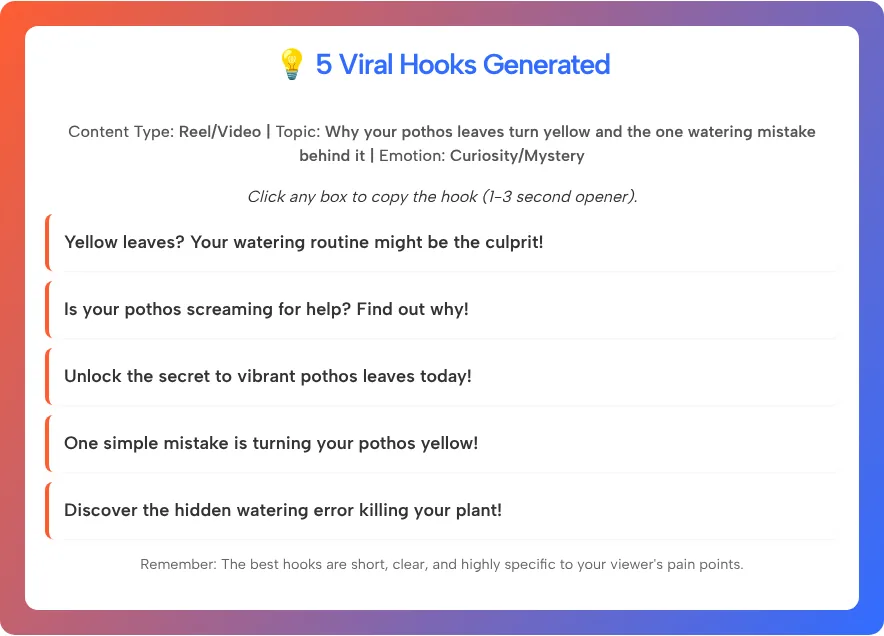
These are the five hooks, exactly as written:
- “Yellow leaves? Your watering routine might be the culprit!”
- “Is your pothos screaming for help? Find out why!”
- “Unlock the secret to vibrant pothos leaves today!”
- “One simple mistake is turning your pothos yellow!”
- “Discover the hidden watering error killing your plant!”
What we noticed:
- They stayed on topic. All five were about yellow leaves or watering, and each one is 8 or 9 words long.
- Two lean clickbait. The third hook is a stock opener you could paste onto any plant video, and “killing your plant” oversells a few yellow leaves. That’s partly the setting, since we picked the option the form calls clickbait style.
- Every hook ends with an exclamation mark. Spoken aloud or shown as on-screen text, a period often sounds calmer and more confident.
- The labels aren’t predictions. The results heading says “5 Viral Hooks Generated,” but nothing in the tool measures or forecasts reach.
Our pick would be “One simple mistake is turning your pothos yellow,” as long as the Reel names that mistake within the first few seconds. We didn’t test the click-to-copy feature, so if it doesn’t respond, select the text and copy it by hand.
What Instagram says about the opening
Instagram’s own advice puts the most important words first. Its Reels guide tells creators to keep a reel “high-quality, original and engaging from the first second,” as Social Media Today reported in September 2026. For captions, Instagram for Business recommends placing important announcements and messages at the very beginning.
In practice, that means your hook goes where people see it first. On a Reel, that’s the on-screen text or the first thing you say. On a carousel or photo post, it’s the first line of the caption.
Turning a generated hook into one you’d post
A hook earns its place when the content delivers on it. Use these checks before you post one:
- Keep the promise. If the hook says “one simple mistake,” name the mistake early. A hook that the video never pays off feels like bait.
- Swap vague words for your real topic. “The secret to green pothos leaves” becomes “Your pothos is yellow because of how you water it.”
- Cut the hype. Words like “secret,” “hidden” and “killing” do more harm than good when the topic is a houseplant.
- Write for one person. The presets are broad, so add your audience to the line yourself, for example “New plant parents: this is why your pothos is yellow.”
- Say it out loud. The results call these 1-3 second openers. If yours takes longer to say, shorten it.
Choosing the emotion for your content type
Start with the emotion that matches what your content really offers, then adjust after you see the hooks:
| Content Type | Desired Effect/Emotion | Works when |
|---|---|---|
| Reel/Video Opener | Relatability/Pain Point | You solve a problem your audience has right now |
| Carousel/Static Post Caption Opener | Immediate Value | The post is a list, a how-to or a checklist |
| Live Stream Topic Hook | Urgency/Scarcity | The Live has a set time or a real deadline |
| Reel/Video Opener | Curiosity/Mystery | The answer is in the video, and you reveal it fast |
| Any | Shock/Controversy | You can back up the bold claim in the content |
Once you have an opener you like, our Instagram post generator can plan the rest of the post around it, from the visual outline to the caption.
Hook generator questions
What is a hook generator?
A hook generator writes the opening line of a video or post, the part meant to make someone stop scrolling and keep watching or reading. This one is built around Instagram and returns 3 to 10 one-line hooks per request.
Can I use these hooks on TikTok or YouTube Shorts?
Yes, they’re plain lines of text, so you can paste them anywhere. The form’s options are written for Instagram, though, and we only tested the Reel setting.
Why do some hooks sound like clickbait?
The Curiosity/Mystery option is labeled clickbait style in the form, and the AI leans on stock teasers such as find out why or the hidden error. Try Immediate Value or Relatability/Pain Point if you want plainer hooks, and edit any line that promises more than your content delivers.
Can I type my own target audience?
No. Target Audience is a list of six presets. To aim at a narrower group, such as new plant parents or wedding photographers, put them in the Content Topic box.
How many hooks can I get at once?
Between 3 and 10 per request. The form starts at 5, which is usually enough to find one or two worth editing.
Does it write the rest of my caption or script?
No, only the opening line. Use the Instagram caption generator or the Reel script writer linked above for the rest, and keep the hook as your first line.